Overview
Background
A DMZ VPC separates the Internet (untrusted zone) from your cloud network (trusted zone), centralizing public network ingress and egress. It simplifies high-concurrency gateway construction, controls outbound access, optimizes bandwidth, and strengthens protection against external threats when integrated with security products. This topic covers DMZ VPC design principles, key considerations, and best practices for building a secure, highly available cloud infrastructure.
Terms
-
Virtual private cloud (VPC): A logically isolated private network on Alibaba Cloud where you create and manage cloud resources such as ECS, SLB, and RDS instances.
-
Transit Router (TR): A hub for network interconnection and route management that connects network instances and supports custom route tables, routes, and routing policies.
-
Application Load Balancer (ALB): A Layer 7 load balancer for HTTP, HTTPS, and QUIC with high elasticity for large-scale application traffic.
-
Network Load Balancer (NLB): A next-generation Layer 4 load balancer with high performance and automatic scaling for high-concurrency workloads.
-
Gateway Load Balancer (GWLB): A Layer 3 load balancer that forwards traffic from all ports to network virtual appliances (NVAs), enabling highly available NVA deployments.
-
NAT Gateway: A fully managed NAT service that hides cloud resource addresses from direct public exposure, enhancing network security.
-
Elastic IP Address (EIP): A standalone public IP address mapped to a cloud resource via NAT. Once associated, the resource uses the EIP for Internet communication.
-
Internet Shared Bandwidth: A regional bandwidth pool that EIPs in the same region share, reducing overall public network costs.
-
Network Intelligence Service (NIS): A cloud network AIOps suite covering the full lifecycle from planning to O&M, including traffic analysis, network inspection, performance monitoring, diagnostics, path analysis, and network topology.
Design principles
A centralized ingress and egress design combines SLB, NAT Gateway, CEN, TR, Internet Shared Bandwidth, EIPs, and security products for network flexibility, scalability, and security. Core principles:
Stability: The centralized gateway bridges your internal network and the Internet. Its continuity directly affects external services, making stability the top priority.
High performance: Traffic fluctuates. The gateway must scale dynamically — up during peaks for reliability, down during off-peak to optimize utilization.
Security and compliance: The centralized gateway isolates external risks and meets industry-specific compliance requirements such as finance. The design must implement both attack defense and intrusion detection.
Principle of least privilege: Each component accesses only the minimum resources required, reducing the attack surface.
Key design considerations
Stability
Deploy NLB, ALB, TR, and NAT Gateway instances across at least two zones. Distribute backend servers across vSwitches in different zones for cross-zone disaster recovery.
Security
-
Basic security measures:
-
Use security groups for ALB and NLB to control access to external services.
-
Enable only SNAT on NAT Gateway. Control backend server public network access as needed to reduce security risks.
-
-
Advanced security capabilities:
-
DDoS protection: Associate Anti-DDoS Proxy-enabled EIPs with private NLB and ALB instances in the DMZ VPC for terabit-level protection. Prerequisite: enable Anti-DDoS Origin (pay-as-you-go).
-
Web security: Enable ALB WAF Enhanced Edition to direct web traffic to WAF 3.0. Unlike WAF 2.0 transparent integration, WAF 3.0 separates forwarding from protection — ALB handles listeners and routing while WAF inspects traffic, eliminating compatibility and stability issues from WAF-based forwarding.
-
Internet firewall: Enable Internet firewall with automatic protection for new assets. Cloud Firewall applies border protection to all new public assets in your account.
-
Third-party firewalls: Use GWLB to implement secure access control with third-party firewalls such as Palo Alto and Fortinet.
-
Performance
-
EIPs with Internet Shared Bandwidth provide up to hundreds of Gbps for ingress and egress to handle traffic surges.
-
A single NAT Gateway provides 10 Gbps throughput and millions of connections for large-scale workloads.
-
Select dynamic IP mode when enabling ALB for automatic scaling during traffic bursts.
-
NLB scales automatically. A single instance handles up to 100 million concurrent connections.
Observability
NIS provides observability through public network traffic analysis, anomaly detection, and performance analysis.
-
Insight provider: Real-time public network quality assessment, degradation detection, and anomaly notifications with impact analysis.
-
Public network traffic analysis: Traffic statistics and maps at region or instance level. Ranks traffic by 1-tuple (cloud IP), 2-tuple (cloud IP + peer IP), and 5-tuple (cloud IP, port, protocol, peer IP, peer port).
-
Internet access performance monitoring: Average latency from external regions to Alibaba Cloud regions, helping you select optimal regions and zones.
Best practices

Overall scenario design
The DMZ VPC separates the Internet (untrusted zone) from your cloud network (trusted zone), centralizing public network access. It simplifies high-concurrency gateway construction, outbound access control, and bandwidth optimization. Security product integration provides layered protection for the internal network.
Transit router and route table design
-
Attach business VPCs requiring public network access and the DMZ VPC to a TR. In business VPCs, add a
0.0.0.0/0route pointing to the TR for public network traffic. -
In the TR default system route table, add a
0.0.0.0/0route with the DMZ VPC as next hop for outbound traffic. Inbound traffic passes through SLB and NAT Gateway for address translation, then routes to the destination VPC based on specific entries.
DMZ VPC design
-
Use an IPv4/IPv6 gateway to centrally manage public network ingress and egress traffic.
-
Public bandwidth:
-
Internet Shared Bandwidth supports subscription, pay-as-you-go by bandwidth, pay-by-95th-percentile, and pay-by-data-transfer billing. EIPs share the pool bandwidth with per-EIP speed limits.
-
CDT for public networks uses pay-by-data-transfer billing. In specific regions, usage is accumulated by user identity for tiered pricing.
-
-
NAT deployment:
-
Create dedicated vSwitches for NAT Gateway instances. Deploy an independent NAT Gateway per zone requiring outbound access so that zone failures do not affect other zones.
-
Disable DNAT and enable only SNAT. Configure SNAT policies to control which private networks access the Internet. Disable ping blocking for NAT Gateway EIPs to prevent unnecessary risks.
-
-
SLB deployment: Create dedicated vSwitches for LB instances. Use NLB for Layer 4 and ALB for Layer 7. Deploy each instance across multiple zones for reliability.
-
Route table: Single-VPC network design in the same region.
This DMZ VPC architecture suits enterprises with controllable public network traffic volumes. For high-inbound-traffic scenarios, use centralized egress with distributed ingress — place load balancers in each business VPC instead of the DMZ VPC.
Security protection design (Optional)
-
Inbound public network protection: Use an Internet firewall.
-
Outbound public network protection: For ECS instances with public IP addresses or EIPs, use an Internet firewall. For NAT egress, use NAT firewalls or VPC firewalls.
Application scenarios
A centralized gateway is standard for medium and large enterprises in finance, retail, manufacturing, government, and multinational operations. A DMZ VPC improves robustness, security, and maintainability in scenarios such as:
Centralized traffic management: A DMZ VPC centralizes control and monitoring of all inbound and outbound Internet traffic, enforcing security policies across web access, file transfer, and remote work.
Enterprise security protection: A centralized gateway reduces the attack surface and simplifies security O&M. Deploy Cloud Firewall, Anti-DDoS, and WAF for multi-layered defense against external attacks and abnormal internal traffic.
Log audit and compliance reporting for logistics companies: Logistics services handle sensitive user data subject to regulatory monitoring. All egress traffic must be logged for compliance audits and security incident investigation. Flow logs and traffic mirroring with a centralized gateway enable comprehensive traffic analysis and audit trails.
Terraform reference
Centralized egress design
|
Project |
Description |
|
Terraform Module official website |
|
|
GitHub address |
|
|
Example address |
Code flow:
-
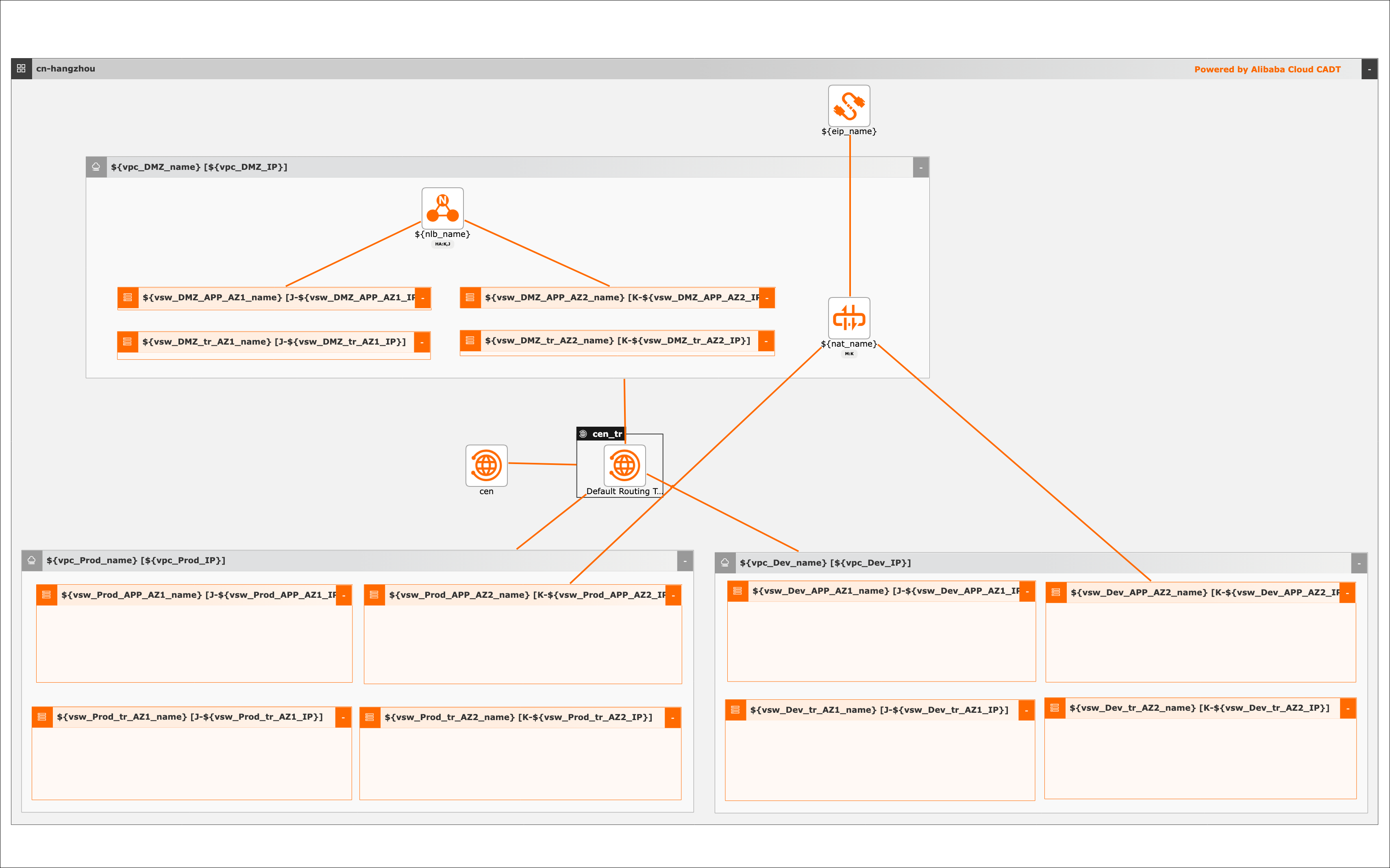
Create production, staging, and DMZ environments with VPCs and vSwitches in each.
-
Create a CEN and TR instance. Add VPCs to the CEN using TR attachments.
-
Configure routes in the TR default route table to direct public network traffic.
-
Create an NLB instance in the DMZ VPC. Add production servers to the NLB backend server group.
-
Create a NAT Gateway in the DMZ VPC and associate an EIP. Enable SNAT only and configure routes for staging instances to access the Internet through the NAT Gateway EIP.
Required instances:
-
3 VPCs
-
12 vSwitches
-
1 CEN instance
-
1 TR instance
-
1 NLB instance
-
1 Internet NAT gateway
-
1 EIP
CADT architecture reference
Centralized egress design
|
Scenario |
Item |
Description |
|
Centralized egress design |
Template ID |
H1IH327YSFQ11L18 |
|
Template library address |
||
|
Code example address |
Visualized deployment architecture diagram
Procedure
Visualized method
You can create related cloud services in batches, including 3 VPCs, 12 vSwitches, and 1 NAT Gateway.
-
Create an application from the template. The default region is China (Hangzhou), and all cloud products are new.
-
Save the application, then validate and price it. All products in this example use pay-as-you-go billing.
-
After verification, agree to the terms and start batch deployment. Routes are configured automatically.
Integrated API call method
-
Use the integrated API operations to complete the setup.
-
Initialize the CLI by following the documentation.
-
Deploy using the model YAML file and obtain the output.
-
To change the region, replace the area_id value. For example, change "cn-hangzhou" to "cn-shanghai" for China (Shanghai).