Overview
Background information
Virtual private clouds (VPCs) are foundational components in cloud computing. Poor network design causes scalability issues, and reconfiguration increases costs and disrupts workflows. To control Internet access and isolate workloads, deploy a single VPC in a region with proper address allocation, subnetting, route configuration, and security hardening as described in this topic.
Key concepts
VPC: An isolated private network in the cloud. You control its CIDR blocks, route tables, and gateways, and deploy cloud resources such as Elastic Compute Service (ECS) instances, ApsaraDB RDS instances, and Server Load Balancer (SLB) instances within it. Each VPC contains at least one private CIDR block, one vSwitch, and one route table.
-
Private CIDR block: A private IP address range in CIDR notation, specified when you create a VPC and vSwitch.
-
Route table: Automatically created with the VPC. Defines traffic forwarding rules within the VPC.
-
vSwitch: Divides a VPC into subnets. vSwitches in the same VPC can communicate with each other. Deploy applications across zones to improve availability.
IPv4 gateway: Connects VPCs to the Internet and controls inbound and outbound IPv4 traffic. Only vSwitches with routes pointing to the IPv4 gateway can access the Internet.
NAT gateway: NAT gateways are classified into Internet NAT gateways and VPC NAT gateways. Internet NAT gateways use SNAT to let multiple ECS instances share elastic IP addresses (EIPs) for Internet access, conserving public IP resources and hiding internal addresses. VPC NAT gateways prevent IP address conflicts by translating private IP addresses.
SLB: Use an SLB instance as the unified Internet traffic ingress with multiple ECS instances across zones as backend servers. This eliminates single points of failure (SPOFs) and improves availability.
Solution highlights
Security: Deploy Internet-facing and internal applications in separate vSwitches. Use access control lists (ACLs) between vSwitches and security groups between server groups. Use Cloud Firewall for protection at Internet, VPC, and NAT gateway borders.
Scalability: Reserve sufficient non-conflicting IP addresses for long-term growth. Insufficient addresses force costly architecture changes.
Reliability: Use at least two vSwitches in different zones for active zone-redundancy. Combine VPC with NAT Gateway, SLB, and Cloud Enterprise Network (CEN) for cross-zone deployment.
Observability: Use Network Intelligence Service (NIS) to visualize network quality, traffic, inspection results, and topology. Use flow logs and traffic mirroring to monitor traffic and troubleshoot errors.
Key design
The following key points show how to design the deployment of one VPC in a region from multiple dimensions to suit different requirements:
Clear network requirements
When selecting a region and zones, consider factors such as network latency and supported cloud services.
-
Use NIS to probe and monitor Internet accessibility.
-
For low-latency requirements, use NIS to test connectivity and monitor latency between zones and regions.
Define VPC requirements and isolation levels. Production and staging environments have different isolation needs, which determine security group, ACL, Cloud Firewall, and networking configurations.
Proper CIDR block allocation
Reserve sufficient IP addresses for growth without over-allocating. Plan public and private vSwitches, assign each application to the appropriate vSwitch, and deploy Internet-facing and internal applications in separate security domains.
Precise routes
Associate public and private vSwitches with separate route tables to isolate traffic. Use gateway route tables to control Internet access per vSwitch.
Security
Use security groups and ACLs to control inbound and outbound traffic. Configure rules per instance to allow access only on specified ports and protocols. For enhanced protection, use Cloud Firewall.
Inbound and outbound rules for Internet traffic
Use an SLB instance as the Internet ingress and a NAT gateway as the egress for servers that need Internet access. Assign separate vSwitches for NAT gateways and SLB instances. Isolate ingress and egress vSwitches from application vSwitches for flexibility and security.
High availability
Design for high availability and scalability. Use at least two vSwitches in different zones. Combine VPC with NAT Gateway, SLB, and CEN for cross-zone deployment.
O&M and monitoring
High observability helps engineers identify errors, optimize performance, and predict failures. Use NIS, flow logs, and traffic mirroring for O&M visualization.
Best practices

Solution overview
Design the complete network architecture based on your business requirements, covering data center internal networks, hybrid cloud networks, and cloud-based wide area networks.
This solution uses VPC, vSwitches, and IPv4 gateways to build a data center in the cloud. Only one VPC is deployed in the region.
-
Security: The VPC uses public vSwitches for Internet-facing applications and private vSwitches for internal applications and databases. Servers in private vSwitches (A and B) cannot access the Internet even with public IP addresses. Use security groups, ACLs, and Cloud Firewall to enhance protection.
-
Scalability: Cloud resources such as ECS instances, networks, and storage consume IP addresses. Use a large subnet mask to reserve sufficient addresses. If addresses run out, add secondary CIDR blocks (which cannot be modified later). A VPC supports multiple public and private vSwitches for deploying multiple applications.
-
Reliability: Make sure that you create at least two vSwitches of each type and deploy the vSwitches in different zones to implement active zone-redundancy.
-
Observability: Use NIS to visualize network quality, traffic, inspections, and topology.
Procedure
-
Select a region and zones
Select a region based on user locations. Select zones based on resource availability and latency. Monitor average network latencies between zones or between regions and Monitor the Internet access latency.
-
Allocate IP addresses
You can use the standard RFC CIDR blocks:
10.0.0.0/8,172.16.0.0/12, and192.168.0.0/16, or their subsets as the VPC CIDR blocks. You can also specify custom VPC CIDR blocks. You cannot specify100.64.0.0/10,224.0.0.0/4,127.0.0.0/8,169.254.0.0/16, or one of their subnets as the custom CIDR block.For multiple VPCs or hybrid cloud environments, use subsets of RFC CIDR blocks with a subnet mask of /20 or smaller. Ensure CIDR blocks of VPCs and data centers do not overlap. For vSwitch CIDR blocks, reserve enough IP addresses for ECS instances and other cloud resources without over-allocating. Excess allocation wastes addresses and limits other VPCs from scaling.
-
Design vSwitches
NoteCreate at least two vSwitches of each type and deploy the vSwitches in different zones to implement active zone-redundancy.
vSwitch
Resource in the vSwitch
Public vSwitches that have Internet access
SLB vSwitch
Only an Internet-facing SLB instance, such as an ALB or NLB instance, is deployed. No ECS instance is deployed.
NAT gateway vSwitch
Only NAT gateways are deployed. No ECS instance is deployed.
Application vSwitch
Internet-facing application servers are deployed. However, ECS instances cannot access the Internet even if they have a public IP address. ECS instances can use the SLB instance or NAT gateway to communicate with the Internet.
Private vSwitches that do not have Internet access
SLB vSwitch
Only an internal-facing SLB instance, such as an ALB or NLB instance, is deployed. No ECS instance is deployed.
Application vSwitch
Internal-facing application servers or databases are deployed. The servers do not have Internet access.
Transit router vSwitch
The VPC uses the transit router to communicate with other VPCs and virtual border routers (VBRs) that are attached to the CEN instance.
-
Design route tables
vSwitch
Zone
Associated route table
Route configuration
Public vSwitches
SLB vSwitch
Zone E and Zone F
System route table
Point the default route to the IPv4 gateway and add the ECS instances in vSwitch A to the SLB instance. The SLB instance functions as the ingress for Internet traffic.
NAT gateway vSwitch
Zone E and Zone F
Application vSwitch
Zone E and Zone F
Custom route table 1
Point the default route to the NAT gateway. ECS instances use the NAT gateway for Internet access or join the SLB instance to serve Internet traffic. No default route points to the IPv4 gateway. vSwitch A does not have a default route that points to the IPv4 gateway. ECS instances cannot reach the Internet even with public IP addresses, ensuring full control over Internet ingress.
Private vSwitches
SLB vSwitch
Zone E and Zone F
Custom route table 2
Deploy an internal-facing SLB instance and add the ECS instances in vSwitch B to the SLB instance. The ECS instances provide internal services. No default route that points to the NAT gateway or IPv4 gateway is configured.
Application vSwitch
Zone E and Zone F
Deploy ECS instances or security-sensitive databases as a private network environment. Do not configure a route that points to the NAT gateway or IPv4 gateway. Do not add the ECS instances to an Internet-facing SLB instance. The ECS instances do not have Internet access.
Transit router vSwitch
Zone E and Zone F
The VPC uses the transit router to communicate with other VPCs and VBRs that are attached to the CEN instance. You need to configure custom routes that point to the transit router.
-
Design security protection
You can improve application security by using security groups, ACLs, and Cloud Firewall.
-
Server security: Associate security groups with ECS instances to control access. Security groups are stateful — inbound rule changes automatically apply to outbound rules.
-
vSwitch security: Associate ACLs with vSwitches to control access. ACLs are stateless — you must explicitly configure outbound allow rules for responses.
-
Advanced security:
-
Internet firewall: After you enable an Internet firewall for Internet-facing assets, Cloud Firewall filters inbound and outbound traffic using traffic analysis, intrusion prevention, threat intelligence, virtual patching, and access control policies. Unauthorized traffic is blocked to ensure security between Internet-facing assets and the Internet.
-
NAT firewall: After you enable a NAT firewall or a NAT gateway, the NAT firewall monitors all outbound traffic from internal VPC resources to the NAT gateway, including same-VPC and cross-VPC traffic.
-
VPC firewall: A VPC firewall monitors and manages traffic between VPCs and traffic between a VPC and a data center.
-
-
-
Design O&M
Combine NIS with flow logs and traffic mirroring for O&M visualization.
-
NIS: Provides network quality, topology, and traffic visualization, plus inspection and diagnostics.
-
Flow logs: Collect 5-tuple information for elastic network interfaces (ENIs), VPCs, and vSwitches. Use flow logs to verify ACL rules, monitor network quality, and troubleshoot errors.
-
Traffic mirroring: Mirrors specific ENI packets for content inspection, threat monitoring, and troubleshooting.
-
-
Remediate invalid configurations
-
Insufficient IP addresses: If addresses are insufficient due to improper planning, you can add secondary CIDR blocks to provide more IP addresses. You cannot modify secondary CIDR blocks.
-
IP address conflicts: If your VPC is assigned sufficient CIDR blocks, create vSwitches with non-overlapping CIDR blocks and migrate applications. Alternatively, use VPC NAT gateways to translate private IP addresses. NAT gateways add routing complexity — use them only when necessary.
-
Virtualize the architecture on CADT
Deploy one VPC in a region
|
Scenario |
Item |
References |
|
Deploy one VPC in a region |
Template ID |
51N54AV10ZTRRTRW |
|
Template library address |
||
|
Sample code |
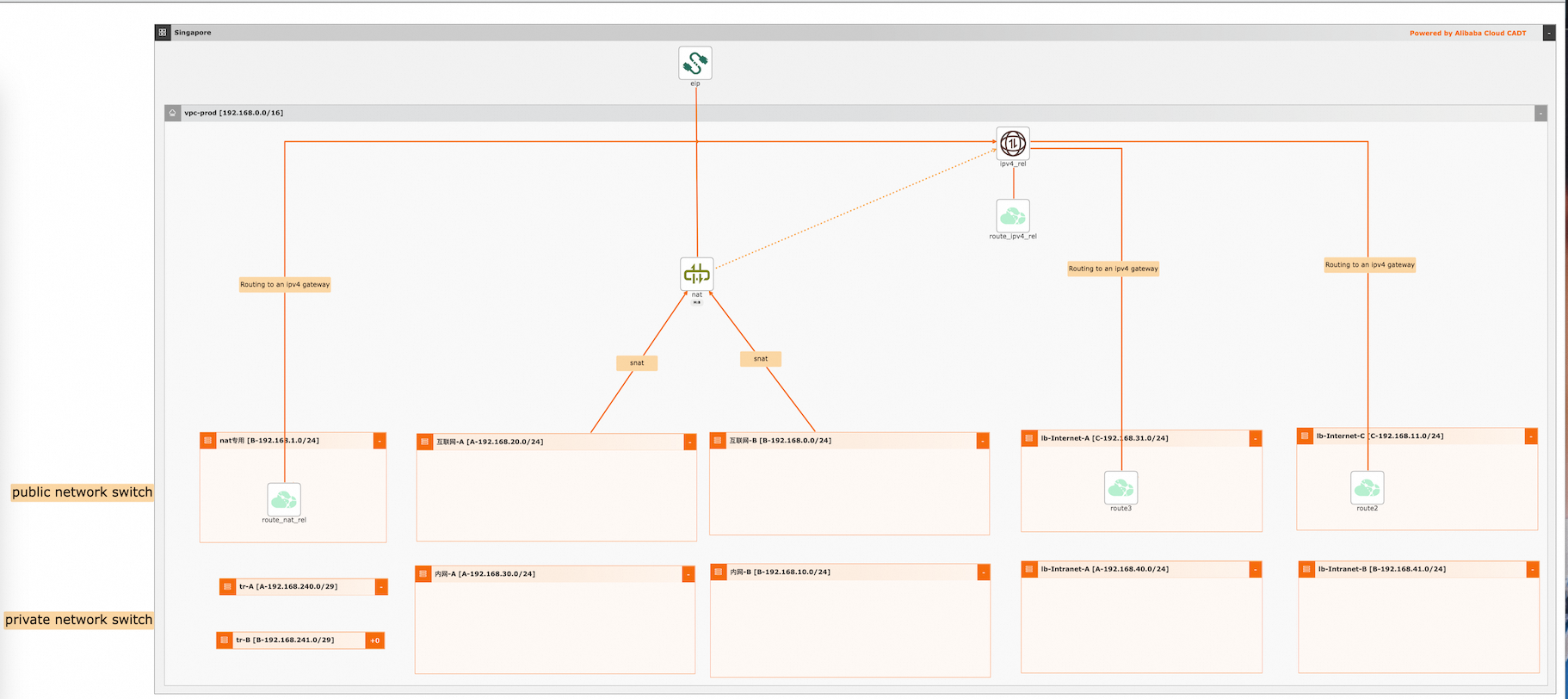
Visualized deployment architecture
Procedures
Visualized deployment
Create required cloud resources, including 1 VPC, 11 vSwitches, 1 IPv4 gateway, and 3 custom route tables.
-
Create an application based on a template. The default region is China (Shanghai). Create the cloud resources, instead of using existing cloud resources.
-
Save and verify the application, and calculate the fees. In this example, all cloud resources are billed on a pay-as-you-go basis.
-
Confirm the configurations, select a protocol, and start the deployment of all resources. Routes are automatically configured.
API calls
-
Call the corresponding API operations to deploy and use cloud resources.
-
Initialize configurations using the CLI as described in the documentation.
-
Use the sample YAML file to deploy and export the architecture.
-
If you want to change the region, change the value of the area_id field. For example, change cn-hangzhou to cn-shanghai.