Template ID
51N54AV10ZTRRTRW
Address: https://bpstudio.console.alibabacloud.com/bpStudio/topo?TemplateId=51N54AV10ZTRRTRW
Supported regions
Singapore, Shenzhen, and Shanghai
Template architecture
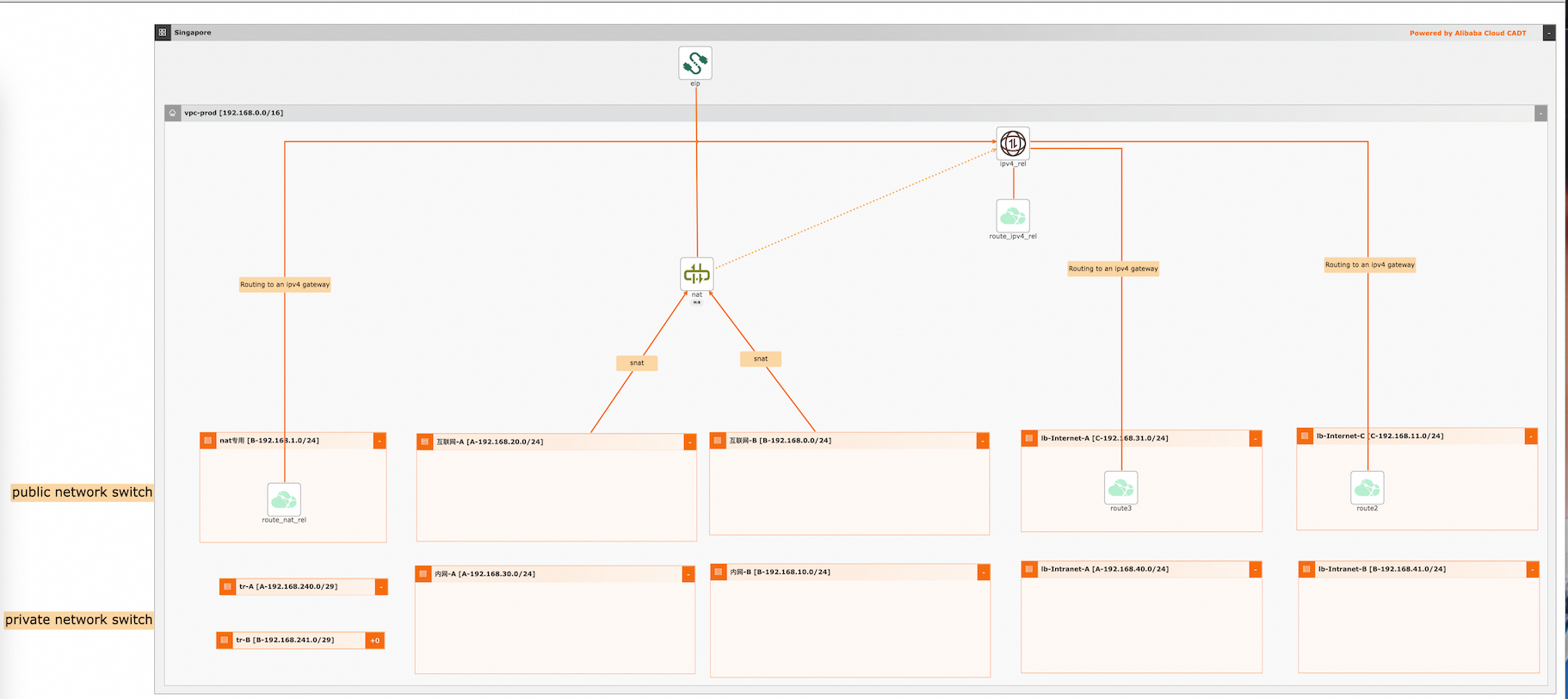
Variables
The variable type can be STRING or other types. You can configure the values of the variables.
If the value of a variable is not configured, use the default value. For information about how to modify the template variables, see Configure template variables.
No. | Variable | Type | Default value | Description |
1 | ${vpc_name} | String | vpc-prod | The virtual private cloud (VPC) name. |
2 | ${vpc_ip} | String | 192.168.0.0/16 | The CIDR block of the VPC. |
3 | ${vsw_nat_name} | String | Dedicated NAT | The name of the NAT gateway. |
4 | ${vsw_nat_ip} | String | 192.168.1.0/24 | The CIDR block of the vSwitch that is associated with the NAT gateway. |
5 | ${vsw_Internet_APP_AZ1_name} | String | Internet-A | The name of Application vSwitch 1 used for accessing the Internet. |
6 | ${vsw_Internet_APP_AZ1_IP} | String | 192.168.20.0/24 | The CIDR block of Application vSwitch 1 used for accessing the Internet. |
7 | ${vsw_Internet_APP_AZ2_name} | String | Internet-B | The name of Application vSwitch 2 used for accessing the Internet. |
8 | ${vsw_Internet_APP_AZ2_IP} | String | 192.168.0.0/24 | The CIDR block of Application vSwitch 2 used for accessing the Internet. |
9 | ${vsw_Internet_LB1_name} | String | lb-Internet-A | The name of Load Balancer (LB) vSwitch 1 used for accessing the Internet. |
10 | ${vsw_Internet_LB1_IP} | String | 192.168.31.0/24 | The CIDR block of LB vSwitch 1 used for accessing the Internet. |
11 | ${vsw_Internet_LB2_name} | String | lb-Internet-C | The name of LB vSwitch 2 used for accessing the Internet. |
12 | ${vsw_Internet_LB2_IP} | String | 192.168.11.0/24 | The CIDR block of LB vSwitch 2 used for accessing the Internet. |
13 | ${vsw_Intranet_APP_AZ1_name} | String | VPC-A | The name of Application vSwitch 1 used for accessing the VPC. |
14 | ${vsw_Intranet_APP_AZ1_IP} | String | 192.168.30.0/24 | The CIDR block of Application vSwitch 1 used for accessing the VPC. |
15 | ${vsw_Intranet_APP_AZ2_name} | String | VPC-B | The name of Application vSwitch 2 used for accessing the VPC. |
16 | ${vsw_Intranet_APP_AZ2_IP} | String | 192.168.10.0/24 | The CIDR block of Application vSwitch 2 used for accessing the VPC. |
17 | ${vsw_Intranet_LB1_name} | String | lb-Intranet-A | The name of LB vSwitch 1 used for accessing the VPC. |
18 | ${vsw_Intranet_LB1_IP} | String | 192.168.40.0/24 | The CIDR block of LB vSwitch 1 used for accessing the VPC. |
19 | ${vsw_Intranet_LB2_name} | String | lb-Intranet-B | The name of LB vSwitch 2 used for accessing the VPC. |
20 | ${vsw_Intranet_LB2_IP} | String | 192.168.41.0/24 | The CIDR block of LB vSwitch 2 used for accessing the VPC. |
21 | ${vsw_tr_AZ1} | String | tr-A | The name of vSwitch 1 that is connected to the transit router. |
22 | ${vsw_tr_AZ1_IP} | String | 192.168.240.0/29 | The CIDR block of vSwitch 1 that is connected to the transit router. |
23 | ${vsw_tr_AZ2} | String | tr-B | The name of vSwitch 2 that is connected to the transit router. |
24 | ${vsw_tr_AZ2_IP} | String | 192.168.241.0/29 | The CIDR block of vSwitch 2 that is connected to the transit router. |
CLI-based debugging
The following sample code provides an example of parameter configurations, including the newly created VPC, vSwitch, security group, IPv4 gateway, and route table, in a YAML file:
template_id: 51N54AV10ZTRRTRW
area_id: "cn-shanghai"

variables = ${vpc_name}: "vpc-prod",
            ${vpc_ip}: "192.168.0.0/16",
            ${vsw_nat_name}: "nat-prod",
            ${vsw_nat_ip}: "192.168.1.0/24",
            ${vsw_Internet_APP_AZ1_name}: "vsw-Internet-APP-D",
            ${vsw_Internet_APP_AZ1_IP}: "192.168.2.0/24",
            ${vsw_Internet_APP_AZ2_name}: "vsw-Internet-APP-E",
            ${vsw_Internet_APP_AZ2_IP}: "192.168.3.0/24",
            ${vsw_Internet_LB1_name}: "vsw-Internet-LB-D",
            ${vsw_Internet_LB1_IP}: "192.168.12.0/24",
            ${vsw_Internet_LB2_name}: "vsw-Internet-LB-E",
            ${vsw_Internet_LB2_IP}: "192.168.13.0/24",
            ${vsw_Intranet_APP_AZ1_name}: "vsw-Intranet-APP-D",
            ${vsw_Intranet_APP_AZ1_IP}: "192.168.22.0/24",
            ${vsw_Intranet_APP_AZ2_name}: "vsw-Intranet-APP-E",
            ${vsw_Intranet_APP_AZ2_IP}: "192.168.23.0/24",
            ${vsw_Intranet_LB1_name}: "vsw-Intranet-LB-D",
            ${vsw_Intranet_LB1_IP}: "192.168.32.0/24",
            ${vsw_Intranet_LB2_name}: "vsw-Intranet-LB-E",
            ${vsw_Intranet_LB2_IP}: "192.168.33.0/24",
            ${vsw_tr_AZ1}: "tr-D",
            ${vsw_tr_AZ1_IP}: "192.168.240.0/29",
            ${vsw_tr_AZ2}: "tr-E",
            ${vsw_tr_AZ2_IP}: "192.168.241.0/29"

configuration:
  enableMonitor: "0"
enableReport: "0"1. If you want to change the region, change the value of the area_id field. For example, change cn-shanghai to cn-shenzhen.
For information about the region IDs, see Regions and zones.
2. The route table of the vSwitch associated with the NAT gateway has been configured with a default route to the IPv4 gateway, and the route table of the LB vSwitch has also been configured with a default route to the IPv4 gateway. After the routes are recorded in the related route tables, you do not need to manually configure the routes.