Overview
Summary
Connecting on-premises networks to Alibaba Cloud is typically the first step in enterprise cloud migration.
This topic provides design principles and best practices for connecting branch networks to Alibaba Cloud through IPsec-VPN, covering stability, security, performance, scalability, observability, and self-service capabilities.
Terms
VPN Gateway: Connects enterprise data centers, office networks, and Internet clients to Alibaba Cloud through encrypted tunnels.
IPsec-VPN: A network-layer protocol that encrypts and authenticates data packets for secure site-to-site connections between branch networks and the cloud. Requires configuration on your local device or gateway.

SSL-VPN: Connects mobile terminals to the cloud using SSL/TLS at the session layer. No client software installation required — users access cloud resources through browsers. Supports Windows, Linux, macOS, and Android clients.

Cloud Enterprise Network (CEN): A high-availability network on the Alibaba Cloud global backbone. CEN uses transit routers to establish cross-region VPC connections and enable communication between VPCs and data centers.
The connection method depends on the associated resource, as illustrated below.
Associate with a VPN gateway: VPN gateways can be directly associated with virtual private clouds (VPCs) to connect the VPCs to other networks.

Associate with a transit router: IPsec connections can be directly attached to transit routers, which connect VPCs to other networks.

Comparison between VPN gateways and transit routers
|
Item |
VPN gateway |
Transit router |
|
Associated resources |
To create an IPsec-VPN connection, you must purchase a VPN gateway and associate the VPN gateway with a VPC. Your data center or branch network can communicate with the associated VPC or other networks through the associated VPC. |
To create an IPsec-VPN connection, you do not need to purchase a VPN gateway or associate the VPN gateway with a VPC. You must create a CEN instance and create a transit router on the CEN instance. Your data center or branch network can communicate with all VPCs connected to the transit router or with other networks through the transit router. |
|
[Scalability] Billing methods |
Subscription You can subscribe to resources on a monthly basis. You must pay for resources before you can use the resources. This billing method is ideal for customers on a tight budget |
Pay-as-you-go You are charged for the amount of consumed resources. You can use resources before you pay for them. This billing method is ideal for customers whose businesses experience large traffic fluctuations. |
|
[Security] Supported encryption algorithms |
|
|
|
[Stability] Supported IPsec-VPN tunnel modes |
|
You can use multiple IPsec connections to implement high availability. |
|
[Scalability] Maximum bandwidth per IPsec-VPN connection |
Maximum: 1,000 Mbit/s |
Maximum (default): 1,000 Mbit/s You can use multiple IPsec connections to increase the bandwidth capacity. This feature is ideal for customers who require high bandwidth. |
|
[Performance] Maximum number of packets that can be transmitted through each IPsec-VPN connection per second |
120,000 |
120,000 |
|
Supported network types |
Encrypted tunnels are established over the Internet.
Encrypted tunnels are established by using private connections over Express Connect circuits. |
Encrypted tunnels are established over the Internet.
Encrypted tunnels are established by using private connections over Express Connect circuits. |
|
Supported access modes |
|
|
|
[Stability] high availability methods |
Active/standby connections |
Equal-cost multipath (ECMP) routing |
Design principles
VPN Gateway establishes encrypted connections between enterprise data centers or branch networks and Alibaba Cloud VPCs. IPsec-VPN is route-based, providing flexible traffic routing and efficient policy management for connections between VPCs, data centers, branch networks, and clients.

-
Stability: The stability of IPsec-VPN connections directly determines the reliability of the hybrid-cloud network. Assess high availability requirements early.
-
Security: Encryption is critical for data center-to-cloud communication. Some industries require specific algorithms such as ShangMi (SM). Assess encryption requirements during design.
-
Scalability: Allocate sufficient bandwidth for peak hours while reducing off-peak waste. Use pay-as-you-go billing for cost optimization, and scale bandwidth capacity close to leased-line levels.
Key design
Stability
-
Device high availability: Uses hot-standby architecture to implement failover within seconds, with session persistence and zero downtime.
-
Connection high availability: All VPN gateways support dual-tunnel mode by default, which implements failover within seconds. IPsec connections attached to transit routers can use ECMP routing for high availability.
You can upgrade single-tunnel IPsec-VPN connections to dual-tunnel mode. For more information, see Upgrade to dual-tunnel mode. In dual-tunnel mode, if the active tunnel goes down, the standby tunnel takes over. The VPN gateway is unavailable during upgrade and existing connections are interrupted. Upgrade during a maintenance window.
-
User-level high availability: Deploy multiple on-premises gateway devices on the customer side to implement failover.
-
Active/standby connections by using IPsec-VPN and an Express Connect circuit: Combine IPsec-VPN connections with an Express Connect circuit for improved architecture stability. Use static routes or BGP dynamic routing to connect on-premises gateways to VPN gateways. To connect to VBRs, enable BGP dynamic routing.
Security and compliance
VPN Gateway uses IKE and IPsec protocols to encrypt data in transit.
-
IKE versions:
-
If you use an SM VPN gateway, only IKEv1 is supported. If you use a standard VPN gateway, IKEv1 and IKEv2 are supported.
-
IKEv2 simplifies SA negotiations and better supports multi-CIDR scenarios. Use IKEv2 (default) when possible.
-
-
Encryption algorithms:
-
If you use a standard VPN gateway, Advanced Encryption Standard (AES)-128, AES-192, AES-256, Data Encryption Standard (DES), and Triple DES are supported.
-
If you use an SM VPN gateway, SM4 is supported, which is the default encryption algorithm.
NoteFor VPN gateways with 200 Mbit/s or higher bandwidth, use AES-128, AES-192, or AES-256. Avoid Triple DES — it is computationally expensive and degrades forwarding performance.
-
-
Authentication algorithms:
-
If you use a standard VPN gateway, Secure Hash Algorithm 1 (SA-1), MD5, SHA-256, SHA-384, and SHA-512 are supported. The default authentication algorithm is SA-1.
-
If you use an SM VPN gateway, only SM3 is supported, which is the default authentication algorithm.
-
-
Compliance: Alibaba Cloud VPN Gateway complies with Chinese mainland policies and regulations. VPN Gateway supports only intra-border connections. For cross-border communication, use CEN cross-border lines.
Performance
-
High bandwidth: Each IPsec connection supports up to 1,000 Mbit/s. To increase bandwidth, attach multiple IPsec connections to transit routers.
-
High number of packets per second: Each IPsec connection supports up to 120,000 packets per second, which equals 256 bytes.
Each transit router supports 16 single-tunnel IPsec-VPN connections that have ECMP enabled.
Scalability
IPsec-VPN connections are ready to use immediately after activation. Attach multiple IPsec connections to a transit router to scale bandwidth capacity.
Each transit router supports 16 single-tunnel IPsec-VPN connections that have ECMP enabled.
Observability
Use CloudMonitor and Network Intelligence Service (NIS) to monitor VPN gateways and IPsec connections, and create threshold-triggered alert rules to detect data transfer anomalies early.

Self-service capabilities
-
Diagnostics and troubleshooting
VPN Gateway provides multiple diagnostic tools.
View IPsec-VPN and SSL-VPN connection logs and error codes in the VPN Gateway console. After activating NIS, use VPN gateway diagnostics and the reachability analyzer to troubleshoot issues.
The following table lists the available diagnostic tools.
|
Diagnostic tool and references |
Description |
|
Troubleshoots VPN gateway issues such as IPsec negotiation failures, incorrect route configurations, and abnormal gateway status. Provides fix suggestions. |
|
|
Checks connectivity between resources using a VPN gateway to help troubleshoot data transfer issues. |
|
|
Provides FAQ about IPsec-VPN connections. Troubleshoot issues based on error codes and log data in the VPN Gateway console. |
|
|
Covers common negotiation and connectivity issues of IPsec-VPN connections with solutions. |
|
|
Provides troubleshooting guidance for IPsec-VPN connection issues. |
Best practices
Connect to the DMZ VPC through a VPN gateway (active/standby tunnels)
-
Scenario: Connect branch offices or employees to cloud resources through a VPN gateway in a DMZ VPC. Multiple service VPCs use the DMZ VPN gateway for encrypted access.
-
Key design of a DMZ VPC: Deploy a VPN gateway in the DMZ VPC to connect branch networks. Once the DMZ VPC connects to the regional transit router, it can access VPCs, VBRs, and VPN gateways in any region.
-
Key design of VPN gateways
-
VPN gateway type: Select a standard or SM VPN gateway. The gateway type cannot be changed after the VPN gateway is created. Proceed with caution.
-
Tunnel mode: We recommend that you select the dual-tunnel mode, which supports active-standby tunnels, dual zones, and dual vSwitches. A dual-tunnel VPN gateway supports disaster recovery based on two public IP addresses and two zones.
-
Access services:
-
If you want to connect branch networks to the cloud, enable the IPsec-VPN feature and create an IPsec tunnel.
-
If you want to connect non-iOS clients to the cloud, enable the SSL-VPN feature and configure an SSL-VPN server.
-
If you want to connect iOS clients to the cloud, enable the SSL-VPN feature and configure an IPsec server.
-
-

Connect to a transit router through an IPsec tunnel (ECMP routing)
-
Scenario: Connect branch networks to cloud resources through IPsec tunnels attached to a transit router. Multiple IPsec connections balance traffic and provide higher bandwidth for private connectivity.
-
Key design of ECMP routing based on multiple IPsec connections:
-
Alibaba Cloud: Configure multiple IPsec-VPN connections attached to a transit router. Add ECMP routes to the transit router's route table to distribute traffic across connections. This provides cross-zone redundancy and increases total bandwidth (1 Gbit/s per tunnel × number of tunnels).
-
Branch networks: Prepare multiple gateway devices, create a tunnel on each, and configure ECMP routing with the gateways as next hops. This enables multi-device disaster recovery and increases total bandwidth (1 Gbit/s per tunnel × number of tunnels).
NoteYou can also create multiple IPsec tunnels on a single device, but this introduces a single point of failure (SPOF).
-

Encrypt connections over an Express Connect circuit by using a private VPN gateway
-
Scenario: Express Connect does not support encryption. Use an IPsec-VPN connection to encrypt traffic over an Express Connect circuit between a data center and a VPC.
-
Private connection encryption: After establishing a private connection through an Express Connect circuit and CEN, create an encrypted tunnel between a private VPN gateway and an on-premises gateway device. Route traffic through this tunnel to encrypt all data in transit.
-
Key design of routing: VBRs and VPN gateways use different protocols. You can use the following routing methods: static routes for the VBR and VPN gateway, static routes for the VBR but BGP dynamic routing for the VPN gateway, and BGP dynamic routing for the VBR and VPN gateway.

Scenarios
-
Telecommuting: Employees access enterprise internal networks over encrypted connections from remote terminals. VPN gateways enable secure remote access to files and applications as if employees were in the office.
-
Secure data transmission: VPN gateways establish encrypted tunnels that protect Internet data against interception. Critical for organizations handling sensitive data, such as financial institutions and legal agencies.
-
Disaster recovery for connections to the cloud: You can create an IPsec-VPN connection and an Express Connect circuit at the same time to implement disaster recovery. The IPsec-VPN connection and Express Connect circuit provide active/standby connections between your data center and Alibaba Cloud.
Virtualize the architecture on CADT
Connect to VPCs by using IPsec-VPN connections
|
Scenario |
Item |
References |
|
Connect to VPCs by using IPsec-VPN connections |
Template ID |
MXQCLVXC1E3J9GOZ |
|
Virtualized deployment template |
||
|
CADT API examples |
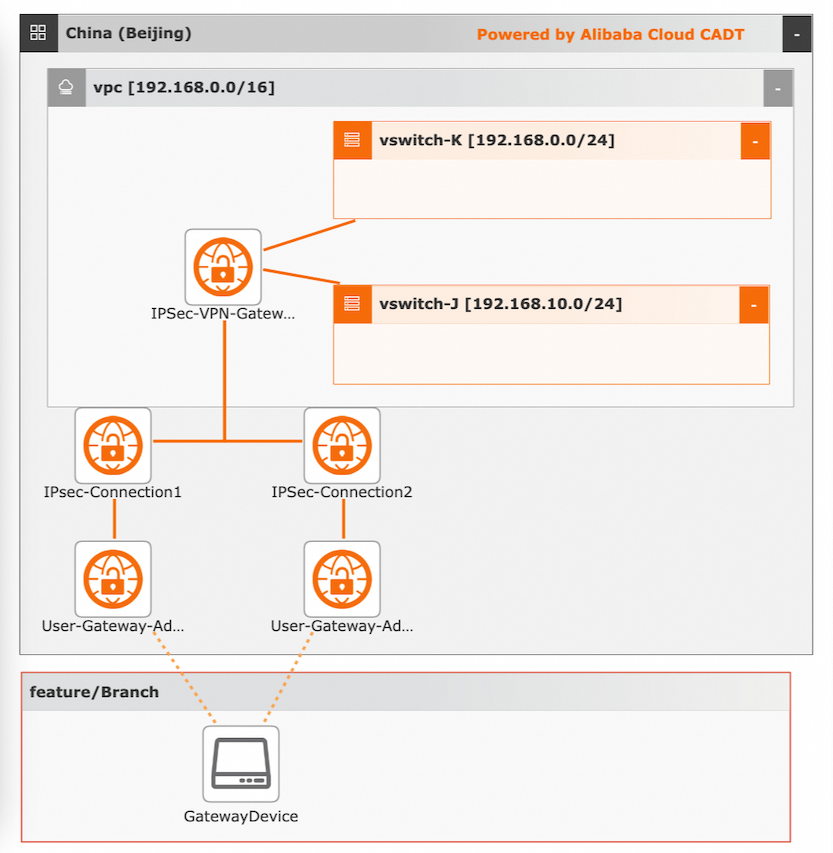
Visualized deployment architecture:
Procedures:
Visualized deployment
Create required cloud resources, including one VPC, two vSwitches, one VPN gateway, two IPsec-VPN connections, and two customer-side gateways with specific addresses.
-
Create an application based on a template. The default region is China (Beijing). Create the cloud resources, instead of using existing cloud resources.
-
Save and verify the application, and calculate the fees. In this example, the cloud resources use the pay-as-you-go billing method.
-
Confirm the configurations, select a protocol, and start the deployment of all resources.
API calls
-
Call the corresponding API operations to deploy and use cloud resources.
-
Refer to the documentation to initialize the configurations by using a command-line interface (CLI).
-
Refer to the sample YAML file to deploy and output the architecture.
-
If you want to modify the configurations, such as VPC and vSwitch, change the value of the ID field for a specific resource.
Connect to transit routers over IPsec tunnels
|
Scenario |
Item |
References |
|
Connect to transit routers over IPsec tunnels |
Template ID |
PDKTO11YPWOW43CY |
|
Virtualized deployment template |
||
|
CADT API examples |
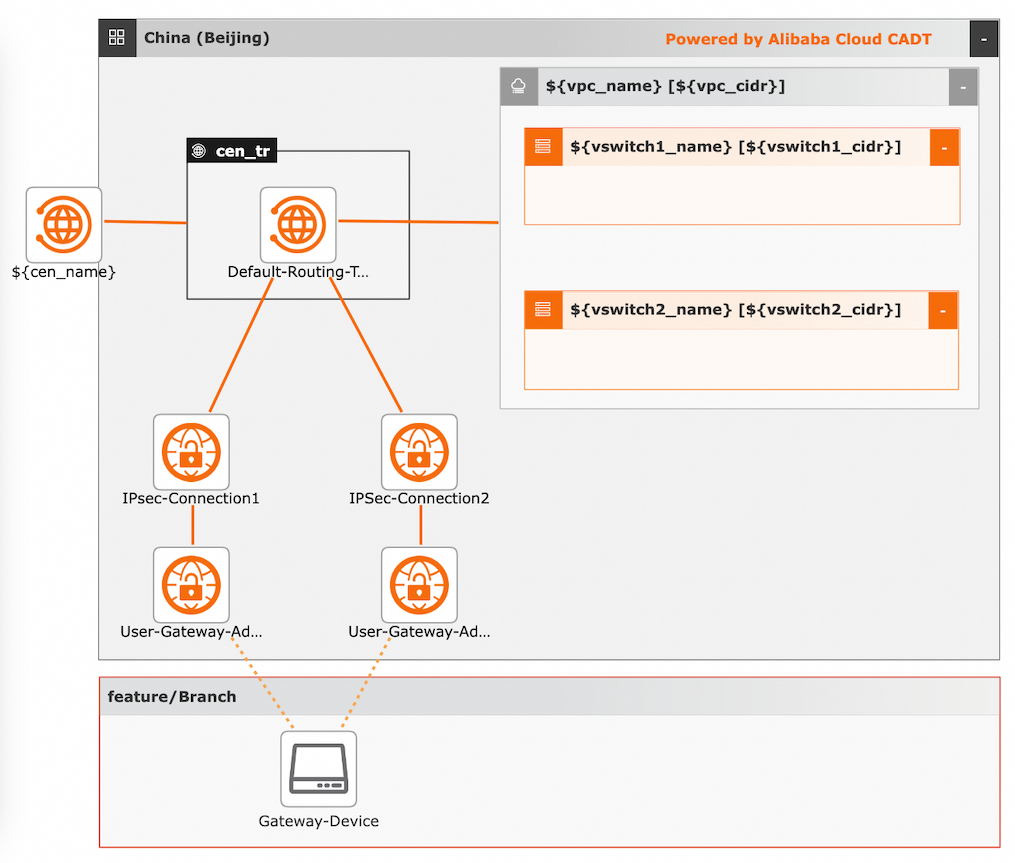
Visualized deployment architecture:
Procedures:
Visualized deployment
Create required cloud resources, including one VPC, two vSwitches, two IPsec-VPN connections, two customer-side gateways with specific addresses, one CEN instance, and one transit router.
-
Create an application based on a template. The default region is China (Beijing). Create the cloud resources, instead of using existing cloud resources.
-
Save and verify the application, and calculate the fees. In this example, the cloud resources use the pay-as-you-go billing method.
-
Confirm the configurations, select a protocol, and start the deployment of all resources.
API calls
-
Call the corresponding API operations to deploy and use cloud resources.
-
Refer to the documentation to initialize the configurations by using a command-line interface (CLI).
-
Refer to the sample YAML file to deploy and output the architecture.
-
If you want to modify the configurations, such as VPC and vSwitch, change the value of the ID field for a specific resource.