Connect to VPCs by using IPsec-VPN connections
Template ID
MXQCLVXC1E3J9GOZ
https://bpstudio.console.alibabacloud.com/bpStudio/topo?TemplateId=MXQCLVXC1E3J9GOZ
Supported regions
Hangzhou, Beijing, Shanghai, Shenzhen, Guangzhou, Hohhot, Ulanqab, Qingdao, Zhangjiakou
Template Architecture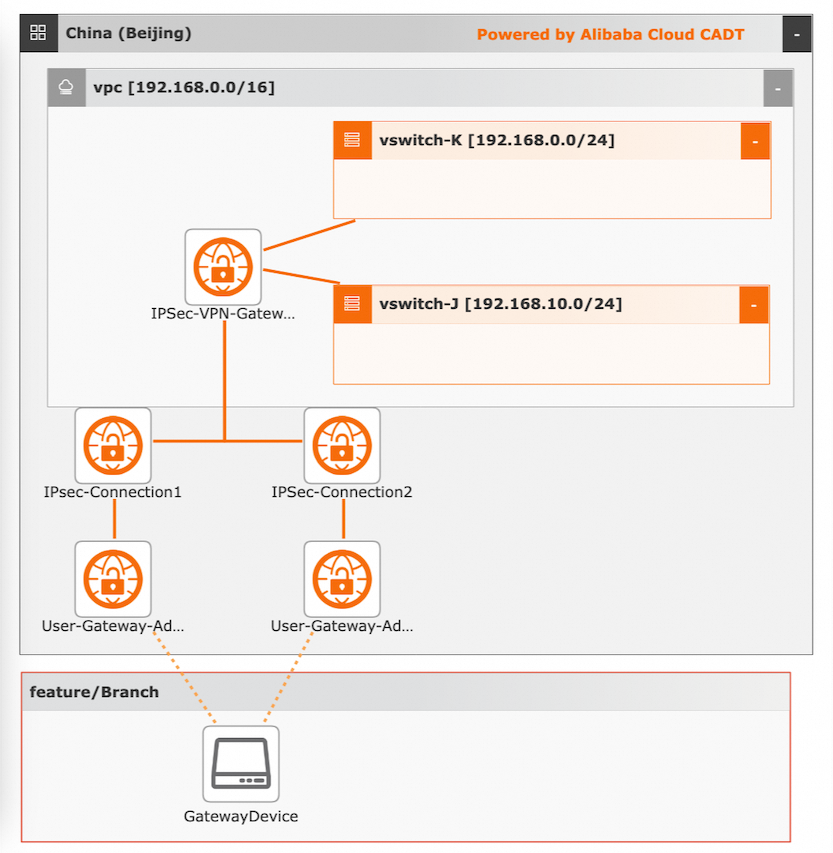
Variables
The parameter type can be STRING, INTEGER, BOOLEAN, MAP, or other types. You can configure the values of the variables. If the value of a variable is not configured, the default value is used. For more information, see Configure template variables.
No. | Variable | Type | Default value | Description |
1 | ${vpc_name} | String | vpc | The name of the VPC. |
2 | ${vpc_cidr} | String | 192.168.0.0/16 | The CIDR block of the VPC. |
3 | ${vswitch1_name} | String | vswitch | The name of the first vSwitch. |
4 | ${vswitch1_cidr} | String | 192.168.0.0/24 | The CIDR block of the first vSwitch. |
5 | ${vswitch2_name} | String | vswitch | The name of the second vSwitch. |
6 | ${vswitch2_cidr} | String | 192.168.10.0/24 | The CIDR block of the second vSwitch. |
7 | ${vpn-bandwidth} | String | 5M | The bandwidth of the VPN gateway. |
8 | ${user_gateway_cidr_1} | String | The IP address 1 of the customer gateway. | |
9 | ${user_gateway_cidr_2} | String | The IP address 2 of the customer gateway. |
CLI-based debugging
The following sample code provides an example of parameter configurations, including the default VPC, vSwitch, and Internet Shared Bandwidth instance, in a YAML file:
template_id: MXQCLVXC1E3J9GOZ
area_id: "cn-beijing"
instances:

variables:
  ${vswitch1_name}: "vswitch"
  ${vswitch1_cidr}: "192.168.0.0/24"
  ${vswitch2_name}: "vswitch"
  ${vswitch2_cidr}: "192.168.10.0/24"
  ${vpn-bandwidth}: "5M"
  ${user_gateway_cidr_1}: ""
  ${user_gateway_cidr_2}: ""
  ${vpc_name}: "vpc"
  ${vpc_cidr}: "192.168.0.0/16"

configuration:
  enableMonitor: "0"
  enableReport: "0"
Notes: 1. If you want to change the region, change the value of the area_id field. For example, change cn-beijing to ap-southeast-1. For information about the ID, see Regions and zones.
2. If you want to modify the configurations, such as the VPC, vSwitch, security group, and Internet Shared Bandwidth instance, of the template, change the value of the id field for a specific resource. The following sample code provides an example on how to change the current VPC ID with an existing VPC ID.
instances:
 - node_type: vpc
  node_name: ${vpc_name}
  id: vpc-2zeb0q38i10******* (Replace the current ID with an existing ID)
Connect to transit routers over IPsec tunnels
Template ID
PDKTO11YPWOW43CY https://bpstudio.console.alibabacloud.com/bpStudio/topo?TemplateId=PDKTO11YPWOW43CY
Supported regions
Hangzhou, Beijing, Shanghai, Shenzhen, Guangzhou, Hohhot, Ulanqab, Qingdao, Zhangjiakou
Template architecture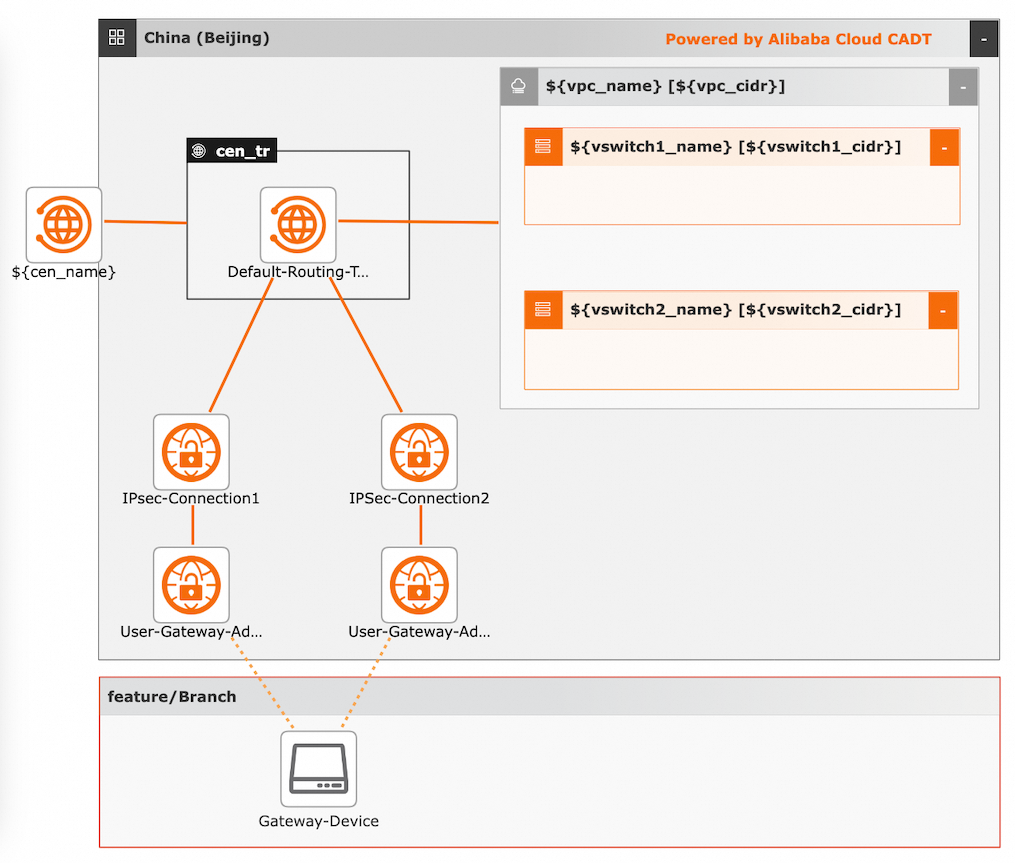
Variables
The parameter type can be STRING, INTEGER, BOOLEAN, MAP, or other types. You can configure the values of the variables. If the value of a variable is not configured, the default value is used. For more information, see Configure template variables.
No. | Variable | Type | Default value | Description |
1 | ${vpc_name} | String | vpc | The name of the VPC. |
2 | ${vpc_cidr} | String | 192.168.0.0/16 | The CIDR block of the VPC. |
3 | ${vswitch1_name} | String | vswitch | The name of the first vSwitch. |
4 | ${vswitch1_cidr} | String | 192.168.0.0/24 | The CIDR block of the first vSwitch. |
5 | ${vswitch2_name} | String | vswitch | The name of the second vSwitch. |
6 | ${vswitch2_cidr} | String | 192.168.10.0/24 | The CIDR block of the second vSwitch. |
7 | ${vpn-bandwidth} | String | 5M | The bandwidth of the VPN gateway. |
8 | ${user_gateway_cidr_1} | String | The IP address 1 of the customer gateway. | |
9 | ${user_gateway_cidr_2} | String | The IP address 2 of the customer gateway. |
CLI-based debugging
The following sample code provides an example of parameter configurations, including the default VPC, vSwitch, security group, and Internet Shared Bandwidth instance, in a YAML file:
template_id: PDKTO11YPWOW43CY
area_id: "cn-beijing"
instances:

variables:
  ${vswitch1_name}: "vswitch"
  ${vswitch1_cidr}: "192.168.0.0/24"
  ${vswitch2_name}: "vswitch"
  ${vswitch2_cidr}: "192.168.10.0/24"
  ${vpn-bandwidth}: "5M"
  ${user_gateway_cidr_1}: ""
  ${user_gateway_cidr_2}: ""
  ${vpc_name}: "vpc"
  ${vpc_cidr}: "192.168.0.0/16"

configuration:
  enableMonitor: "0"
  enableReport: "0"
Notes: 1. If you want to change the region, change the value of the area_id field. For example, change cn-beijing to ap-southeast-1. For information about the ID, see Regions and zones.
2. If you want to modify the configurations, such as the VPC, vSwitch, security group, and Internet Shared Bandwidth instance, of the template, change the value of the id field for a specific resource. The following sample code provides an example on how to change the current VPC ID with an existing VPC ID.
instances:
 - node_type: vpc
  node_name: ${vpc_name}
  id: vpc-2zeb0q38i10******* (Replace the current ID with an existing ID)