This guide shows you how to use a VPC Firewall to control cross-region and inter-VPC (east-west) traffic. A detailed scenario walks you through deploying the firewall and configuring Access Control Policies at the VPC boundary.
Use cases
This document uses a scenario where an enterprise has deployed development VPC1 (172.16.0.0/16) and production VPC1 (10.1.0.0/16) in the China (Beijing) Region, and development VPC2 (172.17.0.0/16) and production VPC2 (10.2.0.0/16) in the China (Shenzhen) Region. All these Virtual Private Cloud (VPC) instances are interconnected through an Enterprise Edition Transit Router (TR) within a Cloud Enterprise Network (CEN). The network architecture has the following access control requirements:
Development VPCs can initiate one-way connections to production VPCs within the same Region. Cross-region access between development and production VPCs is denied.
Development VPCs can communicate with each other bidirectionally, both within the same Region and across Regions.
All other traffic flows between VPCs are denied.

Solution overview
In a CEN-based architecture, you can use the VPC Firewall feature in Cloud Firewall to centrally control traffic and meet these requirements. This solution consists of three main steps:
Create a VPC Firewall for each Transit Router (TR) in the China (Beijing) and China (Shenzhen) Regions.
Configure a traffic diversion scenario for each VPC Firewall. Select the multi-point interconnection type and add the network connections of all relevant VPCs to the scenario.
Configure Access Control Policies for the VPC Firewall to enforce the required access rules.
This solution is easy to deploy, flexible to manage, and highly reliable, making it an excellent model for enterprise cloud network security.
Procedure
1. Create a VPC Firewall
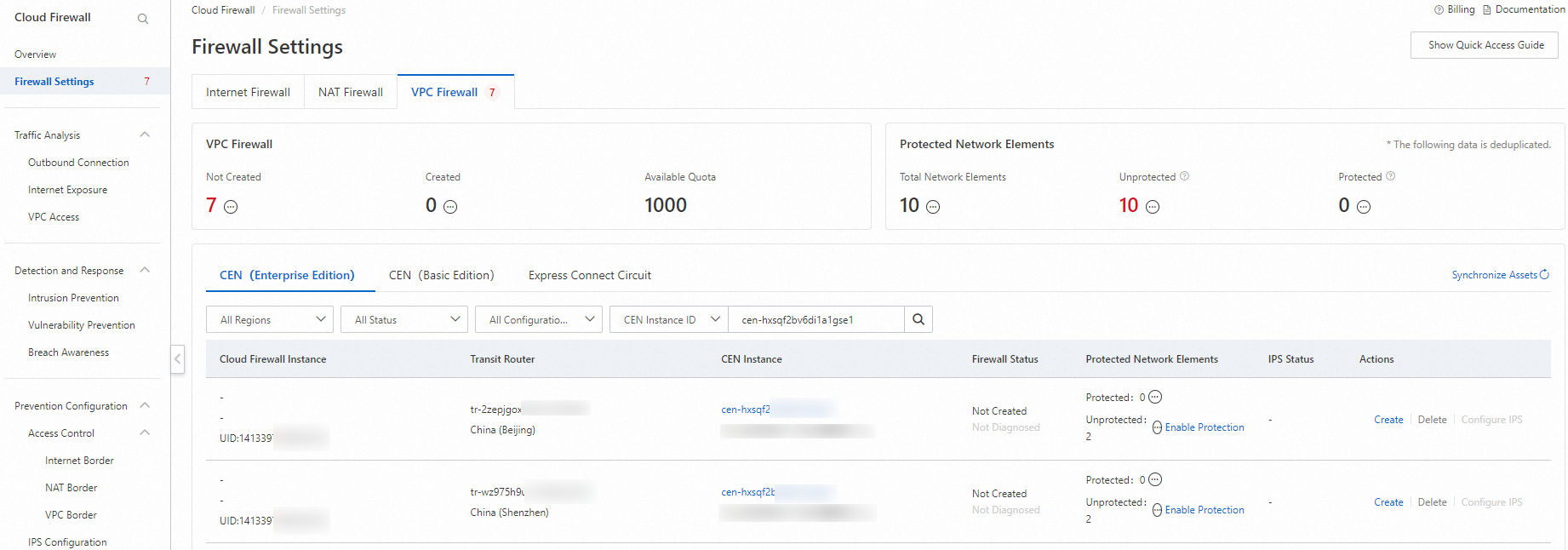
Log on to the Cloud Firewall console. In the left-side navigation pane, click Firewall Settings.
On the VPC Firewall tab, locate the TR instances for the China (Beijing) and China (Shenzhen) Regions, and click Create for each instance to add a VPC Firewall.
2. Create and enable a traffic diversion scenario
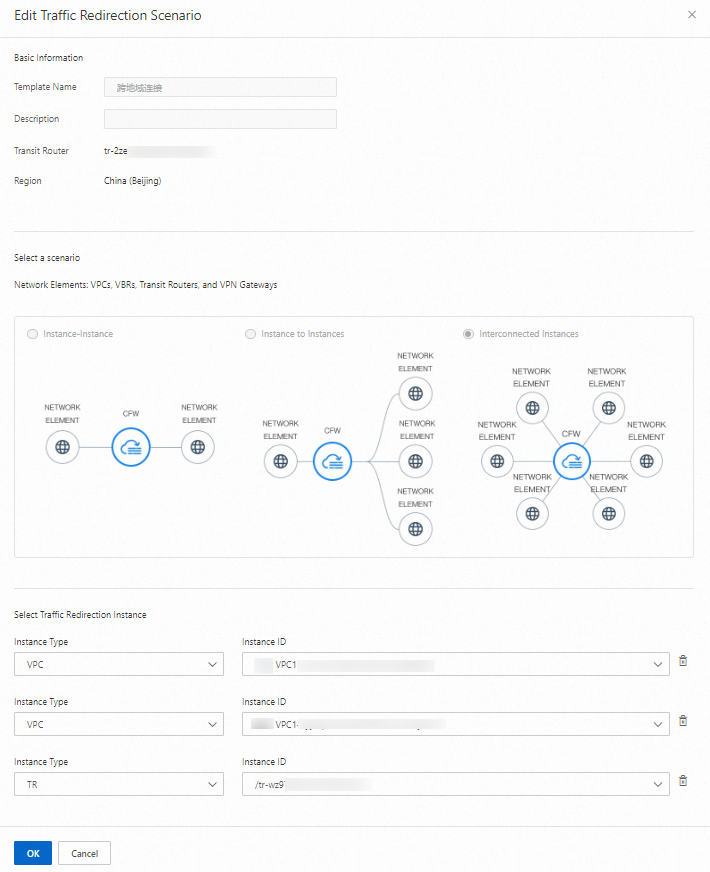
Locate the two VPC Firewalls you created for the China (Beijing) and China (Shenzhen) Regions and click Details. On the Traffic Redirection Scenario tab, click Create Traffic Redirection Scenario for each firewall.
To create a traffic diversion scenario for a VPC Firewall, select the multi-point interconnection type. For each Region, add the following three network elements to the scenario: the local production VPC, the local development VPC, and the peer TR.
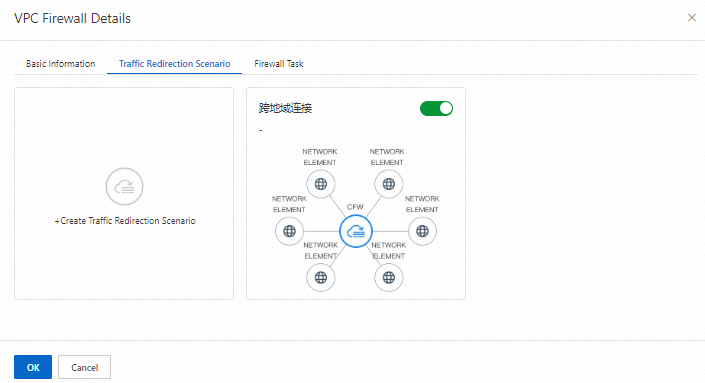
If your traffic diversion scenario is not enabled, enable it manually.
By default, new traffic diversion scenarios are enabled. Verify that the scenario's status is enabled to ensure protection is active.
3. Configure a VPC firewall access control policy
In the page, configure the following Access Control Policies. For detailed instructions, see Configure a VPC Boundary Access Control Policy.
Access Control Policies for the VPC boundary apply globally to all traffic diverted through the associated CEN instance and are enforced by the VPC Firewalls in both Regions.
Access control policy | Source | Destination | Protocol type | Port | Application | Action | Priority | Policy validity period | Status |
China (Beijing): Dev VPC1 -> Prod VPC1 | 172.16.0.0/16 | 10.1.0.0/16 | ANY | ANY | ANY | Allow | 1 | Permanent | Enabled |
China (Shenzhen): Dev VPC2 -> Prod VPC2 | 172.17.0.0/16 | 10.2.0.0/16 | ANY | ANY | ANY | Allow | 2 | Permanent | Enabled |
China (Beijing) Dev VPC1 -> China (Shenzhen) Dev VPC2 | 172.16.0.0/16 | 172.17.0.0/16 | ANY | ANY | ANY | Allow | 3 | Permanent | Enabled |
China (Shenzhen) Dev VPC2 -> China (Beijing) Dev VPC1 | 172.17.0.0/16 | 172.16.0.0/16 | ANY | ANY | ANY | Allow | 4 | Permanent | Enabled |
Deny all other traffic | 0.0.0.0/0 | 0.0.0.0/0 | ANY | ANY | ANY | Deny | 5 | Permanent | Enabled |
4. Verify the configuration
Simulate access traffic by pinging the Private IP Address of an Elastic Compute Service (ECS) instance in each of the four VPCs.
For example, log on to an ECS instance in development VPC1 in China (Beijing) and ping the Private IP Address of an ECS instance in production VPC1 in the same Region.
Verify that the VPC Firewall controls traffic between the network elements.
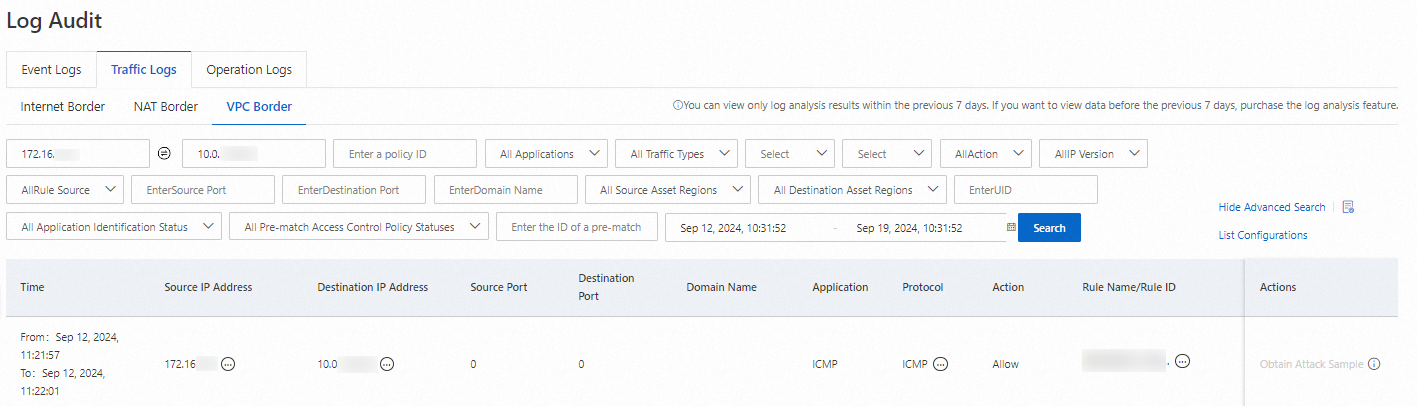
Log on to the Cloud Firewall console. In the left-side navigation pane, choose . On the tab, view the access logs for the VPC boundary.
The following example shows how to query the traffic log to confirm that traffic is allowed from an ECS instance in development VPC1 to an ECS instance in production VPC1, both within the China (Beijing) Region.
Set Source IP Address to the Private IP Address of the ECS instance in development VPC1 and Destination IP Address to the Private IP Address of the ECS instance in production VPC1. Query the log to confirm that traffic between these two ECS instances is allowed. The log entry should show that the policy that allows one-way access from development VPC1 to production VPC1 in China (Beijing) was matched.
Repeat this process to verify that all other traffic flows are processed as expected.
The following table summarizes the expected traffic flow results for this scenario. You can compare these results with your query findings in the traffic log.
Network element
Traffic flow direction
Traffic control result
ECS instance in Dev VPC1, China (Beijing)
To ECS instance in Prod VPC1, China (Beijing)
Allow
To ECS instance in Dev VPC2, China (Shenzhen)
Allow
To ECS instance in Prod VPC2, China (Shenzhen)
Block
ECS instance in Prod VPC1, China (Beijing)
To ECS instance in Dev VPC1, China (Beijing)
Block
To ECS instance in Dev VPC2, China (Shenzhen)
Block
To ECS instance in Prod VPC2, China (Shenzhen)
Block
ECS instance in Dev VPC2, China (Shenzhen)
To ECS instance in Dev VPC1, China (Beijing)
Allow
To ECS instance in Prod VPC1, China (Beijing)
Block
To ECS instance in Prod VPC2, China (Shenzhen)
Allow
ECS instance in Prod VPC2, China (Shenzhen)
To ECS instance in Dev VPC1, China (Beijing)
Block
To ECS instance in Prod VPC1, China (Beijing)
Block
To ECS instance in Dev VPC2, China (Shenzhen)
Block
Related documents
Cloud Firewall provides an automated policy analysis feature to help you analyze your configured VPC Boundary Access Control Policies efficiently. For more information, see Policy Analysis.
Cloud Firewall's built-in Intrusion Prevention System (IPS) uses a threat detection engine to block malicious traffic at the VPC boundary. For more information, see IPS overview.