Cloud Firewall supports multiple integration methods: Alibaba Cloud SDKs, Alibaba Cloud CLI, Resource Orchestration Service (ROS), Terraform, and custom HTTP calls. Use OpenAPI Explorer to browse API documentation and run live requests before writing code.
Choose an integration method
| Method | Best for | Support level |
|---|---|---|
| Alibaba Cloud SDK | Application code; handles signing, retries, and error parsing | Full |
| Alibaba Cloud CLI | Ad hoc commands, scripting, and quick automation | Full |
| ROS | Infrastructure as code with Alibaba Cloud-native templates | Partial |
| Terraform | Infrastructure as code with an open-source, multi-cloud workflow | Partial |
| Custom API encapsulation | When no SDK exists for your language | Full |
SDKs cover the widest range of operations and handle low-level details such as request signing, timeouts, and retries. Use SDKs when building applications.
OpenAPI Explorer
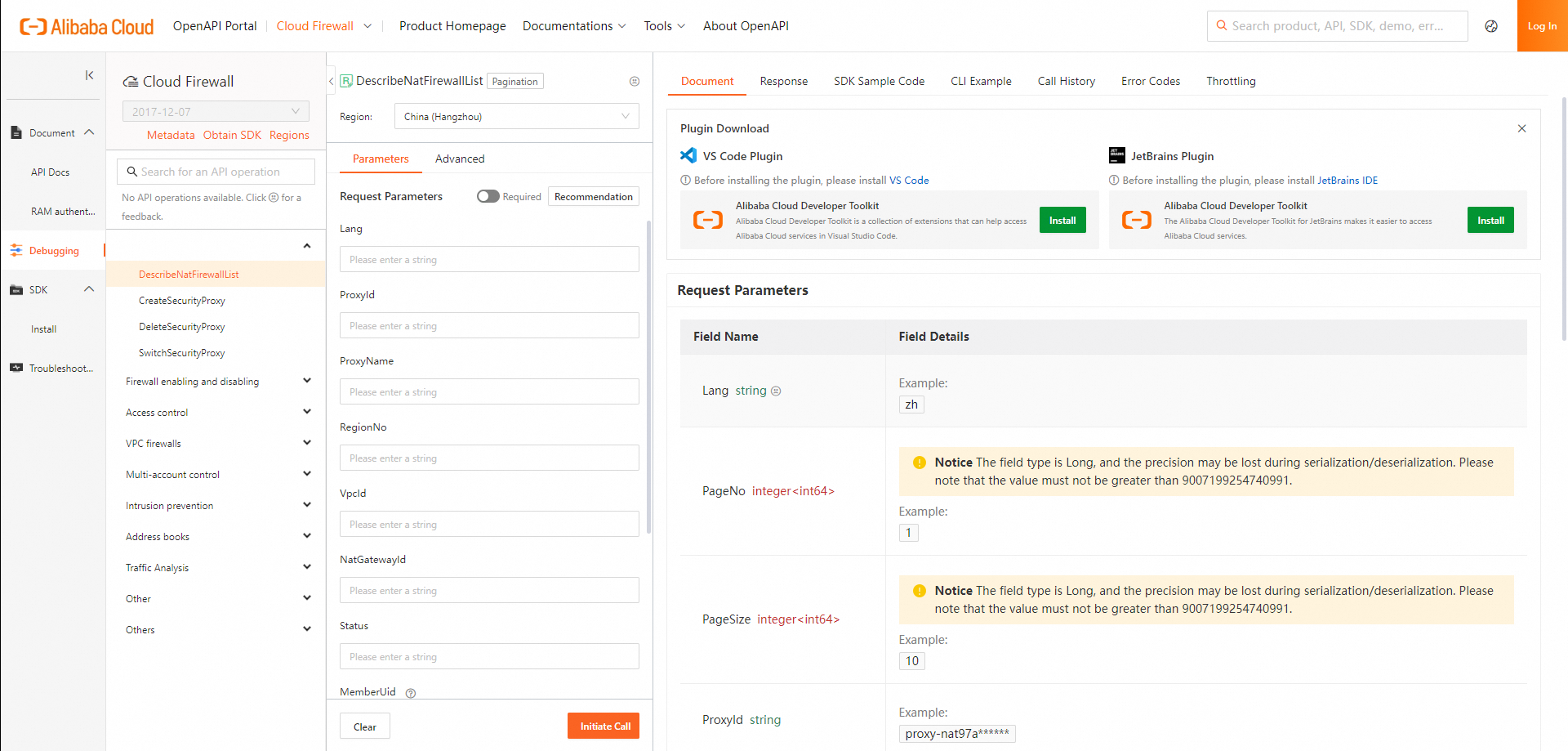
OpenAPI Explorer lets you browse API documentation, run live requests, and download generated SDK sample code—all from a browser.
Key capabilities:
Intelligent search across all Cloud Firewall operations
Online debugging with real credentials
Auto-generated SDK sample code in multiple languages
SDK download
Error diagnostics and call statistics
Open the Cloud Firewall debugging page directly: https://api.alibabacloud.com/api/Cloudfw/2017-12-07
For a full introduction, see What is an API?
API version
Cloud Firewall uses a single API version: 2017-12-07. This is a version identifier, not a date.
| Version | Status |
|---|---|
| 2017-12-072017-12-07 | Recommended |
For background on versioning, see API version.
Endpoints
Select an endpoint in the region where your resources reside to minimize latency.
| Endpoint type | Example (China (Hangzhou)) | Access scope |
|---|---|---|
| Public endpoint | cloudfw.aliyuncs.com | Globally accessible |
| VPC endpoint | cloudfw.vpc-proxy.aliyuncs.com | Within the VPC in that region only |
VPC endpoints route traffic over the internal network, reducing latency and eliminating public bandwidth costs. Traffic never leaves the Alibaba Cloud network, which provides an additional layer of isolation.
For all regional endpoints, see Endpoints.
Identities
By default, OpenAPI Explorer uses the account you logged in with to run debug calls.
| Identity | Supported | Notes |
|---|---|---|
| Alibaba Cloud account | Yes | Has full permissions; avoid using in production |
| RAM user | Yes (recommended) | Grant only the permissions needed |
| RAM role | Yes (recommended) | Preferred for service-to-service access |
Use a Resource Access Management (RAM) user or RAM role with least-privilege permissions for all API calls in production. Alibaba Cloud accounts have unrestricted access to all operations.
References:
Integration methods
Alibaba Cloud SDKs
Alibaba Cloud SDKs handle request signing, timeouts, retries, and response parsing—so you can focus on application logic rather than HTTP mechanics.
Supported languages: Java, C#, Go, Python, Node.js, TypeScript, PHP, and C++.
To get started with a specific language, see the OpenAPI PortalCloud Firewall SDK for installation instructions and sample code.
For an overview of all Alibaba Cloud SDKs, see Alibaba Cloud SDKs.
Alibaba Cloud CLI
Use the aliyun command to call Cloud Firewall API operations from the terminal or scripts.
To install and configure Alibaba Cloud CLI, see What is Alibaba Cloud CLI? and the CLI user guide.
ROS
ROS automates the creation and configuration of Alibaba Cloud resources from declarative templates. The following Cloud Firewall resource types are supported:
| Resource | Description |
|---|---|
| ALIYUN::CLOUDFW::AddressBook | Creates an address book for access control. Supports IP address, ECS tag-based, port, and domain address books. An ECS tag-based address book includes the public IP addresses of the ECS instances that have specific tags. |
| ALIYUN::CLOUDFW::ControlPolicy | Creates an access control policy. |
| ALIYUN::CLOUDFW::VpcFirewallControlPolicy | Creates an access control policy for a VPC firewall policy group. |
| ALIYUN::CLOUDFW::Instance | Activates Cloud Firewall. |
| ALIYUN::CLOUDFW::AllFwSwitch | Enables all firewalls. |
| ALIYUN::CLOUDFW::FwSwitch | Enables firewalls for specific assets. |
For an introduction to ROS, see What is ROS?
Terraform
Terraform lets you define and manage Cloud Firewall resources by interpreting templates. It calls Cloud Firewall API operations based on those templates.
For details on supported resources and usage, see Overview of Terraform.
For a Terraform introduction, see What is Terraform?
Custom API encapsulation
To call API operations directly over HTTP, construct and sign requests manually. All requests must follow the V3 signature method.
Usage notes
QPS limits: The number of queries per second (QPS) allowed varies by operation. See the "QPS limits" section in each operation's API reference. All RAM users under the same Alibaba Cloud account share that account's QPS quota.
Error codes: If a call fails, check the error code and verify that your request parameters are correct. See Error codes.
Self-service diagnostics: Paste a request ID or SDK error message into Alibaba Cloud OpenAPI Diagnostics to get a diagnosis and suggested fix.