How much data can I back up by using Cloud Backup?
Cloud Backup provides backup vaults with unlimited storage space. You can expand backup vaults to store an unlimited amount of backup data.
How long does it take to back up data by using Cloud Backup?
The amount of time required to back up data by using Cloud Backup varies depending on multiple factors such as the total data amount, the total number of files, and the network bandwidth. If the network bandwidth is fixed, the time required to complete a backup job depends on the total data amount and the total number of files.
Where can I find the operation records of adding, modifying, and deleting backup resources?
You can log on to the ActionTrail console to query operation records. ActionTrail can record, save, and track all your operations performed by using an Alibaba Cloud account. For more information, see Use the event query feature to query events.
What types of data can I back up by using Cloud Backup?
You can use Cloud Backup to back up data from your data centers, Elastic Compute Service (ECS) instances including the files and databases that are deployed on ECS instances, File Storage NAS (NAS) file systems, and Object Storage Service (OSS) buckets. For more information, see What is Cloud Backup? and Features.
Does Cloud Backup encrypt backup data that is stored in the cloud?
Yes, Cloud Backup encrypts all your data by using AES-256 encryption, including the backup data that is stored in the cloud.
Does Cloud Backup support data compression and deduplication?
Yes, Cloud Backup supports data deduplication and compression. The compression and deduplication ratio varies depending on the type of source data. The maximum ratio is 30:1.
Does Cloud Backup support incremental backup?
Yes, Cloud Backup supports incremental backup. During an incremental backup, only the data that is generated after the previous backup is uploaded to Cloud Backup. This way, you can back up your data faster and reduce network bandwidth.
What do I do if I forget my logon password for a backup client?
If you forget your logon password for the old backup client whose process is hybridbackup, you need to download the new client from the Cloud Backup console and register the client.
How can I create a backup plan?
When you create a backup plan to back up data, you must select the backup source path and the required backup policy. If you change a backup policy, the change is synchronized to the associated backup plan. If you delete a backup policy, the related backup job is also deleted. However, completed backups are not affected.
Is actual data backed up when I back up symbolic links?
No, actual data is not backed up when you back up symbolic links. Symbolic links of Linux are similar to Windows shortcuts. When you back up symbolic links, the linked data is not backed up.
How am I charged for using Cloud Backup?
You are not charged for activating Cloud Backup. You are charged for using Cloud Backup.
If you only activate Cloud Backup, no data is backed up. We recommend that you use the features provided by Cloud Backup to back up important data. If data is lost or deleted accidentally without being backed up, the data cannot be restored.
How do I deactivate Cloud Backup?
After you activate Cloud Backup, Cloud Backup cannot be directly deactivated. If Cloud Backup is only activated but is not used, no fees are incurred.
If fees are incurred and you no longer use Cloud Backup, you can stop being billed. Data cannot be restored after a backup is deleted. For more information, see How do I stop being billed for Cloud Backup?
For more information about the causes for being billed, see Resource usage and bills.
How does Cloud Backup ensure consistency of backup data?
During data backup and restoration, Cloud Backup performs SHA256 and CRC64 verification when data is uploaded and downloaded to ensure data consistency and integrity.
How does Cloud Backup ensure data security and reliability?
After data is backed up, Cloud Backup periodically performs inspection on the backup data to ensure data reliability. To maximize the redundancy of your backup data, Cloud Backup uses zone-redundant storage (ZRS)-enabled backup vaults by default in regions that support ZRS-enabled backup vaults. For regions that support only locally redundant storage (LRS)-enabled backup vaults, Cloud Backup uses LRS-enabled backup vaults. You do not need to manually select a backup vault type.
How does ECS instance backup ensure data integrity?
The ECS instance backup feature of Cloud Backup is implemented based on the snapshot feature of ECS. For more information about data consistency, see How snapshots work. For more information, contact the ECS snapshot team.
Why is the disk usage of file systems in file backup different from the amount of source data in the storage vault or the total amount of data scanned on the source for a backup job?
The amount of source data in the storage vault or the total amount of data scanned on the source for a backup job indicates the amount of data collected by the backup job. The data amount and the disk usage of file systems are two different statistical dimensions. During backup, some system files such as the /dev and /sys files in the root directory are automatically filtered out and therefore are not included in the backup data. In addition, the metadata of files also occupies disk space, and the actual disk usage of sparse files may be different from the displayed usage. Therefore, the amount of data collected by a file backup job is generally different from the disk usage of file systems.
How does Cloud Backup cancel a backup job?
When you cancel a backup job for a data source that requires a Cloud Backup client, Cloud Backup sends a command to cancel the job to the client. The data sources include ECS file backup, on-premises file backup, local NAS backup, Cloud Parallel File Storage (CPFS) backup, ECS database backup, on-premises database backup, SAP HANA backup, WMware backup, and container backup. If the client runs properly, the client terminates the job after it receives the command and then sends a message to Cloud Backup stating that the job is cancelled successfully. If the client experiences an exception and fails to receive the command, Cloud Backup will forcibly cancel the backup job 1 hour later.
Why does the backup vault usage not decrease after a backup point is deleted?
The backup process can be deemed as a chain, which contains multiple steps, such as deduplication and compression. If a backup point in the chain is deleted, the final storage capacity occupied by the entire chain is not significantly affected. It may take up to 24 hours to collect statistics on the backup vault usage. Therefore, the usage increased after a backup is completed or the usage decreased after a backup is deleted is not immediately reflected in the usage data.
Why does the backup vault usage increase sharply ?
In a backup cycle, a large proportion of source data is modified or added. Therefore, the size of data to be backed up increases significantly, causing a sharp increase in the backup vault usage.
How do I change the resource group of a Cloud Backup resource?
You can go to the Resource Management console to manage Cloud Backup resource groups. For example, you can transfer a backup vault from one resource group to another. To transfer a backup vault across resource groups, perform the following steps:
Log on to the Resource Management console.
Click the Select resource types drop-down list and choose .
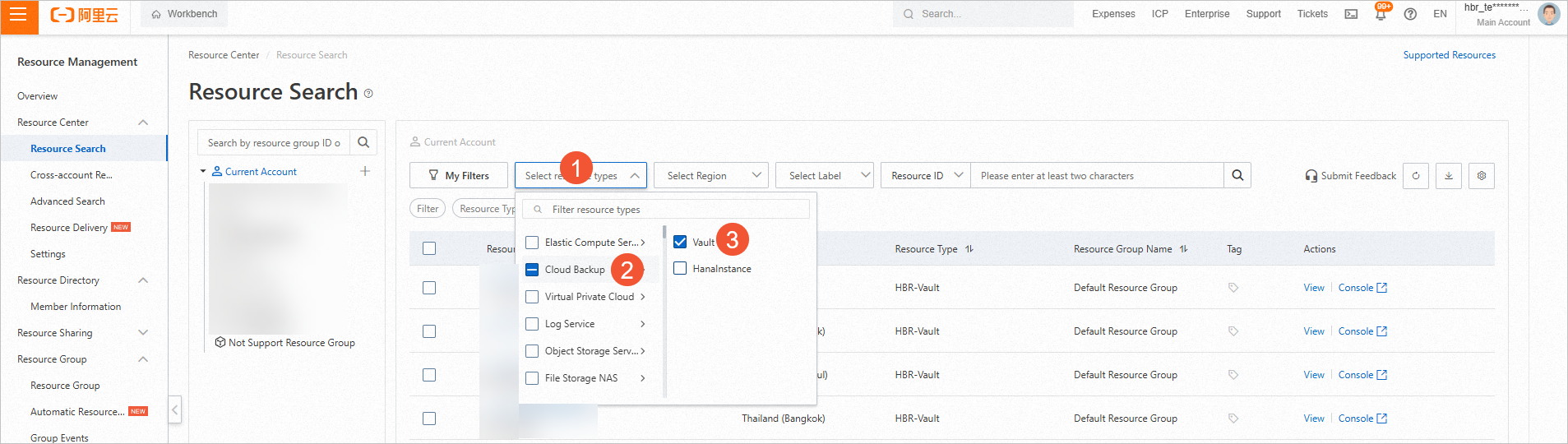
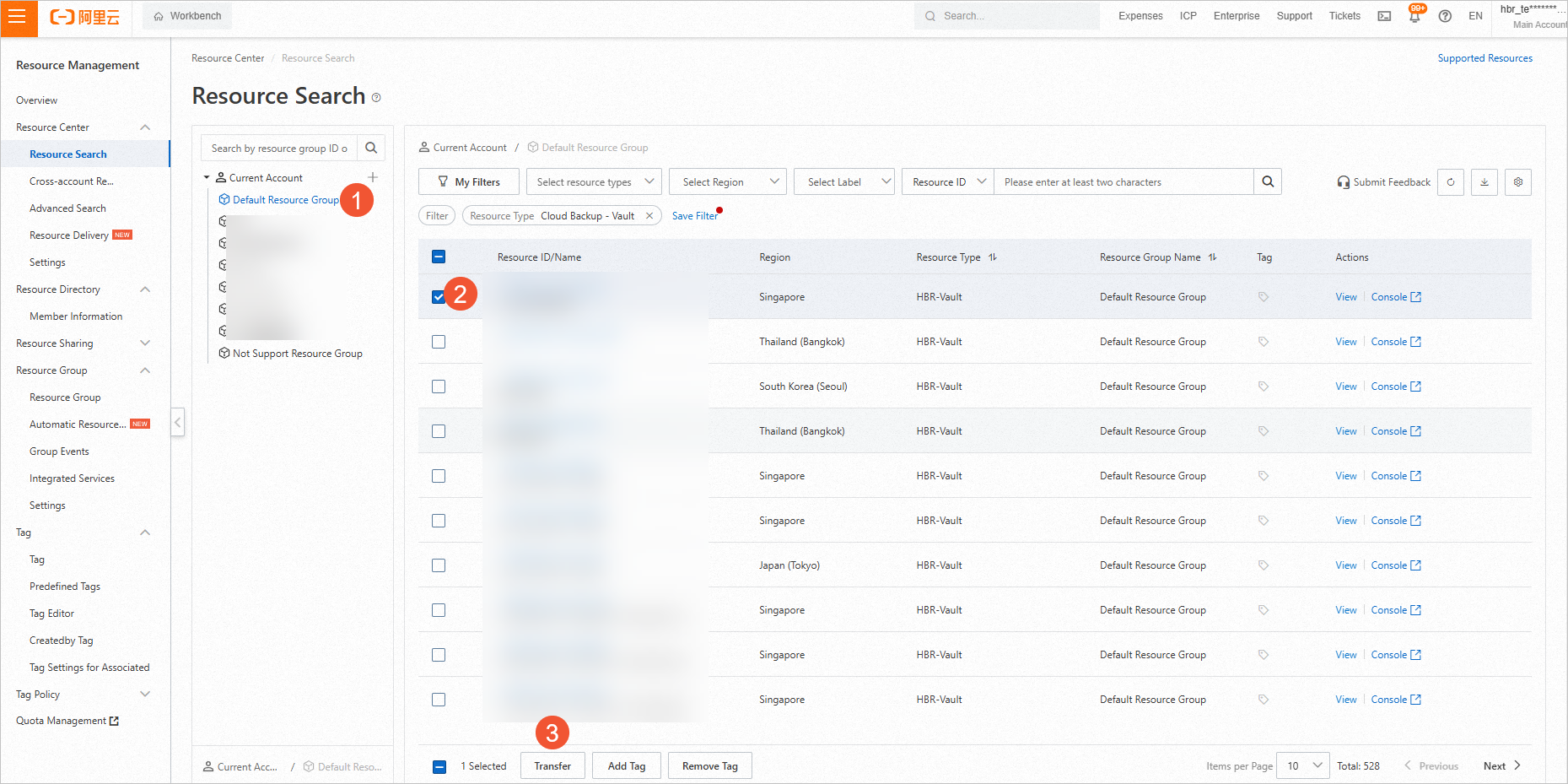
In the left-side navigation tree of the page, click the node of the resource to be transferred, for example, Default Resource Group. In the right-side section that appears, select the resource that you want to transfer. Click Transfer in the lower part of the section.
In the Select Resource Group step of the Transfer dialog box, select the resource group to which you want to transfer the resource and click Confirm.
In the Transfer Result step, click Confirm.
For more information, see Manage resource groups.
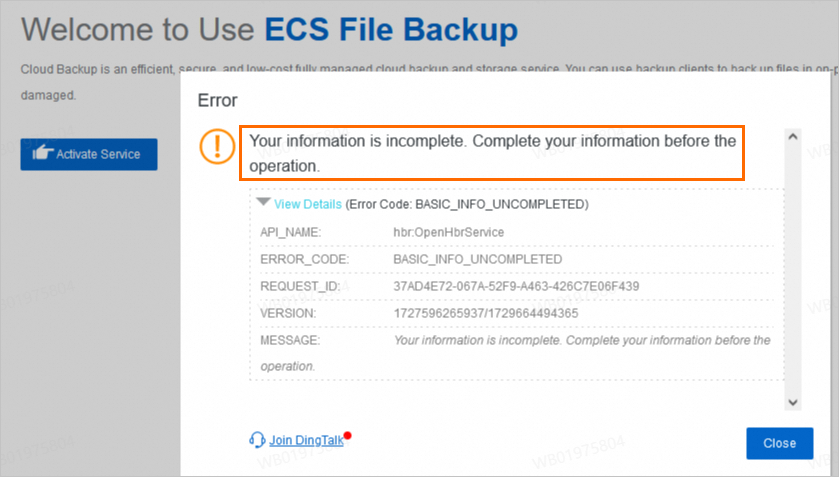
What do I do if Cloud Backup fails to be activated and the following error message appears: Your information is incomplete. Complete your information before the operation?
Issue
When you activate Cloud Backup in the console, the activation fails and the following error message appears: Your information is incomplete. Complete your information before the operation.
Solution
Go to the Alibaba Cloud Account page and complete your information as prompted.
What are the public and private CIDR blocks that need to be configured for a firewall?
To ensure that Cloud Backup can provide backup and restoration services properly, you must add the endpoints and ports to the whitelist of your firewall. For more information, see What are the endpoints and ports that can be accessed by the Cloud Backup client?
You can perform the following operations to obtain public and private CIDR blocks for Cloud Backup.
Public CIDR blocks
CIDR blocks on the management plane: Run the following
pingcommand to obtain the IP address of the corresponding endpoint.ping <Public endpoint>CIDR blocks on the data plane: Provide the backup vault ID to Cloud Backup technical support. Cloud Backup technical support then provides the related endpoint. You can run the following
digcommand to query the IP address of the endpoint and then add routes.dig +short <Public endpoint>
Private CIDR blocks
CIDR blocks on the management plane: Run the following
pingcommand to obtain the IP address of the corresponding endpoint.ping <Private endpoint>CIDR blocks on the data plane: For more information, see Internal OSS endpoints and VIP ranges.