The Forward to Journey component transfers execution from the current journey to another journey. This is a one-way transfer: the current journey stops and does not return. All subsequent steps in the current journey are skipped.
Component information
Icon | Name |
| Forward to Journey |

Prerequisites
To configure this component, access the journey canvas by using an existing journey or creating a new one.
Go to the canvas of an existing journey
On the journey list page of Agentic Journey, click Edit to the right of the journey to enter the canvas edit page.
Create a new journey to open its canvas. For more information, see Use Agentic Journey.
Procedure
Click the Forward to Journey icon on the canvas. The configuration panel appears on the right.
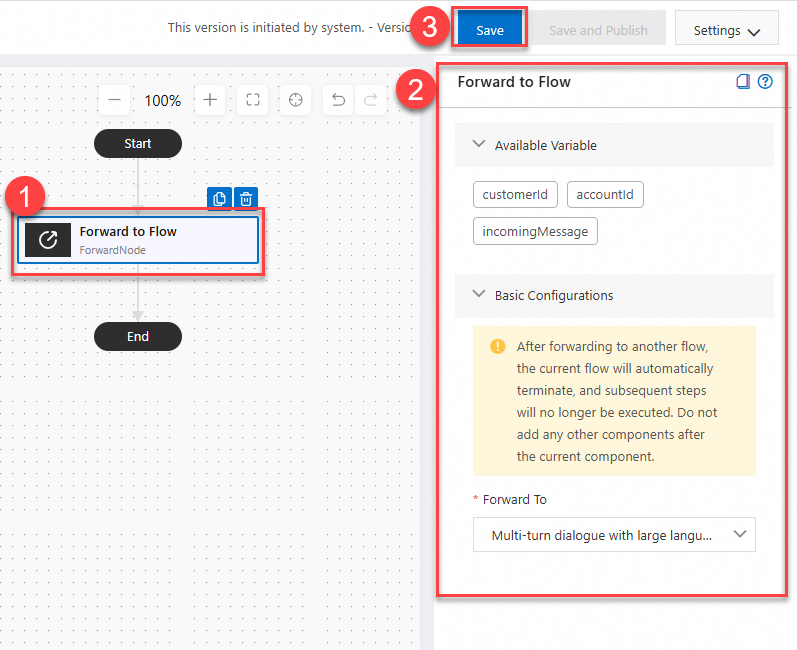
Configure the component parameters. For details, see the Parameters section below.
After you finish the configuration, click Save. In the dialog box that appears, click Save.
Parameters
Parameter | Description |
Forward To | Select a journey that has been published. The target journey does not need to be attached to a WhatsApp Business Account (WABA) or any other account. |
After the Forward to Journey component runs, the current journey stops automatically and no subsequent steps are executed.