Enterprise Edition transit routers support multicast communication. Connect a transit router to your network instances to create multicast networks and forward multicast traffic between them.
Background information
What is multicast?
Multicast is a point-to-multipoint communication model where a server sends the same datagram to multiple clients simultaneously. Common applications include ApsaraVideo Live, video conferencing, financial data synchronization, online education, and web television.
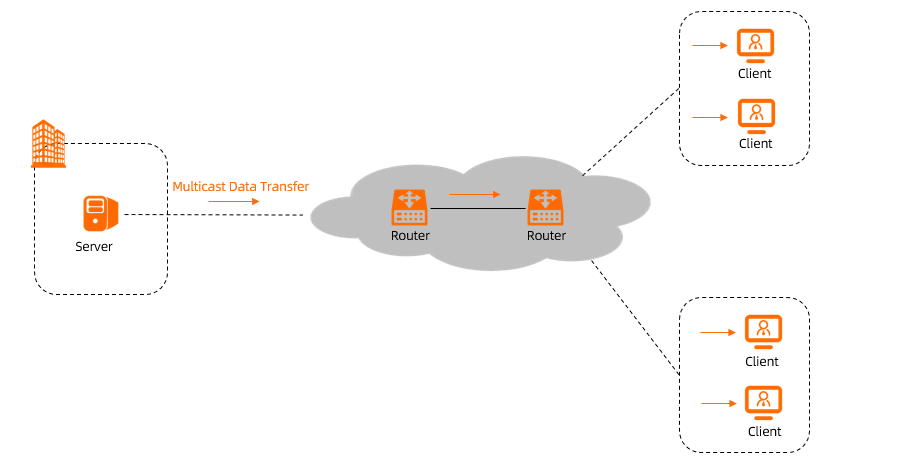
Advantages of multicast
In point-to-multipoint scenarios, multicast reduces the load on the server and improves bandwidth usage compared to unicast and broadcast.
The following live streaming scenario illustrates how multicast outperforms unicast.
For broadcast vs. multicast differences, see the networking documentation.
Unicast mode
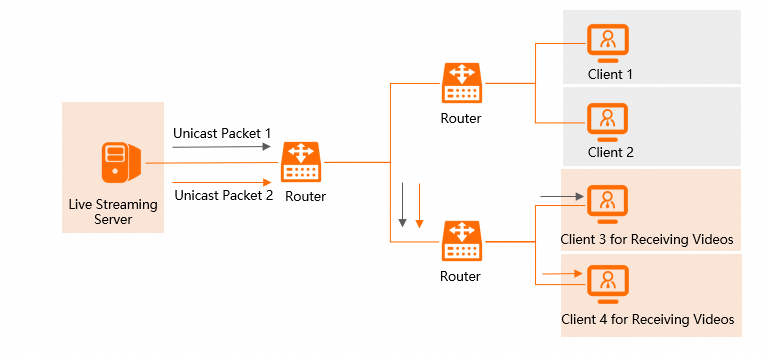
In unicast mode, the live streaming server sends a separate packet to each client (Unicast Packet 1 and Unicast Packet 2). A router forwards each packet to its respective client.
Multicast mode
In multicast mode, the server and clients join the same multicast group. The server sends one packet (Multicast Packet 1), which multicast routers replicate near the clients and forward to each member. The number of replications equals the number of clients in the group.
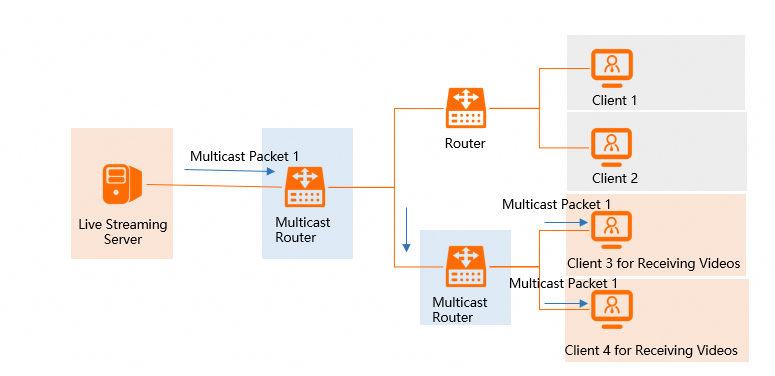
With unicast, the server sends a separate packet per client, increasing server load and bandwidth consumption. With multicast, the server sends one packet that is replicated near the clients, significantly reducing both server load and bandwidth usage.
Multicast features
Enterprise Edition transit routers provide the following multicast scenarios, advantages, and key concepts.
Scenarios
After you enable multicast for an Enterprise Edition transit router, you can build multicast networks in the following scenarios:
Build a multicast network within a single virtual private cloud (VPC), as shown in Multicast Network 3 in the following figure.
Build a multicast network between different VPCs in the same region, as shown in Multicast Network 2 in the following figure.
Build a multicast network between different VPCs in different regions, as shown in Multicast Network 1 in the following figure.

Advantages
Low cost
A cloud-native service that lets you build multicast networks without physical devices or third-party software certificates. Enable as needed and pay only for resources you use.
High reliability
Multi-zone disaster recovery prevents single points of failure and ensures high availability for your multicast network.
Easy maintenance
A unified visual management interface simplifies operations. Manage multicast sources and members without configuring multicast routes.
Terms
The following table describes key multicast concepts.
Term | Description |
Multicast domain | A multicast domain defines the scope of a multicast network within a region. Only resources inside the multicast domain can send or receive multicast traffic. You can create multiple multicast domains for an Enterprise Edition transit router. Multicast domains in the same region are isolated from each other. However, multicast groups that have the same multicast IP address can communicate across different regions. |
Multicast group | In a multicast domain, a multicast group is a set of resources that send and receive the same multicast messages. Each group is identified by a multicast IP address.
|
Multicast source | A multicast source is a resource in a multicast group that sends multicast traffic. |
Multicast member | A multicast member is a resource in a multicast group that receives multicast traffic. |
Networking modes
You can build a multicast network in static mode or using the Internet Group Management Protocol (IGMP).
Static mode: After you create a multicast domain, manually create multicast sources and members to build the network.
IGMP mode: After you create a multicast domain, hosts dynamically join multicast groups using IGMP, which simplifies deployment and management.
IGMP manages IPv4 multicast group membership in the TCP/IP protocol suite. When a host joins a multicast group via IGMP, it becomes both a multicast source and member on the transit router. For more information about how IGMP works on a transit router, see IGMP for transit router.
For more information about how to create a multicast network, see Create and manage a multicast network.
Billing
Using the multicast feature incurs connection fees, data processing fees, and inter-region connection fees that vary by network scenario. For more information about how connection fees and inter-region connection fees are billed, see Billing overview.
The following describes how multicast data processing fees are calculated.
Billing rules
Data processing fees are billed hourly on a pay-as-you-go basis. Usage under one hour is billed as one full hour.
Data processing fee for multicast = Multicast traffic × Unit price per GB (USD 0.02/GB)
Multicast traffic consists of the following two parts:
The total multicast traffic sent from each multicast source to the Enterprise Edition transit router.
The total multicast traffic sent from the Enterprise Edition transit router to each multicast member.
Billing example
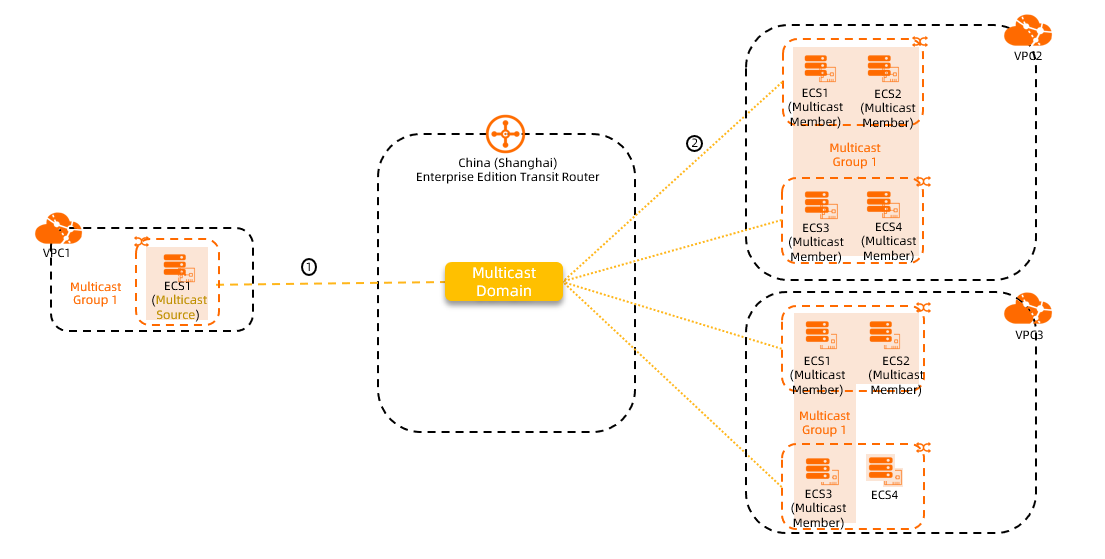
In the preceding figure, ECS instances in VPC1, VPC2, and VPC3 have joined Multicast Group 1. ECS1 in VPC1 is the multicast source, and the ECS instances in VPC2 and VPC3 are multicast members. When the transit router forwards multicast traffic, you are charged for the following two traffic components:
Billable part | Description |
① | The total multicast traffic sent from the multicast source to the Enterprise Edition transit router. |
② | The total multicast traffic sent from the Enterprise Edition transit router to ECS1, ECS2, ECS3, and ECS4 in VPC2, and to ECS1, ECS2, and ECS3 in VPC3. |
Assume that the multicast traffic is 2 GB for part ① and 8 GB for part ②. Then:
Data processing fee = (2 + 8) GB × USD 0.02/GB = USD 0.20
Limits
The multicast feature is available for Enterprise Edition transit routers only in the following regions: China (Hangzhou), China (Shanghai), China (Beijing), China (Ulanqab), China (Shenzhen), China (Chengdu), China (Hohhot), China (Hong Kong), Japan (Tokyo), Singapore, Germany (Frankfurt), UK (London), US (Virginia), US (Silicon Valley), and SAU (Riyadh - Partner Region).
Enterprise Edition transit routers support multicast only for traffic between VPCs.
Elastic network interfaces (ENIs) created by an Enterprise Edition transit router in a VPC cannot be added to a multicast network.
An ENI can be a multicast source and a multicast member in the same multicast group.
Only the primary private IP address of an ENI can be used for multicast communication. Other IP addresses of the ENI do not support multicast.
The following table lists multicast resource quotas.
Resource
Default quota
Request a quota increase
Maximum number of multicast domains that can be created for each transit router
20
Not adjustable
Maximum number of multicast domains that can be associated with each VPC
NoteThe total number of multicast domains associated with all vSwitch instances in a VPC cannot exceed the quota.
20
Maximum number of multicast sources and members for each transit router
2,000
You can request a quota increase by using one of the following methods:
On the Quotas page, request a quota increase. For more information, see Increase CEN quotas.
In Quota Center, request a quota increase. For more information, see Create a quota increase application.
You can request to increase the quota to 3,000. To request a higher quota, contact your account manager. The maximum quota is 10,000.
Maximum number of multicast members in a multicast group of a transit router
100
Not adjustable
Maximum number of multicast sources in a multicast group of a transit router
100
Maximum number of vSwitches that can be associated with a multicast domain of a transit router
10
Maximum number of inter-region multicast members that can be associated with a multicast group of a transit router
15
Number of multicast groups supported by each multicast domain
20 (Deprecated)
Maximum bandwidth of each multicast group
NoteThis is the total bandwidth consumed by traffic from all multicast sources to the multicast group and from the multicast group to all multicast members.
10 Gbps
The multicast feature cannot be disabled after it is enabled. Enabling it does not affect your other services.