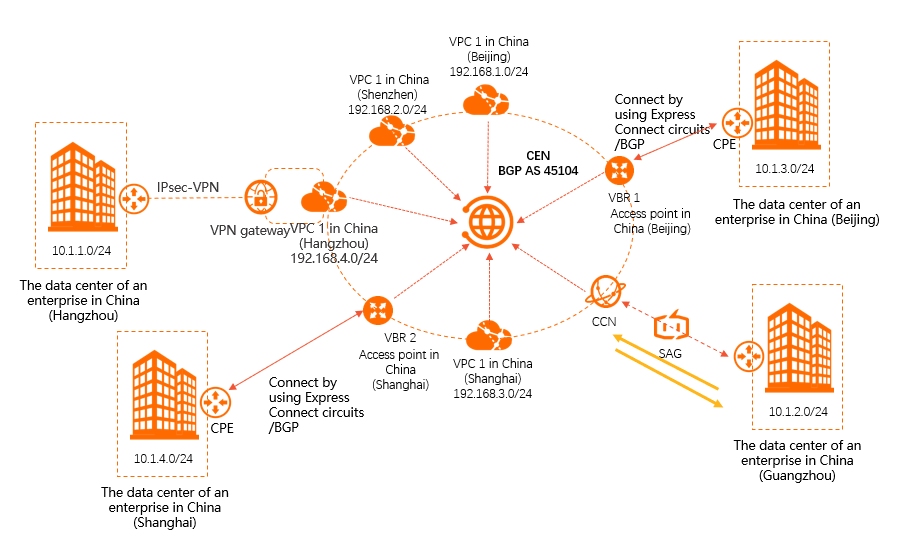
Cloud Enterprise Network (CEN) lets you connect data centers to Alibaba Cloud using different connection methods — Express Connect circuits, VPN gateways, or Smart Access Gateway (SAG) instances — and unify them under a single CEN instance. This topic walks through a reference architecture where four enterprise data centers in different regions use three different connection methods to achieve full-mesh connectivity with four VPCs.
Choose a connection method
Select the connection method that matches each site's requirements before you begin:
| Connection method | Best for | Key characteristic |
|---|---|---|
| Express Connect circuits | High-bandwidth, latency-sensitive data centers | Dedicated physical connection; BGP route exchange with virtual border routers (VBRs) |
| VPN gateway | Data centers with standard internet access | IPsec-VPN tunnel over the public internet; lower cost |
| Smart Access Gateway (SAG) | Branch offices and lightweight edge sites | SD-WAN device; routes managed through Cloud Connect Network (CCN) |
All three methods attach to the same CEN instance, so network instances on different connection methods can communicate with each other through CEN route propagation.
Network topology
The following example uses four data centers and four virtual private clouds (VPCs) across five regions:
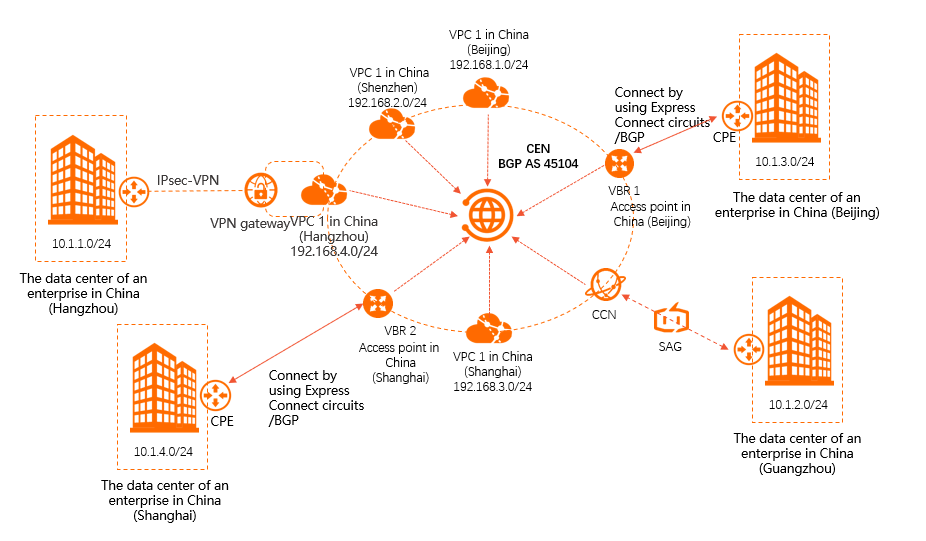
Data centers and their connection methods:
China (Beijing) data center — Express Connect circuit — VBR attached to CEN
China (Shanghai) data center — Express Connect circuit — VBR attached to CEN
China (Hangzhou) data center — VPN gateway — VPC in China (Hangzhou) attached to CEN
China (Guangzhou) data center — SAG instance — CCN instance attached to CEN
VPCs attached directly to CEN:
VPC in China (Beijing)
VPC in China (Shanghai)
VPC in China (Hangzhou)
VPC in China (Shenzhen)
Prerequisites
Before you begin, make sure you have:
A CEN instance
CIDR blocks planned for all networks — no overlapping ranges (see Subnetting below)
Express Connect circuits provisioned for the Beijing and Shanghai data centers
A VPN gateway created for the VPC in China (Hangzhou)
An SAG instance deployed at the China (Guangzhou) data center
Subnetting
All CIDR blocks must be non-overlapping. This example uses the following address plan:
| Network | CIDR block |
|---|---|
| Data center in China (Hangzhou) | 10.1.1.0/24 |
| Data center in China (Guangzhou) | 10.1.2.0/24 |
| Data center in China (Beijing) | 10.1.3.0/24 |
| Data center in China (Shanghai) | 10.1.4.0/24 |
| VPC in China (Beijing) | 192.168.1.0/24 |
| VPC in China (Shenzhen) | 192.168.2.0/24 |
| VPC in China (Shanghai) | 192.168.3.0/24 |
| VPC in China (Hangzhou) | 192.168.4.0/24 |
Connect the Beijing and Shanghai data centers using Express Connect circuits
Express Connect circuits use Border Gateway Protocol (BGP) to exchange routes between the data center's customer-premises equipment (CPE) and the VBR on the Alibaba Cloud side.
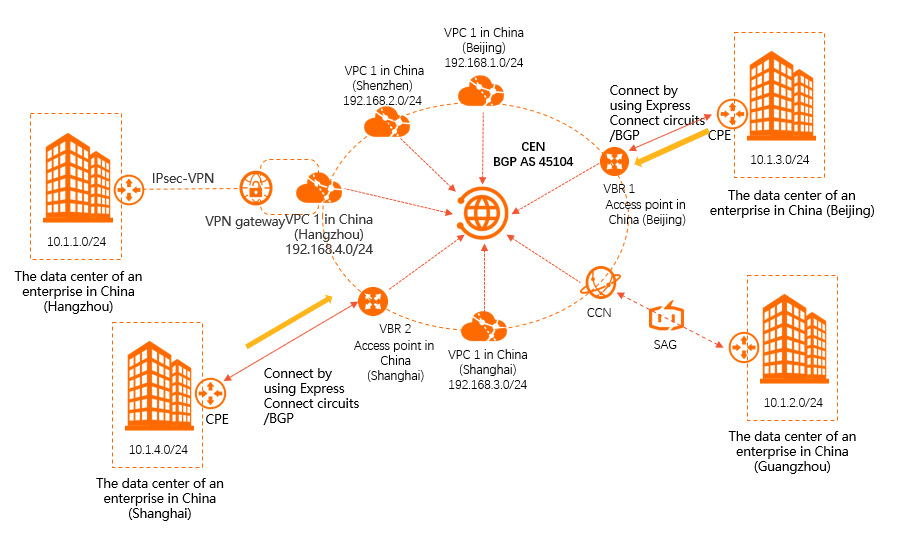
Resources involved:
Two Express Connect circuits (one per data center)
Two VBRs (one per circuit), both attached to the CEN instance
Steps:
Configure BGP peering between each data center's CPE and its corresponding VBR. For details, see Configure BGP.
On each CPE, configure the BGP session to advertise the data center's CIDR block to the VBR: After the BGP session comes up, the CPE and VBR learn each other's routes automatically.
Parameter CPE in China (Beijing) CPE in China (Shanghai) Local BGP ASN A B Peer BGP ASN 45104 45104 Network 10.1.3.0/24 10.1.4.0/24 Attach both VBRs to the CEN instance. CEN then propagates the data center routes (learned via BGP) to all other attached network instances.
Resulting route table — CPE in China (Beijing):
| Destination CIDR block | Next hop | Route type |
|---|---|---|
| 10.1.1.0/24 | BGP peer: VBR in China (Beijing) | BGP route |
| 10.1.2.0/24 | BGP peer: VBR in China (Beijing) | BGP route |
| 10.1.4.0/24 | BGP peer: VBR in China (Beijing) | BGP route |
| 192.168.1.0/24 | BGP peer: VBR in China (Beijing) | BGP route |
| 192.168.2.0/24 | BGP peer: VBR in China (Beijing) | BGP route |
| 192.168.3.0/24 | BGP peer: VBR in China (Beijing) | BGP route |
| 192.168.4.0/24 | BGP peer: VBR in China (Beijing) | BGP route |
Connect the Hangzhou data center using a VPN gateway
The China (Hangzhou) data center connects to its regional VPC over an IPsec-VPN tunnel. The VPC is then attached to CEN, making the data center reachable from all other network instances.
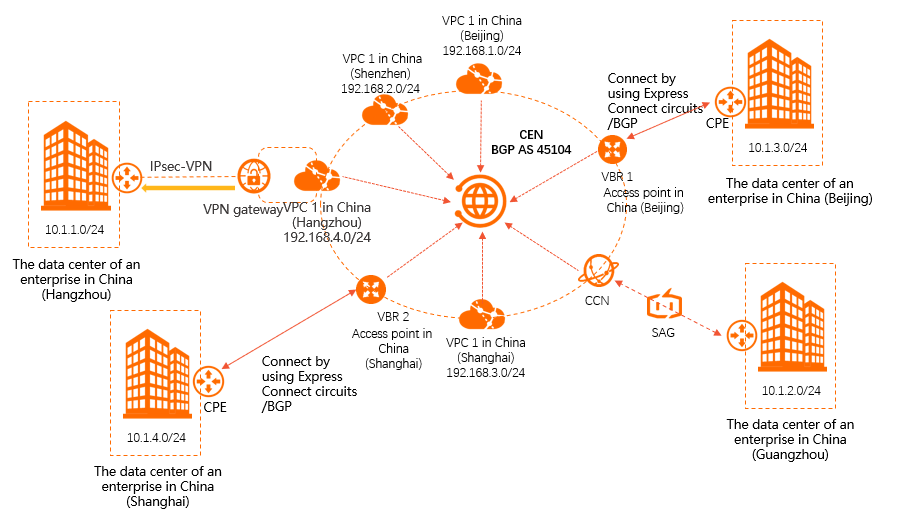
Resources involved:
One VPN gateway (associated with the VPC in China (Hangzhou))
The VPC in China (Hangzhou), attached to the CEN instance
Steps:
Create an IPsec-VPN connection between the China (Hangzhou) data center and the VPC in China (Hangzhou). For setup instructions, see Connect a VPC to a data center in single-tunnel mode.
On the data center side, configure routes pointing to Alibaba Cloud via the VPN gateway. Use either a specific route or a default route: Option 1 — Specific routes (route only known CIDR blocks through the VPN): Option 2 — Default route (route all traffic through the VPN):
Destination CIDR block Next hop 10.1.2.0/24 VPN gateway 10.1.3.0/24 VPN gateway 10.1.4.0/24 VPN gateway 192.168.1.0/24 VPN gateway 192.168.2.0/24 VPN gateway 192.168.3.0/24 VPN gateway 192.168.4.0/24 VPN gateway Destination CIDR block Next hop 0.0.0.0/0 VPN gateway Add a static route to the VPC in China (Hangzhou) pointing back to the data center, then advertise it to CEN:
In the route table of the VPC in China (Hangzhou), add a route with destination
10.1.1.0/24and next hop set to the VPN gateway.
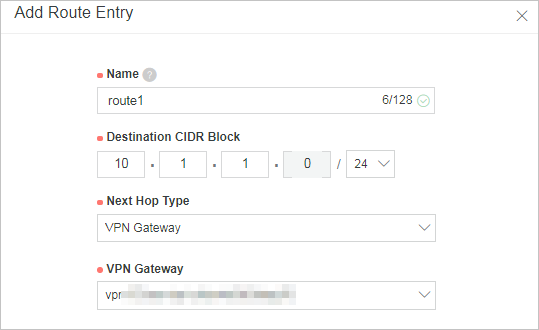
Advertise this route from the VPC to the CEN instance.
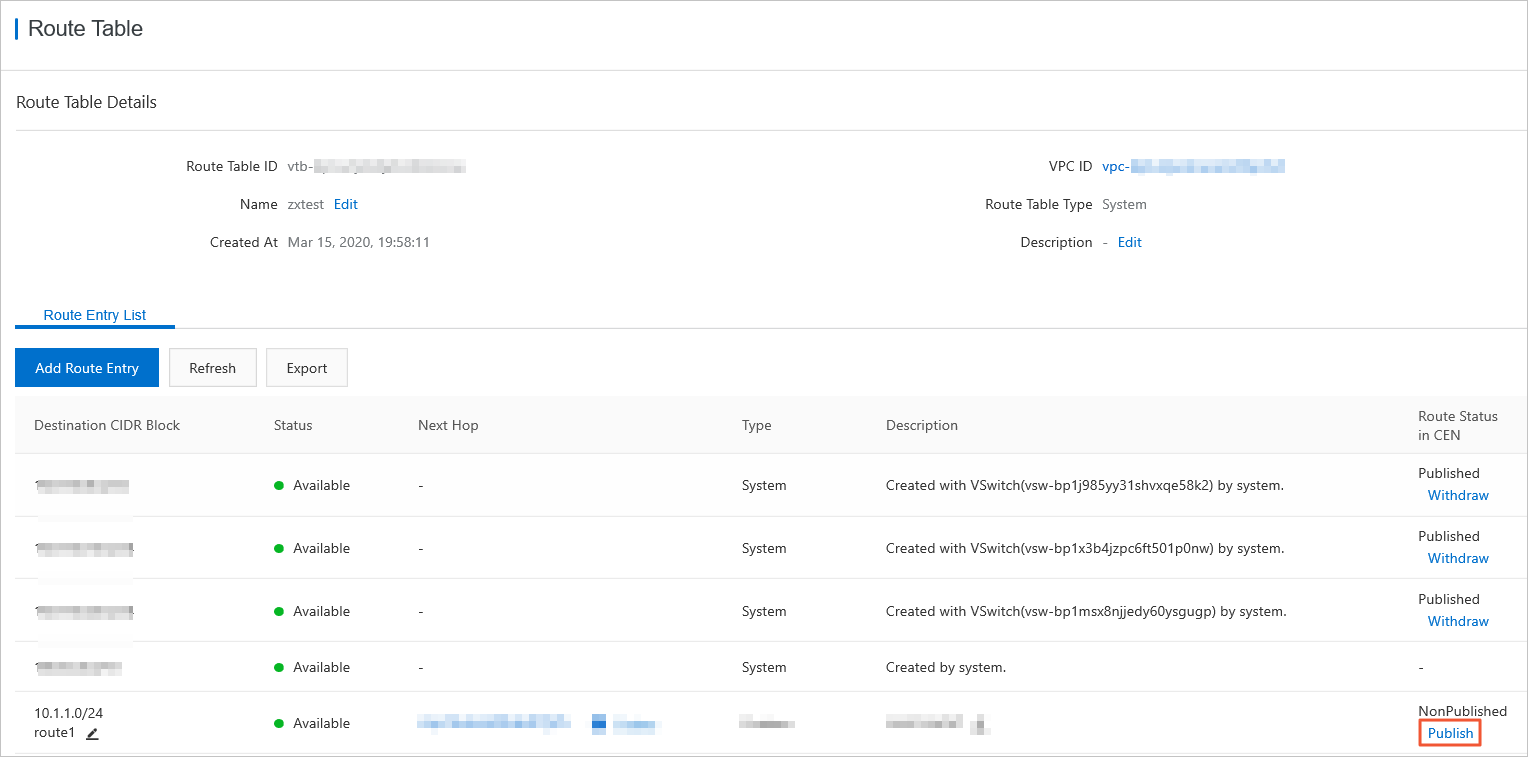
Once advertised, all network instances attached to CEN learn the
10.1.1.0/24route, and the Hangzhou data center can communicate with the entire hybrid cloud.
Connect the Guangzhou data center using an SAG instance
The China (Guangzhou) data center connects via an SAG device. The SAG instance belongs to a CCN instance, which is attached to the CEN instance to join the full network.
Resources involved:
One SAG instance deployed at the Guangzhou data center
One CCN instance (associated with the SAG instance), attached to the CEN instance
Steps:
In the SAG console, select the SAG instance for the China (Guangzhou) data center and configure a route to advertise the data center's CIDR block (
10.1.2.0/24) to Alibaba Cloud. For details, see Advertise routes to Alibaba Cloud.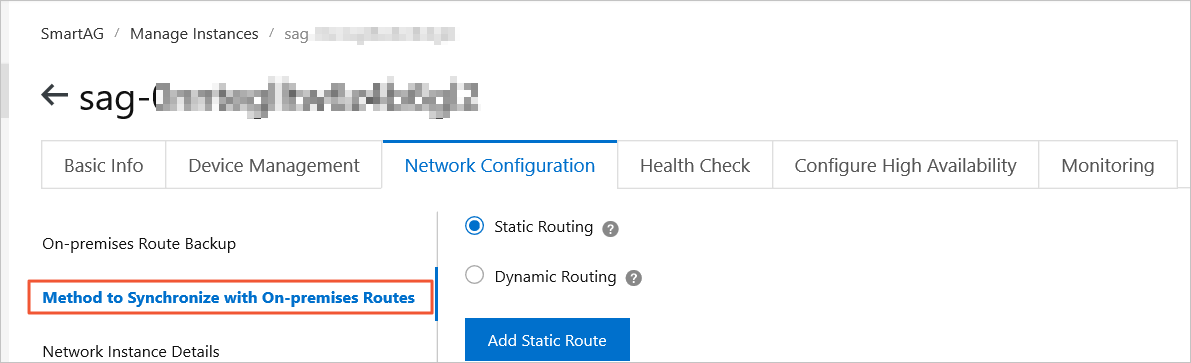
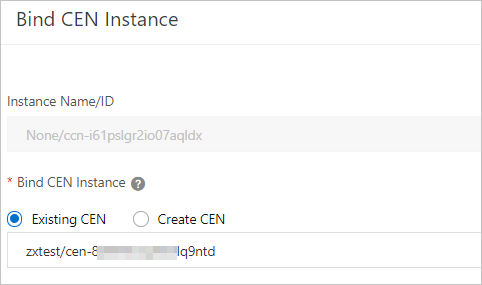
Attach the CCN instance associated with the SAG instance to the CEN instance. This gives the Guangzhou data center full connectivity to all other network instances in the CEN. For details, see Associate a CCN instance with a CEN instance.
Verify full connectivity
After attaching all network instances to the CEN instance, CEN propagates routes dynamically across the entire topology. No manual route configuration is needed between network instances — CEN handles route advertisement automatically to prevent overlapping.
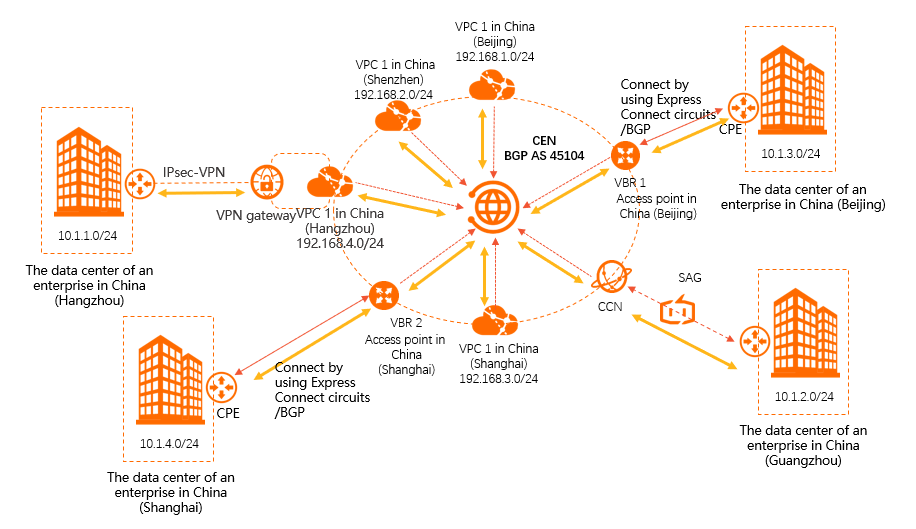
Summary of what each connection type attaches to CEN:
| Data center | Connection method | What attaches to CEN |
|---|---|---|
| China (Beijing) | Express Connect circuit | VBR in China (Beijing) |
| China (Shanghai) | Express Connect circuit | VBR in China (Shanghai) |
| China (Hangzhou) | VPN gateway | VPC in China (Hangzhou) |
| China (Guangzhou) | SAG instance | CCN instance |
To confirm routes are propagating correctly, check the route tables of representative network instances. The following examples show the expected state after full connectivity is established.
VBR in China (Beijing) route table:
| Destination CIDR block | Next hop | Route type |
|---|---|---|
| 10.1.3.0/24 | BGP peer: CPE in China (Beijing) | BGP route |
| 10.1.1.0/24 | VPC in China (Hangzhou) | CEN route |
| 10.1.2.0/24 | CCN | CEN route |
| 10.1.4.0/24 | VBR in China (Shanghai) | CEN route |
| 192.168.1.0/24 | VPC in China (Beijing) | CEN route |
| 192.168.2.0/24 | VPC in China (Shenzhen) | CEN route |
| 192.168.3.0/24 | VPC in China (Shanghai) | CEN route |
| 192.168.4.0/24 | VPC in China (Hangzhou) | CEN route |
VPC in China (Shenzhen) route table:
| Destination CIDR block | Next hop | Route type |
|---|---|---|
| 10.1.1.0/24 | VPC in China (Hangzhou) | CEN route |
| 10.1.2.0/24 | CCN | CEN route |
| 10.1.3.0/24 | VBR in China (Beijing) | CEN route |
| 10.1.4.0/24 | VBR in China (Shanghai) | CEN route |
| 192.168.1.0/24 | VPC in China (Beijing) | CEN route |
| 192.168.3.0/24 | VPC in China (Shanghai) | CEN route |
| 192.168.4.0/24 | VPC in China (Hangzhou) | CEN route |
Each data center's CIDR block appears in the route table of every other network instance, confirming end-to-end reachability across the hybrid cloud.