The QUIC protocol provides security comparable to TLS/SSL, with lower connection and transport latency. Enable the QUIC protocol to improve resource access efficiency and ensure data security.
HTTP/3 and QUIC
HTTP/3
HTTP/3 is the third major version of HTTP. It is built on QUIC instead of the traditional TCP and TLS. HTTP/3 retains many features of HTTP/2, such as header compression and multiplexing, and more effectively handles network congestion to reduce access latency.
QUIC
QUIC (Quick UDP Internet Connections) is an experimental transport-layer network protocol that offers security comparable to TLS/SSL while reducing connection and transport latency. Based on UDP, QUIC delivers excellent performance on weak networks and can maintain service availability even with severe packet loss and high network latency. QUIC can implement different congestion control algorithms at the application layer without dependencies on the operating system or kernel. Compared to traditional TCP, this provides greater flexibility for optimization and is ideal for services where TCP optimization has become a bottleneck.
Alibaba Cloud CDN currently offers QUIC as a layer 7 protocol.
Supported version
Alibaba Cloud CDN supports the IETF QUIC standard.
Client requirements
To use the QUIC protocol, a client must meet one of the following requirements:
Chrome browsers can directly send QUIC requests to Alibaba Cloud CDN because it supports the standard HTTP/3 protocol.
Custom apps must integrate a QUIC-capable network library, such as lsquic-client, Cronet, ngtcp2, or quiche.
How it works
The following figure shows how QUIC works in Alibaba Cloud CDN.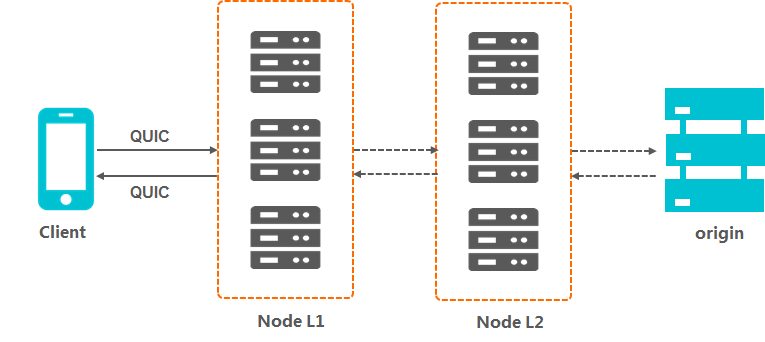
Billing rules
The QUIC protocol is a value-added service, and additional charges apply for QUIC requests. For details, see the QUIC section of CDN Pricing.
Requests transmitted over UDP are counted as QUIC requests.
For HTTPS traffic, requests using the QUIC protocol are billed as QUIC requests. Other requests are billed as standard HTTPS requests.
Billing methods
Billable item | Billing rule | Billing method | Billing cycle |
QUIC requests for static content | Billing is based on the total number of requests for a domain and its associated static resources. | pay-as-you-go | Billed hourly. Bills may take 3 to 4 hours to appear. |
Enable the QUIC protocol
-
Log on to the CDN console.
-
In the left navigation pane, click Domain Names.
-
On the Domain Names page, find the target domain name and click Manage in the Actions column.
In the left-side navigation pane for the domain name, click QUIC, and then turn on the QUIC Protocol switch.
Verify QUIC requests
This example shows how to verify QUIC requests in the Chrome browser.
Right-click a blank area on the webpage and select Inspect > Network. A value of h3-29 in the Protocol column indicates a QUIC request.
If the Protocol column is not visible, refresh the page. Then, right-click the table header and select Header Options > Protocol.