When you add an organization from an external Hyperledger Fabric environment to a channel in Alibaba Cloud BaaS, the channel configuration must change and all participating organizations must sign off on that change. Standard chaincodes cannot coordinate this cross-organization approval process. The management chaincode provides this capability: it collects configuration change requests and gathers the required signatures from all participating organizations.
Bind a management chaincode to the channel only after you have decided to add an external organization. Binding it earlier creates unnecessary overhead.
Prerequisites
Before you begin, make sure you have:
An Alibaba Cloud BaaS instance (V1.4 or V2.2)
An organization that belongs to the target channel
Access to the Alibaba Cloud BaaS console
Bind a management chaincode
All organizations in the target channel must complete Steps 1–3. Coordinate with all other organization administrators before you start.
The procedure differs by version. Follow the steps for your version.
Step 1: Download the management chaincode package
Download the management chaincode package provided by Alibaba Cloud BaaS. The default chaincode name is cmcc.
Select the package that matches your instance version:
V1.4: cmcc.1.4.cc
V2.2: cmcc.1.5.tar.gz
Step 2: Deploy the management chaincode
Log on to the Alibaba Cloud BaaS console. On the Overview page, go to the My Organizations section and click the name of an organization that belongs to the target channel.
Deploy the management chaincode using the steps for your version:
V1.4
Click the Chaincodes tab.
Upload, install, and instantiate the management chaincode. For detailed steps, see Deploy chaincodes.
V2.2
Click the Chaincode Package management tab.
Upload, install, and submit the definition of the management chaincode. For detailed steps, see Deploy chaincodes.
Step 3: Bind the management chaincode to the channel
Click the Chaincodes tab, then click Bind Management Chaincode.

In the pane that appears, select the management chaincode record for the target channel and click Bind.
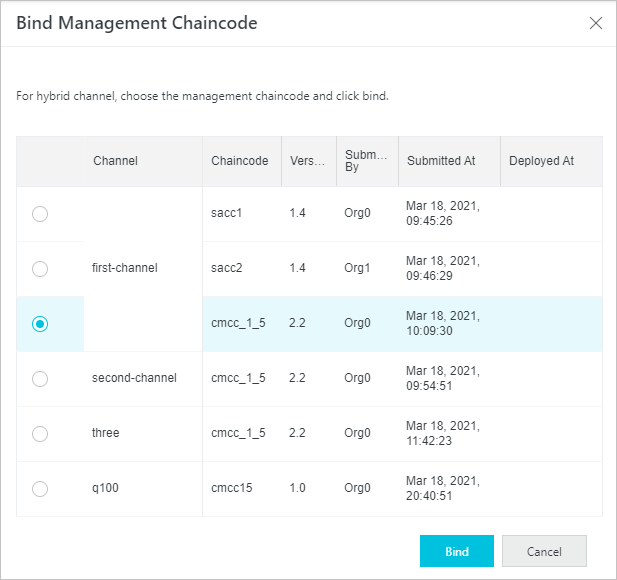
Step 4: Repeat for all organizations
Repeat Steps 1–3 for every other organization in the target channel. All organizations must deploy and bind the management chaincode before you can add external organizations to the channel.
Verify the binding
After all organizations have completed the binding, confirm the result:
The management chaincode is marked with the Management Chaincode identifier.
The target channel is marked with the Hybrid Channel identifier.

What's next
After all organizations have bound the management chaincode, you can proceed to add the external Hyperledger Fabric organization to the channel.