In a canary release, weight-based routing randomly assigns each request to either the stable or canary version. The same user might see different versions across requests -- a poor experience when you test stateful features or collect feedback from specific user groups.
Traffic lanes combined with the Hash tagging plug-in solve this problem. Traffic lanes isolate service versions into independent runtime environments, and the Hash tagging plug-in deterministically maps each user to a lane based on a hash of their user ID. The same user always reaches the same version, and you control the exact percentage of users who see the canary.
This guide walks through a complete example:
Route a named user (
jason) directly to the canary version.Route a configurable percentage (20%) of all other users to the canary version based on a hash of the
x-user-idheader.Keep the remaining 80% of users on the stable version.
How it works
Three components work together to implement user-segment canary release:
| Component | Role |
|---|---|
| Traffic lanes (configured in the ASM console) | Isolate service versions into separate lanes. A baseline lane holds stable versions; a canary lane holds new versions. Requests stay within their assigned lane across the entire call chain. |
| VirtualService routing rules | Match request headers at the ingress gateway and route traffic to the correct lane. A fallback rule sends traffic to the baseline lane when a service is missing from the canary lane. |
| Hash tagging plug-in (WasmPlugin) | Runs at the ingress gateway. Hashes the x-user-id header value, maps the result to a percentage range, and sets a routing header (x-asm-prefer-tag) that the VirtualService rules consume. |
The request flow works as follows:
A request arrives at the ingress gateway with an
x-user-idheader.The Hash tagging plug-in computes
hash(x-user-id) % 100and setsx-asm-prefer-tagto eithers1(stable) ors2(canary).The VirtualService routes the request to the matching lane.
Within the lane, each service forwards the request to the next service in the call chain, preserving the lane assignment.
Prerequisites
Before you begin, make sure that you have:
An ASM instance of version 1.18 or later with a cluster added. For more information, see Add a cluster to an ASM instance
A Kubernetes managed cluster or ACS cluster. For more information, see Create an ACK managed cluster or Create an ACS cluster
An ingress gateway deployed in the ASM instance. For more information, see Create an ingress gateway
Sidecar injection configured for the target namespace
Sample application
This example uses a three-service call chain to demonstrate that lane routing is preserved across multiple hops, not just at the ingress:

mocka (v1 only) -- entry point, forwards requests to mockb
mockb (v1 only) -- middle service, forwards requests to mockc
mockc (v1 and v2) -- terminal service with a canary version to test
Each service propagates the x-user-id header to downstream services, which enables trace context pass-through across the entire chain.
Step 1: Deploy the sample application
Create a file named sample.yaml with the following content, then apply it with the kubeconfig of the data plane cluster.
kubectl apply -f sample.yamlStep 2: Create an Istio gateway
Create an Istio Gateway named ingressgateway in the istio-system namespace. This gateway accepts HTTP traffic on port 80 for all hosts. For more information, see Manage Istio gateways.
apiVersion: networking.istio.io/v1beta1
kind: Gateway
metadata:
  name: ingressgateway
  namespace: istio-system
spec:
  selector:
    istio: ingressgateway
  servers:
    - port:
        number: 80
        name: http
        protocol: HTTP
      hosts:
        - '*'
Step 3: Create a lane group and lanes
Create a lane group
Log on to the ASM console. In the left-side navigation pane, choose Service Mesh > Mesh Management.
On the Mesh Management page, click the target ASM instance. In the left-side navigation pane, choose Traffic Management Center > Traffic Swimlane.
On the Traffic Swimlane page, click Create Swimlane Group and configure the following settings.
| Parameter | Value |
|---|---|
| Name of Swim lane Group | canary |
| Ingress Type | ingressgateway |
| Lane Mode | Loose Mode |
| Pass-through Mode of Trace Context | Pass-through Trace Id |
| Trace ID Request Header | x-user-id |
| Request Routing Header | x-asm-prefer-tag -- enables the gateway to route traffic to different lanes based on request content and pass through the header in lane context |
| Swimlane Service | Select the target cluster, choose the default namespace, select mocka, mockb, and mockc, and click the  icon to add them to the Selected pane icon to add them to the Selected pane |
Click OK.
Create lanes s1 and s2
In the Traffic Rule Definition pane, click Create Swimlanes.
Create two lanes with the following settings.
| Parameter | Lane s1 (baseline) | Lane s2 (canary) |
|---|---|---|
| Swimlane Name | s1 | s2 |
| Configure Service Tag -- Label Key | ASM_TRAFFIC_TAG | ASM_TRAFFIC_TAG |
| Configure Service Tag -- Label Value | v1 | v2 |
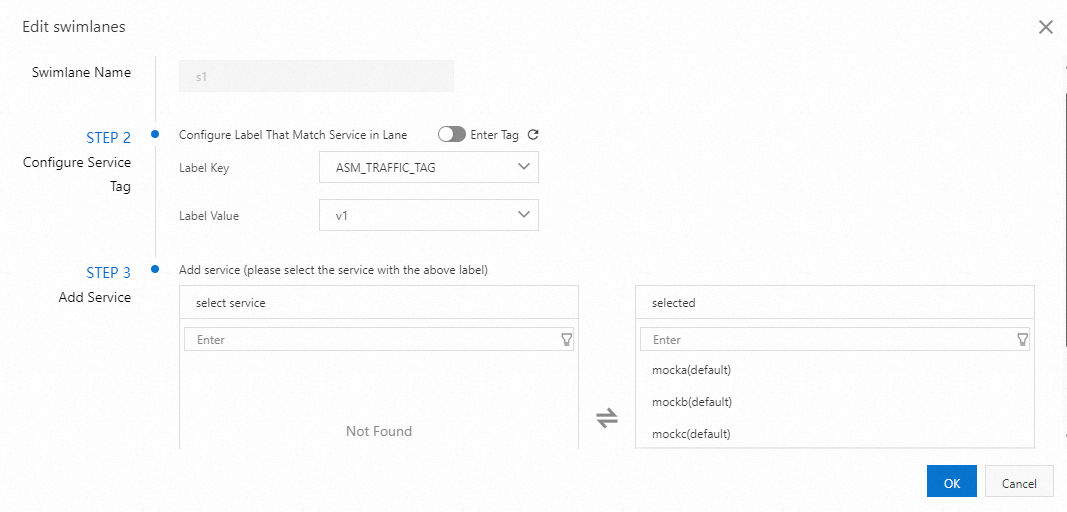
| Add Service | mocka(default), mockb(default), mockc(default) | mockc(default) |
The following figure shows an example of configuring lane s1:
After both lanes are created, the lane group has the following layout:

The first lane created in a lane group serves as the baseline lane by default. When a request targets a service that does not exist in the assigned lane, the request falls back to the baseline lane. For more information, see Modify the baseline lane in loose mode.
Create routing rules
Create a VirtualService with three routing rules. These rules determine how the ingress gateway routes incoming requests to the correct lane.
| Rule | Match condition | Target lane | Additional action |
|---|---|---|---|
| 1 | x-user-id: jason | s2 (canary) | Sets x-asm-prefer-tag: s2 for downstream routing; falls back to s1 if the service is missing from s2 |
| 2 | x-asm-prefer-tag: s2 | s2 (canary) | Falls back to s1 if the service is missing from s2 |
| 3 | x-asm-prefer-tag: s1 | s1 (baseline) | -- |
Rule 1 handles exact-match named users. Rules 2 and 3 handle traffic tagged by the Hash tagging plug-in (deployed in the next step).
Step 4: Deploy the Hash tagging plug-in
The Hash tagging plug-in is a WasmPlugin that runs at the ingress gateway. It hashes the x-user-id header value, computes hash % 100, and sets x-asm-prefer-tag based on configurable percentage ranges.
Create a file named wasm.yaml with the following content, then apply it with the kubeconfig of the ASM instance (not the data plane cluster).
apiVersion: extensions.istio.io/v1alpha1
kind: WasmPlugin
metadata:
  name: hash-tagging
  namespace: istio-system
spec:
  imagePullPolicy: IfNotPresent
  selector:
    matchLabels:
      istio: ingressgateway
  url: registry-cn-hangzhou.ack.aliyuncs.com/acs/asm-wasm-hash-tagging:v1.22.6.2-g72656ba-aliyun
  phase: AUTHN
  pluginConfig:
    rules:
      - header: x-user-id         # Hash this header value
        modulo: 100                # Divide hash result by 100
        tagHeader: x-asm-prefer-tag  # Write the result to this header
        policies:
          - range: 20              # hash % 100 < 20 -> canary (20% of users)
            tagValue: s2
          - range: 100             # hash % 100 >= 20 -> stable (80% of users)
            tagValue: s1
kubectl apply -f wasm.yamlApply this YAML with the ASM instance kubeconfig, not the data plane cluster kubeconfig. The WasmPlugin runs on the ingress gateway, which is managed by ASM.
Step 5: Verify the routing rules
Get the ingress gateway address
export GATEWAY_ADDRESS=$(kubectl get svc -n istio-system | grep istio-ingressgateway | awk '{print $4}')Test named-user routing
Send a request as user jason. This request matches Rule 1 and routes directly to the canary lane (s2), regardless of the hash value.
curl ${GATEWAY_ADDRESS} -H 'x-user-id: jason'Expected output:
-> mocka(version: v1, ip: 10.0.0.15)-> mockb(version: v1, ip: 10.0.0.130)-> mockc(version: v2, ip: 10.0.0.133)The request traverses mocka (v1) and mockb (v1) in the baseline lane, then reaches mockc (v2) in the canary lane. mocka and mockb resolve to the baseline lane because only mockc is assigned to lane s2.
Test hash-based user routing
Send requests as multiple users to see the hash-based split in action.
for i in 'bob' 'stacy' 'jessie' 'vance' 'jack'; do
  curl ${GATEWAY_ADDRESS} -H "x-user-id: $i"
  echo "   user $i requested"
done
Expected output:
-> mocka(version: v1, ip: 10.0.0.15)-> mockb(version: v1, ip: 10.0.0.130)-> mockc(version: v1, ip: 10.0.0.131)   user bob requested
-> mocka(version: v1, ip: 10.0.0.15)-> mockb(version: v1, ip: 10.0.0.130)-> mockc(version: v1, ip: 10.0.0.131)   user stacy requested
-> mocka(version: v1, ip: 10.0.0.15)-> mockb(version: v1, ip: 10.0.0.130)-> mockc(version: v2, ip: 10.0.0.133)   user jessie requested
-> mocka(version: v1, ip: 10.0.0.15)-> mockb(version: v1, ip: 10.0.0.130)-> mockc(version: v1, ip: 10.0.0.131)   user vance requested
-> mocka(version: v1, ip: 10.0.0.15)-> mockb(version: v1, ip: 10.0.0.130)-> mockc(version: v2, ip: 10.0.0.133)   user jack requested
Users jessie and jack are routed to mockc v2 (canary), while bob, stacy, and vance go to mockc v1 (stable). Each user consistently reaches the same version on every request because the hash of their user ID is deterministic.
Next steps
Increase canary traffic gradually. Edit the WasmPlugin
policiesto shift more users to the canary lane. For example, changerange: 20torange: 50to route 50% of users to the canary version.Promote to full release. When the canary version is validated, update lane s1 to include the new version and remove lane s2, or adjust routing rules to send all traffic to the updated baseline.
Roll back. If problems are detected, set
range: 0for the canary lane tag value (s2) in the WasmPlugin, or delete the WasmPlugin entirely to stop all hash-based canary routing. Note that named-user routing (such as thex-user-id: jasonrule in the VirtualService) remains active even without the WasmPlugin.