Service Mesh (ASM) lets you isolate multiple versions or features of an application into independent runtime environments—called traffic lanes—and route matching request traffic to the target version or feature by defining lane rules. In a production environment, you might want to isolate stable and canary release versions using lanes and route traffic to different lanes based on user identity. Specifically, you may want to route requests from certain identified users directly to the canary version for testing, while routing a random portion of other users’ traffic to the canary version based on weight. This topic describes how to combine traffic lanes and hash tagging to implement user-based canary testing.
Prerequisites
-
You have created a cluster and added it to an ASM instance, and the instance version is 1.18 or later. For more information, see Add a cluster to an ASM instance.
-
Create an ACK managed cluster or an ACS cluster. For more information, see Create an ACK managed cluster or Create an ACS cluster.
-
Deploy an ingress gateway. For more information, see Create an ingress gateway.
Procedure
This example scenario creates three applications with the following call chain.
-
mocka, with version v1.
-
mockb, with version v1.
-
mockc, with versions v1 and v2.
The applications use the x-user-id request header to identify user identity, and this header is passed through across service calls. This scenario demonstrates the following:
-
When
x-user-id: jason, the request routes to the new version. -
For all other users, compute a hash of the
x-user-idvalue and route a specified percentage of users to the new version based on the hash result.
Step 1: Deploy sample applications
-
Create a file named sample.yaml with the following content.
-
Using the kubeconfig of your data plane cluster, run the following command to deploy the sample applications.
kubectl apply -f sample.yaml
Step 2: Create a gateway rule
Create a Gateway resource named ingressgateway in the istio-system namespace using the following configuration. For more information, see Manage gateway rules.
apiVersion: networking.istio.io/v1beta1
kind: Gateway
metadata:
  name: ingressgateway
  namespace: istio-system
spec:
  selector:
    istio: ingressgateway
  servers:
    - port:
        number: 80
        name: http
        protocol: HTTP
      hosts:
        - '*'
Step 3: Create a lane group and lanes
-
Create a lane group.
-
Log on to the ASM console. In the left-side navigation pane, choose .
-
On the Mesh Management page, click the target instance name. In the navigation pane on the left, choose .
-
On the Traffic Lane page, click Create Swimlane Group. In the Create Swimlane Group panel, configure the settings and click OK.
Configuration item
Description
Name of swim lane group
Set to canary in this example.
Entrance gateway
Select ingressgateway.
Lane Mode
Select Permissive Mode.
Pass-through Mode of Trace Context
Select Pass Through Trace ID.
Trace ID Request Header
Set to x-user-id in this example.
Routing Request Header
Specify a header that the gateway uses to route traffic to different lanes and maintain lane context. You can set any value. In this example, set it to x-asm-prefer-tag.
Swimlane Services
Select your target Kubernetes cluster and the default namespace. In the list below, select the mocka, mockb, and mockc services, then click the
 icon to add them to the selected area.
-
-
Create two lanes, s1 and s2, and bind them to versions v1 and v2 respectively.
-
In the Traffic Lane page, under the Traffic Rule Definition section, click Create swimlanes.
-
In the Create swimlanes dialog box, configure the settings and click OK.
Configuration item
Description
Swimlane Name
Set to s1 and s2 respectively.
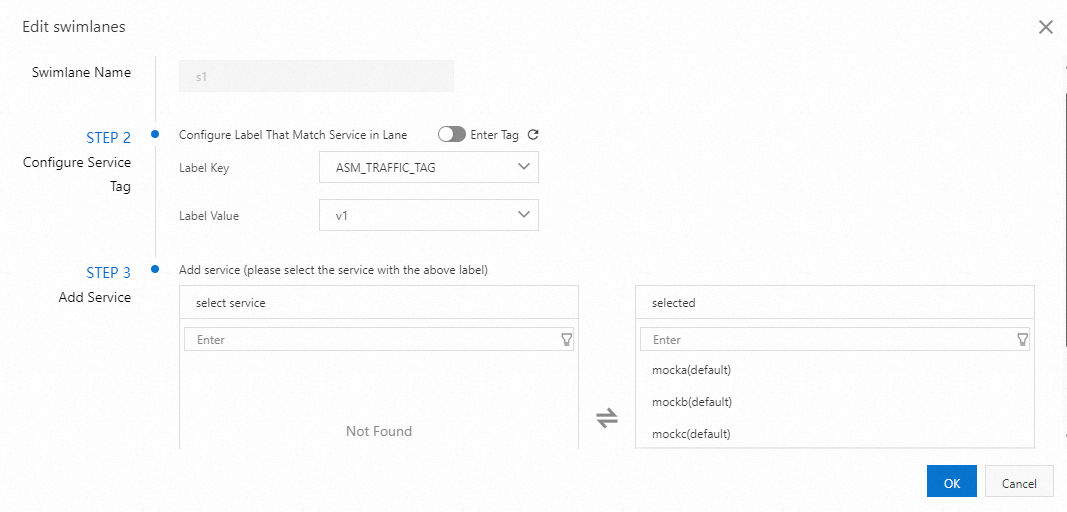
Configure Service Tag
Label Key: Select ASM_TRAFFIC_TAG.
Label Value: Select v1 for one lane and v2 for the other.
Add Service
Lane s1: Select mocka(default), mockb(default), and mockc(default).
Lane s2: Select mockc(default).
The following image shows an example of creating lane s1:
After both lanes are created, the result looks like this:
 Note
NoteBy default, the first lane you create in a lane group becomes the baseline lane. You can change the baseline lane so that when traffic targets a service not present in another lane, the request falls back to the baseline lane. For more information, see Change the baseline lane in loose mode.
-
-
Create routing rules for the lanes.
-
Use the following configuration to create a gateway routing rule for the lanes. This rule has three parts:
-
Requests with
x-user-id: jasonroute to lane s2, and the system adds thex-asm-prefer-tag: s2header to mark the request for lane s2. -
Requests with
x-asm-prefer-tag: s2route to lane s2. -
Requests with
x-asm-prefer-tag: s1route to lane s1.
-
-
Step 4: Deploy the hash tagging plugin
-
Create a file named wasm.yaml with the following content.
apiVersion: extensions.istio.io/v1alpha1 kind: WasmPlugin metadata: name: hash-tagging namespace: istio-system spec: imagePullPolicy: IfNotPresent selector: matchLabels: istio: ingressgateway url: registry-cn-hangzhou.ack.aliyuncs.com/acs/asm-wasm-hash-tagging:v1.22.6.2-g72656ba-aliyun phase: AUTHN pluginConfig: rules: - header: x-user-id modulo: 100 tagHeader: x-asm-prefer-tag policies: # Route 20% of user traffic to lane s2 - range: 20 tagValue: s2 # Route 80% of user traffic to lane s1 - range: 100 tagValue: s1 -
Using the kubeconfig of your ASM instance, run the following command to deploy the tagging plugin.
kubectl apply -f wasm.yaml
Step 5: Verify the setup
-
Run the following command to set a temporary environment variable for the ingress gateway address.
export GATEWAY_ADDRESS=`kubectl get svc -n istio-system | grep istio-ingressgateway | awk '{print $4}'` -
Run the following command to access the application as Jason.
curl ${GATEWAY_ADDRESS} -H 'x-user-id: jason'Expected output:
-> mocka(version: v1, ip: 10.0.0.15)-> mockb(version: v1, ip: 10.0.0.130)-> mockc(version: v2, ip: 10.0.0.133)%The request routes directly to version v2 of the mockc application.
-
You can execute the following command to route random users to the new version.
for i in 'bob' 'stacy' 'jessie' 'vance' 'jack'; do curl ${GATEWAY_ADDRESS} -H "x-user-id: $i";echo " user $i requested"; doneExpected output:
-> mocka(version: v1, ip: 10.0.0.15)-> mockb(version: v1, ip: 10.0.0.130)-> mockc(version: v1, ip: 10.0.0.131)   user bob requested
-> mocka(version: v1, ip: 10.0.0.15)-> mockb(version: v1, ip: 10.0.0.130)-> mockc(version: v1, ip: 10.0.0.131)   user stacy requested
-> mocka(version: v1, ip: 10.0.0.15)-> mockb(version: v1, ip: 10.0.0.130)-> mockc(version: v2, ip: 10.0.0.133)   user jessie requested
-> mocka(version: v1, ip: 10.0.0.15)-> mockb(version: v1, ip: 10.0.0.130)-> mockc(version: v1, ip: 10.0.0.131)   user vance requested
-> mocka(version: v1, ip: 10.0.0.15)-> mockb(version: v1, ip: 10.0.0.130)-> mockc(version: v2, ip: 10.0.0.133)   user jack requested
Requests from users Jessie and Jack route to version v2 of mockc, while others route to version v1.