Organizations with strict security requirements often need all outbound traffic from their service mesh to flow through a controlled set of gateway nodes for auditing, policy enforcement, and monitoring. The ASMEgressTrafficPolicy CustomResourceDefinition (CRD) lets you define which workloads can reach which external services through an egress gateway -- without changes to application code. Behind the scenes, it generates the underlying ServiceEntry, VirtualService, Gateway, DestinationRule, and Sidecar resources automatically.
This topic walks through two scenarios:
Scenario 1: Allow a specific workload to access an external HTTP service while all other workloads remain blocked.
Scenario 2: Upgrade HTTP requests to HTTPS at the egress gateway, and allow direct HTTPS access.
A final section shows how to layer an AuthorizationPolicy on the egress gateway to deny specific HTTP methods.
How egress traffic flows

Traffic from an application pod is intercepted by its sidecar proxy. Based on the egress traffic policy, the sidecar routes the request to the egress gateway instead of sending it directly to the internet. The egress gateway then forwards the request to the external service.
The flow is: application container -> sidecar proxy -> egress gateway -> external service.
The ASMEgressTrafficPolicy CRD controls this routing. Workloads that do not match any policy rule are routed to BlackHoleCluster and dropped.
Prerequisites
Before you begin, make sure that you have:
An ASM instance of a commercial edition (Enterprise Edition or Ultimate Edition) running version 1.16.4 or later. See Create an ASM instance or Update an ASM instance
Automatic sidecar proxy injection enabled for the
defaultnamespace. See Enable automatic sidecar injection
Set up the environment
Complete the following steps before configuring egress traffic policies.
Set the outbound traffic policy to REGISTRY_ONLY
By default, sidecar proxies allow all outbound traffic (ALLOW_ANY mode). In this mode, egress traffic policies have no effect because traffic flows directly to external services without going through the egress gateway.
Switch to REGISTRY_ONLY mode so that sidecar proxies only allow traffic to explicitly registered services. This makes the egress gateway the only path to external services.
Log on to the ASM console. In the left-side navigation pane, choose Service Mesh > Mesh Management.
On the Mesh Management page, click the name of the ASM instance. In the left-side navigation pane, choose Dataplane Component Management > Sidecar Proxy Setting.
On the global tab, set Outbound Traffic Policy to REGISTEY_ONLY, and then click Update Settings.
Create the istio-egress namespace
The istio-egress namespace is a fixed namespace that all ASMEgressTrafficPolicy resources must use.
Create a namespace named
istio-egress. See Manage global namespaces.On the Global Namespace page, click Sync Automatic Sidecar Injection to Kubernetes Cluster to synchronize the namespace to the ACK cluster that is added to the ASM instance.
Create an egress gateway
Create an egress gateway named egressgateway-a in the ASM console. In the Port Mapping section, add the following ports:
| Protocol | Port |
|---|---|
| HTTP | 80 |
| HTTPS | 443 |
| HTTPS | 444 |
Select Support two-way TLS authentication for the egress gateway. See Create an egress gateway.
After the gateway is created, verify that the YAML contains the following in the spec section. Add it manually if needed:
spec:
  podLabels:
    security.istio.io/tlsMode: istio
Deploy test workloads
Deploy two test services to verify egress policy behavior: sleep-a in the mytest namespace and nginx in the default namespace.
Create the mytest namespace
Create a namespace named mytest for the ASM instance and enable automatic sidecar proxy injection. See Manage global namespaces.
Deploy sleep-a and nginx
Create a file named
test.yamlwith the following content:Deploy the services in the ACK cluster:
kubectl apply -f test.yaml
Verify that outbound traffic is blocked
Run the following commands to confirm that both services cannot access http://www.httpbin.org:
kubectl -n mytest exec deployment/sleep-a -- curl -s -o /dev/null -w "%{http_code}\n" http://www.httpbin.org
kubectl -n default exec deployment/nginx -- curl -s -o /dev/null -w "%{http_code}\n" http://www.httpbin.org
Both commands return 502, confirming that REGISTRY_ONLY mode blocks all outbound traffic by default.
Scenario 1: Allow a specific workload to access an external HTTP service
In this scenario, only the sleep-a workload in the mytest namespace can access http://www.httpbin.org through the egress gateway. All other workloads remain blocked.
Apply the egress traffic policy
Create a file named
egress-by-egressgateway-a.yamlwith the following content: Key fields: For the full CRD reference, see CRD fields in an egress traffic policy.Field Description metadata.nameMust follow the format egress-by-{egress gateway name}metadata.namespaceMust be istio-egressfrom[].namespace+workloadSelectorSelects which workloads the rule applies to to[].hostsExternal hosts to allow. Multiple hosts must resolve to the same IP addresses after DNS resolution to[].byEgressGateway.portThe port on the egress gateway that receives the traffic apiVersion: istio.alibabacloud.com/v1 kind: ASMEgressTrafficPolicy metadata: name: egress-by-egressgateway-a # Format: egress-by-{egress gateway name} namespace: istio-egress # Fixed namespace spec: byEgressGateway: name: egressgateway-a egressRules: - from: - namespace: mytest workloadSelector: app: sleep-a to: - name: httpbin-service-http hosts: - www.httpbin.org # Multiple hosts must resolve to the same IP addresses. - httpbin.org port: name: http number: 80 protocol: HTTP byEgressGateway: port: 80 # Traffic path: sidecar proxy -> gateway (port 80) -> httpbin.org (port 80)Apply the policy:
kubectl apply -f egress-by-egressgateway-a.yaml
Verify the policy
Test that the
nginxworkload in thedefaultnamespace is still blocked: Expected result:502-- access denied.kubectl -n default exec deployment/nginx -- curl -s -o /dev/null -w "%{http_code}\n" http://www.httpbin.orgTest that
sleep-ain themytestnamespace can accesshttp://www.httpbin.org: Expected result:200-- access allowed.kubectl -n mytest exec deployment/sleep-a -- curl -s -o /dev/null -w "%{http_code}\n" http://www.httpbin.orgDelete the policy and verify that
sleep-aloses access: Expected result:502-- the policy is no longer in effect.kubectl -n istio-egress delete ASMEgressTrafficPolicy egress-by-egressgateway-a kubectl -n mytest exec deployment/sleep-a -- curl -s -o /dev/null -w "%{http_code}\n" http://www.httpbin.org
Scenario 2: Upgrade HTTP to HTTPS and allow direct HTTPS access
This scenario adds two capabilities on top of Scenario 1:
HTTP-to-HTTPS upgrade: The egress gateway automatically upgrades HTTP requests from
sleep-ato HTTPS before forwarding them to the external service. This lets legacy applications send plain HTTP while the mesh handles TLS origination.Direct HTTPS access:
sleep-acan also send HTTPS requests directly tohttps://www.httpbin.orgthrough the egress gateway.
Apply the egress traffic policy
Create
egress-by-egressgateway-a.yamlwith the following content: Compared to Scenario 1, this YAML adds:If
httpsUpgrade.enabledis set tofalse, thehttpsUpgrade.portvalue has no effect.Addition Purpose httpsUpgrade.enabled: trueEnables HTTP-to-HTTPS upgrade at the egress gateway httpsUpgrade.port: 443Specifies the HTTPS port to forward upgraded requests to httpbin-service-httpsblockAllows direct HTTPS traffic through gateway port 444 apiVersion: istio.alibabacloud.com/v1 kind: ASMEgressTrafficPolicy metadata: name: egress-by-egressgateway-a # Format: egress-by-{egress gateway name} namespace: istio-egress # Fixed namespace spec: byEgressGateway: name: egressgateway-a egressRules: - from: - namespace: mytest workloadSelector: app: sleep-a to: - name: httpbin-service-http hosts: - www.httpbin.org # Multiple hosts must resolve to the same IP addresses. - httpbin.org port: name: http number: 80 protocol: HTTP byEgressGateway: port: 80 # Traffic path: sidecar proxy -> gateway (port 80) -> httpbin.org (port 80) httpsUpgrade: enabled: true # Upgrade HTTP to HTTPS at the egress gateway port: 443 # Traffic path: sidecar proxy -> gateway (port 80) -> httpbin.org (port 443) - name: httpbin-service-https hosts: - www.httpbin.org - httpbin.org port: name: https number: 443 protocol: HTTPS byEgressGateway: port: 444 # Uses port 444 configured in the "Create an egress gateway" sectionApply the policy:
kubectl apply -f egress-by-egressgateway-a.yaml
Verify the policy
Test sleep-a (mytest namespace)
Verify HTTP access: Expected result:
200.kubectl -n mytest exec deployment/sleep-a -- curl -s -o /dev/null -w "%{http_code}\n" http://httpbin.orgConfirm the HTTP-to-HTTPS upgrade by sending an HTTP request and checking the response URL: Expected output: The
urlstarts withhttps, confirming that the egress gateway upgraded the request before forwarding it.kubectl -n mytest exec deployment/sleep-a -- sh -c "curl -s http://httpbin.org/anything | grep url""url": "https://httpbin.org/anything"Verify direct HTTPS access: Expected result:
200.kubectl -n mytest exec deployment/sleep-a -- curl -s -o /dev/null -w "%{http_code}\n" https://www.httpbin.org
Test nginx (default namespace)
Verify that HTTP access is blocked: Expected result:
502.kubectl -n default exec deployment/nginx -- curl -s -o /dev/null -w "%{http_code}\n" http://www.httpbin.orgVerify that HTTPS access is blocked: Expected result: the request is rejected.
kubectl -n default exec deployment/nginx -- curl -s -o /dev/null -w "%{http_code}\n" https://www.httpbin.orgTo confirm the rejection, inspect the sidecar proxy logs for the nginx workload: Expected output (formatted for readability): The
upstream_clustervalueBlackHoleClusterindicates that the request was dropped because no matching egress rule exists for the nginx workload.kubectl -n default logs -f deployment/nginx -c istio-proxy --tail=1{ "upstream_cluster": "BlackHoleCluster", "response_code": "0", "response_flags": "UH", ... }
Clean up
Delete the policy and confirm that sleep-a loses access:
   kubectl -n istio-egress delete ASMEgressTrafficPolicy egress-by-egressgateway-a
   kubectl -n mytest exec deployment/sleep-a -- curl -s -o /dev/null -w "%{http_code}\n" http://www.httpbin.org
kubectl -n mytest exec deployment/sleep-a -- curl -s -o /dev/null -w "%{http_code}\n" https://www.httpbin.orgExpected results:
HTTP returns
502.HTTPS is rejected.
This confirms the egress traffic policy was the only path allowing outbound access.
Route TCP traffic through the egress gateway
When the application initiates TLS directly and the mesh only needs to route the encrypted stream, configure the egress traffic policy with the TCP protocol.

Create the egress traffic policy
ASM console
-
Log on to the ASM console. In the left-side navigation pane, choose Service Mesh > Mesh Management.
-
On the Mesh Management page, click the name of the ASM instance. In the left-side navigation pane, choose ASM Gateways > Egress Gateway.
-
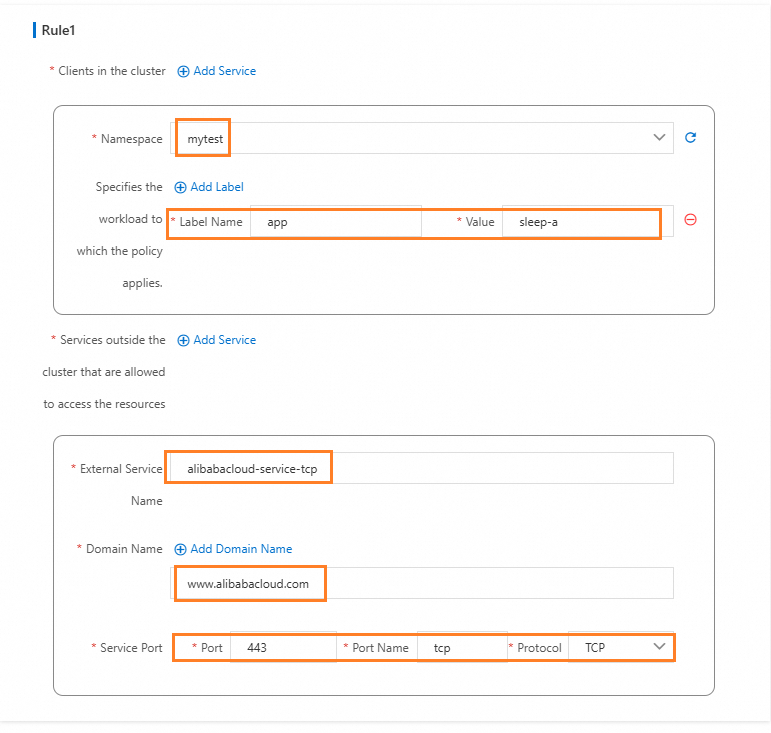
Click the gateway name to open the Gateway overview page, and then click Outbound Traffic Policy on the left. Configure parameters as shown in the following figure.
kubectl
-
Save the following YAML to
egress-by-egressgateway.yaml:apiVersion: istio.alibabacloud.com/v1 kind: ASMEgressTrafficPolicy metadata: name: egress-by-egressgateway namespace: istio-egress spec: byEgressGateway: name: egressgateway egressRules: - from: - namespace: mytest workloadSelector: app: sleep-a to: - byEgressGateway: {} hosts: - www.alibabacloud.com name: aliyun-service-tcp port: name: tcp number: 443 protocol: TCP -
Apply the policy:
kubectl apply -f egress-by-egressgateway.yaml
Verify the policy
-
Confirm that HTTP access from
sleep-atowww.alibabacloud.comreturns an error. TCP mode routes raw TCP streams and does not handle HTTP protocol negotiation: Expected output:502kubectl -n mytest exec deployment/sleep-a -- curl -s -o /dev/null -w "%{http_code}\n" http://www.alibabacloud.com -
Confirm that HTTPS access from
sleep-asucceeds. The application initiates TLS, and the gateway passes the TCP stream through: Expected output:200kubectl -n mytest exec deployment/sleep-a -- curl -s -o /dev/null -w "%{http_code}\n" https://www.alibabacloud.com -
Confirm that
nginxin thedefaultnamespace is blocked: HTTP returns502. HTTPS returns a connection refused error. The sidecar proxy logs show"upstream_cluster":"BlackHoleCluster".kubectl -n default exec deployment/nginx -- curl -s -o /dev/null -w "%{http_code}\n" http://www.alibabacloud.com kubectl -n default exec deployment/nginx -- curl -s -o /dev/null -w "%{http_code}\n" https://www.alibabacloud.com -
Delete the policy and confirm that access is revoked: HTTP returns
502. HTTPS returns a connection refused error.kubectl -n istio-egress delete ASMEgressTrafficPolicy egress-by-egressgateway kubectl -n mytest exec deployment/sleep-a -- curl -s -o /dev/null -w "%{http_code}\n" http://www.alibabacloud.com kubectl -n mytest exec deployment/sleep-a -- curl -s -o /dev/null -w "%{http_code}\n" https://www.alibabacloud.com
Deny specific HTTP methods with an authorization policy
Egress traffic policies control which workloads can reach which external hosts. For finer-grained control -- such as blocking specific HTTP methods -- layer an AuthorizationPolicy on the egress gateway.
The following example denies POST requests from the mytest namespace to httpbin.org while allowing GET requests:
kind: AuthorizationPolicy
apiVersion: security.istio.io/v1beta1
metadata:
  name: sleep-a-egress-www-httpbin-org
  namespace: istio-system
spec:
  action: DENY
  rules:
    - to:
        - operation:
            hosts:
            - www.httpbin.org
            - httpbin.org
            methods:
              - POST
      from:
        - source:
            namespaces: ["mytest"]
  selector:
    matchLabels:
      istio: egressgateway-a
After applying this policy:
POST requests from
sleep-atowww.httpbin.orgreturnRBAC: access(denied by the authorization policy).GET requests from
sleep-atowww.httpbin.orgcontinue to return200.
Security considerations
The egress traffic policy enforces routing through the egress gateway at the mesh layer via sidecar proxies. Keep the following limitations in mind:
Sidecar bypass: If a workload bypasses its sidecar proxy (for example, by running a privileged container or manipulating iptables rules), it can reach external services directly without traversing the egress gateway. To prevent this, combine egress traffic policies with Kubernetes NetworkPolicies or cloud firewall rules that deny direct outbound traffic from application nodes.
Scope of enforcement: The policy applies only to workloads with sidecar injection enabled. Pods in namespaces without sidecar injection are not subject to egress traffic policies.