Standard canary releases route traffic to different versions of a single service based on weight ratios. This works for isolated services but breaks down when a request spans multiple services in a call chain. For example, if canary traffic reaches Service A but then gets randomly routed to the base version of Service B, test results become unreliable.
End-to-end canary releases solve this by tagging ingress traffic at the gateway and propagating that tag across the entire call chain. Every service reads the tag and routes to the matching version, so canary traffic flows exclusively through canary versions and base traffic stays on base versions.
Service Mesh (ASM) implements this through two capabilities:
Traffic labeling: A TrafficLabel CustomResourceDefinition (CRD) that extracts labels from request headers and attaches them to traffic flows
Label-based routing: VirtualService rules that route traffic to subsets matching the label value
How it works
The following diagram shows the call chain used in this tutorial. Service A (mocka) receives ingress traffic and calls Service B (mockb):
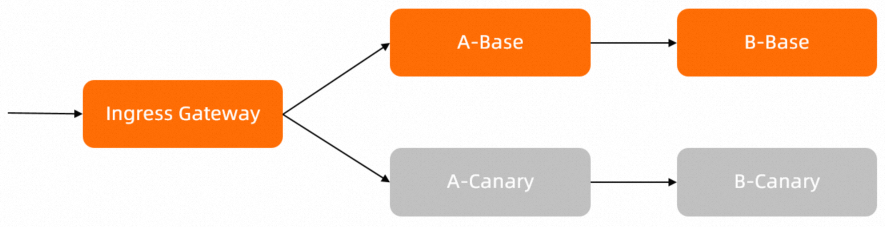
Both services have two deployed versions: base and canary. Without traffic labels, requests are distributed across versions by round-robin load balancing.
After you configure traffic labels, the system:
Reads the
my-asm-prefer-tagheader from incoming requests at the gateway to classify traffic asversion-baseorversion-canary.Routes the request to the matching version of Service A.
Propagates the tag to Service B through the
my-trace-idheader, so Service B routes to the matching version as well.
Your applications must propagate the HTTP header across service calls. The sample services in this tutorial already include this logic. For your own applications, implement header propagation for the header used in traffic labeling. See src/mock-abc/go/main.go in the sample code for a reference implementation.
Prerequisites
Before you begin, ensure that you have:
An ASM instance of Enterprise Edition or Ultimate Edition, version 1.17.2.22 or later. See Create an ASM instance or Update an ASM instance
A cluster added to the ASM instance. See Add a cluster to an ASM instance
An ingress gateway. See Create an ingress gateway
Sample configuration files
Download the sample configuration files used in this tutorial. The archive contains the following files:
| File | Purpose |
|---|---|
application-base.yaml | Deploys the base versions of Service A (mocka) and Service B (mockb) |
application-canary.yaml | Deploys the canary versions of both services |
routing.yaml | Defines the Gateway, DestinationRules, and VirtualServices for initial routing |
trafficlabel.yaml | Configures the TrafficLabel CRDs for traffic labeling |
vs-tf-mockb.yaml | Applies label-based routing to Service B |
vs-tf-mocka.yaml | Applies label-based routing to Service A at the gateway |
vs-tf-mocka-90-10.yaml | Adds weight-based distribution (90% base, 10% label-based) to Service A |
Step 1: Deploy sample services
Enable automatic sidecar proxy injection for the target namespace (
defaultin this example). See Enable automatic sidecar proxy injection.Connect to the Container Service for Kubernetes (ACK) cluster with kubectl and deploy the sample services:
kubectl apply -n default -f application-base.yaml
kubectl apply -n default -f application-canary.yaml
Step 2: Set up initial routing rules
Set up the Gateway, DestinationRules, and VirtualServices to establish basic routing without traffic labels.
Create a file named routing.yaml with the following content:
This configuration:
Creates a Gateway (
simple-gateway) that accepts all HTTP traffic on port 80Defines DestinationRules for both services with
version-baseandversion-canarysubsetsCreates VirtualServices that route traffic without label-based logic
Connect to the ASM instance with kubectl and apply the routing rules:
kubectl apply -n default -f routing.yamlVerify that both service versions are reachable.
Get the public IP address of the ingress gateway from the ASM console. See Obtain the IP address of the ASM ingress gateway.
Set the gateway IP as an environment variable. Replace
<gateway-ip>with the actual IP address:export ASM_GATEWAY_IP=<gateway-ip>Send test requests:
for i in {1..200}; do curl -H'my-asm-prefer-tag: version-base' -H'my-trace-id: x000'$i http://${ASM_GATEWAY_IP}/; echo; sleep 1; done;
Expected output -- traffic is randomly distributed across all versions of both services:
-> mocka(version: canary, ip: 172.17.0.129)-> mockb(version: base, ip: 172.17.0.70)
-> mocka(version: base, ip: 172.17.0.132)-> mockb(version: base, ip: 172.17.0.70)
-> mocka(version: base, ip: 172.17.0.132)-> mockb(version: canary, ip: 172.17.0.54)
-> mocka(version: canary, ip: 172.17.0.129)-> mockb(version: canary, ip: 172.17.0.54)
At this point, the
my-asm-prefer-tagheader has no effect on routing. Requests follow round-robin load balancing regardless of the header value.
Step 3: Configure traffic labels
Create TrafficLabel resources to extract routing labels from request headers. ASM uses these labels to determine whether traffic is version-base or version-canary. For background on traffic labeling, see Label traffic.
Create a file named trafficlabel.yaml with the following content:
This defines two TrafficLabel resources:
Resource Scope Behavior trafficlabel-nsAll services in the defaultnamespace (mocka,mockb)Uses $getExternalInboundRequestHeaderto extract the version tag from themy-asm-prefer-tagheader. The second parameter,my-trace-id, specifies the trace header that the application must propagate between services.ingressgatewayThe ingress gateway only ( istio-systemnamespace)Reads the version tag from the my-asm-prefer-tagheader of the inbound client request.NoteThe header names
my-asm-prefer-tagandmy-trace-idare used in this example. Replace them with headers that match your application.Connect to the ASM instance with kubectl and apply the traffic labels:
kubectl apply -f trafficlabel.yaml
Step 4: Apply label-based routing and verify
This step progressively verifies the end-to-end canary release in three stages:
Single-hop routing -- Apply label-based routing to Service B and confirm that the traffic tag correctly routes requests to the matching version
Full-chain routing -- Apply label-based routing to Service A at the gateway so canary traffic flows through canary versions of all services end to end
Weighted routing -- Combine weight-based distribution with label-based routing to control the canary rollout percentage
Verify label-based routing for Service B
Apply label-based routing to Service B first. This verifies that the traffic tag from Service A correctly routes requests to the matching version of Service B.
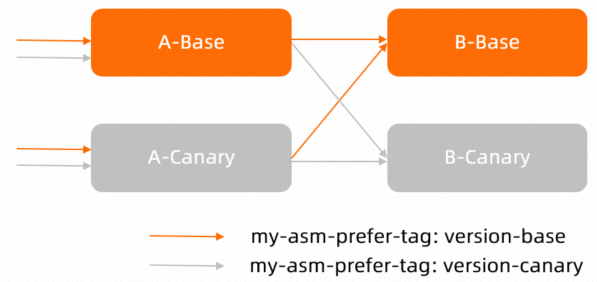
Create a file named
vs-tf-mockb.yamlwith the following content:apiVersion: networking.istio.io/v1beta1 kind: VirtualService metadata: name: vs-mockb spec: hosts: - mockb http: - route: - destination: host: mockb subset: $asm-labels-sampleThe
$asm-labels-samplesubset dynamically resolves to the traffic label value -- eitherversion-baseorversion-canary.Apply the routing rule:
kubectl apply -n default -f vs-tf-mockb.yamlSend canary traffic and verify that Service B receives it on the canary version:
for i in {1..200}; do curl -H'my-asm-prefer-tag: version-canary' -H'my-trace-id: x000'$i http://${ASM_GATEWAY_IP}/; echo; sleep 1; done;Expected output -- Service A still receives random traffic, but Service B consistently routes to the canary version:
-> mocka(version: canary, ip: 172.17.0.129)-> mockb(version: canary, ip: 172.17.0.54)
-> mocka(version: base, ip: 172.17.0.132)-> mockb(version: canary, ip: 172.17.0.54)
-> mocka(version: base, ip: 172.17.0.132)-> mockb(version: canary, ip: 172.17.0.54)
Send base traffic and verify that Service B receives it on the base version:
for i in {1..200}; do curl -H'my-asm-prefer-tag: version-base' -H'my-trace-id: x000'$i http://${ASM_GATEWAY_IP}/; echo; sleep 1; done;Expected output -- Service B consistently routes to the base version:
-> mocka(version: canary, ip: 172.17.0.129)-> mockb(version: base, ip: 172.17.0.70)
-> mocka(version: base, ip: 172.17.0.132)-> mockb(version: base, ip: 172.17.0.70)
-> mocka(version: base, ip: 172.17.0.132)-> mockb(version: base, ip: 172.17.0.70)
Service B routing now works as expected. Service A still receives traffic randomly because no label-based routing rule has been applied to the gateway yet.
Verify end-to-end canary routing
Apply label-based routing to Service A at the gateway level so that the entire call chain respects the traffic label.
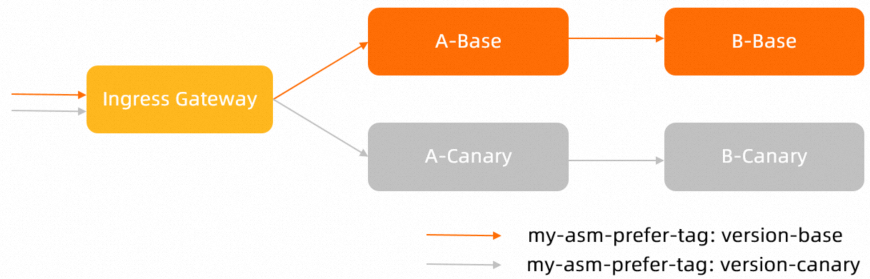
Create a file named
vs-tf-mocka.yamlwith the following content:apiVersion: networking.istio.io/v1beta1 kind: VirtualService metadata: name: vs-gateway-mocka spec: gateways: - simple-gateway hosts: - "*" http: - route: - destination: host: mocka subset: $asm-labels-sampleApply the routing rule to the ingress gateway:
kubectl apply -n default -f vs-tf-mocka.yamlSend canary traffic and verify that both services route to canary versions:
for i in {1..200}; do curl -H'my-asm-prefer-tag: version-canary' -H'my-trace-id: x000'$i http://${ASM_GATEWAY_IP}/; echo; sleep 1; done;Expected output -- all traffic flows through canary versions end to end:
-> mocka(version: canary, ip: 172.17.0.69)-> mockb(version: canary, ip: 172.17.0.130)
-> mocka(version: canary, ip: 172.17.0.69)-> mockb(version: canary, ip: 172.17.0.130)
-> mocka(version: canary, ip: 172.17.0.69)-> mockb(version: canary, ip: 172.17.0.130)
Send base traffic and verify that both services route to base versions:
for i in {1..200}; do curl -H'my-asm-prefer-tag: version-base' -H'my-trace-id: x000'$i http://${ASM_GATEWAY_IP}/; echo; sleep 1; done;Expected output -- all traffic flows through base versions end to end:
-> mocka(version: base, ip: 172.17.0.90)-> mockb(version: base, ip: 172.17.0.93)
-> mocka(version: base, ip: 172.17.0.90)-> mockb(version: base, ip: 172.17.0.93)
-> mocka(version: base, ip: 172.17.0.90)-> mockb(version: base, ip: 172.17.0.93)
End-to-end canary routing is now active. Canary traffic consistently hits canary versions of all services, and base traffic stays on base versions.
Verify weighted traffic distribution with labels
In production, you typically start by routing a small percentage of traffic to the canary version. Combine weight-based distribution with label-based routing to control the rollout.
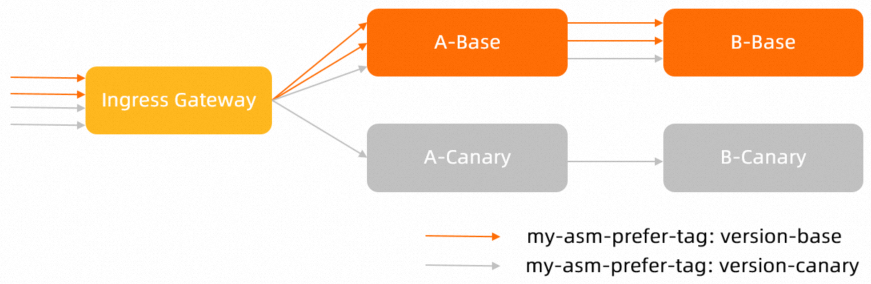
Create a file named
vs-tf-mocka-90-10.yamlwith the following content:apiVersion: networking.istio.io/v1beta1 kind: VirtualService metadata: name: vs-gateway-mocka spec: gateways: - simple-gateway hosts: - "*" http: - route: - destination: host: mocka subset: version-base weight: 90 - destination: host: mocka subset: $asm-labels-sample weight: 10This sends 90% of traffic to the base version of Service A. The remaining 10% is routed based on the traffic label -- if the
my-asm-prefer-tagheader is set toversion-canary, that 10% goes to the canary version.Apply the weighted routing rule:
kubectl apply -n default -f vs-tf-mocka-90-10.yamlSend canary traffic and check the distribution:
for i in {1..200}; do curl -H'my-asm-prefer-tag: version-canary' -H'my-trace-id: x000'$i http://${ASM_GATEWAY_IP}/; echo; sleep 1; done;Expected output -- approximately 90% of requests reach the base version of Service A, while 10% reach the canary version. Service B consistently routes to the canary version because the label propagates through the call chain:
-> mocka(version: base, ip: 172.17.0.90)-> mockb(version: canary, ip: 172.17.0.130)
-> mocka(version: base, ip: 172.17.0.90)-> mockb(version: canary, ip: 172.17.0.130)
-> mocka(version: base, ip: 172.17.0.90)-> mockb(version: canary, ip: 172.17.0.130)
...
-> mocka(version: canary, ip: 172.17.0.69)-> mockb(version: canary, ip: 172.17.0.130)
About 9 out of 10 requests hit
mocka(version: base), while roughly 1 out of 10 hitsmocka(version: canary). In both cases,mockbroutes to the canary version.Send base traffic and verify that all requests reach base versions:
for i in {1..200}; do curl -H'my-asm-prefer-tag: version-base' -H'my-trace-id: x000'$i http://${ASM_GATEWAY_IP}/; echo; sleep 1; done;Expected output -- 90% of traffic goes directly to the base version. The remaining 10% also routes to the base version because the label resolves to
version-base:-> mocka(version: base, ip: 172.17.0.90)-> mockb(version: base, ip: 172.17.0.93) -> mocka(version: base, ip: 172.17.0.90)-> mockb(version: base, ip: 172.17.0.93) -> mocka(version: base, ip: 172.17.0.90)-> mockb(version: base, ip: 172.17.0.93) -> mocka(version: base, ip: 172.17.0.90)-> mockb(version: base, ip: 172.17.0.93)With
my-asm-prefer-tagset toversion-base, 90% goes to the base version by fixed weight and the remaining 10% also resolves to base by label. The result is 100% base traffic.
What to do next
Gradually increase the canary weight as you gain confidence in the new version.
For more details on traffic labeling configuration, see Label traffic.
For single-service canary releases with weight-based routing only, see Deploy an application in blue-green deployment mode and phased release mode.