Service Mesh (ASM) simplifies one-stop configuration of common security scenarios by providing the ASM security policy feature, which abstracts Istio native security resources. ASM integrates the Open Policy Agent (OPA) plug-in, so you can define access control policies and apply fine-grained access control to your applications.
How it works
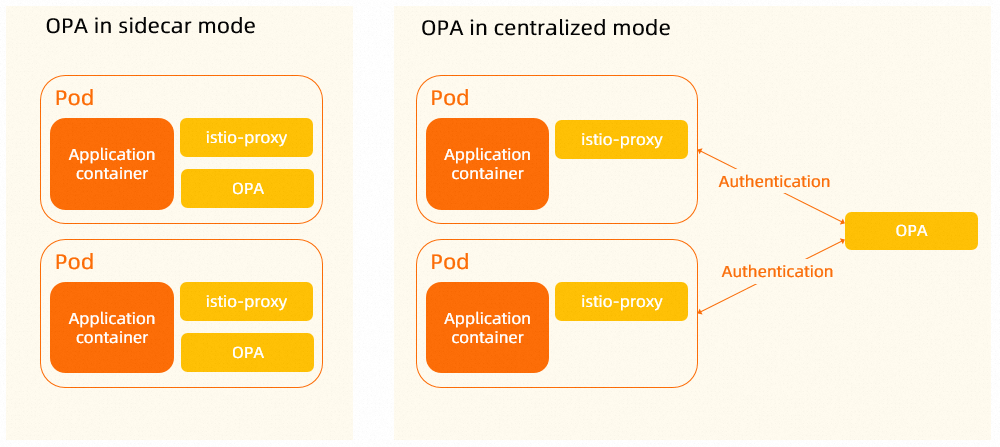
By default, ASM deploys OPA in sidecar mode. This tutorial uses a centralized OPA authorization service instead, which you deploy in your cluster and then connect to your application through an ASM security policy.
-
Sidecar mode (default) — After you enable OPA and restart the application Pod, ASM injects an OPA container into the Pod. The OPA sidecar then validates all requests from the application container. Sidecar mode keeps all access inside the Pod, which delivers lower latency and suits latency-sensitive workloads. The trade-offs are resource consumption, a Pod restart for each application, and limited flexibility.
-
Centralized mode (used in this tutorial) — A centralized OPA complements sidecar mode in these aspects: it consumes fewer resources, connects applications without a restart, and lets you decide which requests to the application are evaluated against OPA policies.
Prerequisites
-
A managed Kubernetes cluster is added to an ASM instance that runs version 1.15.3.25 or later. For instructions, see Add a cluster to an ASM instance and Upgrade an ASM instance.
-
The httpbin application deployed and accessible through an ASM ingress gateway. The test commands in this tutorial send requests to
${ASM_GATEWAY_IP}, which is the IP address of that gateway. For instructions, see Deploy the httpbin application. -
Automatic sidecar injection enabled for the
defaultnamespace. For instructions, see Configure a sidecar injection policy.
Step 1: Deploy OPA
Deploy a centralized OPA authorization service in the cluster that you added to your ASM instance.
-
Create the
asm-opa.yamlfile with the following content. The YAML file deploys an OPA Service, an OPA Deployment, and a Secret.Replace
cn-hangzhouin the imageregistry-vpc.cn-hangzhou.aliyuncs.com/acs/opa:0.46.1-istio-3-staticwith the region of your cluster before you deploy the file.The OPA engine in the Deployment enables logging by default (
--set=decision_logs.console=true) to simplify debugging.The Secret defines the OPA policy, which allows a request in any of the following cases:
-
The request path is
health. -
The request method is
HEAD. -
The username is
alice.NoteThe username comes from the
Authorizationheader of the request, in the formatAuthorization: Basic ${Base64 encoding of the username:password string}.
asm-opa.yaml
apiVersion: v1 kind: Service metadata: name: asm-opa labels: app: opa spec: ports: - name: grpc port: 9191 targetPort: 9191 protocol: TCP - name: http port: 8181 targetPort: 8181 protocol: TCP selector: app: opa --- kind: Deployment apiVersion: apps/v1 metadata: name: opa labels: app: opa spec: replicas: 1 selector: matchLabels: app: opa template: metadata: labels: app: opa annotations: sidecar.istio.io/inject: "false" spec: containers: - name: opa image: registry-vpc.cn-hangzhou.aliyuncs.com/acs/opa:0.46.1-istio-3-static securityContext: runAsUser: 1111 volumeMounts: - readOnly: true mountPath: /policy name: opa-policy args: - "run" - "--server" - "--addr=0.0.0.0:8181" - "--diagnostic-addr=0.0.0.0:8282" - "--set=plugins.envoy_ext_authz_grpc.addr=:9191" - "--set=plugins.envoy_ext_authz_grpc.path=asm/authz/allow" - "--set=decision_logs.console=true" - "--ignore=.*" - "/policy/policy.rego" ports: - containerPort: 9191 protocol: TCP resources: limits: cpu: "0" memory: "0" volumes: - name: opa-policy secret: secretName: opa-policy --- apiVersion: v1 kind: Secret metadata: name: opa-policy type: Opaque stringData: policy.rego: | package asm.authz import future.keywords import input.attributes.request.http as http_request import input.parsed_path default allow := false allow if { parsed_path[0] == "health" } allow if { http_request.method == "HEAD" } allow if { user_name == "alice" } user_name := parsed if { [_, encoded] := split(http_request.headers.authorization, " ") [parsed, _] := split(base64url.decode(encoded), ":") }NoteThe
resources.limitsvalues in this example are placeholders. Setcpuandmemoryto values that suit your environment. -
-
Use the kubeconfig file of the Container Service for Kubernetes (ACK) cluster to run the following command to deploy OPA.
kubectl apply -f asm-opa.yaml -
Confirm that the OPA authorization service is available before you continue. The
opaDeployment must be ready, and theasm-opaService must expose port9191for gRPC and port8181for HTTP.
Step 2: Connect to OPA by using an ASM security policy
Create an ASM security policy that sends selected requests to the OPA authorization service for authorization.
-
Log on to the ASM console. In the left-side navigation pane, choose .
-
On the Mesh Management page, click the name of the ASM instance. In the left-side navigation pane, choose .
-
On the ASMSecurityPolicy page, click Create. In the Create ASMSecurityPolicy dialog box, click the Custom Authorization Service card, and then click OK.
-
Configure the Custom Authorization Service:
-
On the Create Custom Authorization Service page, configure the information of the OPA authorization service that you deployed in Step 1.
Set the parameters as follows: set ASM Security Policy Name to
opa, select GRPC for Protocol, enterasm-opa.default.svc.cluster.localfor Service Address, enter9191for Service Port, and enter10seconds for Timeout. Then, click Next. -
In the Workload and Match Rules wizard, click Add Workload Group. In the New Workload Group dialog box, enter a Workload Group Name and click Add Workload.
-
In the Add Workload dialog box, select Workload Scope, set Namespaces to default, and set Workload Type to Service. In the Select workloads area, select httpbin, click the
 icon, and then click OK.
 -
In the New Workload Group dialog box, go to the Match Rule List area. Set Match Mode to The selected request must be authenticated, set Matching Rules to Custom Matching Rules, turn on the Path switch and set it to
/status/*, and then click OK.This workload group is named
httpbin, and its workload list contains the Sidecar-type httpbin Service with theapp:httpbinlabel. -
In the Workload and Match Rules wizard, click Submit.
After you submit the configuration, the page displays The ASM security policy is created and shows the Istio resources that are created. The resource names are
grpcextauth-asmsecuritypolicy-opafor ASMExtensionProvider andopa-ap-wg-httpbin-default-service-httpbinfor AuthorizationPolicy. You can click View YAML to view the resource details, and then click Done.
-
Step 3: Test httpbin access
In the following commands, ${ASM_GATEWAY_IP} is the IP address of the ASM ingress gateway that exposes httpbin. Each command uses -I to return only the response headers and -X GET to force the GET method, because the OPA policy allows every HEAD request. These tests exercise the username rule of the OPA policy.
-
Run the following command to access the
/path.curl ${ASM_GATEWAY_IP}/ -I -X GETHTTP/1.1 200 OK server: istio-envoy date: Tue, 25 Jul 2023 08:30:58 GMT content-type: text/html; charset=utf-8 content-length: 9593 access-control-allow-origin: * access-control-allow-credentials: true x-envoy-upstream-service-time: 2200 OKresponse shows that the request is allowed. The/path does not match the/status/*matching rule that you configured in Step 2, so the request is not sent to OPA for authorization. -
Run the following command to access the
/status/201path without valid credentials.curl ${ASM_GATEWAY_IP}/status/201 -I -X GETHTTP/1.1 403 Forbidden date: Tue, 25 Jul 2023 08:31:18 GMT server: istio-envoy content-length: 0 x-envoy-upstream-service-time: 1403 Forbiddenresponse indicates that the request is denied because it carries no valid credentials. -
Run the following command to access the
/status/201path with valid credentials.curl ${ASM_GATEWAY_IP}/status/201 -I -X GET --user alice:testpasswordHTTP/1.1 201 Created server: istio-envoy date: Tue, 25 Jul 2023 08:31:38 GMT content-type: text/html; charset=utf-8 access-control-allow-origin: * access-control-allow-credentials: true content-length: 0 x-envoy-upstream-service-time: 3201 Createdresponse confirms that the request is allowed because it carries valid credentials for thealiceuser. If this request also returns403 Forbidden, review the OPA deployment in Step 1 and the ASM security policy configuration in Step 2.
Step 4: Update the OPA policy and retest access
Call the HTTP API of the OPA engine to update the OPA policy at runtime. The opa-policy Secret that you created in Step 1 is not modified and still contains the original policy.
-
Run the following command to update the policy so that only the
bobuser is allowed to access the application and the previousaliceuser is denied.kubectl exec deployment/httpbin -c istio-proxy -- curl asm-opa:8181/v1/policies/policy/policy.rego -XPUT --data-binary 'package asm.authz import future.keywords import input.attributes.request.http as http_request import input.parsed_path default allow := false allow if { parsed_path[0] == "health" } allow if { http_request.method == "HEAD" } allow if { user_name == "bob" } user_name := parsed if { [_, encoded] := split(http_request.headers.authorization, " ") [parsed, _] := split(base64url.decode(encoded), ":") }' -
Run the following command to access httpbin as the
bobuser.curl ${ASM_GATEWAY_IP}/status/201 -I -X GET --user bob:testpasswordHTTP/1.1 201 Created server: istio-envoy date: Tue, 25 Jul 2023 08:32:16 GMT content-type: text/html; charset=utf-8 access-control-allow-origin: * access-control-allow-credentials: true content-length: 0 x-envoy-upstream-service-time: 3201 Createdresponse shows that thebobuser accesses the application successfully under the updated policy. -
Run the following command to access httpbin as the
aliceuser.curl ${ASM_GATEWAY_IP}/status/201 -I -X GET --user alice:testpasswordHTTP/1.1 403 Forbidden date: Tue, 25 Jul 2023 08:32:49 GMT server: istio-envoy content-length: 0 x-envoy-upstream-service-time: 1403 Forbiddenresponse shows that access from thealiceuser is denied.