With static subset routing, every DestinationRule must list each subset explicitly. When a new version ships or an old one retires, someone has to update the rule by hand. Dynamic subset routing removes that overhead: Service Mesh (ASM) watches workload labels and groups endpoints into subsets automatically, keeping routing rules current without manual changes.
The end-to-end example below deploys a multi-version application, routes requests to specific versions and environments by HTTP header, and configures fallback behavior when a target subset does not exist.
How dynamic subsets work
In standard Istio routing, a DestinationRule enumerates every subset with a fixed set of labels. When versions change, the rule must be updated to match.
Dynamic subsets take a different approach. Instead of listing each subset, you specify one or more grouping keys (for example, version and stage). ASM inspects the labels on every endpoint behind a service and groups endpoints that share the same key-value combination into the same subset -- automatically.
A VirtualService then maps incoming request headers to those grouping keys. For example, a request carrying x-version: v2 and x-stage: prod routes to the subset where version=v2 and stage=prod.
Prerequisites
Before you begin, make sure that you have:
An ASM instance of v1.18 or later
A Container Service for Kubernetes (ACK) cluster added to the ASM instance
kubectl configured with the kubeconfig file of the ACK cluster
Step 1: Deploy the sample application
This example uses hashicorp/http-echo to simulate a multi-environment, multi-version deployment:
dev environment: versions v1, v2, v3
prod environment: versions v2, v3
Each pod replies with its environment, version, and IP address. A helloworld Service on port 8000 fronts all pods, and a sleep Deployment provides a client for testing.
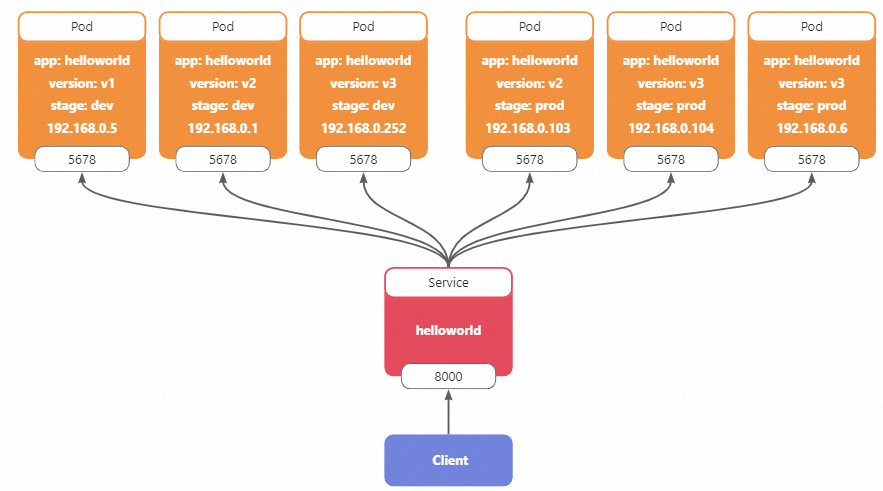
Deploy all resources with kubectl. For more information, see Deploy an application in an ACK cluster that is added to an ASM instance.
Step 2: Route requests to a specific version and environment
After deployment, Kubernetes load-balances requests across all helloworld pods regardless of version or environment. To target a specific combination, create a DestinationRule that defines the grouping keys and a VirtualService that maps request headers to those keys.
Create the DestinationRule
Apply the following DestinationRule to group endpoints by stage and version. For more information, see Manage destination rules.
apiVersion: networking.istio.io/v1beta1
kind: DestinationRule
metadata:
  name: helloworld
  namespace: default
spec:
  host: helloworld.default.svc.cluster.local
  trafficPolicy:
    loadBalancer:
      dynamicSubset:
        subsetSelectors:
          - keys:
              - stage
              - version
ASM reads the stage and version labels from each endpoint and produces the following subsets:
| Subset | Pod | IP address |
|---|---|---|
| stage=dev, version=v1 | helloworld-dev-v1-67b6876778-nf7pz | 192.168.0.5 |
| stage=dev, version=v2 | helloworld-dev-v2-68f65bbc99-v957l | 192.168.0.1 |
| stage=dev, version=v3 | helloworld-dev-v3-7f6978bc56-hqzgg | 192.168.0.252 |
| stage=prod, version=v2 | helloworld-prod-v2-b5745b949-p8rc4 | 192.168.0.103 |
| stage=prod, version=v3 | helloworld-prod-v3-6768bf56f8-6bd6h | 192.168.0.104, 192.168.0.6 |
Create the VirtualService
Apply the following VirtualService to map HTTP headers to dynamic subset keys. For more information, see Manage virtual services.
apiVersion: networking.istio.io/v1beta1
kind: VirtualService
metadata:
  name: helloworld
  namespace: default
spec:
  hosts:
    - helloworld.default.svc.cluster.local
  http:
    - headerToDynamicSubsetKey:
        - header: x-version        # Map the x-version header to the "version" grouping key
          key: version
          defaultValue: v3          # Fall back to v3 if the header is absent
        - header: x-stage           # Map the x-stage header to the "stage" grouping key
          key: stage
          defaultValue: prod        # Fall back to prod if the header is absent
      name: default
      route:
        - destination:
            host: helloworld.default.svc.cluster.local
            port:
              number: 8000
This VirtualService establishes two mappings:
x-versionheader toversiongrouping key. Default:v3when the header is absent.x-stageheader tostagegrouping key. Default:prodwhen the header is absent.
Verify the routing
Send a request targeting the dev environment, version v1:
kubectl exec -it deploy/sleep -c sleep -- curl -H 'x-stage: dev' -H 'x-version: v1' helloworld:8000Expected output:
Welcome to helloworld stage: dev, version: v1, ip: 192.168.0.5The request reaches the pod where stage=dev and version=v1, confirming that dynamic subset routing works correctly.
Step 3: Configure fallback policies
Version v1 does not exist in the prod environment. A request targeting stage=prod, version=v1 matches no subset:
kubectl exec -it deploy/sleep -c sleep -- curl -H 'x-stage: prod' -H 'x-version: v1' helloworld:8000
# Output: no healthy upstream
To handle unmatched subsets, set a fallbackPolicy in the DestinationRule. ASM supports three policies:
| Policy | Behavior | Recommended for |
|---|---|---|
NO_FALLBACK | Returns a no healthy upstream error. This is the default. | Strict routing where misrouted requests must fail fast |
ANY_ENDPOINT | Routes to any available endpoint across all subsets | Development or testing where availability matters more than precision |
DEFAULT_SUBSET (recommended for production) | Routes to a preconfigured default subset | Production workloads, where unmatched requests should land on a known-good version |
NO_FALLBACK
NO_FALLBACK is the default behavior. Requests that match no subset return an error. Set it explicitly to make the fail-fast intent clear.
Apply the following DestinationRule. For more information, see Manage destination rules.
apiVersion: networking.istio.io/v1beta1
kind: DestinationRule
metadata:
  name: helloworld
  namespace: default
spec:
  host: helloworld.default.svc.cluster.local
  trafficPolicy:
    loadBalancer:
      dynamicSubset:
        subsetSelectors:
          - fallbackPolicy: NO_FALLBACK
            keys:
              - stage
              - version
Verify:
kubectl exec -it deploy/sleep -c sleep -- curl -H 'x-stage: prod' -H 'x-version: v1' helloworld:8000Expected output:
no healthy upstreamANY_ENDPOINT
When no subset matches, requests route to any available endpoint regardless of labels.
Apply the following DestinationRule. For more information, see Manage destination rules.
apiVersion: networking.istio.io/v1beta1
kind: DestinationRule
metadata:
  name: helloworld
  namespace: default
spec:
  host: helloworld.default.svc.cluster.local
  trafficPolicy:
    loadBalancer:
      dynamicSubset:
        subsetSelectors:
          - fallbackPolicy: ANY_ENDPOINT
            keys:
              - stage
              - version
Verify by sending two requests. Each may land on a different pod:
# First request
kubectl exec -it deploy/sleep -c sleep -- curl -H 'x-stage: prod' helloworld:8000
Example output:
Welcome to helloworld stage: prod, version: v2, ip: 192.168.0.103# Second request -- targets a non-existent subset
kubectl exec -it deploy/sleep -c sleep -- curl -H 'x-stage: prod' -H 'x-version: v1' helloworld:8000Example output:
Welcome to helloworld stage: dev, version: v2, ip: 192.168.0.1Because no prod/v1 subset exists, the request falls back to a random endpoint.
DEFAULT_SUBSET
When no subset matches, requests route to the subset defined in defaultSubset. This is the recommended policy for production workloads because unmatched requests land on a known-good version rather than failing or scattering randomly.
Apply the following DestinationRule. In this example, defaultSubset points to stage=prod, version=v3. For more information, see Manage destination rules.
apiVersion: networking.istio.io/v1beta1
kind: DestinationRule
metadata:
  name: helloworld
  namespace: default
spec:
  host: helloworld.default.svc.cluster.local
  trafficPolicy:
    loadBalancer:
      dynamicSubset:
        defaultSubset:
          stage: prod
          version: v3
        subsetSelectors:
          - fallbackPolicy: DEFAULT_SUBSET
            keys:
              - stage
              - version
Verify by sending two requests to the non-existent prod/v1 subset:
kubectl exec -it deploy/sleep -c sleep -- curl -H 'x-stage: prod' -H 'x-version: v1' helloworld:8000Expected output:
Welcome to helloworld stage: prod, version: v3, ip: 192.168.0.6kubectl exec -it deploy/sleep -c sleep -- curl -H 'x-stage: prod' -H 'x-version: v1' helloworld:8000Expected output:
Welcome to helloworld stage: prod, version: v3, ip: 192.168.0.104Both requests land on the prod/v3 default subset. The two different IPs (192.168.0.6 and 192.168.0.104) reflect load balancing across the two prod-v3 replicas.
Step 4: Route to a specific pod by IP address
To pin requests to an individual pod, use the built-in %ip% attribute as the grouping key. Each pod becomes its own single-member subset.
Create the DestinationRule
Apply the following DestinationRule to group pods by IP address. For more information, see Manage destination rules.
apiVersion: networking.istio.io/v1beta1
kind: DestinationRule
metadata:
  name: helloworld
  namespace: default
spec:
  host: helloworld.default.svc.cluster.local
  trafficPolicy:
    loadBalancer:
      dynamicSubset:
        defaultSubset:
          stage: prod
          version: v3
        subsetSelectors:
          - keys:
              - '%ip%'
Create the VirtualService
Map the x-ip header to the %ip% key so that the header value specifies the target pod IP. For more information, see Manage virtual services.
apiVersion: networking.istio.io/v1beta1
kind: VirtualService
metadata:
  name: helloworld
  namespace: default
spec:
  hosts:
    - helloworld.default.svc.cluster.local
  http:
    - headerToDynamicSubsetKey:
        - header: x-ip
          key: '%ip%'
      name: default
      route:
        - destination:
            host: helloworld.default.svc.cluster.local
            port:
              number: 8000
Verify the routing
Send multiple requests targeting pod IP 192.168.0.6:
kubectl exec -it deploy/sleep -c sleep -- curl -H 'x-ip: 192.168.0.6' helloworld:8000Expected output (consistent across repeated calls):
Welcome to helloworld stage: prod, version: v3, ip: 192.168.0.6Every request lands on the same pod, confirming IP-based pinning.
CRD field reference
VirtualService
HTTPRoute
ASM extends the HTTPRoute resource with the headerToDynamicSubsetKey field.
| Field | Type | Description |
|---|---|---|
headerToDynamicSubsetKey | HeaderToMetadataSubsetKey[] | Maps request headers to dynamic subset grouping keys. Each element defines one header-to-key mapping. |
HeaderToMetadataSubsetKey
| Field | Type | Description |
|---|---|---|
header | string | Name of the request header. |
key | string | Name of the dynamic subset grouping key. A value enclosed in percent signs (for example, %ip%) refers to a built-in workload attribute. |
defaultValue | string | Value used when the request does not carry the specified header. If omitted and the header is absent, the key is left unset and excluded from subset matching. |
DestinationRule
ASM extends the trafficPolicy structure with the dynamicSubset field.
TrafficPolicy
| Field | Type | Description |
|---|---|---|
dynamicSubset | DynamicSubsetLB | Configures dynamic subset grouping rules. |
DynamicSubsetLB
| Field | Type | Description |
|---|---|---|
defaultSubset | map[string]string | Default subset used when fallbackPolicy is DEFAULT_SUBSET and no subset matches the request. |
subsetSelectors | SubsetSelector[] | List of grouping rules. Each element defines a separate grouping dimension. |
fallbackPolicy | DynamicSubsetLB_FallbackPolicy | Global fallback policy when no subset matches. Defaults to NO_FALLBACK. |
SubsetSelector
| Field | Type | Description |
|---|---|---|
keys | string[] | Grouping dimensions mapped to workload labels. For example, version groups endpoints by the version label. Built-in workload attributes such as %ip% are also supported. |
fallbackPolicy | DynamicSubsetLB_FallbackPolicy | Fallback policy for this specific grouping rule. Overrides the policy set in DynamicSubsetLB. |
DynamicSubsetLB_FallbackPolicy
| Value | Description |
|---|---|
NO_FALLBACK | Returns an error when no subset matches. This is the default. |
ANY_ENDPOINT | Routes to any endpoint of the service when no subset matches. |
DEFAULT_SUBSET | Routes to the subset defined in defaultSubset when no subset matches. |
Built-in workload attributes
| Attribute | Type | Description |
|---|---|---|
%ip% | string | IP address of the pod where the workload runs. |