A new pod added to a load-balanced service receives its full share of traffic immediately. For services that need time to initialize -- JVM-based applications loading classes, caches warming up, or connection pools being established -- this sudden load causes request timeouts, failed responses, and degraded user experience on every scale-out event.
Slow start warm-up solves this by ramping traffic to new pods gradually over a configurable time window. The pod starts with a small fraction of requests and increases to full capacity as the window elapses.
Prerequisites
Before you begin, make sure that you have:
An ASM Enterprise or Ultimate Edition instance, version 1.14.3 or later. See Create an ASM instance
An ASM gateway. See Create an ingress gateway
The Bookinfo sample application deployed (this tutorial uses the reviews service). See Deploy the sample application and enable ambient mode for encrypted communication
Waypoint enabled for the namespace. See Configure a Layer 7 authorization policy
How slow start works
When a new pod starts, ASM assigns it a lower load balancing weight that increases over time until it matches existing pods. This prevents the pod from being overwhelmed during initialization. After the warm-up window elapses, the pod exits slow start mode and receives traffic according to the standard load balancing policy.
Configuration
Add the warmupDurationSecs field to trafficPolicy/loadBalancer in a DestinationRule:
apiVersion: networking.istio.io/v1alpha3
kind: DestinationRule
metadata:
  name: mocka
spec:
  host: mocka
  trafficPolicy:
    loadBalancer:
      simple: ROUND_ROBIN
warmupDurationSecs: 100s| Field | Description |
|---|---|
loadBalancer.simple | Load balancing algorithm. Slow start supports only ROUND_ROBIN and LEAST_REQUEST. |
warmupDurationSecs | Warm-up window duration. Traffic to the new pod increases gradually over this period. |
Zone requirements
Slow start requires at least one existing replica in the same zone as the new pod:
Single zone: Zone A has one replica. A second replica starts in Zone A -- slow start takes effect.
Multi-zone: Zone A has one replica. A second replica starts in Zone B (cross-zone scheduling) -- slow start is not triggered because Zone B has no existing replica. A third replica starting in either zone triggers slow start.
Tutorial: verify the warm-up effect
These steps demonstrate the difference in traffic distribution with and without warm-up, using the Bookinfo reviews service.
Step 1: Set up routing rules
Before starting, scale the reviews-v3 Deployment to 0 replicas in your Kubernetes cluster.
Create a file named
bookinfo-gateway.yaml:Apply the Gateway and VirtualService:
kubectl apply -f bookinfo-gateway.yamlCreate a file named
reviews.yamlwith a DestinationRule for the reviews service (without warm-up):Apply the DestinationRule:
kubectl apply -f reviews.yamlSend a short load test to verify connectivity. This tutorial uses hey, an HTTP load generator: To view the call topology, enable mesh topology in the ASM console. See View the mesh topology of an application.
hey -z 10s -q 100 -c 4 http://${GATEWAY_ADDRESS}/reviews/0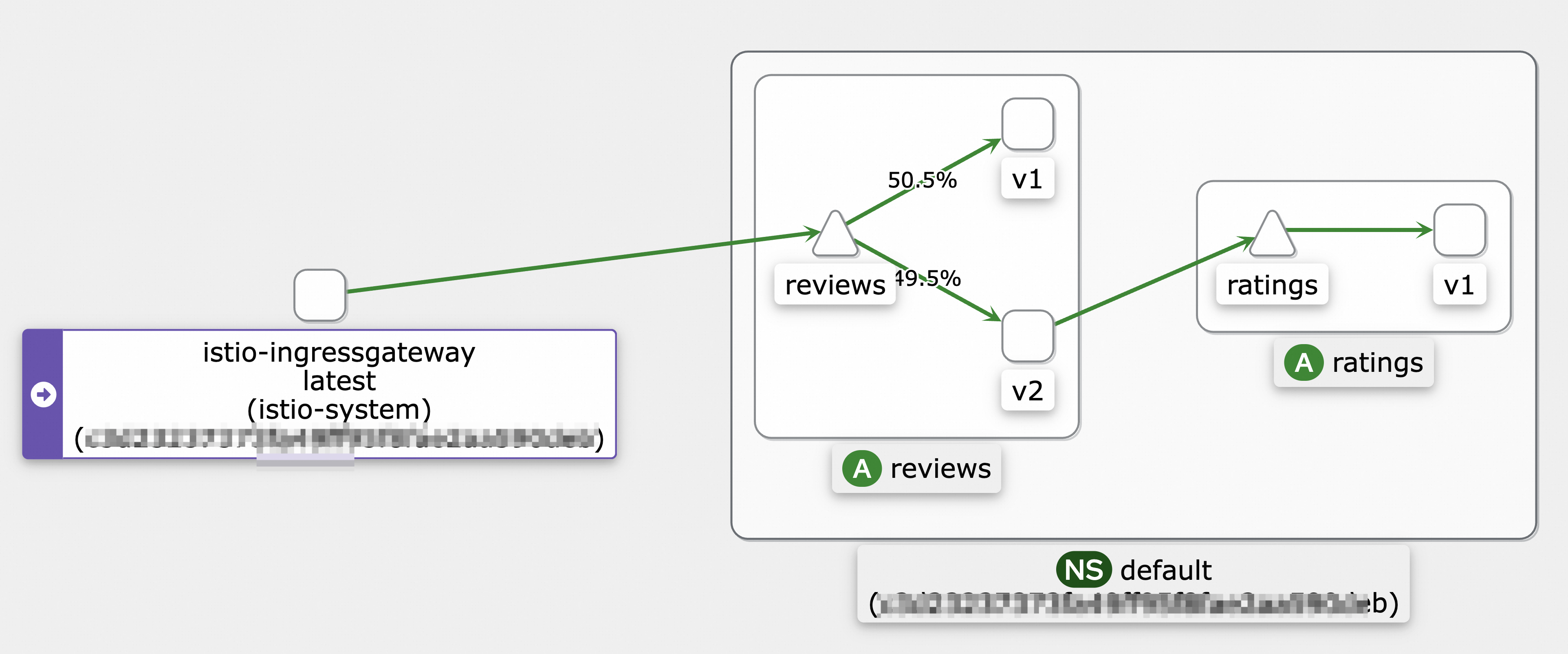
Step 2: Observe pod startup without warm-up
Log on to the ASM console.
In the left-side navigation pane, choose Service Mesh > Mesh Management.
On the Mesh Management page, find your ASM instance and click its name or click Manage in the Actions column.
In the left-side navigation pane, choose Observability Management Center > Monitoring metrics.
Open the monitoring dashboard:
For ASM instances earlier than 1.17.2.35: Click the Monitoring Dashboard tab, then the Cloud ASM Istio Service tab, and select the reviews service.
For ASM instances 1.17.2.35 and later: Click the Cloud ASM Istio Work load tab, select the reviews-v3 workload, and set Reporter to source.
Scale the reviews-v3 Deployment from 0 to 1 replica.
Send a load test for 120 seconds:
hey -z 120s -q 100 -c 4 http://${GATEWAY_ADDRESS}/reviews/0Check the Prometheus monitoring dashboard. Without warm-up, reviews-v3 reaches a balanced share of requests in approximately 45 seconds. Actual timing varies by environment.
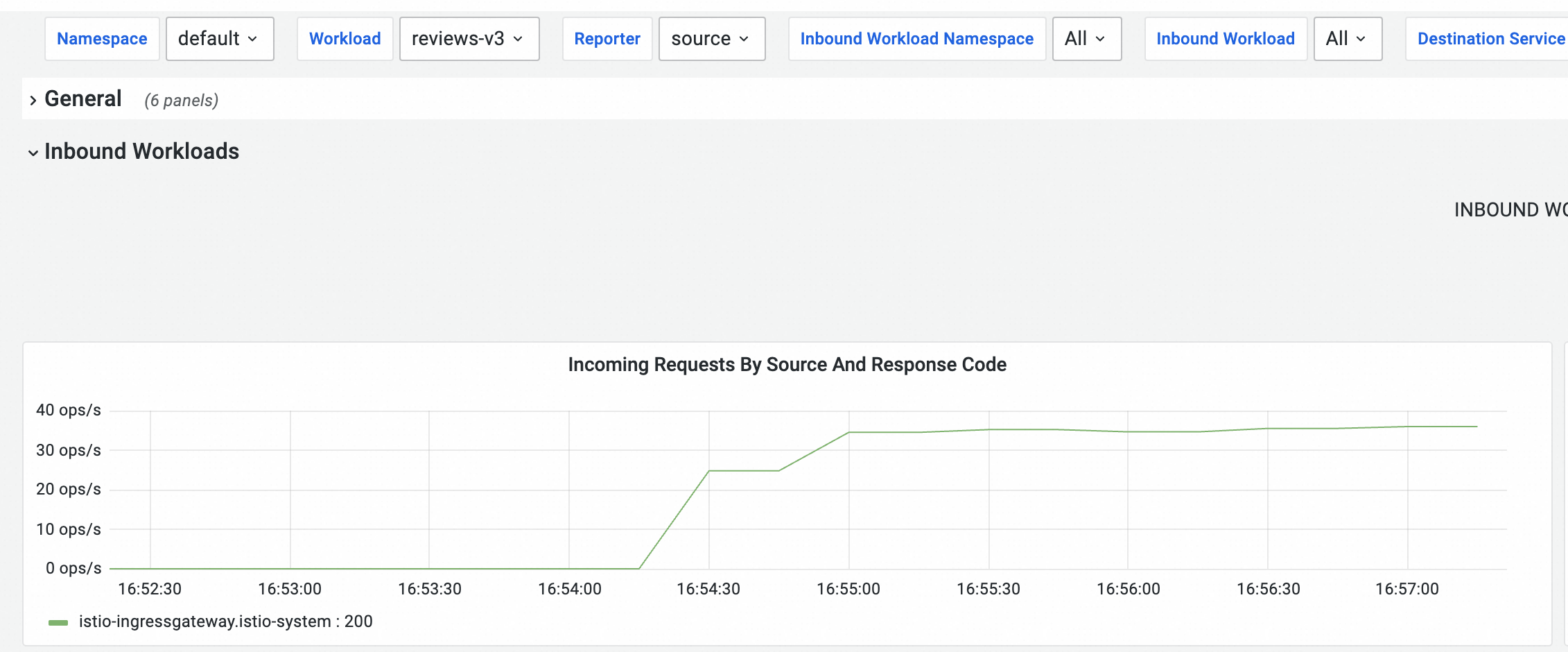
Scale the reviews-v3 Deployment back to 0 replicas.
Step 3: Enable warm-up
Update
reviews.yamlto addwarmupDurationSecswith a 120-second warm-up window:apiVersion: networking.istio.io/v1beta1 kind: DestinationRule metadata: name: reviews spec: host: reviews trafficPolicy: loadBalancer: simple: ROUND_ROBIN warmupDurationSecs: 120sApply the updated DestinationRule:
kubectl apply -f reviews.yaml
Step 4: Verify the warm-up effect
Scale the reviews-v3 Deployment from 0 to 1 replica.
Send a load test for 150 seconds:
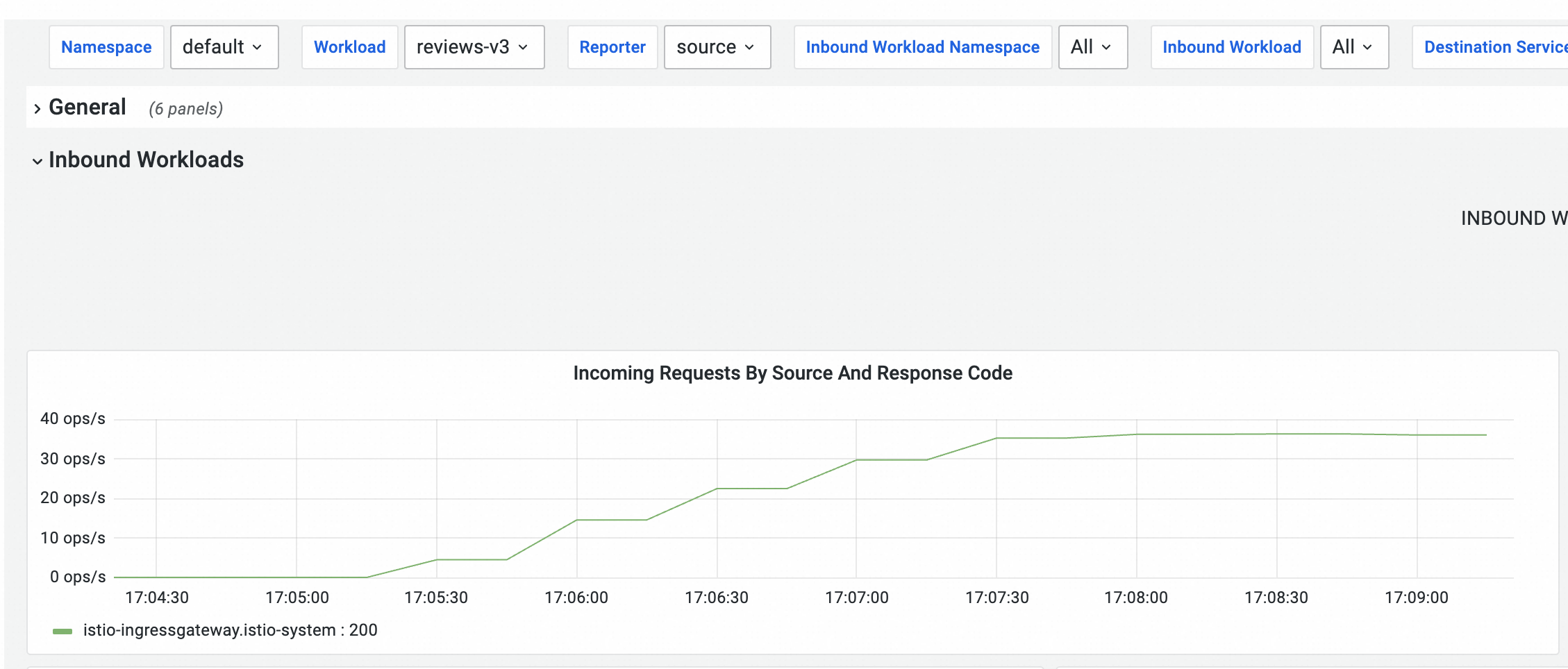
hey -z 150s -q 100 -c 4 http://${GATEWAY_ADDRESS}/reviews/0Check the Prometheus monitoring dashboard. With warm-up enabled, reviews-v3 reaches a balanced share of requests in approximately 120 seconds, matching the configured warm-up duration.
NoteThe monitoring curve may appear stepped rather than smooth due to the metric collection interval. Actual traffic increase to reviews-v3 is gradual. For a smoother view, enable sidecar log collection and check the log volume in SLS over the last 5 minutes.

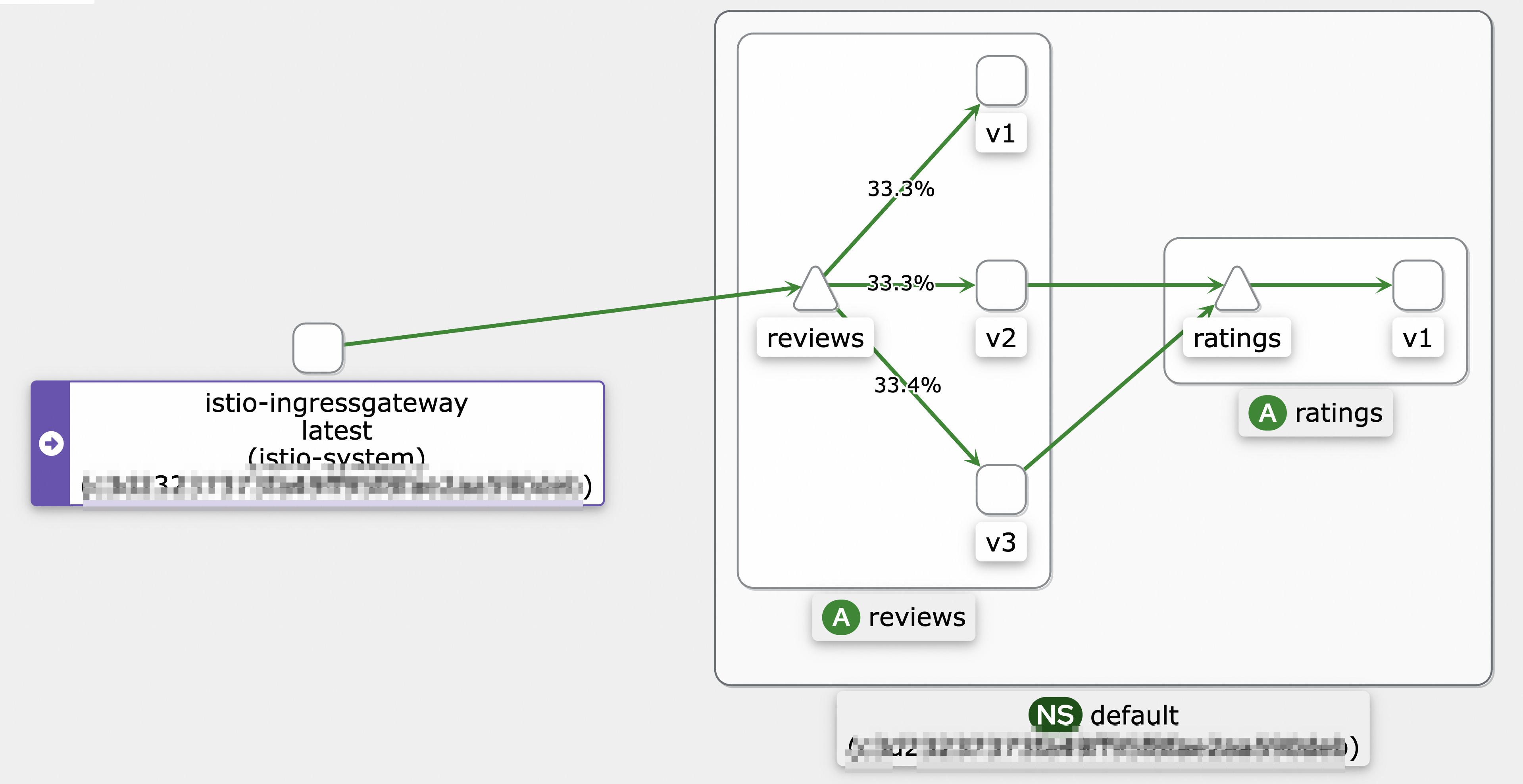
After approximately 2 minutes and 30 seconds, traffic is evenly distributed across the v1, v2, and v3 versions.
Related topics
You can configure local or global rate limiting to keep traffic within a controllable threshold, ensuring continuous service availability and stable performance. For more information, see Configure local rate limiting in the Traffic Management Center and Use ASMGlobalRateLimiter to configure global rate limiting for application service ingress traffic.
You can use ASMAdaptiveConcurrency to implement adaptive concurrency control. This feature dynamically adjusts the allowed number of concurrent requests based on sampled request data, and rejects requests when the concurrency exceeds the service's capacity. For more information, see Use ASMAdaptiveConcurrency to implement adaptive concurrency control.
You can configure a connection pool to implement circuit breaking, which protects the system from further damage in case of failures or overloads. For more information, see Configure a connection pool to implement circuit breaking.