In AI agent development and CI/CD pipelines, skill files may carry injected malicious scripts, risky configurations, or malicious prompts, and manual review does not scale. Skills detection scans skill files and their associated content through the SDK or Skills CLI, automatically intercepts supply chain security risks before deployment, and lets you view detection results and handle risks in the console.
Overview
Skills detection is a security detection component for the AI agent ecosystem. You can quickly integrate it into your development workflow or security operations platform through the SDK or API. Unlike traditional code security scanning tools, Skills detection focuses on the supply chain security of agent skills and covers dangerous commands, data exfiltration, prompt injection, privilege escalation, insecure configurations, and sensitive information leaks. For common identifiable risks, see Typical identifiable risks.
Detection capabilities
Malicious file detection:
Identifies malicious files, backdoors, persistence logic, and resource abuse in skills by combining external threat intelligence, malicious signatures, and suspicious script behavior.
Sensitive information detection
Detects leak risks such as hardcoded API keys, AccessKey pairs, database credentials, private keys, bearer tokens, and cloud provider credentials through rule matching and context analysis.
Skills poisoning and prompt attack detection:
Detects prompt injection attacks carried out through malicious skill injection, and prevents attackers from using skills distribution channels to tamper with agent behavior, steal sensitive information, or perform unauthorized operations.
LLM deep intent analysis
Analyzes the overall behavioral intent of a skill based on large language models (LLMs) to identify combined risks, contextual risks, and covert attack chains that rules alone cannot cover. For more information, see LLM deep intent analysis coverage.
Context-aware precise detection
The detection process incorporates contextual information to achieve high-confidence risk identification.
Development workflow exemption: Automatically identifies routine commands in DevOps, build, and test scripts to avoid classifying legitimate O&M operations as malicious behavior.
Non-sensitive content filtering: Semantically distinguishes environment variable placeholders, sample configurations (such as
.env.example), and documentation to exclude interference from non-real credentials.Legitimate behavior noise reduction: Lowers risk weights based on context for public API calls, explicitly specified upload targets, and standard tool usage.
Dynamic risk rating: Treats privilege escalation and insecure configurations as low-priority items by default, and raises the risk level only in high-risk scenarios that involve data exfiltration, backdoor implantation, or malicious execution.
Precise intent identification: Strictly distinguishes security education and risk disclosure documents from real attack instructions in prompt interactions, so that interception is triggered only for malicious intent.
Scenarios
AI agent application development: Detect malicious commands and prompt injection in skill files during development to ensure that skills come from trusted sources and their instructions are secure.
Continuous integration/continuous delivery (CI/CD) security scanning: Integrate Skills detection into your CI/CD pipeline for automated security scanning.
Security operations center (SOC) platform integration: Connect Skills detection to your SOC platform to continuously monitor the security of your agent ecosystem. After you integrate it with a security information and event management (SIEM) platform, you can incorporate detection results into your unified security event management process.
Before you begin
A paid Agent Security Center instance is activated. For more information, see Purchase and unsubscribe from Agent Security Center.
Upload skill files
Agent Security Center lets you upload skill files for risk detection in the following ways:
SDK
Integrate the multi-language SDK (Java, Python, Go, and more) and call the operation for creating skill detection tasks to upload skill files for risk detection.
Limits
Permission requirements: The RAM user must have the
aisc:CreateSkillFileCheckandaisc:ListSubTaskspermissions.Supported operations:
CreateSkillFileCheck: launches detections on user-defined skills in batches.
ListSubTasks: queries detection task information, including file risk information, skill detection task progress and results, and the risk detail list.
Install the SDK
Java
Environment requirements
Java 8 or later.
Installation
Add the following dependency to your Maven project:
<dependency>
  <groupId>com.aliyun</groupId>
  <artifactId>aisc20260101</artifactId>
  <version>1.0.1</version>
</dependency>We recommend that you use the latest version. For release notes, see SDK reference.
Python
Environment requirements
Python 3.7 or later.
Installation
pip install alibabacloud_aisc20260101==1.0.1We recommend that you use the latest version. For release notes, see SDK reference.
Go
Environment requirements
Go 1.10.x or later.
Install the OpenAPI SDK core library.
go get github.com/alibabacloud-go/darabonba-openapi/v2/client
Installation
go get github.com/alibabacloud-go/aisc-20260101We recommend that you use the latest version. For release notes, see SDK reference.
Configure access credentials
For more credential configuration methods, see Manage credentials.
AccessKey
An Alibaba Cloud account has Administrator permissions on all resources by default, and this cannot be changed. To keep your resources secure, we recommend that you create an AccessKey pair for a RAM user and grant only the minimum required permissions.
Create an AccessKey pair
Log on to the RAM console. On the page, click the name of the target RAM user. If you do not have a RAM user, first Create a RAM user.
On the Authentication tab, in the AccessKey section, click Create AccessKey and follow the instructions to complete the creation.
NoteKeep your
AccessKey IDandAccessKey Secretsafe to prevent leaks.
Create a permission policy:
Go to the Permissions > Policies page and click Create Policy.
Select JSON, enter the following content, and then click OK.
{
  "Version": "1",
  "Statement": [
    {
      "Effect": "Allow",
      "Action": [
        "yundun-aisc:CreateSkillFileCheck",
        "yundun-aisc:List*"
      ],
      "Resource": "*"
    }
  ]
}
In the Create Policy dialog box, enter a policy name and click OK.
Bind permissions: Click Grant Permission in the Actions column of the RAM user to attach the policy created in the previous step. For more information, see Manage RAM user permissions.
ECS RAM role
An ECS RAM role is a RAM role granted to an ECS instance. The role is a normal service role whose trusted service is Elastic Compute Service (ECS). With an instance RAM role, applications on the ECS instance can obtain temporary credentials (STS tokens) to call Agent Security Center API operations without configuring an AccessKey pair on the instance.
Create an ECS RAM role and attach it to an ECS instance
Log on to the RAM console and create a RAM role whose trusted entity is an Alibaba Cloud service. For more information, see Instance RAM roles.
Trusted entity type: Select Elastic Compute Service.
Trusted entity name: Select Elastic Compute Service.
Log on to the ECS console and attach the RAM role to the ECS instance.

Create a permission policy:
Go to the Permissions > Policies page and click Create Policy.
Select JSON, enter the following content, and then click OK.
{
  "Version": "1",
  "Statement": [
    {
      "Effect": "Allow",
      "Action": [
        "yundun-aisc:CreateSkillFileCheck",
        "yundun-aisc:List*"
      ],
      "Resource": "*"
    }
  ]
}
In the Create Policy dialog box, enter a policy name and click OK.
Bind permissions: Click Grant Permission in the Actions column of the ECS RAM role to attach the policy created in the previous step.
AK+RamRoleArn
A RAM user or cloud service can assume a role to obtain temporary credentials (STS tokens) instead of directly using long-term keys, which reduces the risk of key leaks. For example, in a temporary data processing task, a RAM user or cloud service temporarily assumes a role with a specific RamRoleArn. After the task is complete, the role permissions are revoked, which reduces the risk of leaks.
Create an AccessKey pair
Log on to the RAM console. On the page, click the name of the target RAM user. If you do not have a RAM user, first Create a RAM user.
Click Grant Permission in the Actions column of the RAM user to attach the
AliyunSTSAssumeRoleAccesssystem policy or a custom policy that includes thests:AssumeRoleaction.On the Authentication tab, in the AccessKey section, click Create AccessKey and follow the instructions to complete the creation.
Create a permission policy:
Go to the Permissions > Policies page and click Create Policy.
Select JSON, enter the following content, and then click OK.
{
  "Version": "1",
  "Statement": [
    {
      "Effect": "Allow",
      "Action": [
        "yundun-aisc:CreateSkillFileCheck",
        "yundun-aisc:List*"
      ],
      "Resource": "*"
    }
  ]
}
In the Create Policy dialog box, enter a policy name and click OK.
Create a RAM role and grant permissions:
On the page, click Create Role. For more information, see Create a RAM role.
Click Grant Permission in the Actions column of the RAM role to attach the policy created in the previous step.
Obtain the RamRoleArn: Click the name of the role created in the previous step to go to the role details page. You can obtain the RamRoleArn in the ARN section. For more information, see View a RAM role.
NoteThe RamRoleArn is the ARN of the RAM role, that is, the ID of the role to assume. The format is acs:ram::$accountID:role/$roleName, where $accountID is the Alibaba Cloud account ID and $roleName is the RAM role name.
Obtain an endpoint
The endpoint format for API access is aisc.[RegionId].aliyuncs.com. For specific endpoints, see Endpoints.
Call the API
The following sample code for uploading skill files for detection uses an AccessKey pair as the access credential.
Replace
#download_url#in the code with a publicly accessible URL of the skill file. The file to download must be a compressed package in tar.gz or ZIP format.We recommend that you upload the skill file to an object storage service such as Alibaba Cloud OSS and use a signed URL or a public-read URL as the DownloadUrl.
package com.aliyun.sample;

import com.aliyun.tea.*;

public class Sample {

    /**
     * <b>description</b> :
     * <p>Initialize the client with credentials</p>
     * @return Client
     *
     * @throws Exception
     */
    public static com.aliyun.aisc20260101.Client createClient() throws Exception {
        // For production, use a more secure AK-free method. For credential configuration methods, see https://www.alibabacloud.com/help/document_detail/378657.html.
        com.aliyun.credentials.models.Config credentialConfig = new com.aliyun.credentials.models.Config();
        credentialConfig.setType("access_key");
        // Required. This example obtains the AccessKey ID from environment variables.
        credentialConfig.setAccessKeyId(System.getenv("ALIBABA_CLOUD_ACCESS_KEY_ID"));
        // Required. This example obtains the AccessKey Secret from environment variables.
        credentialConfig.setAccessKeySecret(System.getenv("ALIBABA_CLOUD_ACCESS_KEY_SECRET"));

        com.aliyun.credentials.Client credential = new com.aliyun.credentials.Client(credentialConfig);
        com.aliyun.teaopenapi.models.Config config = new com.aliyun.teaopenapi.models.Config()
                .setCredential(credential);
        // For endpoints, see https://api.alibabacloud.com/product/AISC.
        config.endpoint = "aisc.[RegionId].aliyuncs.com";
        return new com.aliyun.aisc20260101.Client(config);
    }

    public static void main(String[] args_) throws Exception {
        com.aliyun.aisc20260101.Client client = Sample.createClient();
        // Replace with the actual publicly accessible download URL (DownloadUrl) and file name (FileName).
        com.aliyun.aisc20260101.models.CreateSkillFileCheckRequest.CreateSkillFileCheckRequestFiles files0 = new com.aliyun.aisc20260101.models.CreateSkillFileCheckRequest.CreateSkillFileCheckRequestFiles()
                .setDownloadUrl("#DownloadUrl#")
                .setFileName("#FileName#");
        com.aliyun.aisc20260101.models.CreateSkillFileCheckRequest createSkillFileCheckRequest = new com.aliyun.aisc20260101.models.CreateSkillFileCheckRequest()
                .setFiles(java.util.Arrays.asList(
                    files0
                ));
        com.aliyun.teautil.models.RuntimeOptions runtime = new com.aliyun.teautil.models.RuntimeOptions();
        try {
            com.aliyun.aisc20260101.models.CreateSkillFileCheckResponse resp = client.createSkillFileCheckWithOptions(createSkillFileCheckRequest, runtime);
            System.out.println(new com.google.gson.Gson().toJson(resp));
        } catch (TeaException error) {
            // This is for demonstration only. Handle exceptions carefully and do not ignore them in production projects.
            // Error message
            System.out.println(error.getMessage());
            // Diagnostic URL
            if (error.getData() != null) {
                System.out.println(error.getData().get("Recommend"));
            }
        } catch (Exception _error) {
            TeaException error = new TeaException(_error.getMessage(), _error);
            // This is for demonstration only. Handle exceptions carefully and do not ignore them in production projects.
            // Error message
            System.out.println(error.getMessage());
            // Diagnostic URL
            if (error.getData() != null) {
                System.out.println(error.getData().get("Recommend"));
            }
        }
    }
}# -*- coding: utf-8 -*-
# This file is auto-generated, don't edit it. Thanks.
import os
import sys
import json
from typing import List
from alibabacloud_aisc20260101.client import Client as AISC20260101Client
from alibabacloud_credentials.client import Client as CredentialClient
from alibabacloud_credentials.models import Config as CredentialConfig
from alibabacloud_tea_openapi import models as open_api_models
from alibabacloud_aisc20260101 import models as aisc20260101_models
from alibabacloud_tea_util import models as util_models
from alibabacloud_tea_util.client import Client as UtilClient
class Sample:
def __init__(self):
pass
@staticmethod
def create_client() -> AISC20260101Client:
"""
Initialize the client with credentials
@return: Client
@throws Exception
"""
# For production, use a more secure AK-free method. For credential configuration methods, see https://www.alibabacloud.com/help/document_detail/378659.html.
credentialsConfig = CredentialConfig(
type='access_key',
# Required. This example obtains the AccessKey ID from environment variables.
access_key_id=os.environ.get('ALIBABA_CLOUD_ACCESS_KEY_ID'),
# Required. This example obtains the AccessKey Secret from environment variables.
access_key_secret=os.environ.get('ALIBABA_CLOUD_ACCESS_KEY_SECRET')
)
credential = CredentialClient(credentialsConfig)
config = open_api_models.Config(
credential=credential
)
# For endpoints, see https://api.alibabacloud.com/product/AISC.
config.endpoint = f'aisc.[RegionId].aliyuncs.com'
return AISC20260101Client(config)
@staticmethod
def main(
args: List[str],
) -> None:
# Replace with the actual publicly accessible download URL (download_url) and file name (file_name).
client = Sample.create_client()
files_0 = aisc20260101_models.CreateSkillFileCheckRequestFiles(
download_url='#download_url#',
file_name='#file_name#'
)
create_skill_file_check_request = aisc20260101_models.CreateSkillFileCheckRequest(
files=[
files_0
]
)
runtime = util_models.RuntimeOptions()
try:
resp = client.create_skill_file_check_with_options(create_skill_file_check_request, runtime)
print(json.dumps(resp, default=str, indent=2))
except Exception as error:
# This is for demonstration only. Handle exceptions carefully and do not ignore them in production projects.
# Error message
if hasattr(error, 'message'):
print(error.message)
# Diagnostic URL
if hasattr(error, 'data') and error.data:
print(error.data.get("Recommend"))
@staticmethod
async def main_async(
args: List[str],
) -> None:
client = Sample.create_client()
files_0 = aisc20260101_models.CreateSkillFileCheckRequestFiles(
download_url='#download_url#',
file_name='#file_name#'
)
create_skill_file_check_request = aisc20260101_models.CreateSkillFileCheckRequest(
files=[
files_0
]
)
runtime = util_models.RuntimeOptions()
try:
resp = await client.create_skill_file_check_with_options_async(create_skill_file_check_request, runtime)
print(json.dumps(resp, default=str, indent=2))
except Exception as error:
# This is for demonstration only. Handle exceptions carefully and do not ignore them in production projects.
# Error message
if hasattr(error, 'message'):
print(error.message)
# Diagnostic URL
if hasattr(error, 'data') and error.data:
print(error.data.get("Recommend"))
if __name__ == '__main__':
Sample.main(sys.argv[1:])package main
import (
"encoding/json"
"strings"
"fmt"
"os"
aisc20260101 "github.com/alibabacloud-go/aisc-20260101/client"
openapi "github.com/alibabacloud-go/darabonba-openapi/v2/client"
util "github.com/alibabacloud-go/tea-utils/v2/service"
credential "github.com/aliyun/credentials-go/credentials"
"github.com/alibabacloud-go/tea/tea"
)
// Description:
//
// Initialize the client with credentials
//
// @return Client
//
// @throws Exception
func CreateClient () (_result *aisc20260101.Client, _err error) {
// For production, use a more secure AK-free method. For credential configuration methods, see https://www.alibabacloud.com/help/document_detail/378661.html.
credentialsConfig := new(credential.Config).
SetType("access_key").
SetAccessKeyId(os.Getenv("ALIBABA_CLOUD_ACCESS_KEY_ID")).
SetAccessKeySecret(os.Getenv("ALIBABA_CLOUD_ACCESS_KEY_SECRET"))
credential, _err := credential.NewCredential(credentialsConfig)
if _err != nil {
return _result, _err
}
config := &openapi.Config{
Credential: credential,
}
// For endpoints, see https://api.alibabacloud.com/product/AISC.
config.Endpoint = tea.String("aisc.[RegionId].aliyuncs.com")
_result = &aisc20260101.Client{}
_result, _err = aisc20260101.NewClient(config)
return _result, _err
}
func _main (args []*string) (_err error) {
client, _err := CreateClient()
if _err != nil {
return _err
}
// Replace with the actual publicly accessible download URL (DownloadUrl) and file name (FileName).
files0 := &aisc20260101.CreateSkillFileCheckRequestFiles{
DownloadUrl: tea.String("#download_url#"),
FileName: tea.String("#file_name#"),
}
createSkillFileCheckRequest := &aisc20260101.CreateSkillFileCheckRequest{
Files: []*aisc20260101.CreateSkillFileCheckRequestFiles{files0},
}
runtime := &util.RuntimeOptions{}
tryErr := func()(_e error) {
defer func() {
if r := tea.Recover(recover()); r != nil {
_e = r
}
}()
resp, _err := client.CreateSkillFileCheckWithOptions(createSkillFileCheckRequest, runtime)
if _err != nil {
return _err
}
fmt.Printf("[LOG] %v\n", resp)
return nil
}()
if tryErr != nil {
var error = &tea.SDKError{}
if _t, ok := tryErr.(*tea.SDKError); ok {
error = _t
} else {
error.Message = tea.String(tryErr.Error())
}
// This is for demonstration only. Handle exceptions carefully and do not ignore them in production projects.
// Error message
fmt.Println(tea.StringValue(error.Message))
// Diagnostic URL
var data interface{}
d := json.NewDecoder(strings.NewReader(tea.StringValue(error.Data)))
d.Decode(&data)
if m, ok := data.(map[string]interface{}); ok {
recommend, _ := m["Recommend"]
fmt.Println(recommend)
}
}
return _err
}
func main() {
err := _main(tea.StringSlice(os.Args[1:]))
if err != nil {
panic(err)
}
}Skills CLI
Use the alibabacloud-aisc-skill-inspection skill from the Alibaba Cloud Agent Skills portal to quickly launch skill file security detection through a Python wrapper script, without writing integration code. The skill encapsulates the OpenAPI call logic, detects skill files, and generates a detection report.
Limits
Environment requirements: Python 3.7 or later; Node.js 18 or later (required to install the skill).
Permission requirements: The RAM user must have the
aisc:CreateSkillFileCheckandaisc:ListSubTaskspermissions.Supported operations:
CreateSkillFileCheck: launches detections on user-defined skills in batches.
ListSubTasks: queries detection task information, including file risk information, skill detection task progress and results, and the risk detail list.
Configure Alibaba Cloud access credentials
The skill automatically obtains credentials through the Alibaba Cloud default credential chain (alibabacloud_credentials), which supports environment variables, ECS RAM roles, and other methods. This topic uses environment variables and a configuration file as examples to describe how to configure access credentials.
Configure an AccessKey pair or role information: Log on to the RAM console and create a role or an AccessKey pair. For more information, see the Configure access credentials part of the SDK section in this topic.
Write the obtained AccessKey pair or role information to environment variables or a configuration file.
Environment variables
export ALIBABA_CLOUD_ACCESS_KEY_ID="AccessKey ID"
export ALIBABA_CLOUD_ACCESS_KEY_SECRET="AccessKey Secret"
Configuration file
Default full path of the file
Linux/Mac:
~/.aliyun/config.jsonWindows:
C:\Users\USER_NAME\.aliyun\config.json
Content format example:
{
  "current": "<credential name>",
  "profiles": [
    {
      "name": "AK",
      "mode": "AK",
      "access_key_id": "<ALIBABA_CLOUD_ACCESS_KEY_ID>",
      "access_key_secret": "<ALIBABA_CLOUD_ACCESS_KEY_SECRET>"
    },
    {
      "name":"RamRoleArn",
      "mode":"RamRoleArn",
      "access_key_id":"<ALIBABA_CLOUD_ACCESS_KEY_ID>",
      "access_key_secret":"<ALIBABA_CLOUD_ACCESS_KEY_SECRET>",
      "ram_role_arn":"<ROLE_ARN>",
      "ram_session_name":"<ROLE_SESSION_NAME>",
      "expired_seconds":3600
    },
    {
      "name":"EcsRamRole",
      "mode":"EcsRamRole",
      "ram_role_name":"<RAM_ROLE_ARN>"
    }
  ]
}
Key parameters
Parameter
Description
current
profilescan contain multiple credential entries.currentspecifies the credential entry the system is currently using (corresponding tonameinprofiles).For example, if both AK and EcsRamRole entries are configured and
currentis set to AK, the system uses the AccessKey pair to access the API.ImportantIf you previously set the
ALIBABA_CLOUD_PROFILEenvironment variable to specify a credential, the system preferentially uses the credential from the environment variable.profiles
The collection of credential entries. The
modeparameter specifies the credential type:AK: uses the user's AccessKey pair as the credential.
RamRoleArn: obtains credentials by having a RAM user assume a RAM role.
EcsRamRole: an ECS RAM role.
Install the skill
CLI command installation
Skills CLI
npx skills add aliyun/alibabacloud-aiops-skills --skill alibabacloud-aisc-skill-inspection --agent claude-code -y --full-depthNoteReplace the
--agentparameter value with the name of the agent client you actually use, such asclaude-code,cursor,qoder, orqwen-code. To install globally, add the-gparameter.ClawHub CLI
npx clawhub install alibabacloud-aisc-skill-inspection
Manual download
Download the skill files: Download the ZIP package or obtain the skill files from the GitHub repository.
Extract or move the downloaded ZIP file to your agent directory. Common agent directories are as follows:
Qoder: .qoder/skills/
Qwen Code: .qwen-code/skills/
Claude Code: .claude/skills/
OpenClaw: ./skills/
Codex: .codex/skills/
Cursor: .cursor/skills/
Gemini CLI: .gemini/skills/
GitHub Copilot: .github-copilot/skills/
After the installation is complete, restart the agent client before you use this skill. For more information about the skill, see the installation guide on the alibabacloud-aisc-skill-inspection description page.
Install dependencies
Go to the skill installation directory (usually under your project root, such as .claude/skills/alibabacloud-aisc-skill-inspection/) and run the following command to install the Python dependencies:
For the dependency list, see scripts/requirements.txt.
python3 -m pip install -r scripts/requirements.txtVerify credentials
After you install the dependencies, verify that your Alibaba Cloud credentials are configured correctly:
python3 -c "from alibabacloud_credentials.client import Client as CredentialClient; CredentialClient(); print('Credentials OK')"If the output is Credentials OK, the credentials are configured correctly.
Launch a detection
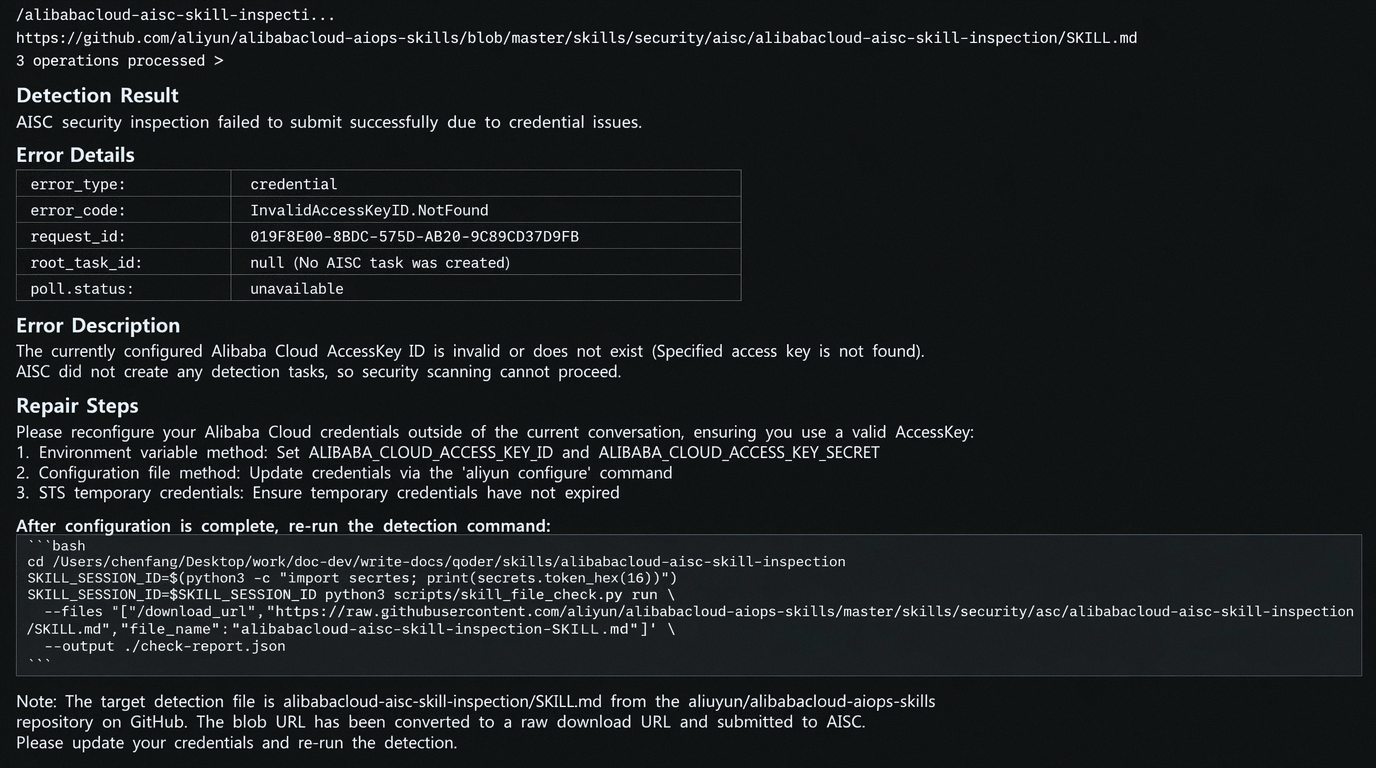
In your agent tool, use /alibabacloud-aisc-skill-inspection download_url or natural language to invoke the skill and detect the file at download_url. The following figure uses Qoder as an example to show how to launch a detection.
The
download_urlin the command must be a publicly accessible URL, and the file to download must be a compressed package in tar.gz or ZIP format.We recommend that you upload the skill file to an object storage service such as Alibaba Cloud OSS and use a signed URL or a public-read URL.
View detection results
Detection results are automatically synchronized to the Agent Security Center console, where you can view them on the Skills detection page. For more information, see View risks and API usage. A local copy of the check-report.json file is also kept. The following table describes the main fields:
Field | Description |
| The root ID of the detection task, used for subsequent queries. |
| The detection status, such as |
| The total number of detection subtasks. |
| The detailed detection results of each subtask, including risk levels and risk information. |
View risks and API usage
Access the Security Center console - Agent Security Center - Agent Risks. At the top of the left side of the page, select the region where the asset to be protected is located: Chinese Mainland or Outside Chinese Mainland
On the Skills Check tab, view file risk data.
Statistics fields:
Field
Description
Used Quotas
The total number of skill files submitted for detection by the current account (the billing basis; each file counts as one detection).
Unprocessed Files
The number of skill files that were submitted for detection, found to contain risks, and are not yet handled.
Unhandled Risk Severity
The distribution of unhandled files by high, medium, and low risk levels.
Detection task list fields:
Field
Description
Risk Level
The risk level of the detection result: high (Critical/High), medium (Medium), or low (Low). For the level classification standard, see Risk levels.
File Name
The name of the skill file submitted for detection.
SHA256
The SHA256 hash of the file, which uniquely identifies the file content.
Scenario
The detection trigger method: SDK or Skills CLI.
First Detected At
The time when a risk was first detected in the file.
Last Scan Time
The time when the file was last detected.
Status
The risk handling status: Unhandled (pending) or Ignored (manually marked as ignored).
Handle risks
Access the Security Center console - Agent Security Center - Agent Risks. At the top of the left side of the page, select the region where the asset to be protected is located: Chinese Mainland or Outside Chinese Mainland
On the Skills Check tab, click Details in the Actions column of the target file.
On the risk details page, choose an appropriate handling method based on the analysis results in Threat Description.
Manual fix: Follow the fix suggestions in the Solution section and fix the issue manually in the AI agent where the skill file is located.
Ignore: If the risk is within a controllable scope, click Ignore in the lower-left corner. After the operation is complete, the Status changes to Ignored.
Allowlist policy
For files that a security assessment confirms are safe, do not require detection, or are within a trusted scope, you can configure an allowlist policy to exclude them from detection. Files that match an allowlist policy are no longer scanned for risks.
Configure an allowlist rule
Access the Security Center console - Agent Security Center - Agent Risks. At the top of the left side of the page, select the region where the asset to be protected is located: Chinese Mainland or Outside Chinese Mainland
On the Skills Check tab, click Policy Configuration in the upper-right corner.
On the Policy Configuration page, click Add Rule, configure the following parameters, and then click OK.
Parameter
Description
Rule Type
Only SHA256 is supported.
Field value
The SHA256 hash of the file, which uniquely identifies the file content.
Remarks
(Optional) Enter the reason for allowlisting to help your security team audit and trace the decision.
Manage allowlist policies
On the Skills Check tab, click Policy Configuration in the upper-right corner.
On the Policy Configuration page, click Edit or Delete in the Actions column of the rule.
Billing
Billing unit: Billed by file count. Each Skill file detected counts as 1 instance.
Accumulation method: If multiple files are passed in a single API call, billing is accumulated based on the total number of files.
Example: A single API call with 10 files passed will be counted as 10 instances.
Billing condition: Charges are incurred only when the detection task is successfully completed. If file upload fails or the detection task fails to execute, no charge is incurred.
Pricing: $1.42/instance.
Limits
The Skills detection API has a rate limit of 10 calls per second by default. To increase the quota, contact your business manager.
The size of a single file for detection cannot exceed 10 MB.
FAQ
How do I troubleshoot AccessKey configuration errors?
If an SDK call returns an
InvalidAccessKeyIdorAccessKeyDisablederror, check the following items:Confirm that the AccessKey ID and AccessKey Secret are entered correctly, without extra spaces or line breaks.
Confirm that the AccessKey pair is enabled. Check the key status in the RAM console.
We recommend that you configure the credentials through the
ALIBABA_CLOUD_ACCESS_KEY_IDandALIBABA_CLOUD_ACCESS_KEY_SECRETenvironment variables to avoid hardcoding them in your code.
What should I do if the call rate limit is exceeded?
A
Throttling.Usererror indicates that the current call rate exceeds the API rate limit threshold (10 calls per second by default). Handle it in the following ways:Add a retry mechanism to your call logic. We recommend an exponential backoff strategy (start with a 1-second wait, double it each time, and retry up to 3 times).
If you need a higher call rate, contact your business manager to increase the quota.
Appendix
Risk levels
Risk level | Description |
Critical | May cause severe consequences such as system crashes, complete data loss, production credential leaks, and remote control. |
High | May cause high-risk consequences such as data corruption, non-production credential leaks, major security bypasses, and permission abuse. |
Medium | May cause information leaks, development environment risks, and recoverable data or configuration issues. |
Low | Low risk, common in normal skill development scenarios; judge based on context. |
LLM deep intent analysis coverage
LLM deep intent analysis currently covers 6 categories and 46 check items.
Scan category | Check items | Core detection targets |
Dangerous commands | 12 | Destructive file deletion, disk operations, process termination, system shutdown, destructive database operations, destructive Git operations, package tampering, reverse shells, resource abuse, persistent backdoors, insecure code injection, SQL injection / path traversal. |
Data exfiltration | 7 | Outbound data transfers, credential file access, SSH key exfiltration, environment variable theft, clipboard/screenshot exfiltration, encoded data exfiltration, agent context leaks. |
Prompt injection | 8 | Direct instruction overrides, obfuscated instructions, indirect manipulation, meta-instruction attacks, role switching, user deception, tool description injection, system prompt leaks. |
Privilege escalation | 5 | Privilege escalation, sandbox escapes, security feature bypasses, system configuration changes, permission loosening. |
Insecure configurations | 6 | Dangerous tools without confirmation, missing confirmation requirements, overly permissive permissions, insecure tool configurations, insecure default behavior, MCP least-privilege violations. |
Sensitive information leaks | 8 | Hardcoded API keys, hardcoded access keys, hardcoded secrets, hardcoded passwords, hardcoded database credentials, hardcoded private keys, hardcoded bearer tokens, hardcoded cloud credentials. |
Typical identifiable risks
Risk category | Typical characteristics |
Destructive commands | Destructive operations such as |
Credential theft | Reading |
Obfuscated instructions | Encoding obfuscation techniques such as Base64, Hex, ROT13, zero-width characters, and Unicode homoglyphs. |
Reverse shells | Reverse shell or remote control instructions such as |
Persistent backdoors | Persistence mechanisms such as writing to |
Prompt injection | Injection patterns such as |
MCP tool injection | Hidden instructions or permission inducement in MCP tool descriptions, parameter schemas, and default values. |
Privilege escalation | Permission-loosening operations such as |
Insecure configurations | Insecure configurations such as |
Hardcoded credentials | Hardcoded credentials such as |