After you install an agent for a Java application, ARMS begins monitoring the application. On the Exception Analysis page, you can filter and analyze exceptions by name, interface, and host to optimize the code that is causing errors.
View exception analysis
-
In the top navigation bar, choose .
-
In the quick filter area, you can filter the exception count and exception list by Exception, Operation, and Host.
-
In the trend chart area, you can view the number of times a specific exception was thrown by the application within a specified time range. The exceptions are displayed in a stacked chart.
Click the
 icon to view statistics for the metric within a specific time period or to compare statistics for the same time period across different dates. You can click the
  icon to switch between a bar chart and a trend chart.
 -
In the exception list area, you can view exception names, exception counts, percentages, and exception summaries.
From the exception list, you can perform the following operations:
-
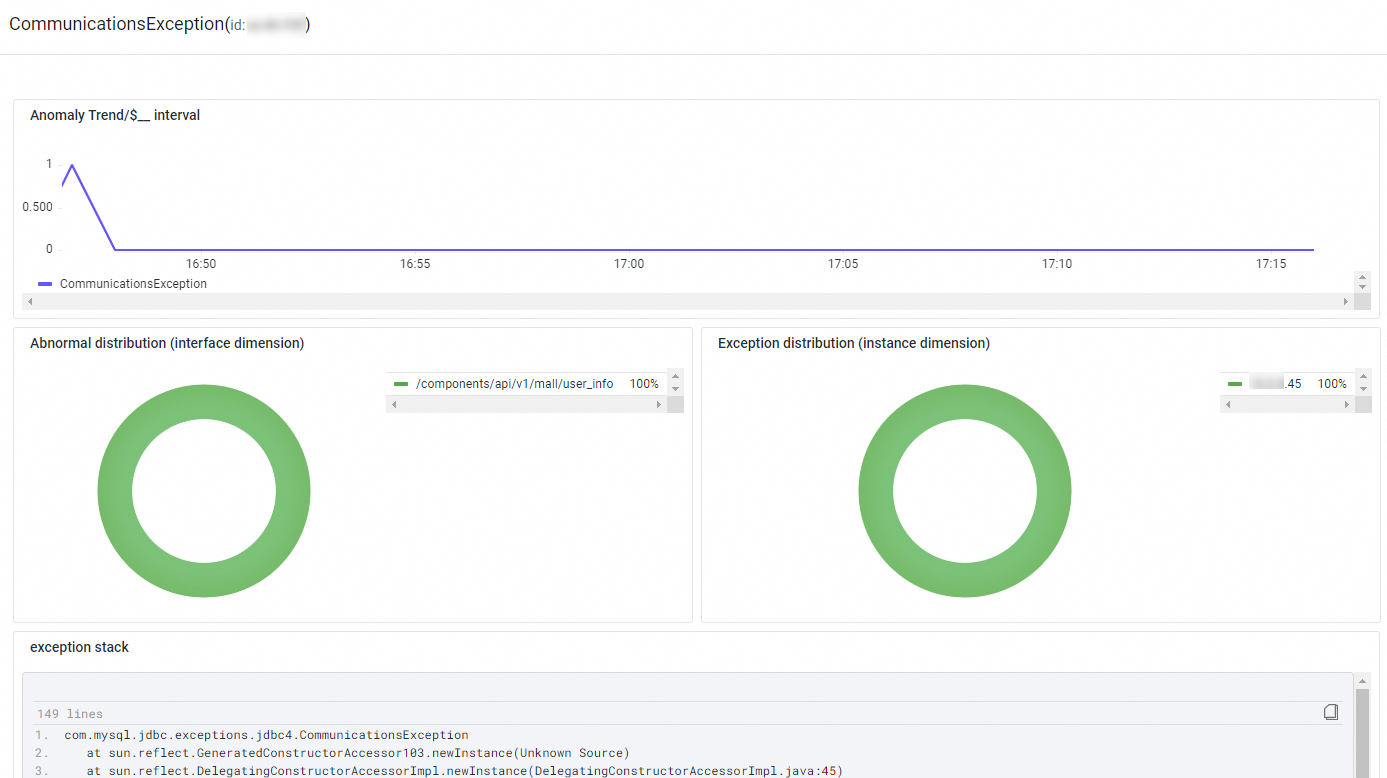
Click Overview in the Actions column to open a panel on the right. This panel shows an overview of the exception, including its count trend, distribution by interface and instance, and the exception stack.
-
Click Traces in the Actions column to view the trace details. For more information, see Trace Explorer.
-
-
Related documents
For detailed information about application monitoring metrics, see Application monitoring metrics.
FAQ
Why does exception count exceed request count?
This can happen for the following reasons:
-
ARMS records an exception each time one is thrown by an instrumented method. If multiple instrumented methods throw exceptions during a single interface call, ARMS records each one, resulting in multiple records for a single call.
-
If the same exception propagates up the call stack through multiple instrumented methods, each of these methods may record the exception, resulting in multiple counts for a single occurrence.
Why do exception counts change after an upgrade?
Each agent version may increase or decrease the number of instrumented methods. Consequently, the number of exceptions captured from these methods may also increase or decrease.
Why are unhandled exceptions displayed?
In many framework-level methods that are instrumented by the agent, exceptions may be caught and handled internally without being propagated to your business code. The agent captures these exceptions even if your application is not aware of them.
For example, a call to MongoDB using MongoTemplate might not throw an error in your application, but you may see errors in the ARMS console. This is because MongoTemplate encapsulates retry logic. When a MongoTemplate method call encounters a timeout, it retries the operation. An exception is thrown to the caller only after multiple retries fail. Therefore, when you use MongoTemplate to access MongoDB and an underlying retry occurs due to a timeout, your application might not see an exception, but the ARMS console will.
Why do stack traces mismatch exceptions?
To improve data processing and reporting efficiency, the ARMS agent generates a fingerprint for each exception based on its class name, the first three lines of its stack trace, and the last three lines of its stack trace. This fingerprint is then encoded into a 64-bit string using CRC64. On the first occurrence, the agent reports both the encoded value and the original stack trace. For subsequent identical exceptions, only the encoded value is reported. This process can cause mismatches in two situations:
-
Two exceptions have different full stack traces but have the same exception class name and the same first and last three lines of their stack traces. Due to the fingerprinting logic, their encoded values will be identical, leading to a mismatch.
-
Two exceptions have different class names or different first and last three lines of their stack traces, but a hash collision occurs because CRC64 is a non-unique encoding algorithm. This can result in the same encoded value for different exceptions.
If either of these situations occurs, you can increase the similar exception stack differentiation depth parameter in the Exception Advanced Filtering Configuration section of the Custom Configuration page. The exception advanced filtering configuration page includes the following settings: Collect Plugin Exceptions (controls whether to collect exceptions from plugins), Collect All Exceptions (instruments exception constructors to capture all exceptions when enabled), Similar exception stack differentiation depth (default value: 2; used to differentiate similar exceptions based on stack depth), Exception Filtering Whitelist (exceptions in the whitelist are excluded from exception-related charts), Exception Filtering Parent Class Inheritance (supported only on agent v4.1.6 and later), and Exception Message Filtering.
Why do old exceptions only show an ID?
To optimize data reporting volume, when an exception first occurs, ARMS encodes it and sends both the encoded value and the original value to the server. The server stores this mapping, which expires after 30 days. If an application runs for more than 30 days, the original value of an exception may no longer be retrievable from its encoded value.
Why are some exceptions not displayed?
By default, the ARMS agent does not capture all exceptions. Only exceptions thrown by methods that are instrumented by the ARMS agent are collected.
If you are using agent version 4.1.12 or later, you can enable the exception plugin in the Agent Switch Settings section of the Custom Configuration page. After you enable this plugin, ARMS collects exception data each time an exception instance is created.