ApsaraVideo VOD accelerates video content delivery by using Alibaba Cloud CDN. This topic introduces the requirements and limitations that you need to understand before adding your domain name to ApsaraVideo VOD.
Onboarding process
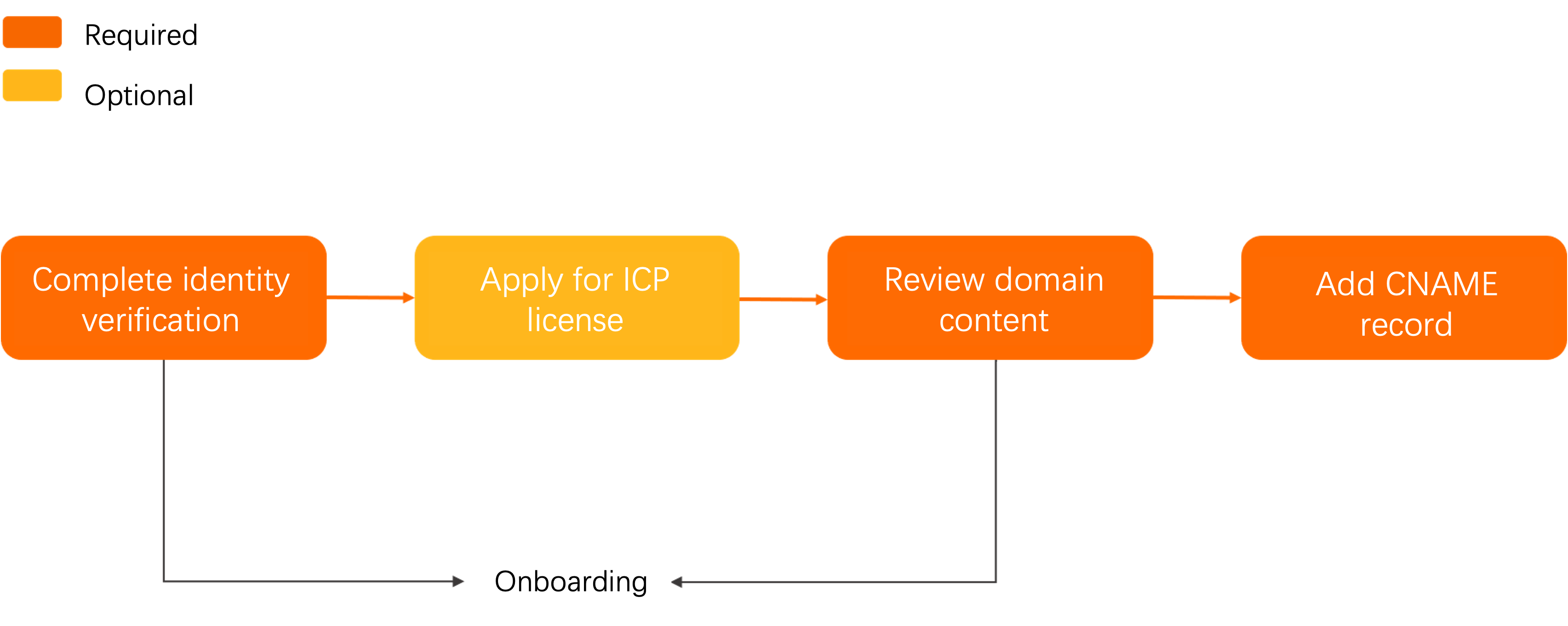
Log on to the Alibaba Cloud official website. Go to the account center, click Account Verification, and complete the verification as prompted.
Optional:If your service involves regions in the Chinese mainland, apply for an Internet content provider (ICP) license from the Ministry of Industry and Information Technology (MIIT) of China. We recommend that you use the Alibaba Cloud ICP Filing system. Before application, Check the filing server.
Review the content on the origin server. You can store the content in ApsaraVideo VOD or Object Storage Service (OSS). If your origin source is not on Alibaba Cloud, submit a ticket before proceeding.
Add a CNAME record for your domain name at the DNS service provider. This ensures that your domain name is mapped to the CNAME that is assigned by ApsaraVideo VOD. For more information, see Configure a CNAME record with Alibaba Cloud DNS.
If your origin server is deployed on an ECS instance, we recommend provisioning its bandwidth to be at least 20% of your total expected traffic volume.
In your origin server's security software, ensure that you have allowlisted the IP addresses of ApsaraVideo VOD's cache nodes to permit inbound requests.
Make sure that all requests are redirected to the origin server if acceleration in ApsaraVideo VOD is stopped or disabled.
The assigned CNAME domain is for DNS configuration purposes only and cannot be used for direct access. You must point your own domain to this CNAME record and use your custom domain to serve your content.
Content moderation
You assume all potential risks associated with hosting the prohibited content listed above. ApsaraVideo VOD also periodically reviews domain content. If any violations are found, the system immediately disables or blocks the domain. In severe cases, domain services for the account will be permanently disabled and cannot be restored.
If you add a wildcard domain name, such as
*.aliyundoc.com, to ApsaraVideo VOD and one of its specific subdomains (demo.aliyundoc.com) is found to contain prohibited content, ApsaraVideo VOD disables the wildcard domain name.
All accelerated domains added to ApsaraVideo VOD are subject to review. Domain types not supported for acceleration include, but are not limited to:
Websites that are inaccessible or with no substantive content.
Private servers for games, such as MMORPGs or card games.
Websites offering pirated software or other copyrighted material for download.
P2P lending or financial websites.
Lottery or gambling websites.
Websites for illegal hospitals or pharmaceuticals.
Content related to pornography, drugs, or gambling.
If your domain name is rejected:
In the ApsaraVideo VOD console, choose Configuration Management > CDN Configuration > Domain Names to view the rejection reason. Then, modify the content and submit the domain name for review again.
Quantity limits
Item | Description |
Domain name | Each Alibaba Cloud account can add a maximum of 20 accelerated domains. If the total average daily peak bandwidth of your domain names exceeds 50 Mbit/s, you can submit a ticket to increase the quota. Make sure that the quota increase does not incur business risks. |
Origin server | By default, each accelerated domain can be configured with a maximum of 10 IP addresses. |
Cache refresh |
|
Domain reclamation policy
If your accelerated domain... | The system will... | To continue using the service... |
Has no traffic for over 90 days (even if in a Normal state) | Automatically disable the domain but retain its configuration records. | Enable the domain again. |
Has been in a disabled state for over 120 days (including domains in a review failed state). | Automatically delete all configuration records for the domain. | Add the domain to ApsaraVideo VOD again. |