Hardcoded AccessKey pairs in application code are a security risk. If your source code is leaked or committed to a repository, your credentials are exposed. Key Management Service (KMS) eliminates this risk through centralized management, dynamic retrieval, and automated rotation. Instead of embedding an AccessKey pair, your application references a secret name and retrieves valid credentials from KMS at runtime.
For authenticating with ApsaraMQ for RocketMQ, consider these approaches in order of preference:
ECS instance RAM role or standard RAM role (recommended): No credentials on disk. Use this approach when your application runs on an ECS instance or supports Security Token Service (STS).
KMS-managed RAM secret (this document): Centralized credential management with automated rotation. Use this approach when RAM roles are not viable.
Static AccessKey pair (not recommended): Hardcoded or environment-variable-based credentials with no rotation.
How it works
After you store a RAM user's AccessKey pair as a managed secret in KMS:
Your application calls KMS with a secret name to retrieve a valid AccessKey pair.
KMS returns the current AccessKey ID and AccessKey secret.
Your application authenticates with ApsaraMQ for RocketMQ using these credentials to send or receive messages.
No credentials are embedded in code, configuration files, or environment variables on disk. When KMS rotates the secret, your application automatically picks up the new credentials without any code changes.
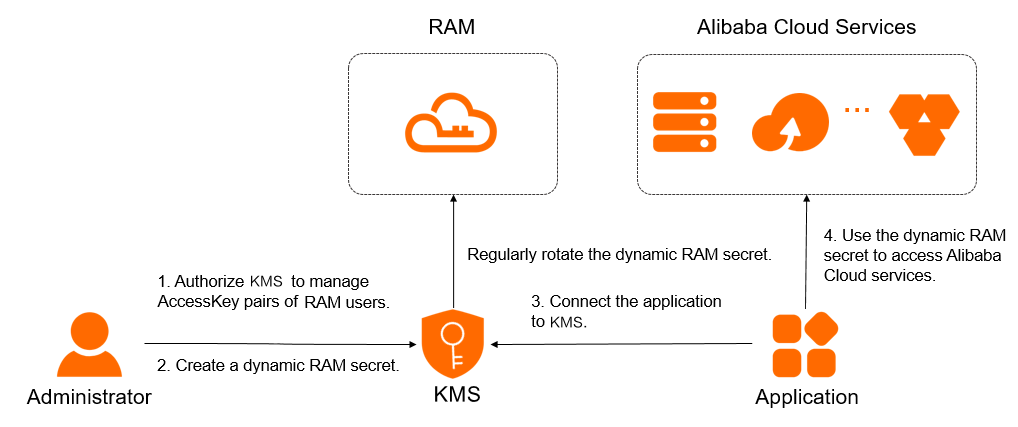
Request latency: An additional request is required to obtain the RAM credential from KMS, which increases latency.
Graceful degradation: Ensure that your application can handle the degradation of KMS dependencies. This prevents issues with KMS, such as service exceptions or jitter, from affecting your message sending and receiving features.
Limitations
Only the AccessKey pair of a RAM user can be managed through KMS. The AccessKey pair of an Alibaba Cloud account is not supported.
Secret rotation
Rotation replaces an existing AccessKey pair with a new one. During rotation, KMS performs three steps:
RAM creates a new AccessKey pair for the RAM user.
KMS writes the new AccessKey pair as the current secret value.
RAM deletes the old AccessKey pair, and KMS removes the old secret value.
Two rotation methods are available:
| Rotation method | Rotation period | When to use |
|---|---|---|
| Automatic rotation | Approximately 2 days | Routine credential hygiene. Set the interval to no more than three months to minimize the window of exposure if an AccessKey pair is compromised. |
| Immediate rotation | 10 minutes to 2 days | Emergency response to a leaked secret (set to 30 minutes), or on-demand rotation triggered by your application (set to 2 days for non-urgent scenarios). |
Do not delete the RAM user associated with a secret while rotation is in progress. Deleting the user causes rotation to fail.
While rotation is in progress, you cannot configure an automatic rotation policy or trigger immediate rotation. Wait for the current rotation to complete first.
Prerequisites
Before you begin, make sure you have:
A symmetric key for encrypting secrets created in the KMS instance
(If a RAM user or RAM role manages the secrets) The AliyunKMSSecretAdminAccess and AliyunRAMReadOnlyAccess system policies attached to the RAM user or attached to the RAM role
Step 1: Authorize KMS to manage the AccessKey pair of a RAM user
Log on to the KMS console. In the top navigation bar, select a region. In the left-side navigation pane, choose Resource > Secrets.
Click the Customer-managed Secrets tab. Under the RAM Secrets type, select the target instance ID from the Instance ID drop-down list, then click Create Secret.
On the Create RAM Secrets panel, click Authorize KMS to access AccessKey pairs.
Complete the authorization:
If you use a RAM administrator user without the AliyunKMSManageRAMCredentialsRole or AliyunKMSManagedRAMCrendentialsRole service-linked role, click Agree to Authorization on the Cloud Resource Access Authorization page.
Otherwise, send the Cloud Resource Access Authorization link to a RAM administrator or the Alibaba Cloud account owner to complete the authorization.
After authorization, the system creates the service-linked role AliyunKMSManageRAMCredentialsRole and attaches the permission policy AliyunKMSManageRAMCredentialsRolePolicy. KMS uses this role to manage your RAM secrets and perform rotation.
To view the service-linked role and its policy, see View the information about a RAM role and View the information about a policy.
Step 2: Create a RAM secret
Log on to the KMS console. In the top navigation bar, select a region. In the left-side navigation pane, choose Resource > Secrets.
Click the Customer-managed Secrets tab. Under the RAM Secrets type, select the target instance ID from the Instance ID drop-down list, then click Create Secret.
Configure the following parameters and click OK.
| Parameter | Description |
|---|---|
| Select RAM User | The RAM user whose AccessKey pair you want to manage. The selected user must have at least one AccessKey pair. If needed, create an AccessKey pair first. The secret name is auto-generated from the RAM user name and is unique within the current region. |
| Secret Value | The AccessKey secret of the RAM user. Maximum size: 30,720 bytes (30 KB). |
| CMK | The symmetric key used to encrypt the secret value. The key and the secret must belong to the same KMS instance. For supported key types, see Key specifications for symmetric and asymmetric encryption. If you are using a RAM user or RAM role, you must have permission to call the GenerateDataKey operation with this key. |
| Tag | Optional. Tags for classifying and managing secrets. Each tag is a key-value pair. A tag key or value can contain up to 128 characters (letters, digits, /, \, _, -, ., +, =, :, @, and spaces). A tag key cannot start with aliyun or acs:. Maximum: 20 tags per secret. |
| Automatic Rotation | Toggle to enable automatic rotation. |
| Days (7 Days to 365 Days) | The rotation interval. This field appears only when Automatic Rotation is enabled. KMS rotates the secret based on this interval. |
| Description | A description of the secret. |
| Advanced Settings > Policy Settings | The access policy for the secret. For details, see Overview of secret policies. You can use the default policy and modify it after creation. |
Step 3: Integrate the RAM secret into your application
Retrieve the secret value at runtime by calling the GetSecretValue (OpenAPI) operation. KMS provides several integration methods:
| Method | Supported languages and scenarios | Supported gateways |
|---|---|---|
| RAM secret plug-in | Java 8+, Go, Python. Requires a supported SDK version. | Shared gateway, Dedicated gateway |
| Secret Client | Java 8+, Go, Python. | Shared gateway, Dedicated gateway |
| Alibaba Cloud SDK | Java 8+ (Java 6+ with SDK V1.0), PHP, Go, Python, .NET (C#), C++, TypeScript, Swift. | Dedicated gateway (preferred), Shared gateway |
| KMS Agent | Any language. Best for multi-application deployments that use standardized HTTP APIs. | Dedicated gateway (preferred), Shared gateway |
| KMS Instance SDK (not recommended) | Java 8+, PHP, Go, Python, .NET (C#). Calls GetSecretValue (KMS Instance API). | Dedicated gateway only |
Authentication: Use an ECS instance RAM role or a standard RAM role instead of an AccessKey pair to avoid storing credentials on disk.
Error handling: Implement a retry mechanism in your application to handle transient KMS errors.
Endpoints:
Shared gateway: see Endpoints.
Dedicated gateway:
{INSTANCE_ID}.cryptoservice.kms.aliyuncs.com.