Each device requires a unique access credential (ClientId, DeviceAccessKeyId, and DeviceAccessKeySecret) to connect to ApsaraMQ for MQTT. The device uses this credential to set the Username and Password, then sends an authentication request to ApsaraMQ for MQTT. ApsaraMQ for MQTT authenticates and activates the device for data transfer with ApsaraMQ for MQTT.
Terms
|
Term |
Description |
|
Device access credential |
A globally unique credential issued by the ApsaraMQ for MQTT server to a client, bound to a Client ID. It consists of a DeviceAccessKeyId and DeviceAccessKeySecret, which the client uses to set the Username and Password when connecting to ApsaraMQ for MQTT. |
|
Application server |
Your server that manages local accounts and handles device access credential requests for clients. |
|
ApsaraMQ for MQTT server |
The ApsaraMQ for MQTT server that handles authentication, processes credential requests from the application server, and manages message traffic. |
Calculation method
As described in Authentication overview, set the Username and Password in the connect message when connecting to the MQTT server:
-
Username
The Username has three pipe-separated (|) parts: authentication mode, DeviceAccessKeyId, and instance ID. Set the mode to DeviceCredential.
Example: For Client ID GID_Test@@@0001, instance ID mqtt-xxxxx, and DeviceAccessKeyId YYYYY, the Username is DeviceCredential|YYYYY|mqtt-xxxxx.
Client ID formats are defined in the Glossary.
-
Password
The Password is the Base64-encoded HMAC-SHA1 signature of the Client ID, using the DeviceAccessKeySecret as the key.
Example: For Client ID GID_Test@@@0001 with DeviceAccessKeySecret XXXXX:
Sign GID_Test@@@0001 with HMAC-SHA1 using key XXXXX to produce a binary array, then Base64-encode it to get the Password.
Most programming languages include HMAC-SHA1 libraries.
Authentication flow
Deploy your application server as shown in the following figure. During initialization, the MQTT client interacts with your application server to obtain and update device access credentials.
Figure 1. Authentication flow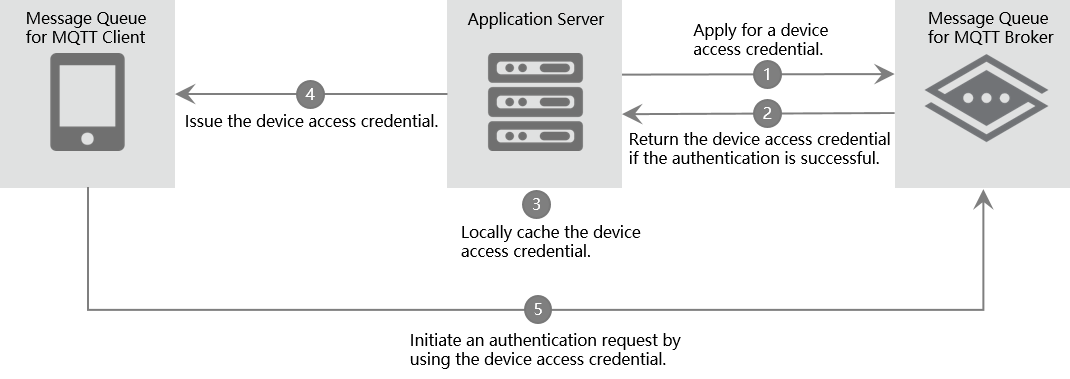
The process is as follows:
-
Your application server calls an OpenAPI to request a device access credential from the MQTT server for the client in advance.
-
The MQTT server validates the request. If the request is valid, the server issues the device access credential.
-
The application server caches the credential locally and maps it to the client. Benefits of caching:
-
Unless there are issues such as credential leaks on the client side, the cached credential can be returned directly, avoiding additional API calls.
-
When a client requests a device access credential again and the MQTT server is unavailable, the application server can return the cached credential for disaster recovery.
-
-
Your application server sends the credential to the MQTT client.
-
The MQTT client sets connection parameters using the credential and connects to the MQTT server. After successful validation, the client can send and receive messages.
Limits
Instance specification constraints
-
The credential quota equals the connection limit of your instance specification. After the quota is reached, upgrade the instance to add capacity. Renew, upgrade, or downgrade an instance.
-
Call the UnRegisterDeviceCredential API operation to unregister credentials for unused devices and free up quota.
Client behavior constraints
-
Set the Username and Password using the device access credential for every connection.
-
Save the credential from the application server to persistent storage to avoid repeated requests and reduce application server load during mass reconnections.
Application server behavior constraints
-
Manage the mapping between credentials and clients to prevent duplicate requests.
-
Implement local disaster recovery to maintain service when the MQTT server is temporarily unavailable.
Related API operations
Your application server manages device access credentials by calling ApsaraMQ for MQTT OpenAPI operations over HTTPS.
Each operation requires an AccessKey and request signature for identity verification. You can register, query, unregister, and update credentials. Application server API operations for unique-certificate-per-device authentication.