Description
This alert is triggered when the data disk usage of the OceanBase cluster exceeds the threshold.
It takes some time to increase the disk space. Therefore, we recommend that you set two metric thresholds for disk usage, one at the Warning level and the other at the Critical level.
Alert rule
For more information about how to add an alert rule, see Add an alert rule
Alert item | Metric type | Metric | Default threshold | Duration (consecutive cycles for triggering an alert) | Detection cycle | Alert level |
OBServer data disk usage | Single metric | disk_ob_data_size | 80% | 15 | 1 minute | Warning |
90% | 15 | 1 minute | Critical |
Impact on the system
This issue may cause the system to stop responding to business write operations.
Possible causes
Your disk resources are insufficient to cope with the increased disk usage arising from your rapid business growth.
You have enabled the recycle bin for the cluster and the recycle bin contains too much data.
Too much temporary data is generated during major compactions and minor compactions.
Solutions
Log in to the ApsaraDB for OceanBase console. Click the target instance name on the Instances page to go to the Cluster Instance Workspace page.
Click Tenant Management, and check Used Storage of each tenant. Large storage usage of tenants in the cluster indicates a large business data volume. In this case, you need to scale out the cluster.
Log in to the business tenant and run the following command to check whether the recycle bin is enabled: show variables like 'recyclebin'. ON indicates that the recycle bin is enabled, and OFF indicates disabled.
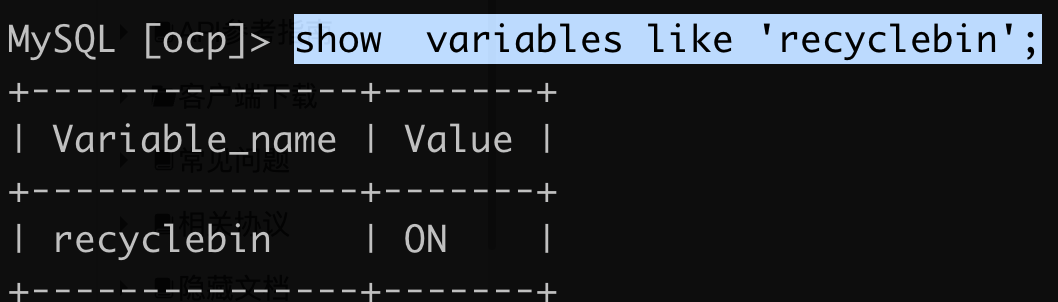
If the recycle bin is enabled, execute the PURGE RECYCLEBIN statement to clear data in the recycle bin. You can also run the following command to disable the recycle bin: set global recyclebin= 0.
After you purge the recycle bin, wait for a while and see whether the disk usage drops to the normal level.
Go to the Cluster Instance Workspace page and check the major compaction records of the cluster. Then, check the disk usage during the last few major compactions. If the disk usage dropped to the normal level after the completion of each major compaction, no additional operation is required. It is expected that disk usage may increase during major compactions. The increased disk usage depends on specific business scenarios. Scenarios with a large number of INSERT and random UPDATE requests are usually accompanied by high disk usage.