To connect to an ApsaraDB MyBase for MySQL instance, you must enter the internal or public endpoint and port number of the instance. This topic describes how to view and change the internal and public endpoints and port numbers of an ApsaraDB MyBase for MySQL instance.
View the internal and public endpoints and port numbers
- Find the instance that you want to manage and click Details in the Actions column. Use one of the following methods to view the internal and public endpoints
and port numbers.
- In the Basic Information section of the Basic Information page, click See Detail next to Network Type. In the panel that appears, view the internal and public endpoints
and port numbers of the instance.
 Note This method is supported only for ApsaraDB MyBase for MySQL High-availability Edition instances.
 - In the left-side navigation pane, click Database Connection. On the Database Connection page, view the internal and public endpoints and port
numbers of the instance.
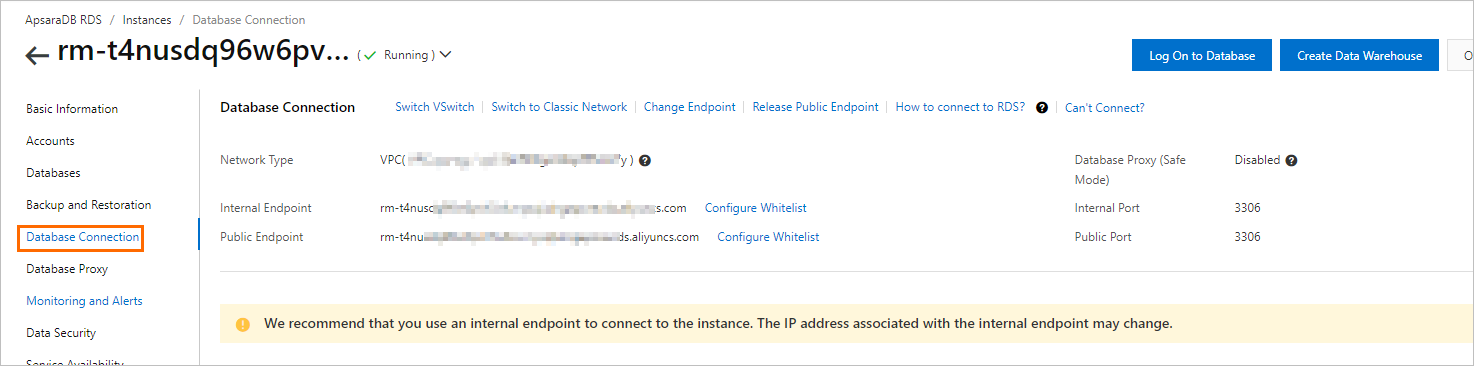
Note The public endpoint of an instance is displayed only after you apply for a public endpoint for the instance. For more information about how to apply for a public endpoint, see Apply for or release a public endpoint. - In the Basic Information section of the Basic Information page, click See Detail next to Network Type. In the panel that appears, view the internal and public endpoints
and port numbers of the instance.