A static website is a collection of web pages that contain only static content. Static content includes HTML files, CSS files, and scripts that can be executed on the client, such as JavaScript files. You can store files that are required by static websites in Object Storage Service (OSS) buckets and then use Cloud-native API Gateway instances as proxies to manage the static website content that is stored in OSS buckets. This topic describes how to implement static website hosting by using Cloud-native API Gateway and Alibaba Cloud OSS.
Prerequisites
A Cloud-native API Gateway instance is created. For more information, see Create a gateway instance.
Background information
In most cases, web applications provide web pages for external access. During page accesses, static web pages are requested first. Then, calls to backend services are initiated based on JavaScript scripts. At last, the content of web pages is dynamically modified based on the response result. In the design concept of frontend and backend separation, static files are decoupled from backend services. This way, static pages and backend services can be separately maintained, and development efficiency is significantly improved.
In the frontend and backend separation architecture, you must use a storage service to store static pages and deploy backend services in another location. Then, you can use a Layer-7 gateway to route requests to the static pages or backend services.
Sample scenario
In this scenario, a web application is available. The domain name for external access is example.com, and static pages are stored in OSS buckets. A Cloud-native API Gateway instance is used as a proxy to route requests to OSS buckets in which static pages are stored or route requests to backend services. The following figure shows the architecture in the sample scenario:

The Cloud-native API Gateway instance routes all requests destined for static pages to OSS buckets. For example, when you visit
example.comorexample.com/index.html, the homepage index.html is returned.The Cloud-native API Gateway instance routes requests for other services to the destination backend service. For example, when you visit
example.com/app, the service processing result of the backend service is returned.
Step 1: Create an OSS bucket and upload a static page to the OSS bucket
Create a public-read bucket to store static pages.
Log on to the OSS console.
In the left-side navigation pane, click Buckets. On the Buckets page, click Create Bucket.
In the Create Bucket panel, configure the parameters that are described in the following table, retain the default settings for other parameters, and then click OK.
Parameter
Description
Bucket Name
Enter a name for the bucket. In this example, the bucket name is static-demo.
Block Public Access
Disable this feature. For more information, see Block Public Access.
Storage Class
Select Standard.
ACL
Click Public Read. In the Are you sure you want to select Public Read? message, click Continue.
On the Buckets page, click the name of the created bucket. In the Objects pane, click Upload Object to upload the following static web page
index.html. For the upload operation, select Inherited from Bucket for Object ACL.<html> <head> <title>Hello OSS!</title> <meta charset="utf-8"> </head> <body> <P>Configure static website hosting for Alibaba Cloud OSS.</p> <P>This is the index page.</p> </body> </html>Click Upload Object.
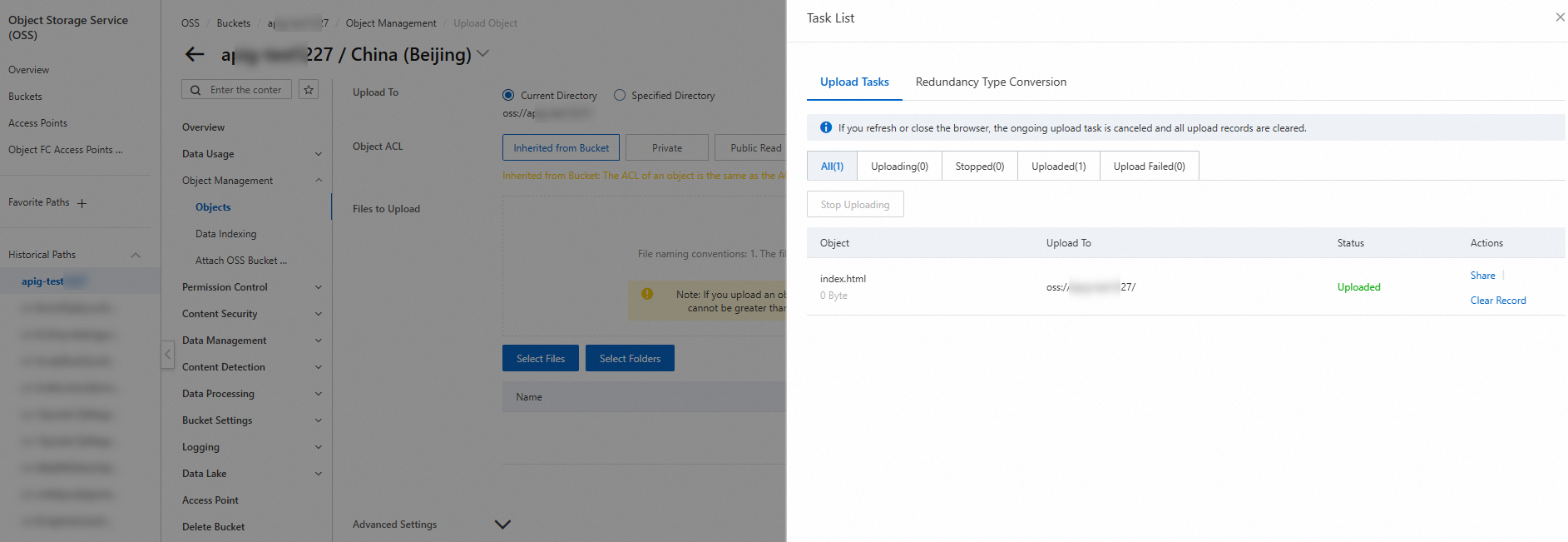
You can view the upload progress of files in the Task List panel. After the file is uploaded, you can view the name, size, and storage class of the uploaded file in the destination directory.
(Optional) Step 2: Configure the default homepage
If you want the static page index.html to be returned when you access the root path / of the service domain name example.com, configure the static page as the default homepage in the destination bucket.
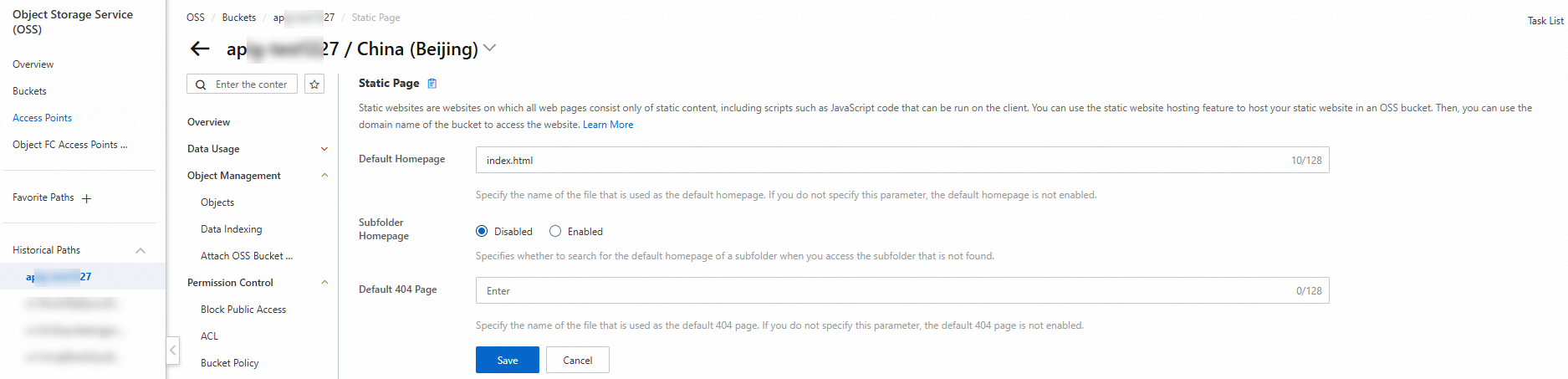
If you want the default page 404 to be returned when you access a non-existent static file, upload the 404.html page to the bucket. You also need to configure the 404 page in the static page.
<html>
   <head>
       <title>The page you visited does not exist</title>
       <meta charset="utf-8">
   </head>
   <body>
       <p>The page you visited does not exist.</p>
       <p>You can try to visit the homepage.</p>
   </body>
 </html>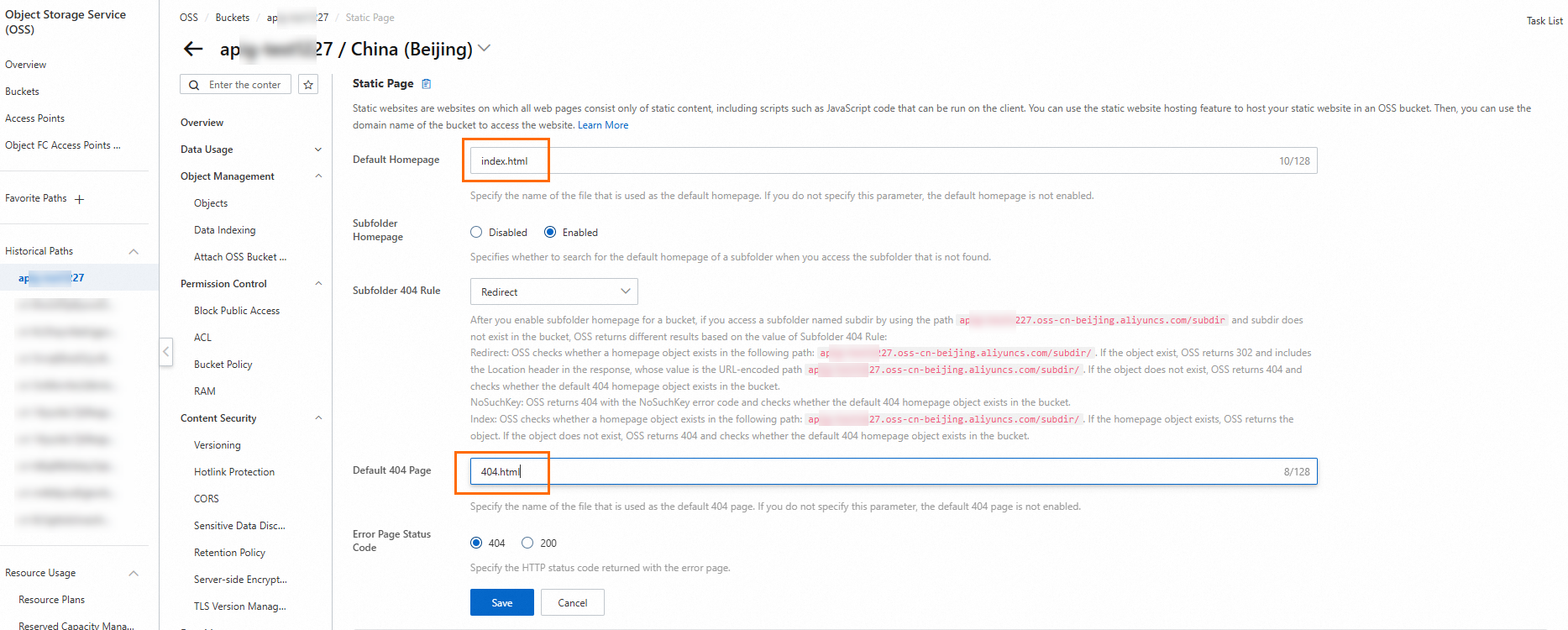
For more information about how to configure the default homepage, see the "Step 2: Configure static website hosting for the examplebucket bucket" section of the Tutorial: Use static website hosting to build a single-page application topic.
Step 3: View the default domain name of the OSS bucket
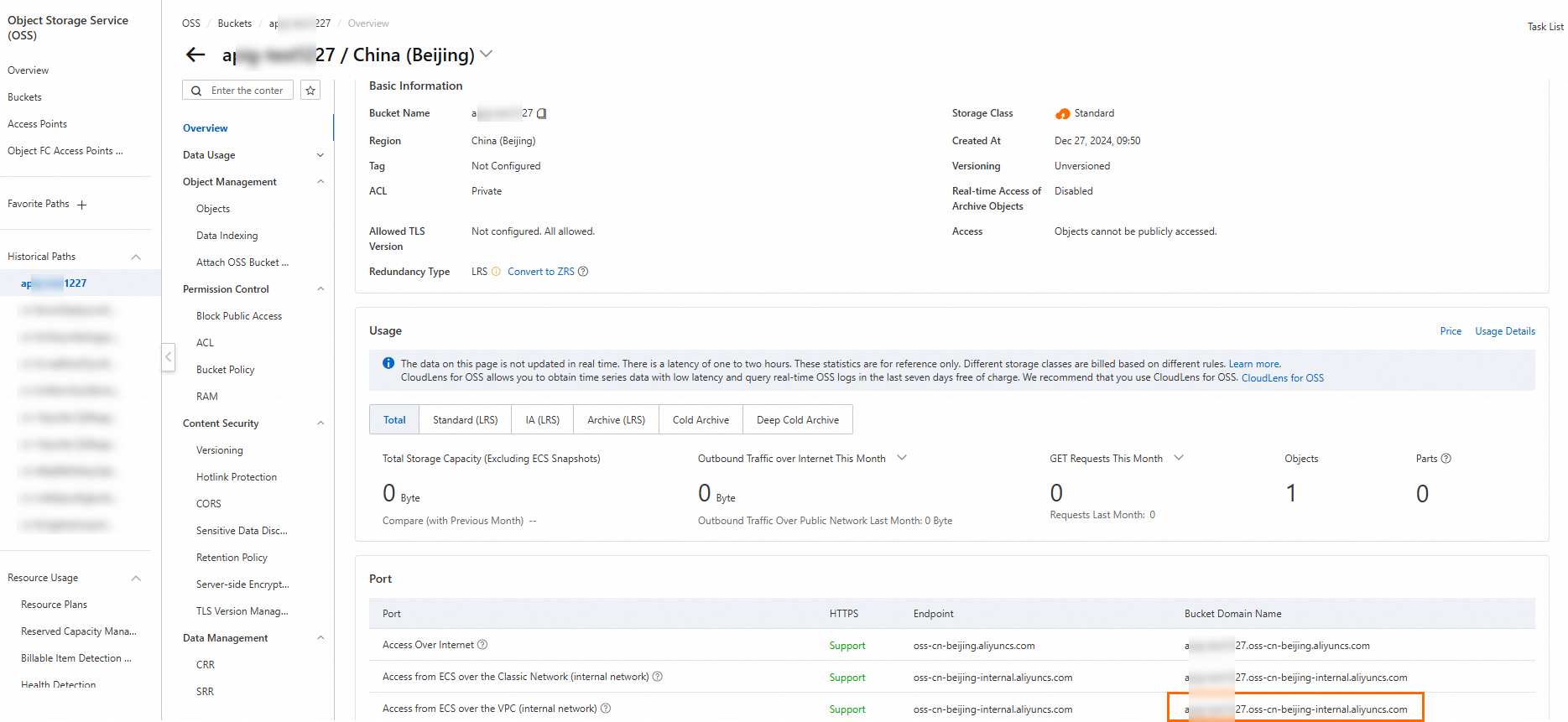
By default, Alibaba Cloud OSS creates a domain name for the bucket that you create. To view the domain name, click the OSS bucket and navigate to the Port section in the Overview panel. For more information, see Access to OSS resources from an ECS instance by using an internal endpoint of OSS.
Step 4: Create a service for the OSS bucket on the Cloud-native API Gateway instance
For the Cloud-native API Gateway instance, the OSS bucket that stores static pages is considered a service. Therefore, you must create a service based on Domain Name System (DNS) service discovery on the Cloud-native API Gateway instance.
Log on to the Cloud-native API Gateway console.
In the left-side navigation pane, click Instance. In the top navigation bar, select a region.
On the Instance page, click the name of the gateway instance that you want to manage.
In the left-side navigation tree, click Service. Then, click the Services tab.
On the Services tab, click Create Service. In the Create Service panel, configure parameters and click OK.
Parameter
Description
Service Source
Select DNS Domain Name.
Service Name
Enter a name for the service. The name is the unique identifier of the service. In this example, the service name is
static.Service URL
Enter the service address in the format of domain name:port. In this example,
xxx-static-demo.oss-cn-hangzhou-internal.aliyuncs.com:80is used, which is the internal domain name of the OSS bucket in Step 3.TLS Mode
Select Disable.
Step 5: Create a route for the static page on the Cloud-native API Gateway instance
Create an HTTP API. For more information, see Create an HTTP API.
Click the target API and click Create Route in the upper-left corner.
In the Create Route panel, create a route whose matching rule is Prefix, path is
/, and destination service isstatic. For more information, see Create a route.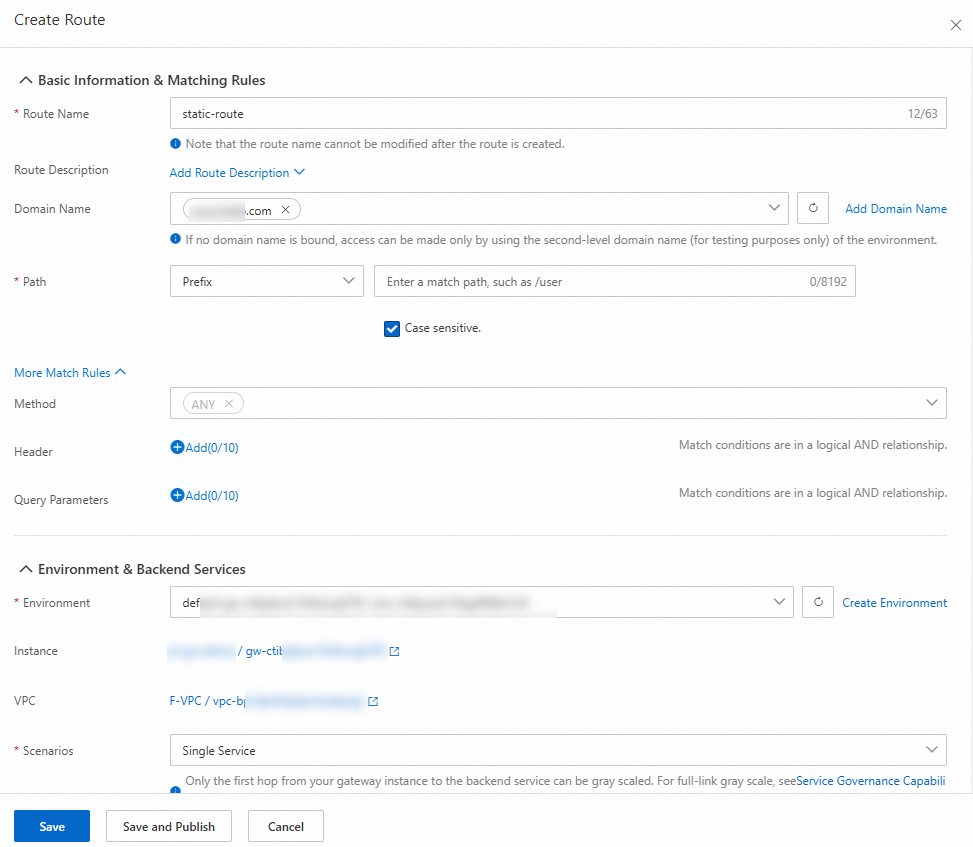
Click the name of the created route. On the route details page, click the Configure Policy tab. In the left-side navigation pane of the Configure Policy tab, click Rewrite to add a rewrite policy for the route. Enter the internal domain name
xxx-static-demo.oss-cn-hangzhou-internal.aliyuncs.comof the OSS bucket in the Destination Host field, and click Save. After the rewrite policy is enabled, the Cloud-native API Gateway instance rewrites the path and host of a request based on the configured rewrite policy when the Cloud-native API Gateway instance forwards the request to the backend service. For more information, see Configure a rewrite policy.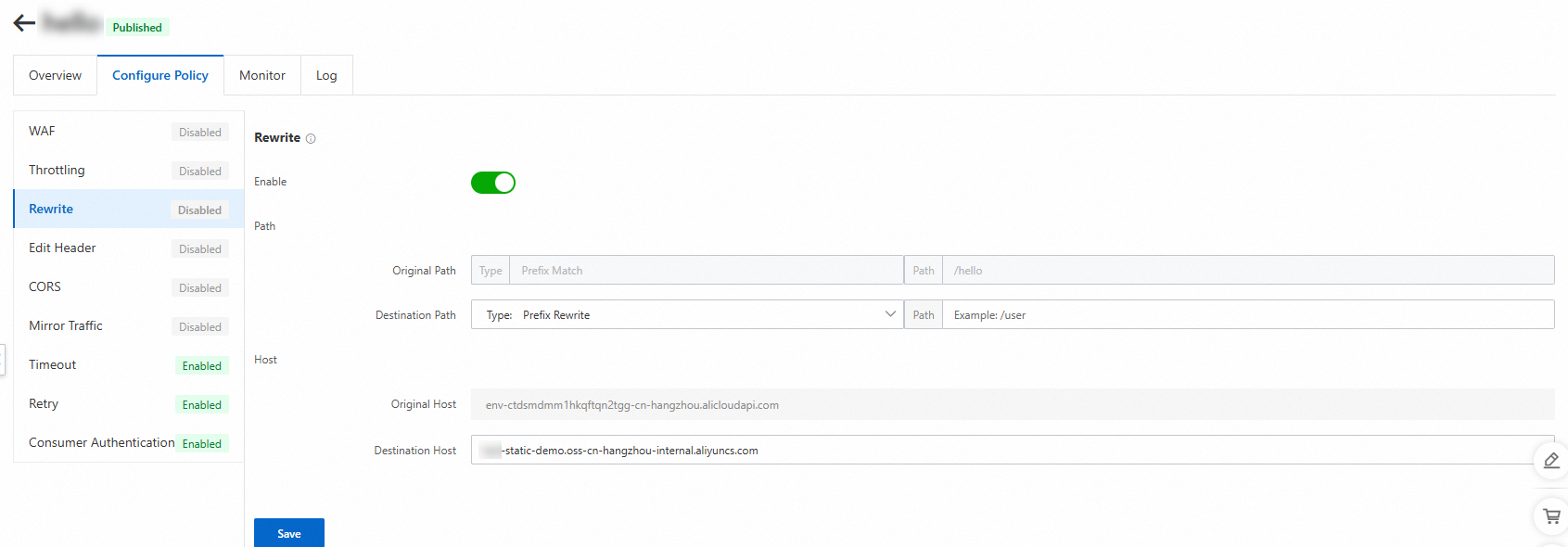
In the left-side navigation pane of the Policies tab, click Edit Header. Add a policy of deleting the content-disposition header from OSS responses and enable the policy. The Cloud-native API Gateway instance manages the headers in requests or responses. For more information, see Configure a header setting policy.
Step 6: Perform access testing
In this example, the service domain name is example.com. In the address bar of a web browser, enter example.com, example.com/index.html, and example.com/test separately, and check the returned static pages.
After you enter example.com in the address bar of a web browser, you are redirected to the index.html page because the index.html page is configured as the default homepage in the OSS bucket in Step 2.
You can also directly access the index.html page. After you enter example.com/index.html in the address bar of a web browser, you are redirected to the index.html page.
For a non-existent page named test, after you enter example.com/test in the address bar of a web browser, you are redirected to the 404.html page that is uploaded to the OSS bucket.