An AnalyticDB for PostgreSQL instance organizes data across a hierarchy of objects: an instance contains multiple databases, each database contains one or more schemas, and each schema contains tables, indexes, views, sequences, and other objects. The full hierarchy is: instance → database → schema → table/index/view/sequence.
The following figure illustrates this hierarchy.

Databases
Each AnalyticDB for PostgreSQL instance can contain multiple databases.
To list all databases in psql, run:
\lSample output:
                                  List of databases
   Name    |   Owner    | Encoding |  Collate   |   Ctype    |       Access privileges
-----------+------------+----------+------------+------------+-------------------------------
 diskquota | xiaoxia.zj | UTF8     | en_US.utf8 | en_US.utf8 |
 postgres  | xiaoxia.zj | UTF8     | en_US.utf8 | en_US.utf8 |
 template0 | xiaoxia.zj | UTF8     | en_US.utf8 | en_US.utf8 | =c/"xiaoxia.zj"              +
           |            |          |            |            | "xiaoxia.zj"=CTc/"xiaoxia.zj"
 template1 | xiaoxia.zj | UTF8     | en_US.utf8 | en_US.utf8 | =c/"xiaoxia.zj"              +
           |            |          |            |            | "xiaoxia.zj"=CTc/"xiaoxia.zj"
 zj        | xiaoxia.zj | UTF8     | en_US.utf8 | en_US.utf8 |
Schemas
A schema is a named namespace within a database. Each schema contains tables and other objects such as data types, functions, and operators. Use schemas to:
Let multiple users or teams share one database without object name conflicts.
Organize objects into logical groups for easier management.
Isolate third-party application objects from your own.
To create a schema, run:
CREATE SCHEMA myschema;When creating or querying a table in a specific schema, use the schemaName.tableName format:
CREATE TABLE myschema.mytable (···)···;
SELECT * FROM myschema.mytable;
The search_path parameter controls which schemas are searched when you reference an object without a schema prefix. The first schema in the list is the default. If search_path is not set, the schema named public is used.
To change the default schema for a database, run:
ALTER DATABASE mydatabase SET search_path TO myschema;Tables, indexes, and views
AnalyticDB for PostgreSQL organizes data in tables the same way relational databases do. It also supports indexes, views, and sequences. For details on these objects, see the official PostgreSQL documentation.
Tablespaces
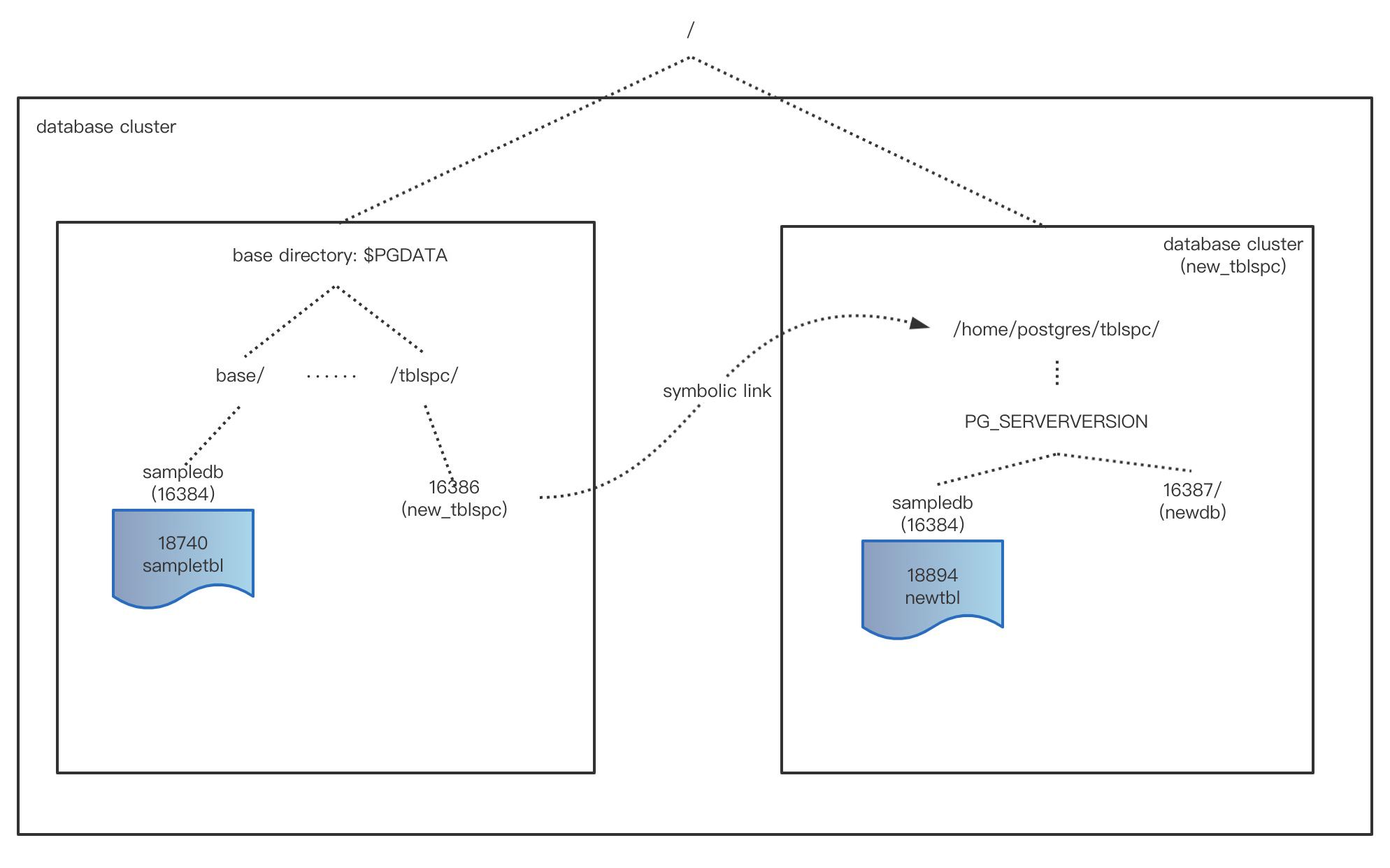
A tablespace maps a name to a physical location on the file system, letting you control where data files for database objects are stored. Tablespaces are useful for performance optimization: place frequently accessed tables or indexes on fast storage such as SSDs, and move less critical data to conventional disks.
Logically, different tablespaces are used to store different database objects. For example, you can store different databases in different tablespaces to differentiate their physical locations.
The following figure illustrates how databases and tablespaces relate.
To list databases and their associated tablespaces in psql, run:
\l+Sample output:
 diskquota | xiaoxia.zj | UTF8     | en_US.utf8 | en_US.utf8 |                               | 69 MB   | pg_default |
 postgres  | xiaoxia.zj | UTF8     | en_US.utf8 | en_US.utf8 |                               | 72 MB   | pg_default | default administrative connection database
 template0 | xiaoxia.zj | UTF8     | en_US.utf8 | en_US.utf8 | =c/"xiaoxia.zj"              +| 69 MB   | pg_default | unmodifiable empty database
           |            |          |            |            | "xiaoxia.zj"=CTc/"xiaoxia.zj" |         |            |
 template1 | xiaoxia.zj | UTF8     | en_US.utf8 | en_US.utf8 | =c/"xiaoxia.zj"              +| 69 MB   | pg_default | default template for new databases
           |            |          |            |            | "xiaoxia.zj"=CTc/"xiaoxia.zj" |         |            |
 zj        | xiaoxia.zj | UTF8     | en_US.utf8 | en_US.utf8 |                               | 1062 MB | pg_default |
To create a table in a specific tablespace, you need the CREATE privilege on that tablespace. Then run:
CREATE TABLE tablename (options) TABLESPACE spacename;