AnalyticDB for PostgreSQL provides the resource group management feature. You can use the feature to associate resource groups with database accounts. You can also configure resource group settings, such as the maximum number of concurrent transactions, CPU utilization, and memory percentage, to achieve resource scalability and accelerate queries.
Limits
For AnalyticDB for PostgreSQL V6.0 instances of V6.6.1.0 or later or AnalyticDB for PostgreSQL V7.0 instances of V7.0.6.3 or later, you can switch the resource management method from resource queue management to resource group management in the AnalyticDB for PostgreSQL console.
For AnalyticDB for PostgreSQL V6.0 instances earlier than V6.6.1.0 or AnalyticDB for PostgreSQL V7.0 instances earlier than V7.0.6.3, you must submit a ticket to switch the resource management method from resource queue management to resource group management.
For information about how to view the minor version of an AnalyticDB for PostgreSQL instance, see View the minor version of an instance.
Introduction to resource groups
AnalyticDB for PostgreSQL allows you to use resource groups to manage database resources. Compared with resource queue management, resource group management supports more resource categories and manages resources in a finer-grained manner. Resource group management and resource queue management cannot be used at the same time. After you enable the resource group management feature, the resource queue management feature is automatically disabled. For more information about the resource queue management feature, see Use resource queues to perform workload management.
When you use resource groups to manage resources, you can associate a resource group with one or more database accounts and configure settings, such as CPU utilization, memory percentage, and concurrency, for each resource group. This way, you can manage the queries that are submitted by the database accounts associated with each resource group. The SET, RESET, and SHOW statements are not affected by the resource group settings.
Resource groups of AnalyticDB for PostgreSQL V6.0
The following table describes the parameters of the resource categories supported by AnalyticDB for PostgreSQL V6.0.
Parameter | Description | Value |
CONCURRENCY | The maximum number of concurrent transactions or parallel queries that are allowed for a resource group. | Optional. Default value: 50. Valid values: 1 to the value of the max_connections parameter. For information about the max_connections parameter, see Performance parameter optimization. |
CPU_RATE_LIMIT | The percentage of CPU resources that can be allocated to a resource group when multiple resource groups compete for CPU resources. | Required. No default value. Valid values: 0 to 100 The sum of the values for all resource groups cannot exceed 100. |
MEMORY_LIMIT | The percentage of the total memory that can be reserved for a resource group. For more information, see the "Memory management of V6.0 resource groups" section of this topic. | Optional. Default value: 0. Valid values: 0 to 100 The sum of the values for all resource groups cannot exceed 100. |
MEMORY_SHARED_QUOTA | The percentage of shared memory to all memory in a resource group. For more information, see the "Memory management of V6.0 resource groups" section of this topic. | Optional. Default value: 80. Valid values: 0 to 100. |
MEMORY_SPILL_RATIO | The memory spill ratio, which specifies the percentage of memory that is used for memory-sensitive transactions. | Optional. Default value: 0. Valid values: 0 to 100. |
Memory management of V6.0 resource groups
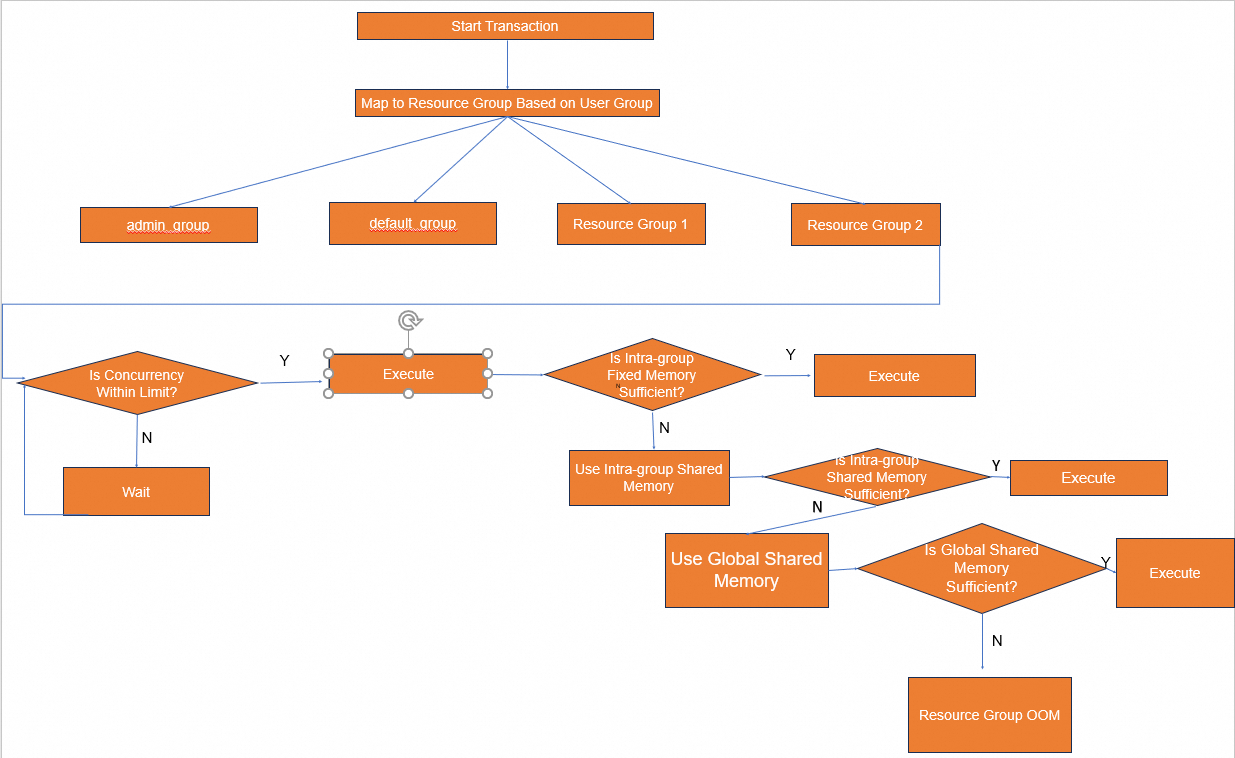
The system reserves memory resources for resource groups based on the memory_limit parameter that you specify for each resource group. If the sum of the values of the memory_limit parameter of all resource groups is less than 100, the system stores the remaining memory that is not reserved for resource groups to a memory pool for global sharing. If necessary, the system allocates the global shared memory to transactions in a first-in first-out (FIFO) manner.
Within the memory pool of each resource group, the system configures the fixed memory quota and the shared memory quota based on the MEMORY_SHARED_QUOTA parameter that you specify. If you set the MEMORY_SHARED_QUOTA parameter to 100 for a resource group, all memory in the resource group is considered as shared memory and can be used for all jobs. If you set the MEMORY_SHARED_QUOTA parameter to a value that is less than 100 for a resource group, the system divides the resource group memory into the fixed memory and the shared memory based on the parameter. The fixed memory is assigned to each job, and the shared memory can be shared by all jobs.

When AnalyticDB for PostgreSQL performs memory management on resource groups, the memory pool of host resources is divided into the intra-group fixed memory, intra-group shared memory, and global shared memory. To perform a query, the system uses the intra-group fixed memory first. If the intra-group fixed memory is insufficient, the system applies for the intra-group shared memory. If the intra-group shared memory is insufficient, the system applies for the global shared memory. If the global shared memory is insufficient, the system returns an out-of-memory (OOM) error and terminates the query.

If a query meets all the following conditions, the query fails due to insufficient memory:
No intra-group shared memory is available.
No global shared memory is available.
The query requests for additional memory.

In actual scenarios, we recommend that you use the intra-group fixed memory to support most queries. This way, a large number of queries can be concurrently performed during traffic spikes. If a large amount of memory is required to perform queries, sufficient shared memory can be used.
Concurrency management of V6.0 resource groups
When the number of queries that enter a resource group reaches the value of the CONCURRENCY parameter, new queries must wait in queues. Queued queries are managed in a FIFO manner.
If a query must wait because the value of the CONCURRENCY parameter is reached, the query is in the waiting state and the value of the waiting_reason field is displayed as group when you query the pg_stat_activity view.
CPU management of V6.0 resource groups
AnalyticDB for PostgreSQL allows you to manage the CPU allocation rate for resource groups. The system allocates CPU time slices based on the CPU_RATE_LIMIT parameter that you specify for each resource group. If you set the CPU_RATE_LIMIT parameter to a higher value for a resource group, the resource group can obtain more CPU time slices to execute jobs. If you set the CPU_RATE_LIMIT parameter to a lower value for a resource group, the resource group can use less CPU resources. The resource group management feature also supports CPU preemption. If only one of the resource groups is running jobs, the resource group can use all CPU resources.
If two resource groups are both busy, the resource group for which you set the CPU_RATE_LIMIT parameter to 40 can obtain twice the CPU resources of the resource group for which you set the CPU_RATE_LIMIT parameter to 20.
If no queries are performed by the resource group for which you set the CPU_RATE_LIMIT parameter to 40, the resource group for which you set the CPU_RATE_LIMIT parameter to 20 can use nearly all CPU resources.
Disk spilling management of V6.0 resource groups
AnalyticDB for PostgreSQL allows you to manage the memory spill ratio for resource groups. When AnalyticDB for PostgreSQL executes memory-intensive operators, a large number of intermediate temporary results may be generated and spilled to disks. You can modify the MEMORY_SPILL_RATIO parameter to increase or decrease the spill amount. The MEMORY_SPILL_RATIO parameter applies only to operation types that generate a large number of intermediate temporary results. The operations that do not spill execution results to disks continue to occupy memory even when the memory usage exceeds the upper limit.
If the value of the MEMORY_SPILL_RATIO parameter is greater than 0, the memory spill ratio is determined by the MEMORY_SPILL_RATIO parameter. When the memory that is used for memory-sensitive transactions reaches this value, data is spilled to disks.
If the value of the MEMORY_SPILL_RATIO parameter is 0, the memory spill ratio is determined by the statement_mem parameter. For more information about the statement_mem parameter, see Performance parameter optimization.
If memory is insufficient to process heavy workloads, decrease the value of the MEMORY_SPILL_RATIO parameter for the involved resource group to spill the execution results of memory-intensive operators such as HashAgg, Join, and Sort to disks and reduce memory usage. If memory is sufficient to process small workloads, increase the value of the MEMORY_SPILL_RATIO parameter for the involved resource group to allow more operators to be executed in the memory and improve query efficiency.
Resource groups of AnalyticDB for PostgreSQL V7.0
The following table describes the parameters of the resource categories supported by AnalyticDB for PostgreSQL V7.0.
Parameter | Description | Value |
CONCURRENCY | The maximum number of concurrent transactions or parallel queries that are allowed for a resource group. When the number of queries that enter a resource group reaches the value of this parameter, new queries must wait in queues. No limit is imposed on the maximum number of queries in a queue. Queued queries are managed in a FIFO manner. | Optional. Default value: 50. Valid values: 1 to the value of the max_connections parameter. For information about the max_connections parameter, see Performance parameter optimization. |
CPU_MAX_PERCENT | The maximum CPU utilization of a resource group. | Required. No default value. Valid values: 0 to 100 The sum of the values for all resource groups can exceed 100. |
CPU_WEIGHT | The weight of CPU resources that can be allocated to a resource group. | Optional. Default value: 50. Valid values: 0 to 500. |
MEMORY_LIMIT | The maximum memory that can be used by a resource group. The value must be an integer. Unit: MB. | Optional. Default value: -1, which specifies that the maximum memory that can be used by a query is the value of the statement_mem parameter. If you set the MEMORY_LIMIT parameter to a value other than -1, the maximum memory that can be used by a query is the result of the MAX(MEMORY_LIMIT/CONCURRENCY, statement_mem) function. Value values: 0 to the value of the gp_vmem_protect_limit parameter (both exclusive). For information about the statement_mem and gp_vmem_protect_limit parameters, see Performance parameter optimization. |
MIN_COST | The minimum optimizer cost threshold of a resource group. If the optimizer cost is lower than the value of the parameter specified for a resource group, the optimizer uses the global resources instead of being limited by the resource group. | Optional. Default value: 0, which specifies that the minimum optimizer cost threshold does not impose limits on the resource allocation within the resource group. Valid values: 0 to 2147483647. |
Concurrency management of V7.0 resource groups
When the number of queries that enter a resource group reaches the value of the CONCURRENCY parameter, new queries must wait in queues. Queued queries are managed in a FIFO manner.
If a query must wait because the value of the CONCURRENCY parameter is reached, the value of the wait_event_type field is displayed as ResourceGroup when you query the pg_stat_activity view.
If a large number of queries are waiting in a resource group because the value of the CONCURRENCY parameter is reached, you must appropriately increase the concurrency capability of the resource group to ensure query performance.
Memory management of V7.0 resource groups
AnalyticDB for PostgreSQL V7.0 uses the MEMORY_LIMIT, statement_mem, and gp_resgroup_memory_query_fixed_mem parameters to manage the memory usage of resource groups.
If the gp_resgroup_memory_query_fixed_mem parameter is set to a value greater than 0, the maximum memory that can be used by a query is the value of the parameter.
If the gp_resgroup_memory_query_fixed_mem parameter is set to the default value 0, resource groups use the statement_mem and MEMORY_LIMIT parameters to determine the maximum memory that can be used by a query.
If the MEMORY_LIMIT parameter of the resource group is set to -1, the maximum memory that can be used by a query within the resource group is the value of the statement_mem parameter.
If the MEMORY_LIMIT parameter of the resource group is set to a value greater than -1, the maximum memory that can be used by a query within the resource group is the result of the MAX(MEMORY_LIMIT/CONCURRENCY, statement_mem) function. For example, the MEMORY_LIMIT parameter of the etl resource group is set to 2.0 GB and the CONCURRENCY parameter of the resource group is set to 5. By default, a query can use 400 MB of memory. Take note of the following scenarios:
If the etl1 user submits a query and sets the session-level gp_resgroup_memory_query_fixed_mem parameter to 800 MB and the statement_mem parameter to 900 MB, the query can use up to 800 MB of memory.
If the etl2 user submits a query, leaves the session-level gp_resgroup_memory_query_fixed_mem parameter empty, and sets the statement_mem parameter to 300 MB, the query is submitted to the system and occupies 400 MB of memory because 300 MB is less than the default memory of a query (400 MB).
If the etl3 user submits a query, leaves the session-level gp_resgroup_memory_query_fixed_mem parameter empty, and sets the statement_mem parameter to 700 MB, the query is submitted to the system and occupies 700 MB of memory because 700 MB is greater than the default memory of a query (400 MB).
CPU management of V7.0 resource groups
AnalyticDB for PostgreSQL V7.0 uses the CPU_MAX_PERCENT parameter to manage the maximum CPU utilization of each resource group, and uses the CPU_WEIGHT parameter to manage the CPU allocation rate of each resource group. The system allocates CPU time slices based on the CPU_WEIGHT parameter of each resource group and ensures that the CPU utilization of each resource group does not exceed the value of the CPU_MAX_PERCENT parameter.
For example, the CPU_MAX_PERCENT parameter of the rg1 resource group is set to 30 and the CPU_WEIGHT parameter of the rg1 resource group is set to 100. The CPU_MAX_PERCENT parameter of the rg2 resource group is set to 60 and the CPU_WEIGHT parameter of the rg2 resource group is set to 50.
If only the rg1 resource group has active queries, the CPU utilization of the rg1 resource group can reach 30%, and the CPU utilization of the rg2 resource group can reach 60%.
If the rg1 and rg2 resource groups have active queries, the system allocates CPU time slices based on 100:50 until the CPU utilization of a resource group reaches the value of the CPU_MAX_PERCENT parameter of the resource group. For example, when the CPU utilization of the rg1 resource group reaches 30%, the system preferentially allocates CPU time slices to the rg2 resource group to ensure that the CPU utilization of the rg1 resource group does not exceed 30%.
Enable the resource group management feature
Enable or disable the resource group management feature in the AnalyticDB for PostgreSQL console
For AnalyticDB for PostgreSQL V6.0 instances of V6.6.1.0 or later, you can enable or disable the resource group management feature in the AnalyticDB for PostgreSQL console. This operation switches the resource management method from resource queue management to resource group management. During the switchover, the AnalyticDB for PostgreSQL instance restarts and becomes unavailable for approximately 5 minutes. To prevent your business from being affected, enable or disable the resource group management feature during off-peak hours. Perform the following steps:
- Log on to the AnalyticDB for PostgreSQL console.
- In the upper-left corner of the console, select a region.
- Find the instance that you want to manage and click the instance ID.
In the left-side navigation pane, click Workload Management.
Click Enable Resource Group Management. In the message that appears, click OK.
Enable or disable the resource group management feature by submitting a ticket
For AnalyticDB for PostgreSQL V6.0 instances earlier than V6.6.1.0 and AnalyticDB PostgreSQL V7.0 instances, you must submit a ticket to enable or disable the resource group management feature.
For AnalyticDB for PostgreSQL V7.0 instances, you can only execute SQL statements to use resource groups.
After you enable the resource group management feature, the system automatically creates a resource group named default_group. You can choose in the left-side navigation pane and click the Resource Group Monitoring tab to view the monitoring information of all resource groups and the CPU and memory metrics of compute nodes.
Create a resource group
After you enable the resource group management feature, you can create resource groups in the AnalyticDB for PostgreSQL console or by using SQL syntax.
AnalyticDB for PostgreSQL V6.0 reserves the
admin_groupresource group to manage the system workloads of databases.The sum of CPU utilizations and the sum of memory percentages are both 100% for all resource groups within an AnalyticDB for PostgreSQL V6.0 instance. The system reserves 10% of the CPU resources and 10% of memory for the
admin_groupresource group. For all other resource groups, including the created resource groups and thedefault_groupresource group, the sum of CPU utilizations and the sum of memory percentages cannot exceed 90%.AnalyticDB for PostgreSQL V7.0 provides three default resource groups. The
admin_groupandsystem_groupresource groups are used to manage the system workloads of databases, and thedefault_groupresource group is used by other users.
Procedure in the AnalyticDB for PostgreSQL console
On the Workload Management page, click Create Resource Group.
In the Resource Group Settings section, configure the parameters and click Save. For information about the parameter limits, see the "Limits" section of this topic.
SQL syntax
CREATE RESOURCE GROUP <group_name> WITH (group_attribute=value [, ... ])For AnalyticDB for PostgreSQL V6.0, the group_attribute parameter consists of the following fields:
CPU_RATE_LIMIT=integer
MEMORY_LIMIT=integer
[ CONCURRENCY=integer ]
[ MEMORY_SHARED_QUOTA=integer ]
[ MEMORY_SPILL_RATIO=integer ]For AnalyticDB for PostgreSQL V7.0, the group_attribute parameter consists of the following fields:
CPU_MAX_PERCENT=integer
[CPU_WEIGHT=integer ]
[ CONCURRENCY=integer ]
[ MEMORY_LIMIT=integer ]
[ MIN_COST=integer ]View the resource group settings
After you create a resource group, you can view the resource group settings in the AnalyticDB for PostgreSQL console or by using SQL syntax.
Procedure in the AnalyticDB for PostgreSQL console
In the Resource Group Settings section of the Workload Management page, view the settings of all resource groups in the AnalyticDB for PostgreSQL instance.
SQL syntax
Execute the following SQL statement to query the resource group settings:
SELECT * FROM gp_toolkit.gp_resgroup_config;Modify the resource group settings
You can modify the resource group settings in the AnalyticDB for PostgreSQL console or by using SQL syntax.
Procedure in the AnalyticDB for PostgreSQL console
On the Workload Management page, click Edit.
Change the concurrency, CPU utilization, or memory percentage of a resource group based on your business requirements and click Save.
SQL syntax
For AnalyticDB for PostgreSQL V6.0, you can use only privileged accounts to modify the settings of all resource groups except for the admin_group resource group.
ALTER RESOURCE GROUP <group_name>
SET CONCURRENCY|CPU_RATE_LIMIT|MEMORY_LIMIT|MEMORY_SHARED_QUOTA|MEMORY_SPILL_RATIO <value>;Examples:
Change the concurrency of the
testresource group to 30.ALTER RESOURCE GROUP test SET CONCURRENCY 20;Change the CPU utilization of the
test_pg1resource group to 20.ALTER RESOURCE GROUP test_pg1 SET CPU_RATE_LIMIT 20;
For AnalyticDB for PostgreSQL V7.0, you can use only privileged accounts to modify the settings of all resource groups except for the admin_group and system_group resource groups.
ALTER RESOURCE GROUP <group_name>
SET CPU_MAX_PERCENT|CPU_WEIGHT|CONCURRENCY|MEMORY_LIMIT|MIN_COST <value>;Examples:
Change the concurrency of the
testresource group to 30.ALTER RESOURCE GROUP test SET CONCURRENCY 20;Change the maximum CPU utilization of the
test_pg1resource group to 20.ALTER RESOURCE GROUP test_pg1 SET CPU_MAX_PERCENT 20;
Associate a resource group with one or more database accounts
You can associate a resource group with one or more database accounts in the AnalyticDB for PostgreSQL console or by using SQL syntax. For information about how to create a database account, see Create a database account.
Each resource group can be associated with one or more database accounts, but each database account can be associated with only one resource group.
By default, privileged accounts are associated with the
default_groupresource group.If a database account is not associated with a resource group, the database account is associated with the
default_groupresource group.
Procedure in the AnalyticDB for PostgreSQL console
In the Allocate Resource Groups section of the Workload Management page, click the
icon on the card of the resource group that you want to manage. Select a database account from the Role drop-down list and click OK.
SQL syntax
You can associate only privileged database accounts with resource groups. Use one of the following methods to associate a resource group with a database account:
Associate a resource group with an existing database account.
ALTER ROLE <user_name> RESOURCE GROUP <group_name>;When you create a database account, associate a resource group with the database account.
CREATE ROLE <user_name> WITH LOGIN RESOURCE GROUP <group_name>;
Delete a resource group
You can delete a resource group in the AnalyticDB for PostgreSQL console or by using SQL syntax.
Procedure in the AnalyticDB for PostgreSQL console
On the Workload Management page, find the resource group that you want to delete, click Delete in the Actions column, and then click OK.
SQL syntax
You can use only privileged accounts to delete resource groups.
Version | Parameter | Deletable |
AnalyticDB for PostgreSQL V6.0 |
| No |
| No | |
AnalyticDB for PostgreSQL V7.0 |
| No |
| No | |
| No |
DROP RESOURCE GROUP <group_name>;Query the monitoring information of a resource group
V6.0
SELECT * FROM gp_toolkit.gp_resgroup_status;The following table describes the metrics.
Field | Description |
rsgname | The name of the resource group. |
groupid | The ID of the resource group. |
num_running | The number of running queries. |
num_queueing | The number of queuing queries. |
num_queued | The total number of queued queries in the resource group. |
num_executed | The total number of executed queries in the resource group. |
total_queue_duration | The total queue duration of the resource group. Unit: seconds. |
cpu_usage | The CPU utilization of the resource group on each compute node. |
memory_used | The total amount of memory that is used by the resource group. Unit: MB. |
memory_available | The total amount of memory that can be used by the resource group. Unit: MB. |
memory_quota_used | The total amount of memory that is used by the fixed memory portion of the resource group. Unit: MB. |
memory_quota_available | The total amount of memory that can be used by the fixed memory portion of the resource group. Unit: MB. |
memory_quota_granted | The total amount of memory that is allocated to the fixed memory portion of the resource group. Unit: MB. |
memory_shared_used | The total amount of memory that is used by the shared memory portion of the resource group. Unit: MB. |
memory_shared_available | The total amount of memory that can be used by the shared memory portion of the resource group. Unit: MB. |
memory_shared_granted | The total amount of memory that is allocated to the shared memory portion of the resource group. Unit: MB. |
V7.0
Query the queue duration and the number of queued transactions
SELECT * FROM gp_toolkit.gp_resgroup_status;The following table describes the metrics.
Field | Description |
groupid | The ID of the resource group. |
groupname | The name of the resource group. |
num_running | The number of running transactions in the resource group. |
num_queueing | The number of queuing transactions in the resource group. |
num_queued | The number of queued transactions in the resource group. |
num_executed | The number of executed transactions in the resource group. |
total_queue_duration | The total queue duration of the resource group. Unit: seconds. |
Query the CPU utilization and the memory used
SELECT * FROM gp_toolkit.gp_resgroup_status_per_host;The following table describes the metrics.
Field | Description |
groupid | The ID of the resource group. |
groupname | The name of the resource group. |
hostname | The name of the host. |
cpu_usage | The CPU utilization. Unit: %. |
memory_usage | The total amount of memory that is used by the resource group on the compute node. Unit: MB. |
Disable the resource group management feature
If you want to switch the resource management method to resource queue management, you can disable the resource group management feature in the AnalyticDB for PostgreSQL console. During the disabling process, the AnalyticDB for PostgreSQL instance restarts and becomes unavailable for approximately 5 minutes. To prevent your business from being affected, disable the resource group management feature during off-peak hours. Perform the following steps:
Log on to the AnalyticDB for PostgreSQL console.
In the upper-left corner of the console, select a region.
Find the instance that you want to manage and click the instance ID.
In the left-side navigation pane, click Workload Management. On the page that appears, click Disable Resource Group Management.