AnalyticDB for MySQL supports vector search on unstructured data using standard SQL. Store feature vectors alongside structured columns, create an approximate nearest neighbor (ANN) index, and run similarity queries with L2_DISTANCE—no separate vector database required.
Prerequisites
Your cluster must run kernel version 3.1.4.0 or later.
The vector index feature is more stable on clusters that run kernel version 3.1.5.16, 3.1.6.8, 3.1.8.6, or a later version.
If your cluster is not running one of the stable versions listed, set the CSTORE_PROJECT_PUSH_DOWN and CSTORE_PPD_TOP_N_ENABLE parameters to false before you use the vector index feature.
Before you begin, make sure you have:
An AnalyticDB for MySQL cluster running V3.1.4.0 or later
(Recommended) Minor version 3.1.5.16, 3.1.6.8, 3.1.8.6, or later for optimal vector search performance
If your cluster is not on one of the recommended minor versions, set the CSTORE_PROJECT_PUSH_DOWN and CSTORE_PPD_TOP_N_ENABLE parameters to false before using vector search. To check your minor version, see How do I query the version of an AnalyticDB for MySQL cluster? To upgrade the minor version, contact technical support.
How it works
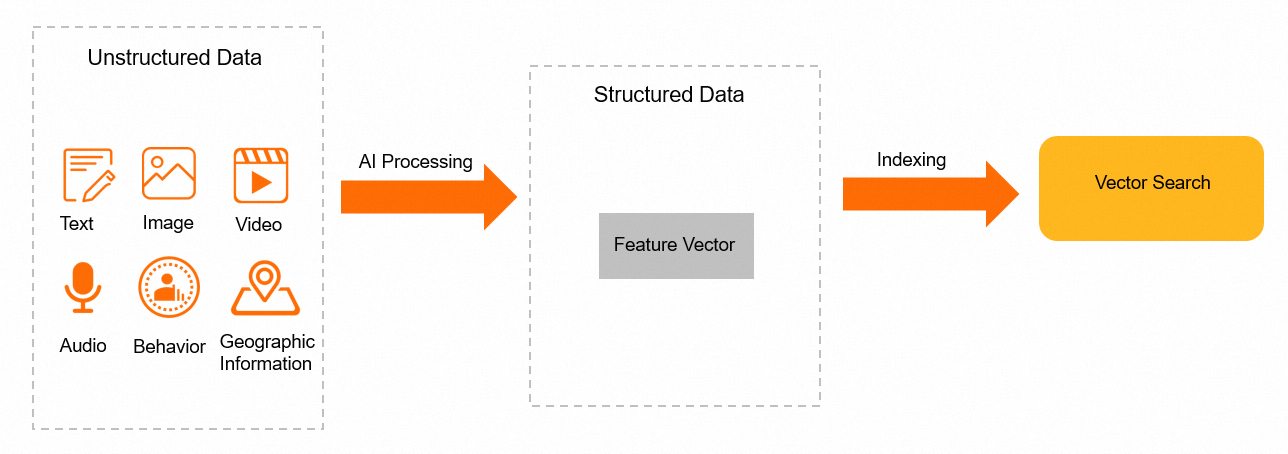
Use an AI model to extract features from your unstructured data and encode them as fixed-length float arrays (feature vectors). Store those vectors in AnalyticDB for MySQL alongside your structured columns.
At query time, pass a query vector to L2_DISTANCE. The database computes the squared Euclidean distance between the query vector and each stored vector, then returns the closest matches. A smaller distance means greater similarity.
The full workflow:
Create a table with one or more vector columns (
ARRAY<FLOAT>,ARRAY<BYTE>, orARRAY<SMALLINT>).Add an ANN index on each vector column—at table creation time or with
ALTER TABLE.Insert rows, including the vector values.
Query with
L2_DISTANCEandORDER BY … LIMIT(k-nearest neighbor) or add a distance threshold inWHERE(radius nearest neighbor).
Key concepts
| Term | Definition |
|---|---|
| Feature vector | A fixed-length numeric array that represents an entity in vector space. Distance between two vectors measures their similarity. For example, a 512-dimensional float array can represent a human face. |
| Vector index (ANN INDEX) | A specialized index that accelerates approximate nearest-neighbor search on vector columns. |
| k-nearest neighbor (KNN) | Returns the *k* rows whose vectors are closest to a query vector. Use ORDER BY l2_distance(...) LIMIT k. |
| Radius nearest neighbor (RNN) | Returns all rows whose vectors fall within a specified distance of a query vector. Use WHERE l2_distance(...) < threshold. |
| L2_DISTANCE | The SQL function for squared Euclidean distance: (x₁−y₁)² + (x₂−y₂)² + … + (xₙ−yₙ)². A lower value means vectors are more similar. |
Scenarios
AnalyticDB for MySQL vector analysis is typically used in the following scenarios:
Image search: Search for similar images using an image.
Voiceprint matching: Search for similar audio using an audio file.
Text search: Search for similar text using a text string.
Product image search: Search many images to find ones that contain the same product.
Vector analysis modes
AnalyticDB for MySQL vector analysis supports two modes: lossless and slightly lossy. The appropriate mode depends on your scenario. The lossless mode guarantees a 100% data recall rate. In the slightly lossy mode, AnalyticDB for MySQL builds an index for the vectors. This indexing causes a slight decrease in the recall rate but ensures it remains at 99% or higher. Refer to the following table to select the appropriate mode for your business scenario.
Scenario | Data volume | QPS | Vector analysis mode | Data recall rate |
| Millions | 100 QPS | Lossless mode | 100% |
| Hundreds of millions | 1,000 QPS | Slightly lossy mode | 99% |
Archive database | Millions | 100 QPS | Slightly lossy mode | 99% |
Create a table with a vector index
Define vector columns as ARRAY<FLOAT>, ARRAY<BYTE>, or ARRAY<SMALLINT> and add ANN INDEX declarations in the same CREATE TABLE statement.
Syntax:
ANN INDEX [index_name] (column_name) [algorithm=HNSW_PQ] [distancemeasure=SquaredL2]| Parameter | Description |
|---|---|
index_name | Name of the index. See Naming limits. |
column_name | Name of the vector column. Supported data types: ARRAY<FLOAT>, ARRAY<BYTE>, ARRAY<SMALLINT>. See Naming limits. |
algorithm | Set to HNSW_PQ (hierarchical navigable small world with product quantization). This is the only supported algorithm. |
distancemeasure | Set to SquaredL2 (squared Euclidean distance). This is the only supported distance metric. Formula: (x₁−y₁)² + (x₂−y₂)² + … + (xₙ−yₙ)². |
Example:
The following statement creates a table named vector with two indexed vector columns: float_feature (ARRAY<FLOAT>, 4-dimensional) and short_feature (ARRAY<SMALLINT>, 4-dimensional).
CREATE TABLE vector (
  xid bigint not null,
  cid bigint not null,
  uid varchar not null,
  vid varchar not null,
  wid varchar not null,
  float_feature array < float >(4),
  short_feature array < smallint >(4),
  ANN INDEX idx_short_feature(short_feature),
  ANN INDEX idx_float_feature(float_feature),
  PRIMARY KEY (xid, cid, vid)
) DISTRIBUTED BY HASH(xid);
Add a vector index to an existing table
Use ALTER TABLE to add an ANN index to a column in an existing table.
Syntax:
ALTER TABLE table_name ADD ANN INDEX [index_name] (column_name) [algorithm=HNSW_PQ] [distancemeasure=SquaredL2]Example:
Given the table below (created without ANN indexes):
CREATE TABLE vector (
  xid BIGINT not null,
  cid BIGINT not null,
  uid VARCHAR not null,
  vid VARCHAR not null,
  wid VARCHAR not null,
  float_feature array < FLOAT >(4),
  short_feature array < SMALLINT >(4),
  PRIMARY KEY (xid, cid, vid)
) DISTRIBUTED BY HASH(xid);
Add indexes on both vector columns:
ALTER TABLE vector ADD ANN INDEX idx_float_feature(float_feature);
ALTER TABLE vector ADD ANN INDEX idx_short_feature(short_feature);
ALTER TABLE table_name ADD ANN INDEX [index_name] (column_name) [algorithm=HNSW_PQ ] [distancemeasure=SquaredL2]Query vector data
All examples below use L2_DISTANCE to rank rows by similarity to a query vector.
Insert sample data:
INSERT into vector (xid,cid,uid,vid,wid,short_feature,float_feature) VALUES (1,2,'A','B','C','[1,1,1,1]','[1.2,1.5,2,3.0]');
INSERT into vector (xid,cid,uid,vid,wid,short_feature,float_feature) VALUES (2,1,'e','v','f','[2,2,2,2]','[1.5,1.15,2.2,2.7]');
INSERT into vector (xid,cid,uid,vid,wid,short_feature,float_feature) VALUES (0,6,'d','f','g','[3,3,3,3]','[0.2,1.6,5,3.7]');
INSERT into vector (xid,cid,uid,vid,wid,short_feature,float_feature) VALUES (5,4,'j','b','h','[4,4,4,4]','[1.0,4.15,6,2.9]');
INSERT into vector (xid,cid,uid,vid,wid,short_feature,float_feature) VALUES (8,5,'Sj','Hb','Dh','[5,5,5,5]','[1.3,4.5,6.9,5.2]');
INSERT into vector (xid,cid,uid,vid,wid,short_feature,float_feature) VALUES (5,4,'x','g','h','[3,4,4,4]','[1.0,4.15,6,2.9]');
INSERT into vector (xid,cid,uid,vid,wid,short_feature,float_feature) VALUES (5,4,'j','r','k','[6,6,4,4]','[1.0,4.15,6,2.9]');
INSERT into vector (xid,cid,uid,vid,wid,short_feature,float_feature) VALUES (5,4,'s','i','q','[2,2,4,4]','[1.0,4.15,6,2.9]');
KNN: return the top k nearest neighbors
Return the 3 rows in short_feature closest to [1,1,1,1]:
SELECT xid, l2_distance(short_feature, '[1,1,1,1]') as dis FROM vector ORDER BY 2 LIMIT 3;Result:
+-------+--------------+
| xid   |   dis        |
+-------+--------------+
| 1     |   0.0        |
+-------+--------------+
| 2     |   4.0        |
+-------+--------------+
| 0     |   16.0       |
+-------+--------------+
KNN with a structured filter
Return the 4 closest rows where xid = 5 and cid = 4:
SELECT uid, l2_distance(short_feature, '[1,1,1,1]') as dis FROM vector WHERE xid = 5 AND cid = 4 ORDER BY 2 LIMIT 4;Result:
+-------+--------------+
| uid   |   dis        |
+-------+--------------+
| s     |   20.0       |
+-------+--------------+
| x     |   31.0       |
+-------+--------------+
| j     |   36.0       |
+-------+--------------+
| j     |   68.0       |
+-------+--------------+
RNN: filter by distance threshold
Return up to 3 rows where distance is less than 50.0 and xid = 5:
SELECT uid, l2_distance(short_feature, '[1,1,1,1]') as dis FROM vector WHERE l2_distance(short_feature, '[1,1,1,1]') < 50.0 AND xid = 5 ORDER BY 2 LIMIT 3;Result:
+-------+---------------+
| uid   |   dis         |
+-------+---------------+
| s     |   20.0        |
+-------+---------------+
| x     |   31.0        |
+-------+---------------+
| j     |   36.0        |
+-------+---------------+
Delete a vector index
Syntax
Deleting vector indexes is supported only on clusters that run kernel version 3.2.1.0 or later. You can use the following statement to delete a vector index from a table:
ALTER TABLE table_name DROP [ANN] INDEX index_name;Example
Delete the vector indexes from the vector table.
ALTER TABLE vector DROP ann INDEX idx_short_feature;
ALTER TABLE vector DROP ann INDEX idx_float_feature;
Use cases
Image-based search — Encode product or scene images as vectors and find visually similar results.
Facial recognition — Store face embeddings and match query faces against a database.
Voiceprint matching — Compare speaker voice embeddings for authentication or identification.
Text search — Encode sentences with a language model and retrieve semantically similar passages.
Performance
AnalyticDB for MySQL uses a massively parallel processing (MPP) architecture to deliver millisecond-level vector search. Benchmark results using 512-dimensional face vectors:
| Scenario | Data volume | QPS | Response time | Recall |
|---|---|---|---|---|
| High recall, moderate load | 10 billion entries | 100 | 50 ms | 99% |
| High throughput | 200 million entries | 1,000 | 1 s | 99% |
The database supports high-concurrency real-time writes. Data is immediately queryable after insertion.