The AnalyticDB for MySQL import tool loads local delimited files into an AnalyticDB for MySQL Data Warehouse Edition cluster over Java Database Connectivity (JDBC). It outperforms the LOAD DATA statement by supporting concurrent multi-file imports and letting you tune batchSize and concurrency to maximize write throughput.
How it works
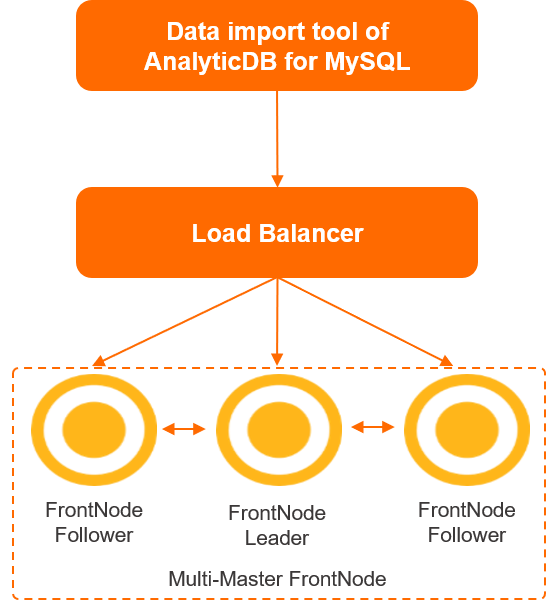
The tool connects to a Server Load Balancer (SLB) instance, which distributes traffic across multiple front nodes. The front nodes parse MySQL protocols and SQL statements, write data, and schedule queries. Data flows from the front nodes to storage nodes for persistence.
Prerequisites
Before you begin, make sure you have:
Java 1.8 or later installed (run
java -versionto check)Network access to the AnalyticDB for MySQL cluster endpoint
A database and target table already created in the cluster
Import data
| Step | Description |
|---|---|
| Step 1: Download and decompress the import tool | Download and decompress the tool package. |
| Step 2: Prepare data files | Verify file format, column order, and delimiters. |
| Step 3: Configure the import script | Set connection, file, and performance parameters. |
| Step 4: Run the import | Run the script and monitor progress. |
Step 1: Download and decompress the import tool
Create a working directory:
mkdir -p /u01/loadataGo to the directory:
# cd /u01/loadataDownload the tool:
wget https://help-static-aliyun-doc.aliyuncs.com/file-manage-files/zh-CN/20220811/gpvn/adb-import-tool.tar.gzDecompress the package:
tar zxvf adb-import-tool.tar.gz
The package extracts these files:
adb-import.sh.template
adb-import.sh.template.md5
adb-import-tool.jar
adb-import-tool.jar.md5
Step 2: Prepare data files
Check file format
Note the absolute path of the files or folders to import.
Identify the row delimiter and column delimiter. You'll set these in the script parameters.
Verify that the column order in your files matches the
CREATE TABLEstatement. RunSHOW CREATE TABLEin the database to check. Your table and a matching data file might look like this:CREATE TABLE `product_info` ( `id` bigint NOT NULL, `name` varchar, `price` decimal(15, 2) NOT NULL ) DISTRIBUTED BY HASH(`id`) INDEX_ALL='Y';1|tv|1000.0 2|computer|2000.0 3|cup|15.8Files must contain at least two columns. A trailing delimiter on the last column is accepted — both
1|abc|3.0and1|abc|3.0|are valid.
Empty fields are treated as null by default. For example,4||5.0inserts null into thenamecolumn, not an empty string. Auto-increment columns are handled automatically — no preprocessing needed.
Split large files
Splitting a large file into segments lets the import tool read them concurrently. A segment size of 1 to 2 GB is recommended.
For a 128 GB file named filename.txt, split it into 64 segments of 2 GB each:
# split -l$((`wc -l < filename.txt`/64 + 1)) filename.txt filename.txt.split -da 2;The tool reads all 64 segments concurrently during import.
Step 3: Configure the import script
The adb-import.sh.template file is a reusable template. Copy and rename it for each table — for example, adb-import-product_info.sh for the product_info table.
Required parameters
Set these parameters for every import job:
####################################
# Path to the Java command.
# If Java is already on your PATH, leave this as-is.
####################################
java_cmd=java

####################################
# Absolute path to the import tool JAR.
# If the script and JAR are in the same directory, leave this as-is.
####################################
jar_path=adb-import-tool.jar

####################################
# Database connection settings.
# If encryptPassword=true, provide a Base64-encoded password.
####################################
host=host
port=3306
user=adbuser
password=pwd
database=dbname
encryptPassword=false

####################################
# Table name.
####################################
tableName=please_set_table_name

####################################
# Path to the file or folder to import.
# For multiple files, separate paths with commas (,).
####################################
dataPath=please_set_data_file_path_or_dir_path

####################################
# The number of files that are imported in a concurrent manner.
# To fully leverage the performance of AnalyticDB for MySQL, set this
# parameter to a number within the range of 16 to 96.
####################################
concurrency=64

####################################
# The number of values that are written when the import operation is performed.
# Specify this parameter based on the lengths of individual rows.
# To fully leverage the performance of AnalyticDB for MySQL, set this
# parameter to a number within the range of 1024 to 4096.
# Smaller batches make individual failed rows easier to identify.
####################################
batchSize=4096

####################################
# File encoding. Valid values: UTF-8, GBK.
####################################
encoding=UTF-8

####################################
# Row delimiter.
# For non-printable characters, use hexadecimal notation.
# Example: \x0d\x06\x08\x0a -> hex0d06080a
####################################
lineSeparator="\\n"

####################################
# Column delimiter.
# For non-printable characters, use hexadecimal notation.
# Example: \x07\x07 -> hex0707
####################################
delimiter="\\|"
Optional parameters
Tune these parameters for specific scenarios:
####################################
# JVM heap size. Increase if you see frequent garbage collection (GC).
####################################
jvmopts="-Xmx12G -Xms12G"

####################################
# Max number of files read concurrently from a folder.
####################################
maxConcurrentNumOfFilesToImport=64

####################################
# How to handle empty fields.
# false (default): empty fields become null.
# true: empty fields become '' (empty string).
####################################
nullAsQuotes=false

####################################
# Print the actual row count of the destination table after each file.
####################################
printRowCount=false

####################################
# Max characters to display for failed SQL statements.
####################################
failureSqlPrintLengthLimit=1000

####################################
# Dry-run mode. true=display INSERT statements only, false=execute them.
####################################
disableInsertOnlyPrintSql=false

####################################
# Skip the header row in each file.
####################################
skipHeader=false

####################################
# Buffer pool size for INSERT batches.
# Separates I/O and compute, improving client throughput.
####################################
windowSize=128

####################################
# Escape backslashes (\) and apostrophes (') in column values.
# true (default): safe for all data but slightly slower.
# false: faster, but only use if your data contains neither character.
####################################
escapeSlashAndSingleQuote=true

####################################
# Ignore batches that fail to import instead of stopping.
####################################
ignoreErrors=false

####################################
# Print failed SQL statements.
####################################
printErrorSql=true

####################################
# Print the stack trace when a SQL error occurs.
####################################
printErrorStackTrace=true
Step 4: Run the import
Run the import script:
sh adb-import-product_info.sh;The following log entry confirms the script has started:
[2021-03-13 17:50:24.730] add consumer consumer-01The tool does not display a progress bar. To check how many rows have been loaded, query the destination table:
mysql > select count(*) from dbname.product_info;When the import completes, the tool prints a summary: how many rows were read per file, how long each file took, the total elapsed time, and whether all files succeeded.
All files succeeded:
all import finished successfullyOne or more files failed:
all import finished with ERROR!
If an error occurs during the data import process, the import tool immediately terminates the import operation and provides the details of the failed SQL statements. The destination table contains partial data. RunTRUNCATE TABLE table_nameto clear the destination table and then perform the import operation again. You can also runDROP TABLE table_nameto delete the destination table and then create another table for import.
FAQ
How do I check whether the bottleneck is on the client or the server?
Run these commands on the client machine to identify resource saturation:
| Command | What it shows |
|---|---|
top | CPU utilization |
free | Memory usage |
vmstat 1 1000 | Overall system load |
dstat -all --disk-util or iostat 1 1000 | Disk read bandwidth and utilization |
jstat -gc <pid> 1000 | Java garbage collection details |
If jstat shows frequent GC, increase the JVM heap by setting jvmopts to -Xmx16G -Xms16G.
How do I import multiple tables with one script?
If all tables share the same delimiters, parameterize tableName and dataPath:
tableName=$1
dataPath=$2
Then run a separate invocation per table:
# sh adb-import.sh table_name001 /path/table_001
# sh adb-import.sh table_name002 /path/table_002
# sh adb-import.sh table_name003 /path/table_003
How do I run the import in the background?
# nohup sh adb-import.sh &Check logs:
# tail -f nohup.outVerify the process is running:
# ps -ef|grep importHow do I ignore import errors?
If SQL execution errors occur, set ignoreErrors=true. The tool continues importing and logs the affected files, starting row numbers, and failed statements. If the batchSize parameter is specified, the faulty row number is less than or equal to the start row number plus the batchSize value.
Column count mismatches are not ignorable. When the number of columns in a row does not match the table definition, the tool stops that file immediately. Check the file manually before retrying. The error message looks like this:
[ERROR] 2021-03-22 00:46:40,444 [producer- /test2/data/lineitem.csv.split00.100-41] analyticdb.tool.ImportTool
(ImportTool.java:591) -bad line found and stop import! 16, file = /test2/data/tpch100g/lineitem.csv.split00.100, rowCount = 7, current row = 3|123|179698|145|73200.15|0.06|0.00|R|F|1994-02-02|1994-01-04|1994-02-
23|NONE|AIR|ongside of the furiously brave acco|
How do I narrow down the cause of an import error?
Three approaches:
Increase the SQL print length to see more of the failing statement:
printErrorSql=true
failureSqlPrintLengthLimit=1500
Reduce `batchSize` to pinpoint the faulty row:
batchSize=10Isolate a specific file segment if you have already identified which split file contains the error:
dataPath=/u01/this/is/the/directory/where/product_info/stores/file007
How do I run the tool on Windows?
On Windows, no shell script is provided. Call the JAR directly using the command-line interface:
usage: java -jar adb-import-tool.jar [-a <arg>] [-b <arg>] [-B <arg>] [-c <arg>]
      [-D <arg>] [-d <arg>] [-E <arg>] [-f <arg>] [-h <arg>] [-I <arg>]
      [-k <arg>] [-l <arg>] [-m <arg>] [-n <arg>] [-N <arg>] [-O <arg>]
      [-o <arg>] [-p <arg>] [-P <arg>] [-Q <arg>] [-s <arg>]  [-S <arg>]
      [-t <arg>] [-T <arg>] [-u <arg>] [-w <arg>][-x <arg>] [-y <arg>] [-z <arg>]
Required parameters:
| Flag | Description |
|---|---|
-h, --ip <arg> | Cluster endpoint |
-u, --username <arg> | Database account |
-p, --password <arg> | Account password |
-P, --port <arg> | Port number |
-D, --databaseName <arg> | Database name |
-f, --dataFile <arg> | Absolute path to the file or folder. For multiple files, separate paths with commas (,). |
-t, --tableName <arg> | Destination table name |
Optional parameters:
| Flag | Default | Description |
|---|---|---|
-a, --createEmptyFinishFilePath <arg> | (empty) | Creates a marker file when import completes. Leave blank to disable. |
-b, --batchSize <arg> | 1 | Rows per INSERT batch. Set between 1024 and 4096 for best throughput. |
-B, --encryptPassword <arg> | false | Enable Base64 password encryption. |
-c, --printRowCount <arg> | false | Print the destination table row count after each file. |
-d, --skipHeader <arg> | false | Skip the first row of each file. |
-E, --escapeSlashAndSingleQuote <arg> | true | Escape \ and ' in column values. Set to false if your data contains neither character. |
-I, --ignoreErrors <arg> | false | Continue importing when SQL errors occur. |
-k, --skipLineNum <arg> | 0 | Number of rows to skip at the start of each file (similar to IGNORE number LINES). |
-l, --delimiter <arg> | | | Column delimiter. For non-printable characters, use hex notation (e.g., \x07\x07 -> hex0707). |
-m, --maxConcurrentNumOfFilesToImport <arg> | Integer.MAX_VALUE | Max files read concurrently from a folder. |
-n, --nullAsQuotes <arg> | false | false: empty fields -> null. true: empty fields -> ''. |
-N, --printErrorSql <arg> | true | Print SQL statements that fail to run. |
-O, --connectionPoolSize <arg> | 2 | Database connection pool size. |
-o, --encoding <arg> | UTF-8 | File encoding. Valid values: GBK, UTF-8. |
-Q, --disableInsertOnlyPrintSql <arg> | false | true: print INSERT statements without executing. false: execute them. |
-s, --lineSeparator <arg> | \n | Row delimiter. For non-printable characters, use hex notation (e.g., \x0d\x06\x08\x0a -> hex0d06080a). |
-S, --printErrorStackTrace <arg> | false | Print the stack trace when a SQL error occurs. |
-w, --windowSize <arg> | 128 | Buffer pool size for INSERT batches. Separates I/O from compute to improve client performance. |
-x, --insertWithColumnNames <arg> | true | Append column names to INSERT statements (e.g., INSERT INTO tb(column1, column2)). |
-y, --failureSqlPrintLengthLimit <arg> | 1000 | Max characters to display for failed SQL statements. |
-z, --connectionUrlParam <arg> | ?characterEncoding=utf-8 | Additional JDBC connection parameters. Example: ?characterEncoding=utf-8&autoReconnect=true. |
Examples:
Import a single file with default parameters:
java -Xmx8G -Xms8G -jar adb-import-tool.jar \
  -hyourhost.ads.aliyuncs.com -uadbuser -ppassword -P3306 -Dtest \
  --dataFile /data/lineitem.sample --tableName LINEITEM
Import all files in a folder with maximum throughput:
java -Xmx16G -Xms16G -jar adb-import-tool.jar \
  -hyourhost.ads.aliyuncs.com -uadbuser -ppassword -P3306 -Dtest \
  --dataFile /data/tpch100g --tableName LINEITEM \
  --concurrency 64 --batchSize 2048