After AnalyticDB for MySQL receives a query, it splits the query into multiple stages. These stages are distributed across worker nodes and executor nodes to read and compute data. Some stages can run in parallel, while others have dependencies and must run sequentially. This complexity makes it difficult to analyze the duration of complex SQL statements. You can use stage and task details in the console or an API to analyze slow queries.
Procedure
Log on to the AnalyticDB for MySQL console. In the upper-left corner of the console, select a region. In the left-side navigation pane, click Clusters. Find the cluster that you want to manage and click the cluster ID.
-
In the left-side navigation pane, click Diagnostics and Optimization.
-
In the SQL Queries section, click Diagnose for the desired query.
-
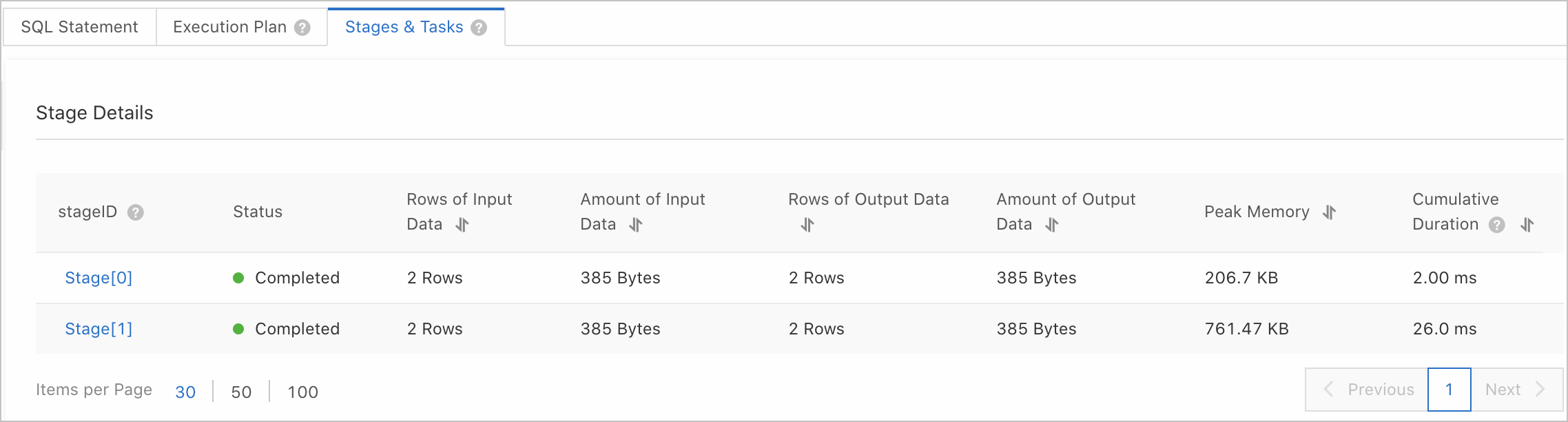
Click the Stages & Tasks tab. The Query Properties section at the top of the page displays information such as the start and end time, username, queuing duration, total duration, peak memory, scanned data volume, returned data volume, status, and resource group. The Stages & Tasks tab lists execution details for each stage, including the Stage ID, status, input/output rows and data volume, peak memory, and cumulative duration. For a description of the stage query results, see Stage parameters.
-
To troubleshoot a slow query, click a Stage ID to view the details of all tasks within that stage. For a description of the task query results, see Task parameters.
ImportantTask details are available only for queries that take more than 1 second to complete.
Parameters
Stage parameters
|
Parameter |
Description |
|
Stage ID |
The unique identifier of the stage. This ID corresponds to the stage ID in the execution plan tree. |
|
Status |
The execution status of the stage. Valid values:
|
|
Input rows |
The number of rows in the stage's input data. |
|
Input data size |
The size of the stage's input data. |
|
Output rows |
The number of rows in the stage's output data. |
|
Output data size |
The size of the stage's output data. |
|
Peak memory |
The maximum memory usage of the stage. |
|
Cumulative duration |
The sum of the time consumed by all operators in the stage. This parameter helps you identify stages that are time-consuming or have high CPU usage. You cannot directly compare the cumulative duration with the query duration. You must also consider the parallelism of the stage to determine the relationship between query duration and cumulative duration. |
Task parameters
|
Parameter |
Description |
|
Task ID |
The unique identifier of the task. For example, in |
|
Status |
The execution status of the task. Valid values:
|
|
Input data |
The number of rows and size of the task's input data. You can sort tasks by this value to check if there is data skew in the stage's input data. If data skew exists, it indicates that the GROUP BY or JOIN clause has an inefficient distribution key. You need to trace back to the upstream stage to resolve the issue. Note
Data skew occurs when an inefficient distribution key causes data to be unevenly distributed across worker nodes. |
|
Output data |
The number of rows and size of the task's output data. By examining the properties of the Aggregation or Join node in the current stage's operator plan, you can map it to the SQL statement and check whether combined fields are used in the partition key or JOIN condition. For example, |
|
Peak memory |
The maximum memory used during the execution of the task. Peak memory is proportional to the size of the input data. It can help you determine if a query failed due to highly unbalanced memory usage on certain nodes. |
|
Table read duration |
When a stage's operator tree contains a TableScan operator, this parameter indicates the total time spent by all TableScan operators within the stage reading table data. This duration is a cumulative value from multiple machines and threads and cannot be directly compared with the query duration. By comparing it with the cumulative duration, you can determine if a stage's execution time is primarily spent on data scanning. |
|
Data read from tables |
When a stage's operator tree contains a TableScan operator, this parameter indicates the number of rows and the amount of data read from the source table by all TableScan operators in the stage. By sorting this field, you can determine if data skew exists in the source table. If it does, you can use the console to diagnose the distribution key skew. For more information, see Data modeling diagnostics. |
|
Created at |
The time when the task was created. |
|
Queuing duration |
The time the task spent in the queue before execution began. |
|
Ended at |
The time when the task finished execution. |
|
Interval between start and end time |
The elapsed time between the task's creation time and its end time. For example, if a task was created at 2022-12-12 12:00:00 and ended at 2022-12-12 12:00:04, the interval is 4s. By comparing this interval with the query duration, you can identify where performance bottlenecks occur. For example, if the query duration is 6s and the interval is 4s, the bottleneck is in the current stage. For a detailed calculation method, see Example: Calculating task duration and concurrency. |
|
Cumulative duration |
The sum of the execution time for all threads within this task. For a detailed calculation method, see Example: Calculating task duration and concurrency. |
|
Computing time ratio |
The ratio of the actual data processing time to the subtask lifecycle. Formula: Computing time ratio = (Cumulative duration / Subtask concurrency) / Interval between start and end time. In this formula, (Cumulative duration / Subtask concurrency) represents the average time each thread spent processing data, while the interval includes actual processing time, subtask queuing duration, and network latency. For a detailed calculation method, see Example: Calculating task duration and concurrency. Note
A smaller computing time ratio suggests a longer interval between start and end time, which means you should identify time-consuming operators. Conversely, a larger ratio suggests a shorter interval, which points to issues like resource waits or network latency. |
|
Subtask concurrency |
Each task is executed by multiple concurrent threads on a single machine. The number of threads executing computing tasks simultaneously is the subtask concurrency. For a detailed calculation method, see Example: Calculating task duration and concurrency. |
|
Execution node |
The internal IP address of the node where the task was executed. If multiple queries show a long tail on the same node, you should investigate that specific node. Note
A long tail occurs when some tasks in a distributed AnalyticDB for MySQL execution take significantly longer to complete than other tasks. |
Example: Calculating task duration and concurrency
This example shows how to calculate the interval between start and end time, cumulative duration, computing time ratio, and subtask concurrency for a task named Task 2.1.
Assume that Task 2.1 belongs to stage[2], which contains four operators: StageOutput, Join, TableScan, and RemoteSource. The following figure shows the operator tree.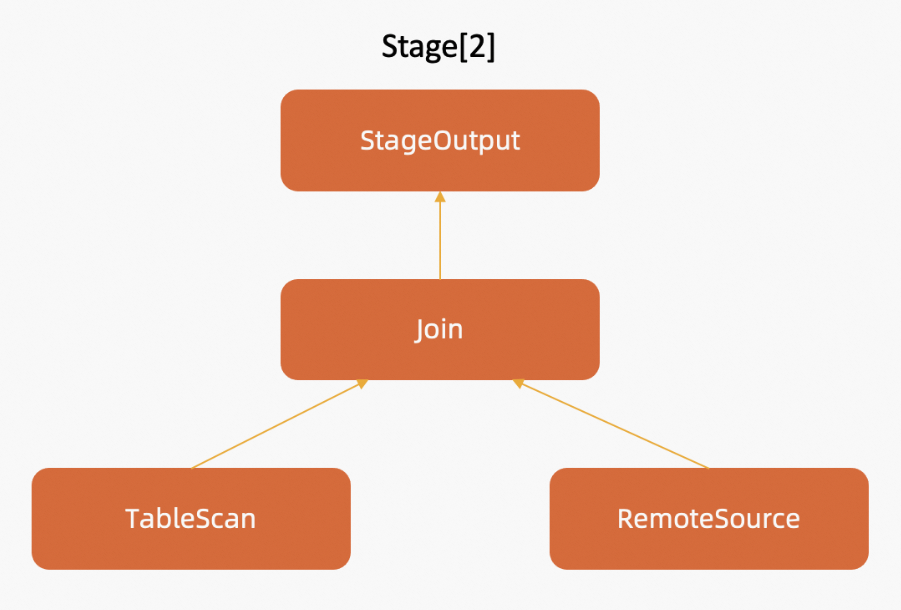
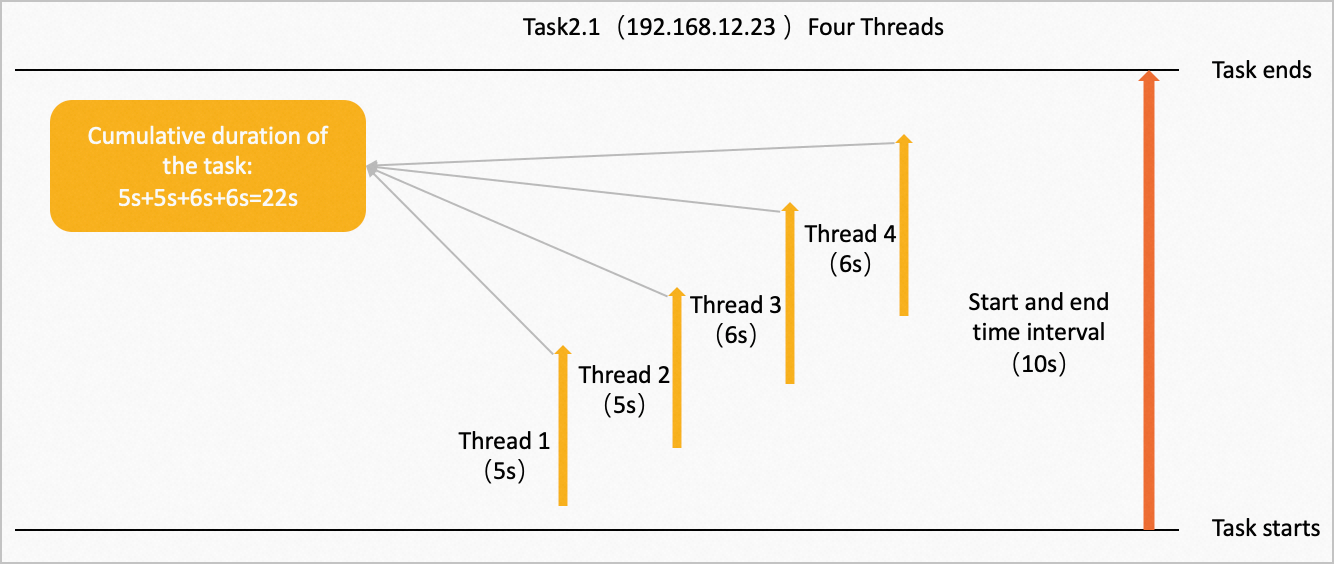
The operators in the tree are executed in parallel on multiple nodes, following the direction of the arrows. Task 2.1 runs on four concurrent threads on the node at IP address 192.168.12.23. The data processing times for Thread 1, Thread 2, Thread 3, and Thread 4 are 5s, 5s, 6s, and 6s, respectively. The following figure shows the process.
-
The cumulative duration of the task is the sum of the execution times for all threads: 5s + 5s + 6s + 6s = 22s.
-
The interval between start and end time is 10s.
-
The computing time ratio is (cumulative duration / subtask concurrency) / interval between start and end time: (22s / 4) / 10s = 0.55.
Related APIs
|
API |
Description |
|
Gets the execution details of an SQL statement. |
|
|
Gets the execution details of distributed subtasks for a specified query ID and stage ID. |