AnalyticDB for MySQL Data Warehouse Edition (V3.0) uses external tables to move data between AnalyticDB for MySQL and external storage systems. This topic describes how to export data from an AnalyticDB for MySQL cluster to Apsara File Storage for HDFS using external tables.
Prerequisites
Before you begin, ensure that you have:
-
An AnalyticDB for MySQL cluster running V3.1.4.4 or later.
To check the minor version of your cluster, see How do I query the version of an AnalyticDB for MySQL cluster? To upgrade the minor version, contact technical support.
-
An Apsara File Storage for HDFS cluster with a destination folder for the exported data. This example uses a folder named
hdfs_output_test_csv_data.INSERT OVERWRITEdeletes all existing files in the destination folder before writing new data. To avoid accidental data loss, create a new destination folder for each export job rather than reusing an existing one. -
The following service access ports configured in the Apsara File Storage for HDFS cluster to allow access from AnalyticDB for MySQL:
Node Purpose Default port Configuration parameter Reference NameNode Reads and writes file system metadata 8020 fs.defaultFScore-default.xml DataNode Reads and writes data 50010 dfs.datanode.addresshdfs-default.xml -
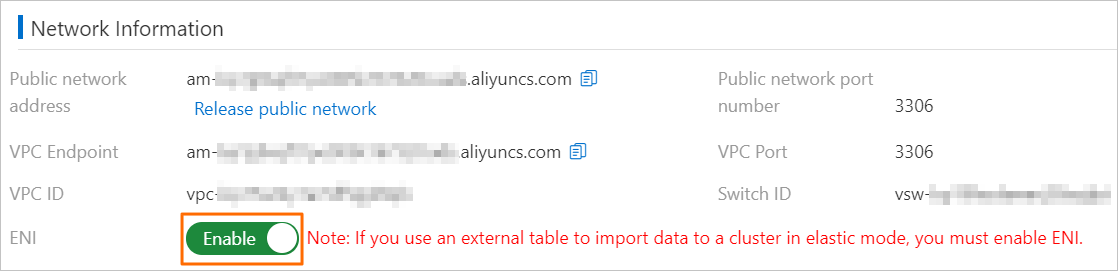
For clusters in elastic mode: ENI enabled on the Cluster Information page under Network Information.
Usage notes
-
Only CSV and Parquet files can be exported. ORC is not supported.
-
INSERT INTO VALUESandREPLACE INTO VALUESare not supported for external tables. UseINSERT INTO ... SELECTorREPLACE INTO ... SELECTinstead. -
All columns of the external table must be included in the export. Exporting a subset of columns is not supported.
-
Partitioned external tables cannot export individual files; data is always distributed across partition directories.
-
Partition column values are stored as HDFS directory names, not as columns in the exported data files. For example, if you export to
adb_data/with partition columnsp1=1andp2=a, the data lands atadb_data/p1=1/p2=a/. The exported CSV or Parquet file contains only the non-partition columns.
Export data to Apsara File Storage for HDFS
Step 1: Connect to the AnalyticDB for MySQL cluster
Connect to the cluster. For details, see Connect to an AnalyticDB for MySQL cluster.
Step 2: Create a source database and table
This example uses a database named adb_demo as the source.
-
Create the source database. For details, see Create a database.
-
Create a source table named
adb_hdfs_import_sourceinadb_demo:CREATE TABLE IF NOT EXISTS adb_hdfs_import_source ( uid string, other string ) DISTRIBUTED BY HASH(uid); -
Insert test data:
INSERT INTO adb_hdfs_import_source VALUES ("1", "a"), ("2", "b"), ("3", "c");
Step 3: Create an external table
Create an external table in adb_demo that maps to the destination folder in Apsara File Storage for HDFS. AnalyticDB for MySQL supports two external table types: standard and partitioned.
Standard external table
A standard external table exports all data to a single directory without partition sub-directories. The following examples show how to create a standard external table for CSV and Parquet formats.
CSV format:
CREATE TABLE IF NOT EXISTS hdfs_import_external
(
    uid string,
    other string
)
ENGINE='HDFS'
TABLE_PROPERTIES='{
    "format":"csv",
    "delimiter":",",
    "hdfs_url":"hdfs://172.17.***.***:9000/adb/hdfs_output_test_csv_data"
}';
Parquet format:
CREATE TABLE IF NOT EXISTS hdfs_import_external
(
    uid string,
    other string
)
ENGINE='HDFS'
TABLE_PROPERTIES='{
    "format":"parquet",
    "hdfs_url":"hdfs://172.17.***.***:9000/adb/hdfs_output_test_csv_data"
}';
Partitioned external table
A partitioned external table organizes exported data into partition sub-directories based on the values of partition columns. Define both ordinary columns (such as uid and other) and partition columns (such as p1, p2, and p3) in the CREATE TABLE statement.
CREATE TABLE IF NOT EXISTS hdfs_import_external_par
(
    uid string,
    other string,
    p1 date,
    p2 int,
    p3 varchar
)
ENGINE='HDFS'
TABLE_PROPERTIES='{
    "format":"csv",
    "delimiter":",",
    "hdfs_url":"hdfs://172.17.***.***:9000/adb/hdfs_output_test_csv_data",
    "partition_column":"p1, p2, p3"
}';
For the complete syntax, see the Create an Apsara File Storage for HDFS external table and Create a partitioned Apsara File Storage for HDFS external table sections of the Use external tables to import data to Data Warehouse Edition topic.
Step 4: Export data
Use one of the export methods described in the appendixes to run an export job:
What's next
After the export completes, verify the data in one of these two ways:
-
Use the Hadoop client to browse the
hdfs_output_test_csv_datadestination folder. -
Query the exported data from AnalyticDB for MySQL through the external table. The query syntax is the same for standard and partitioned external tables:
SELECT * FROM hdfs_import_external LIMIT 100;
Appendix 1: Export methods for standard external tables
Standard external tables support four export methods. All methods require that every column of the external table be included in the SELECT statement.
| Method | Statement | Behavior |
|---|---|---|
| Append | INSERT INTO |
Appends a new file to the destination directory. Existing files are not overwritten. |
| Append (equivalent) | REPLACE INTO |
Identical behavior to INSERT INTO for external tables. External tables have no primary keys, so there is no deduplication. |
| Overwrite | INSERT OVERWRITE |
Deletes all existing files in the destination directory, then writes new data. Use with caution. |
| Async overwrite | SUBMIT JOB INSERT OVERWRITE |
Same as overwrite, but runs asynchronously. Returns a job ID for status tracking. |
INSERT INTO
Each execution appends a new file to the HDFS destination directory without deleting existing files.
Syntax:
INSERT INTO <target_table>
SELECT <col_name> FROM <source_table>;
Example:
INSERT INTO hdfs_import_external
SELECT col1, col2, col3 FROM adb_hdfs_import_source;
col1, col2, col3 represent all columns of the external table.REPLACE INTO
Equivalent to INSERT INTO for HDFS external tables. External tables have no primary keys, so REPLACE INTO appends a new file to the destination directory rather than replacing rows.
Syntax:
REPLACE INTO <target_table>
SELECT <col_name> FROM <source_table>;
Example:
REPLACE INTO hdfs_import_external
SELECT col1, col2, col3 FROM adb_hdfs_import_source;
INSERT OVERWRITE
Deletes all files in the destination directory before writing new data.
This operation cannot be undone. All existing files in the external table path are permanently deleted.
Syntax:
INSERT OVERWRITE <target_table>
SELECT <col_name> FROM <source_table>;
Example:
INSERT OVERWRITE hdfs_import_external
SELECT col1, col2, col3 FROM adb_hdfs_import_source;
SUBMIT JOB INSERT OVERWRITE (async)
Runs the overwrite export asynchronously and returns a job ID immediately. Use this method for large exports that would otherwise block the session.
Syntax:
SUBMIT JOB INSERT OVERWRITE <target_table>
SELECT <col_name> FROM <source_table>;
Example:
SUBMIT JOB INSERT OVERWRITE hdfs_import_external
SELECT col1, col2, col3 FROM adb_hdfs_import_source;
The returned job ID identifies the asynchronous task:
+---------------------------------------+
| job_id                                |
+---------------------------------------+
| 2020112122202917203100908203303****** |
+---------------------------------------+
To check the task status, see Asynchronously submit an import task.
Appendix 2: Export methods for partitioned external tables
When using a partitioned external table, include a PARTITION clause in the statement to specify partition column values. Partition values can be fully static, static-dynamic, or fully dynamic.
All methods require that every non-partition column of the external table be included in the SELECT statement.
| Method | Statement | Behavior |
|---|---|---|
| Append | INSERT INTO PARTITION |
Appends a new file to the matching partition directory. Existing files are not overwritten. |
| Append (equivalent) | REPLACE INTO PARTITION |
Identical behavior to INSERT INTO PARTITION for external tables. |
| Overwrite | INSERT OVERWRITE PARTITION |
Overwrites existing data in the specified partition directories only. Unaffected partitions are unchanged. |
| Async overwrite | SUBMIT JOB INSERT OVERWRITE |
Same as overwrite, but runs asynchronously. |
INSERT INTO PARTITION
Each execution appends a new file to the matching partition directory.
Fully static partition — all partition values are specified explicitly:
INSERT INTO <target_table> PARTITION(par1=val1, par2=val2, ...)
SELECT <col_name> FROM <source_table>;
Example:
INSERT INTO hdfs_import_external_par PARTITION(p1='2021-05-06', p2=1, p3='test')
SELECT col1, col2, col3 FROM adb_hdfs_import_source;
Static-dynamic partition — some partition values are static, others are derived from the query result:
Static partition columns must appear before dynamic partition columns in the PARTITION clause.INSERT INTO <target_table> PARTITION(par1=val1, par2, ...)
SELECT <col_name> FROM <source_table>;Example:
INSERT INTO hdfs_import_external_par PARTITION(p1='2021-05-27', p2, p3)
SELECT col1, col2, col3 FROM adb_hdfs_import_source;
Fully dynamic partition — partition values are derived from the query result; no PARTITION clause is needed:
INSERT INTO <target_table>
SELECT <col_name> FROM <source_table>;
Example:
INSERT INTO hdfs_import_external_par
SELECT col1, col2, col3 FROM adb_hdfs_import_source;
REPLACE INTO PARTITION
Equivalent to INSERT INTO PARTITION for HDFS external tables. External tables have no primary keys, so REPLACE INTO PARTITION appends a new file rather than replacing rows.
Fully static partition:
REPLACE INTO <target_table> PARTITION(par1=val1, par2=val2, ...)
SELECT <col_name> FROM <source_table>;
Example:
REPLACE INTO hdfs_import_external_par PARTITION(p1='2021-05-06', p2=1, p3='test')
SELECT col1, col2, col3 FROM adb_hdfs_import_source;
Static-dynamic partition:
Static partition columns must appear before dynamic partition columns in the PARTITION clause.REPLACE INTO <target_table> PARTITION(par1=val1, par2, ...)
SELECT <col_name> FROM <source_table>;Example:
REPLACE INTO hdfs_import_external_par PARTITION(p1='2021-05-06', p2, p3)
SELECT col1, col2, col3 FROM adb_hdfs_import_source;
Fully dynamic partition:
REPLACE INTO <target_table>
SELECT <col_name> FROM <source_table>;
Example:
REPLACE INTO hdfs_import_external_par
SELECT col1, col2, col3 FROM adb_hdfs_import_source;
INSERT OVERWRITE PARTITION
Overwrites existing data in the specified partition directories. Partitions not covered by the statement are not affected. The optional IF NOT EXISTS clause skips partitions that already contain data.
This operation cannot be undone. Existing data in the targeted partitions is permanently deleted.
Syntax:
INSERT OVERWRITE <target_table> PARTITION(par1=val1, par2=val2, ...) [IF NOT EXISTS]
SELECT <col_name> FROM <source_table>;
Example:
INSERT OVERWRITE hdfs_import_external_par PARTITION(p1='2021-05-06', p2=1, p3='test') IF NOT EXISTS
SELECT col1, col2, col3 FROM adb_hdfs_import_source;
IF NOT EXISTS prevents data from being written to a partition that already has data, leaving its existing content intact.SUBMIT JOB INSERT OVERWRITE (async)
Runs the partition overwrite export asynchronously and returns a job ID immediately.
Syntax:
SUBMIT JOB INSERT OVERWRITE <target_table>
SELECT <col_name> FROM <source_table>;
Example:
SUBMIT JOB INSERT OVERWRITE hdfs_import_external_par PARTITION(p1='2021-05-06', p2=1, p3='test') IF NOT EXISTS
SELECT col1, col2, col3 FROM adb_hdfs_import_source;
The returned job ID identifies the asynchronous task:
+---------------------------------------+
| job_id                                |
+---------------------------------------+
| 2020112122202917203100908203303****** |
+---------------------------------------+
To check the task status, see Asynchronously submit an import task.