DataV is an Alibaba Cloud data visualization service that lets you build interactive dashboards from large, complex datasets. Connect an AnalyticDB for MySQL cluster as a data source to query and visualize your data directly in DataV.
Prerequisites
Before you begin, collect the following information:
Connection method: Determine whether to connect over the internal network (VPC) or the Internet. Use the internal network if your AnalyticDB for MySQL cluster and DataV are in the same region; use the Internet otherwise.
Domain name or IP address: The endpoint of your AnalyticDB for MySQL cluster. Find this on the Clusters page of the AnalyticDB console.
Port: Default is
3306.Database name, username, and password for the AnalyticDB for MySQL database.
VPC ID (internal network only): The ID of the Virtual Private Cloud (VPC) where your cluster resides. Find this in the AnalyticDB console.
VPC instance ID (internal network only): This is not the instance ID shown in the console. Use the DescribeDBClusterAttribute API and retrieve the
VPCCloudInstanceIdorVPCInstanceIdfield from the response.
Add a data source over the internal network
Use this method when your AnalyticDB for MySQL cluster and DataV are in the same region.
Log on to the DataV console.
On the My Data tab, select Data Source and click Add Source.
In the Type list, select AnalyticDB for MySQL.
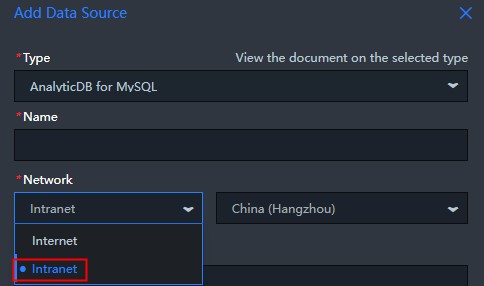
In the Network drop-down list, select Internal. Then select the region where your cluster resides. The default region is China East 2.
Enter the database connection details.
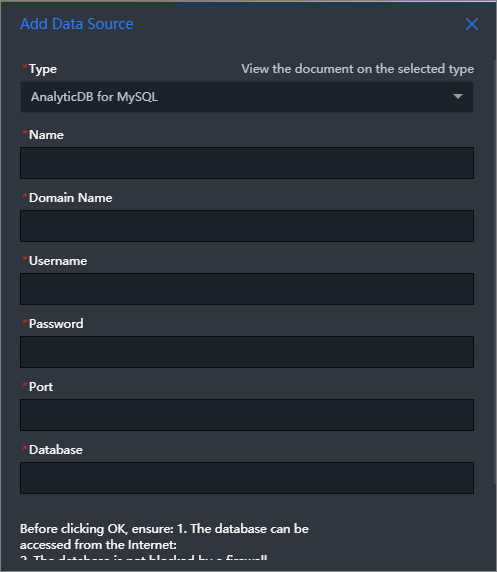
Parameter Description Name A custom name for this data source. VPC ID The ID of the VPC where your AnalyticDB for MySQL cluster resides. Find this in the AnalyticDB console. Instance ID The VPC instance ID of your cluster. This differs from the instance ID shown in the console. Use the DescribeDBClusterAttribute API to get the VPCCloudInstanceIdorVPCInstanceIdvalue.domain name The domain name or IP address of your AnalyticDB for MySQL cluster. For Internet access, the domain name follows the format am-bp1uxxxxxxxxxxxxxx0o.ads.aliyuncs.com. Find this on the Clusters page of the AnalyticDB console.Port Number The database port. Default: 3306.Username The username for your AnalyticDB for MySQL database. Password The password for your AnalyticDB for MySQL database. Database The name of the database. After you enter the details, DataV automatically runs a connectivity test.
After the connectivity test passes, click OK.
The data source appears in the data source list.
Add a data source over the Internet
Use this method when your AnalyticDB for MySQL cluster is in a different region from DataV, or is not accessible over the internal network.
Log on to the DataV console.
On the My Data tab, click Data Source and click Add Data.
In the Type drop-down list, select AnalyticDB for MySQL.
In the Network drop-down list, select Internet.
Enter the database connection details.
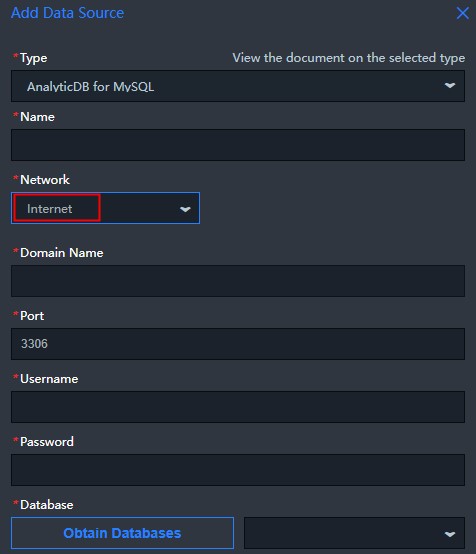
Parameter Description Name A custom name for this data source. domain name The domain name or IP address of your AnalyticDB for MySQL cluster. The domain name follows the format am-bp1uxxxxxxxxxxxxxx0o.ads.aliyuncs.com. Find this on the Clusters page of the AnalyticDB console.Port Number The port used to connect to the database. Username The username for your AnalyticDB for MySQL database. Password The password for your AnalyticDB for MySQL database. Database The name of the database. After you enter the details, DataV automatically runs a connectivity test.
After the connectivity test passes, click OK.
The data source appears in the data source list.
Troubleshooting
Connectivity test fails with "Access VPC instance fail"
This error occurs when DataV cannot locate your cluster using the provided instance ID.
To resolve this, append one of the following suffixes to the Instance ID field and run the connectivity test again:
-mysql-instance-controller
For example, if your instance ID is am-bp1uxxxxxxxxxxxxxx0o, try am-bp1uxxxxxxxxxxxxxx0o-mysql.
What's next
After the data source is added, create a DataV project to start visualizing your data. See Use a template to create a project for step-by-step instructions.