This tutorial walks you through migrating a Databricks schema — and all its tables — to AnalyticDB for MySQL using an automated Python script. The script handles schema-only migration (DDL); for data migration, see Load data into Delta Lake tables.
How it works
Azure Databricks organizes metadata in three layers: catalog.schema.table. AnalyticDB for MySQL uses two layers: database.table. The script bridges this gap by:
Connecting to Databricks and parsing all Delta table structures in a target schema
Generating Spark SQL Data Definition Language (DDL) statement files compliant with the open-source Delta Lake standard
Creating a matching database and tables in AnalyticDB for MySQL using a Spark Interactive resource group

Each script run migrates one schema and creates one database in AnalyticDB for MySQL. To migrate multiple schemas, run the script once per schema.
Prerequisites
Before you begin, ensure the following resources are in place.
On the Azure Databricks side:
The Databricks SQL Warehouse is running
You have a Databricks access token with read permission on the catalog or schema. For details, see Manage personal access token permissions
On the AnalyticDB for MySQL side:
An AnalyticDB for MySQL Enterprise Edition, Basic Edition, or Data Lakehouse Edition cluster is created
A Spark Interactive resource group is created in the cluster, and its public endpoint is obtained. See Create the resource group and Get the public endpoint
The Spark Interactive resource group is running
A database account is created:
Alibaba Cloud account: Create a privileged account
RAM user: Create a privileged account and a standard account, then associate the standard account with the RAM user
On the local machine:
Python 3.6 or later is installed
The IP address of the machine is added to the whitelist of the AnalyticDB for MySQL cluster
Migrate a schema
Step 1: Install dependencies
pip install pyhive
pip install thrift
pip install thrift_sasl
Step 2: Configure the script
Download GetDDLFromDatabricksV01.py and update the following parameters:
| Parameter | Description | Example |
|---|---|---|
databricks_workspace_url | Workspace URL of Azure Databricks. Format: https://adb-<id>.azuredatabricks.net/?o=<id>. See Workspace URL. | https://adb-28944**.9.azuredatabricks.net/?o=28944** |
databricks_token | Access token for Azure Databricks. Must have read permission on the catalog or schema. | dapi**** |
databricks_catalog | Catalog name in Azure Databricks. | databricks**** |
databricks_schema | Schema name to migrate. | adbmysql |
databricks_warehouse_id | Warehouse ID in Azure Databricks. | 42**** |
ddl_output_root_path | Local path where the script writes temporary .sql files. The AnalyticDB for MySQL Spark engine runs these files sequentially. | /root/databricks/ |
adb_spark_host | Public endpoint of the Spark Interactive resource group. | amv-uf648****sparkwho.ads.aliyuncs.com |
adb_username | Database account name for the AnalyticDB for MySQL cluster. | user |
adb_password | Password for the database account. | password**** |
adb_spark_resource_group | Name of the Spark Interactive resource group. | Interactive |
adb_database_oss_location | OSS path for Delta Lake table data. This path must be empty — a non-empty path causes table creation to fail. The Location parameter applies at the database level in this tutorial, so all tables share this path. | oss://testBucketName/adbmysql/ |
Step 3: Run the script
python GetDDLFromDatabricksV01.pyStep 4: Verify the migration
Verify schema structure in the console
Log on to the AnalyticDB for MySQL console. In the upper-left corner, select a region. In the left-side navigation pane, click Clusters, then click the cluster ID.
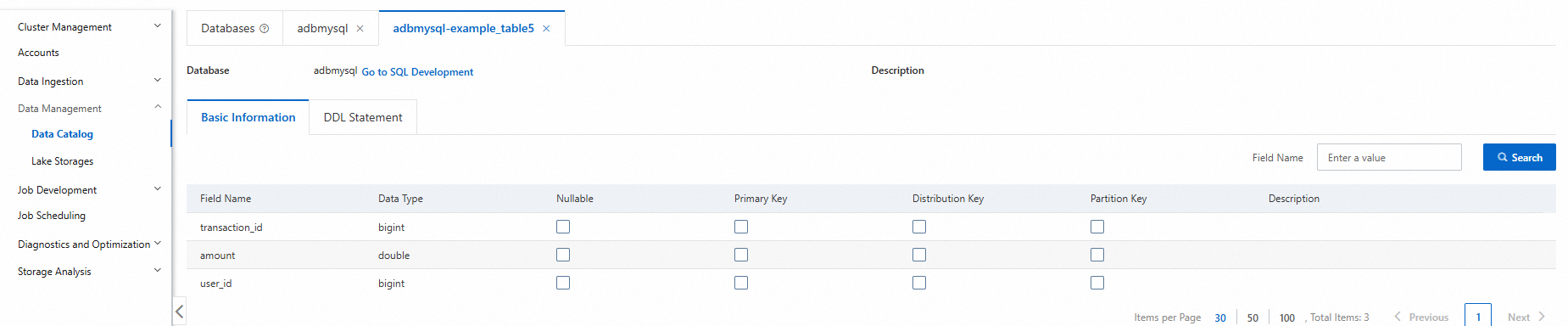
In the left-side navigation pane, choose Data Management > Data Catalog.
Click the target database and table to review details such as table type, storage data size, and column names.
In the left-side navigation pane, choose Job Development > SQL Development.
Select the Spark engine and the Interactive resource group, then run the following command to confirm the table schema:
DESCRIBE DETAIL adbmysql.table_name;