This guide shows how to build a distributed pipeline that auto-labels image data for multimodal model training. The pipeline combines ADB Ray for distributed computing, Lance for columnar image storage, and LLaMA-Factory for Supervised Fine-Tuning (SFT) of the Qwen-VL model — delivering a 193% speed improvement for the labeling stage compared to Parquet-based workflows.
Background
Game platforms face a recurring challenge: players encounter mismatched guides and missing context that disrupts their experience. One solution is a gaming assistant that identifies the player's current game state and surfaces relevant suggestions. Training such an assistant requires a large volume of labeled image data — which is where manual annotation becomes a bottleneck.
The existing approach uses LLaMA-Factory for SFT and Continued Pre-Training (CPT), with vLLM or Alibaba Cloud Model Studio handling inference. The bottleneck is not the training itself, but the data preparation: downloading, transforming, and incrementally labeling thousands of images at scale.
This guide addresses that bottleneck by centering the workflow on ADB Ray, integrating it with Lance for structured image storage and Ray Data for distributed preprocessing. LLaMA-Factory is then connected to this pipeline to fine-tune Qwen-VL on the labeled dataset.
How it works
The pipeline runs in three stages:
Data preparation — Load images from ModelScope, download binary image data, convert to a structured format, and write to Lance using Ray Data.
Incremental labeling — Deploy a scoring model with Ray Serve and use Lance's column-append API to label data without rewriting existing records.
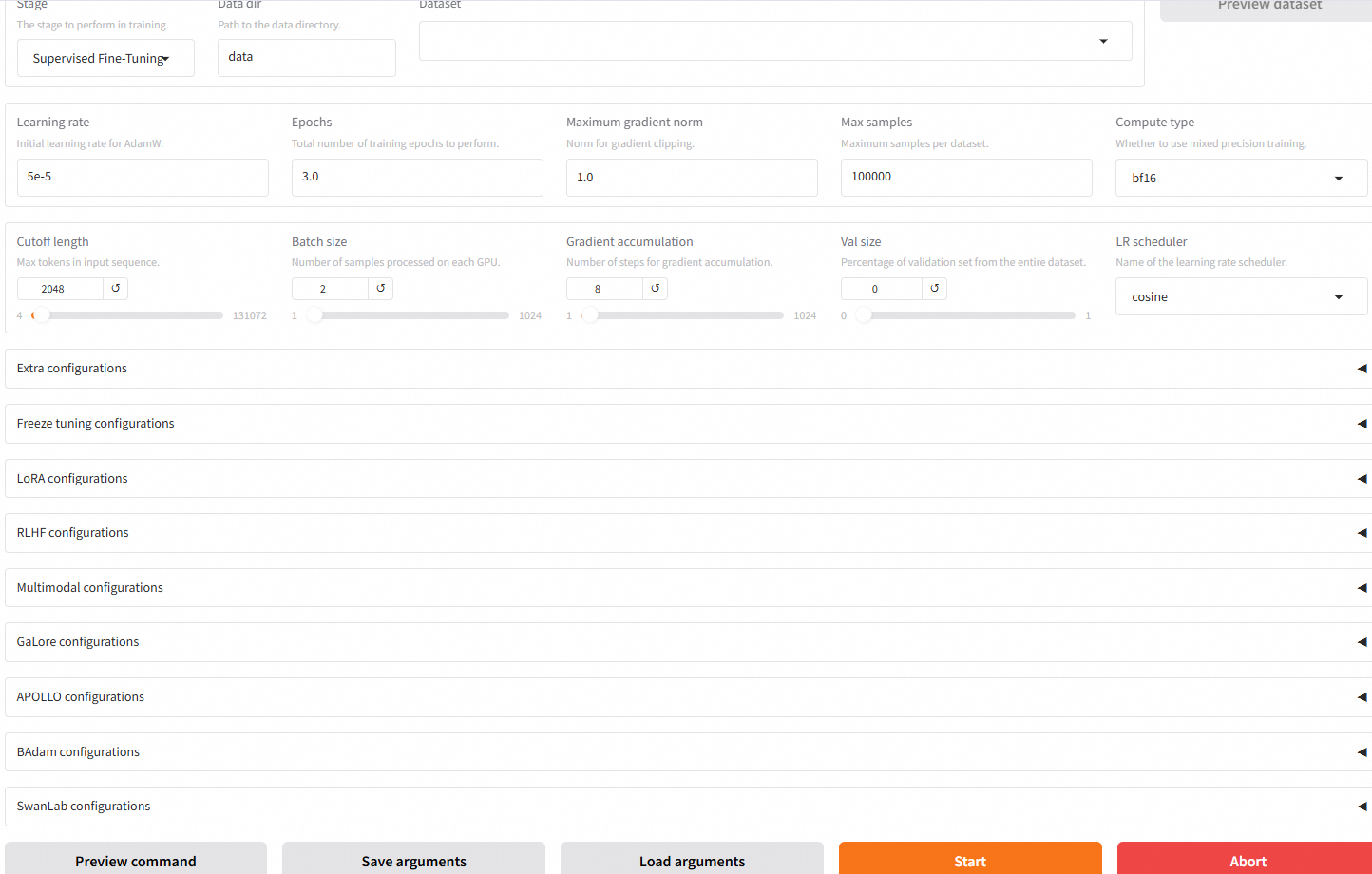
Model fine-tuning — Configure LLaMA-Factory to read Lance data directly and train Qwen-VL using the LLaMA Factory Web UI.

Why Lance instead of Parquet?
Parquet works well for structured tabular data but falls short when images are involved. It lacks native support for storing image binary data alongside metadata, which means you either store images separately (adding remote I/O on every read) or serialize them in ways that degrade read performance. Lance solves this by integrating image binary data and structured columns in a single dataset, supporting data versioning, and allowing incremental column additions without rewriting the entire dataset. The result is a 193% speed improvement for the labeling stage compared to Parquet.
Prerequisites
Before you begin, ensure that you have:
An AnalyticDB for MySQL cluster (Enterprise Edition, Basic Edition, or Data Lakehouse Edition)
A managed Ray service enabled on the cluster, with Worker Resource Type set to GPU
LLaMA-Factory deployed — submit a ticket to request deployment assistance
A network interface card attached to enable internet access from the VPC — submit a ticket to request this configuration
Step 1: Prepare data and write it to Lance
This step loads the Tongyi-DataEngine/SA1B-Paired-Captions-Images dataset from ModelScope, downloads the image binary data for each record, converts the dataset into a multimodal conversation format, and writes the result to Lance using Ray Data's distributed map_batches.
Update the configuration parameters at the top of the script to match your environment before running it.
from modelscope.msdatasets import MsDataset
import lance
import pyarrow as pa
import pandas as pd
import os
import json
import uuid
import shutil
from tqdm import tqdm
import time
import requests
from PIL import Image
import io
import numpy as np
import ray
import pyarrow.compute as pc

# Configuration parameters
OUTPUT_DIR = "/home/ray/binary_data"
NUM_SAMPLES = 10000  # Set to a smaller value (e.g., 100) to validate quickly before scaling
FIXED_USER_PROMPT = "Please describe what is happening in this image<image>"
HEADERS = {'User-Agent': 'Mozilla/5.0 (Windows NT 10.0; Win64; x64) AppleWebKit/537.36 (KHTML, like Gecko) Chrome/58.0.3029.110 Safari/537.3'}

def prepare_output_directory():
    """Prepare output directory structure"""
    if os.path.exists(OUTPUT_DIR):
        shutil.rmtree(OUTPUT_DIR)

    os.makedirs(OUTPUT_DIR)
    print(f"Output directory created: {OUTPUT_DIR}")

def download_image_binary(image_url, max_retries=3):
    """Download image file from URL, return image binary data"""
    for attempt in range(max_retries):
        try:
            # Download image data
            response = requests.get(image_url, headers=HEADERS, timeout=10)
            response.raise_for_status()

            # Check if content is valid image
            try:
                image = Image.open(io.BytesIO(response.content))
                image.verify()  # Verify if it's a valid image
                return response.content
            except (IOError, SyntaxError) as e:
                raise ValueError(f"Downloaded image is invalid: {str(e)}")

        except (requests.RequestException, ValueError) as e:
            if attempt < max_retries - 1:
                wait_time = 2 ** attempt
                print(f"Download failed (attempt {attempt+1}/{max_retries}), will retry in {wait_time} seconds: {str(e)}")
                time.sleep(wait_time)
            else:
                # Create alternative image binary data
                print(f"Unable to download image, creating alternative image: {image_url}")
                img = Image.new('RGB', (256, 256), color=(122, 122, 122))
                buffer = io.BytesIO()
                img.save(buffer, format='JPEG')
                return buffer.getvalue()

def parse_global_caption(sample):
    """Extract global description text from sample"""
    # Try to get global_caption from different locations
    global_caption = None

    # First try to get directly from top-level fields
    if 'global_caption' in sample:
        global_caption = sample['global_caption']

    # Then try to find in cap_seg field
    elif 'cap_seg' in sample:
        cap_seg = sample['cap_seg']
        # Handle JSON string format
        if isinstance(cap_seg, str):
            try:
                cap_seg = json.loads(cap_seg)
            except json.JSONDecodeError:
                # Might be a string with single quotes
                try:
                    cap_seg = json.loads(cap_seg.replace("'", '"'))
                except:
                    cap_seg = {}

        # Handle dictionary format
        if isinstance(cap_seg, dict) and 'global_caption' in cap_seg:
            global_caption = cap_seg['global_caption']

    # Fallback: use default description
    if not global_caption or not isinstance(global_caption, str):
        print(f"No valid global_caption found, using default description")
        global_caption = "This is an image"

    return global_caption.strip()


def convert_samples(samples_df):
    """Convert a single batch of samples to target format"""
    results = []
    for _, row in samples_df.iterrows():
        sample = row.to_dict()
        index = sample.get("__index_level_0__", "")  # Get index column if available

        # Generate unique ID
        image_id = str(uuid.uuid4())

        # Get image URL and download
        image_url = sample.get("opensource_url", "")
        if not image_url:
            print(f"Missing opensource_url, using default image")
            image_url = "https://modelscope.cn-beijing.oss.aliyuncs.com/open_data/sa-1b-cot-qwen/default.jpg"

        # Download image binary data
        image_binary = download_image_binary(image_url)

        # Build conversation structure
        result = {
            "id": image_id,
            "messages": [
                {"content": FIXED_USER_PROMPT, "role": "user"},
                {"content": parse_global_caption(sample), "role": "assistant"},
            ],
            "images": [image_binary],  # Store binary image data directly
            "image_url": image_url,  # Keep original URL for debugging
        }
        results.append(result)

    return pd.DataFrame(results)


def save_with_ray_lance(processed_ray_dataset):
    """Save as Lance format using Ray's write_lance method"""
    print("Saving data using Ray's write_lance method...")

    lance_output_path = os.path.join(OUTPUT_DIR, "original_data.lance")

    # Write to Lance format
    processed_ray_dataset.write_lance(lance_output_path)

    print(f"Data successfully written to: {lance_output_path}")


def main():
    # Set dataset information
    dataset_name = "Tongyi-DataEngine/SA1B-Paired-Captions-Images"

    # Prepare output directory
    prepare_output_directory()

    # Download dataset
    print(f"Downloading dataset: {dataset_name} (first {NUM_SAMPLES} samples)")

    ms_dataset = MsDataset.load(dataset_name, split="train")

    ray_dataset = ray.data.from_huggingface(ms_dataset).limit(NUM_SAMPLES)

    ray_dataset = ray_dataset.repartition(100)

    # Process samples
    print("Starting to process samples...")
    processed_ray_dataset = ray_dataset.map_batches(
        convert_samples,
        batch_format="pandas",
        num_cpus=1,
        concurrency=100,
        batch_size=32,
    )

    # Save converted samples
    save_with_ray_lance(processed_ray_dataset)

    # Add metadata
    metadata = {
        "dataset": dataset_name,
        "num_samples": NUM_SAMPLES,
        "conversion_date": pd.Timestamp.now().isoformat(),
        "conversion_format": "SA1B to multimodal conversation (binary image storage)",
        "message_structure": [
            {"role": "user", "content": "Fixed prompt<image>"},
            {"role": "assistant", "content": "Image description"},
        ],
    }

    with open(os.path.join(OUTPUT_DIR, "metadata.json"), "w", encoding="utf-8") as f:
        json.dump(metadata, f, indent=2, ensure_ascii=False)

    print("\nConversion completed!")
    return 0


if __name__ == '__main__':
    main()
Scale up for production
The example uses NUM_SAMPLES = 10000 and concurrency=100 to validate the pipeline quickly. For production-scale runs, increase NUM_SAMPLES to your full dataset size and tune concurrency and batch_size based on your GPU worker count and available memory.
Step 2: Label data incrementally with Ray Serve
Lance's column-append API lets you add a scoring column to an existing dataset without rewriting it. This step deploys a scoring model as a Ray Serve endpoint, then calls it to score each record and write the scores back as a new column.
1. Deploy the scoring service.
The following code deploys a ScoringModel service using Ray Serve. The score method returns random values as a placeholder — replace it with your actual scoring logic (for example, an LLM-based quality scorer) before running in production.
"""
Ray Serve scoring service for data preprocessing.
The score function here is a placeholder. Replace with a real LLM model or scorer for production.
"""
import ray
from ray import serve
from ray.data import Dataset
import pandas as pd
import pyarrow as pa
import logging
import random

# Set up logging
logging.basicConfig(level=logging.INFO)
logger = logging.getLogger(__name__)

# Initialize Ray
ray.init(address="ray://127.0.0.1:10001")

# Configure Ray Serve
@serve.deployment()
class ScoringModel:
    def __init__(self):
        # Load your model here
        pass

    def score(self, data_batch):
        results = []
        print(f"Scoring {len(data_batch)} items")
        print(data_batch[0])
        for item in data_batch:
            # Replace with actual scoring logic
            score = random.randint(60, 100)
            item["score"] = score
            results.append(item)
        return results

# Deploy model service
model_deployment = ScoringModel.bind()
serve.run(model_deployment, name="scoring_model")
2. Run incremental labeling on the Lance dataset.
All records are scored in parallel. add_columns appends the score1 column to each fragment in the Lance dataset without touching existing data.
import pyarrow as pa
from pathlib import Path
import lance
import ray
import pandas as pd
from lance.ray.fragment_api import add_columns
import random
from ray import serve

path = "/nas/lance/binary_data_10w/original_data.lance"


# Define label generation logic
def generate_labels(batch: pa.RecordBatch) -> pa.RecordBatch:
    """Score a batch using the Ray Serve endpoint, return a new RecordBatch with scores"""
    # Convert RecordBatch to Pandas DataFrame
    batch_df = batch.to_pandas()

    handle = serve.get_app_handle("scoring_model")
    # Convert DataFrame to list of dictionaries (one dictionary per row)
    dict_list = batch_df.to_dict('records')

    # Asynchronously call scoring service
    scored_data_ref = handle.score.remote(dict_list)
    scores = scored_data_ref.result()  # Get scoring results

    return pa.RecordBatch.from_arrays([scores], names=["score1"])


def main():
    # Add new columns in parallel
    lance_ds = lance.dataset(path)

    add_columns(
        lance_ds,
        generate_labels,
        source_columns=["images"],  # Input columns needed
    )

    print("Data labeling completed")


if __name__ == "__main__":
    main()
Step 3: Fine-tune the model with LLaMA-Factory
1. Install LLaMA-Factory and open the Web UI.
Follow the installation guide to install LLaMA-Factory, then open the LLaMA Factory Web UI.
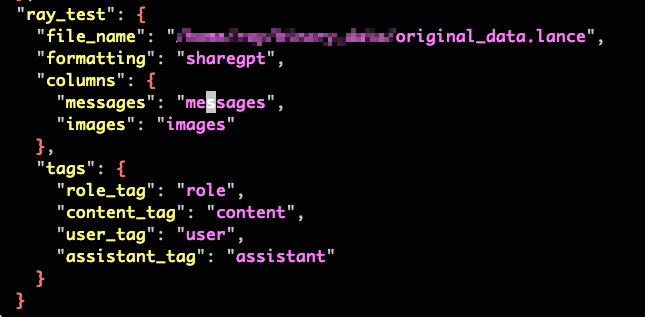
2. Register the Lance dataset in `dataset_info.json`.
Insert the dataset_info metadata into dataset_info.json (or create the file) to declare the mapping between your Lance data directory and the expected data fields.
3. Enable Lance data reading in LLaMA-Factory.
Submit a ticket to request technical support for modifying the LLaMA-Factory source code to read Lance datasets and load only the required columns.submit a ticketSubmit a ticketSubmit a ticket
4. Start training.
Run llamafactory webui and select the dataset by the name you registered in dataset_info.json.