AnalyticDB for MySQL provides five ways to call API operations, from fully managed SDKs to direct HTTP requests. Before making your first API call, confirm the API version, endpoint, and authentication identity that match your cluster edition and network setup.
OpenAPI Explorer
OpenAPI Explorer is a browser-based tool for exploring and testing AnalyticDB for MySQL API operations. It provides intelligent search, online debugging, SDK download, sample code, error diagnostics, and call statistics — all in one place.
API versions
AnalyticDB for MySQL uses two API versions. Select the one that matches your cluster edition.
| API version | Cluster editions |
|---|---|
| 2019-03-15 | Data Warehouse Edition |
| 2021-12-01 | Enterprise Edition, Basic Edition, and Data Lakehouse Edition |
Online debugging
OpenAPI Explorer supports online debugging for all AnalyticDB for MySQL API operations. Before you start, confirm your cluster's API version, endpoint, and integration method.
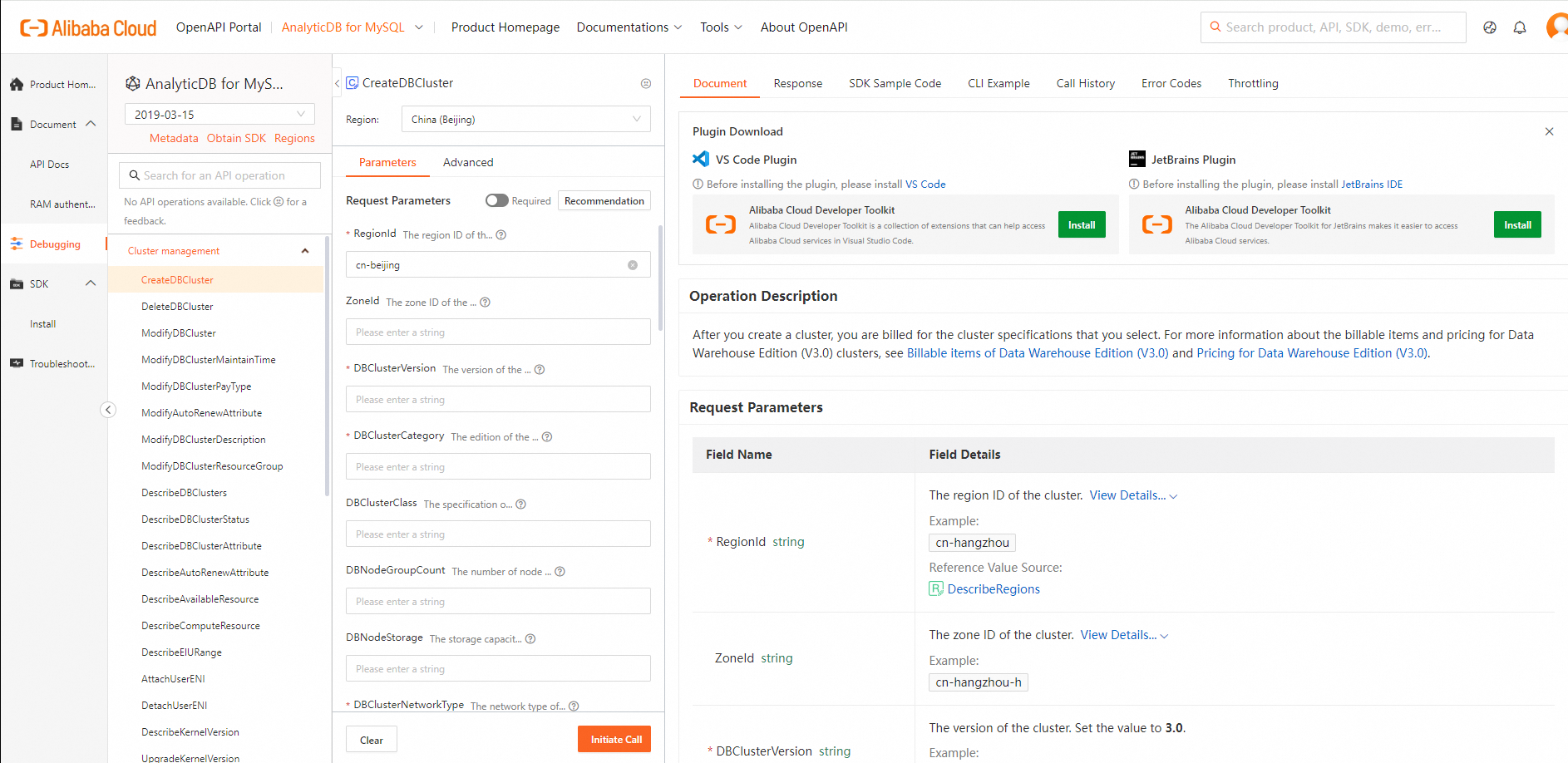
Debugging pages
Open the debugging page that corresponds to your cluster edition.
| Cluster edition | Debugging page |
|---|---|
| Data Warehouse Edition | API debugging page for Data Warehouse Edition |
| Enterprise Edition, Basic Edition, and Data Lakehouse Edition | API debugging page for Data Lakehouse Edition |
Version number | Description |
Data Warehouse Edition | API debugging entry point for Data Warehouse Edition clusters |
Data Lakehouse Edition | API debugging entry point for Data Lakehouse Edition clusters |
Endpoints
Select an endpoint based on the region where your cluster resides to reduce latency.
Endpoint types
| Type | Access scope | Advantages |
|---|---|---|
| Public endpoint | Accessible globally | Available from any network |
| Virtual Private Cloud (VPC) endpoint | Accessible only from within a VPC | Higher security, faster response, lower cost |
Endpoint format
Public:  adb.<region-id>.aliyuncs.com
VPC:     adb-vpc.<region-id>.aliyuncs.com
For example, for a cluster in the China (Zhangjiakou) region:
Public endpoint:
adb.cn-zhangjiakou.aliyuncs.comVPC endpoint:
adb-vpc.cn-zhangjiakou.aliyuncs.com
For Data Warehouse Edition endpoints, see Endpoints. For Enterprise Edition, Basic Edition, and Data Lakehouse Edition, see the topics of specific API operations.
Supported identities
Use a Resource Access Management (RAM) user or RAM role for API calls and routine O&M. An Alibaba Cloud account has unrestricted access to all API operations — if compromised, an attacker gains full control of your resources. RAM users and RAM roles limit the blast radius through scoped permissions.
| Identity | Supported | Notes |
|---|---|---|
| Alibaba Cloud account | Yes | High risk: has permissions for all API operations |
| RAM user | Yes (recommended) | Scope-limited permissions reduce blast radius |
| RAM role | Yes (recommended) | Scope-limited permissions reduce blast radius |
Before using a RAM user, grant the required AnalyticDB for MySQL permissions based on your business requirements. For details, see RAM authorization.
Integration methods
Five integration methods are available. Choose based on how much control you need versus how much you want the tooling to handle for you.
| Integration method | Best for | Trade-offs |
|---|---|---|
| Alibaba Cloud SDKs (recommended) | Application integration in any supported language | Handles authentication, signature generation, and error handling for you — less boilerplate, simpler integration path |
| Alibaba Cloud CLI | Ad-hoc operations, scripting, and automation from the command line | No application code required; less suitable for programmatic integration in applications |
| Terraform | Infrastructure-as-code workflows and reproducible environment provisioning | Requires learning Terraform's configuration language; not suited for ad-hoc calls |
| ROS | Alibaba Cloud-native resource orchestration and stack-based deployment | Tightly integrated with Alibaba Cloud services; does not support non-Alibaba Cloud resources |
| Custom encapsulation | Full control over HTTP requests when no SDK or CLI fits your environment | Maximum flexibility; you must construct requests and manage signatures manually |
Alibaba Cloud SDKs
Alibaba Cloud SDKs are available in Java, C#, Go, Python, TypeScript, Node.js, PHP, and C++. They abstract authentication, signature rules, and error handling, so you call wrapper functions directly without managing low-level HTTP details.
Overview: Alibaba Cloud SDKs
AnalyticDB for MySQL SDK download and sample code: AnalyticDB for MySQL SDKs
Alibaba Cloud CLI
Alibaba Cloud CLI lets you run aliyun commands to manage Alibaba Cloud resources from the terminal. It suits scripting and one-off operations where writing application code is not necessary.
Overview: What is Alibaba Cloud CLI?
Using Alibaba Cloud CLI with AnalyticDB for MySQL: Alibaba Cloud CLI
Terraform
Terraform is an open source infrastructure-as-code tool for provisioning and managing cloud resources. It calls API operations by interpreting configuration templates, so you can version-control your infrastructure and apply changes predictably.
Overview: What is Terraform?
ROS
Resource Orchestration Service (ROS) is an Alibaba Cloud-native service for managing cloud resources through stack templates. Describe your resources — such as Elastic Compute Service (ECS) instances and ApsaraDB RDS instances — and their dependencies in a template, and the ROS engine provisions and configures everything automatically.
Overview: What is ROS?
ROS templates for AnalyticDB for MySQL: ROS
Custom encapsulation
Use custom encapsulation when you need to make native HTTP calls outside of any SDK or CLI. You construct the request and sign it manually. For the signature method, see Request syntax and signature method V3.
Usage notes
If an API call returns an error, check whether the request parameters and their values are valid based on the returned error code. For a full list of error codes, see Service error codes.Error Code CenterError Code Center
For self-service diagnostics, use the Alibaba Cloud OpenAPI Diagnostics platform with the request ID or SDK error information from the failed call.
Notes
If an error is returned after you call an API, use the returned error code to check whether the request parameters and their values are correct. For more information, see Error Code Center.
You can also record the RequestID or the SDK error message from the response and use the Alibaba Cloud OpenAPI Diagnostic Platform for self-service diagnostics.
Basic information
Version guide
Version number | Description |
2019-03-15 | Use this version to call APIs for Data Warehouse Edition clusters. |
2021-12-01 | Use this version to call APIs for Enterprise Edition, Basic Edition, and Data Lakehouse Edition clusters. |
Endpoint description
To minimize latency, select an endpoint based on the region where your cluster is located.
For example, the VPC endpoint for the China (Zhangjiakou) region is adb-vpc.cn-zhangjiakou.aliyuncs.com. For more information, see Endpoints.
User identity
User identity | Supported features |
Support | |
RAM user (Recommended) | Supported |
RAM role (Recommended) | Support |
Supported call methods
Call method | Support | Description |
Alibaba Cloud SDK (Recommended) | Support | For information about the supported languages and how to install dependencies for the AnalyticDB for MySQL SDK, see AnalyticDB for MySQL SDK. |
Cloud Assistant CLI | Support | For more information about using the Alibaba Cloud CLI to call AnalyticDB for MySQL APIs, see Alibaba Cloud CLI. |
Resource Orchestration | Support | For information about how to use Resource Orchestration Service to call the OpenAPI of AnalyticDB for MySQL, see Resource Orchestration. |
Terraform | Support | For information about how to use Terraform to call the OpenAPI of AnalyticDB for MySQL, see Terraform. |
If none of the preceding methods meet your business requirements, you can encapsulate requests to call the OpenAPI on your own. This method is not recommended. For more information, see Custom encapsulation.