Add a DKIM record to your domain's DNS to verify that emails from your Alibaba Mail account are authentic and unaltered in transit.
What is DKIM?
DomainKeys Identified Mail (DKIM) is an email authentication method that detects forged and tampered emails. Senders attach a digital signature to prove the email originated from the claimed domain and was not altered in transit.
Get the DKIM record value
-
Log on to the management console as a mailbox administrator. Go to Enterprise Customization > Domain Management > Domain Settings and click View Details.
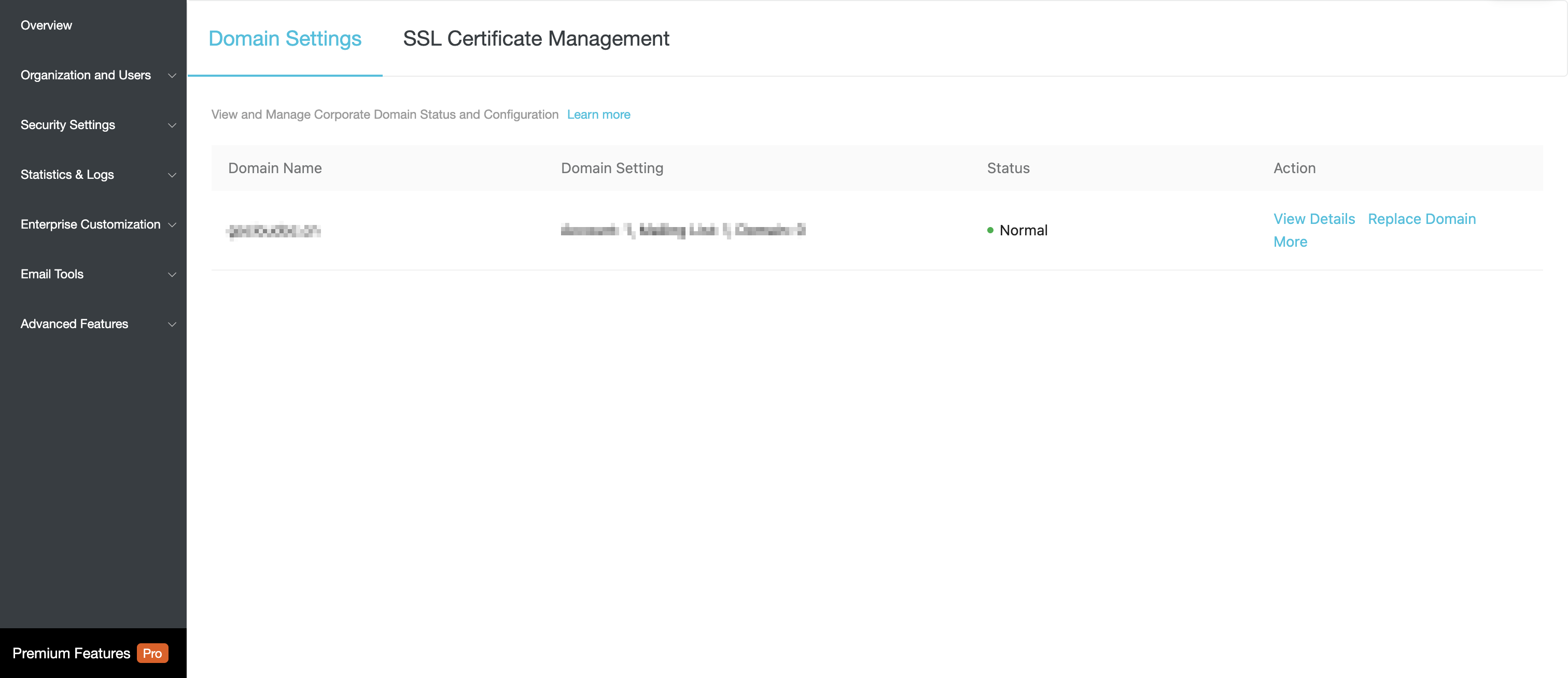
-
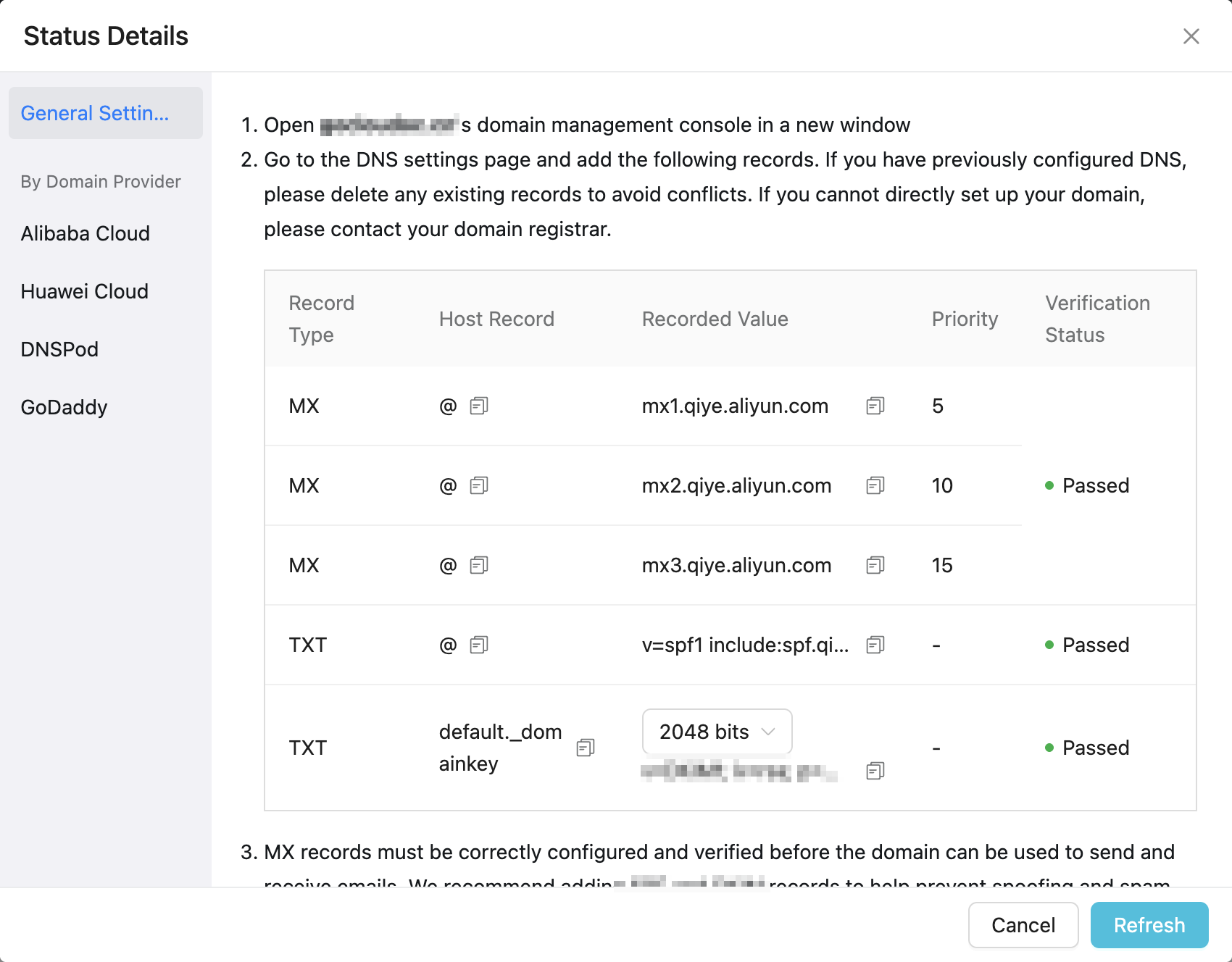
Click Copy to get the DKIM record value.
 Note
Note-
The host record and record value are unique to each domain. Obtain them from your mailbox management console.
-
The record value obtained from the console is the final value to configure. Copy and use it directly. The actual value may differ slightly from the template example (for example, it may not include the
g=*parameter). This is expected and does not affect DKIM functionality. -
The encryption bit length can be 1024 or 2048. Select a value based on your domain management platform requirements. Most platforms support both. If you change the bit length, the previous record value becomes invalid. Update your DNS configuration with the new record.
-
To activate the change, navigate away from Domain Management and then return. This triggers the server-side DKIM signature.
Add a DKIM record to DNS
The following steps use Alibaba Cloud DNS as an example. If you use a different DNS provider, refer to that provider's console.
1. Log on to the Alibaba Cloud DNS console.
2. Click the domain name to open the DNS Settings page.
3. On the DNS Settings page, click Add Record to add a TXT record.
4. Set the host record to default._domainkey.
5. Set the TXT record value to v=DKIM1; g=*; k=rsa; p=... . Note that the record must be on a single line. The actual DKIM record value generated in the Alibaba Mail management console may not include the g=* parameter, depending on the DKIM implementation used. Use the value obtained from the console as is and copy it directly; you do not need to add g=* manually. Example DKIM record configuration: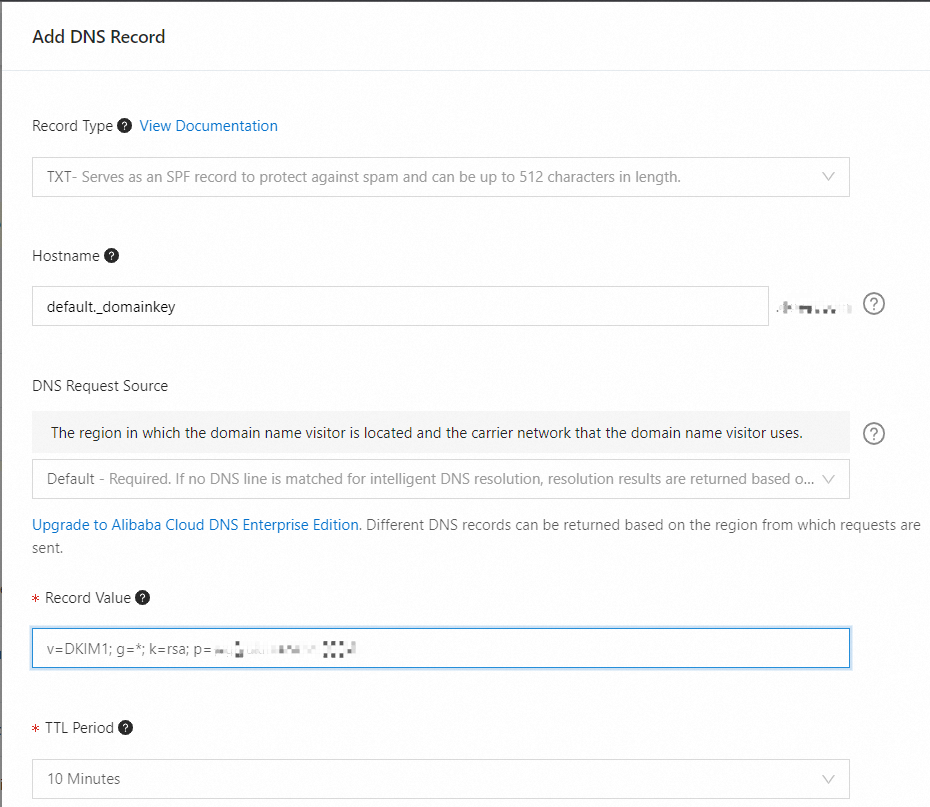
After you add the TXT record, DNS propagation typically takes from a few minutes to several hours. After you complete the configuration, return to the domain settings page of the Alibaba Mail management console and click Verify Now to check the DKIM verification status. If verification fails, wait for the DNS record to take effect and try again.
DKIM signature syntax
When DKIM is enabled, the sending server adds a DKIM-Signature header to each email. This header contains the digital signature (generated with a private key) and the selector (a string identifier used to locate the corresponding DKIM public key in DNS).
Example DKIM-Signature header:
DKIM-Signature: v=1; a=rsa-sha256; d=example.com; s=default; c=relaxed/relaxed;
h=from:to:subject:date:message-id; i=@example.com;
bh=...; b=...;
In this header:
-
v=1indicates the DKIM version. -
a=rsa-sha256indicates the signature algorithm. -
d=example.comindicates the sending domain. -
s=defaultindicates the selector used for the signature. -
c=relaxed/relaxedindicates the canonicalization algorithm. -
h=from:to:subject:date:message-idindicates the signed header fields. -
i=@example.comindicates the signing identity. -
The part after
bh=is the hash of the email body. -
The part after
b=is the signature itself.
The receiving server inspects the DKIM-Signature header and extracts d= (domain) and s= (selector) to determine which DNS record to query for the public key.
For example, with d=example.com and selector default, the DNS query is:
default._domainkey.example.comThe server retrieves the public key from this DNS record and validates the signature in b=. A successful validation confirms the email is from the claimed domain and was not altered in transit.
If a domain has multiple sending sources, each source should use a different selector so that receivers can locate the correct public key from each email's DKIM-Signature header.