Problem description
Connect to the SMTP server to send mail, and an error message such as "Could not connect to SMTP host" appears.
Cause
This error occurs because a problem occurs when the program connects to the email server in the initial stage of sending emails. At this time, the email server does not have incoming records and related sending logs. Generally, you need to start troubleshooting from the client where the SMTP sending code is located.
Solution
Step-by-step investigation and analysis, according to the specific situation to take corresponding measures.
1. Event analysis
Is it good to judge before first? Does every call report an error (is the error occasional or mandatory)?
If it was good before, whether code changes, component upgrades and other operations were made before the problem occurred, and try to roll back and restore;
If the error can be reproduced, it will facilitate subsequent troubleshooting.
2. Connectivity analysis
Take the 465 port as an example. Run the following command and take a screenshot:
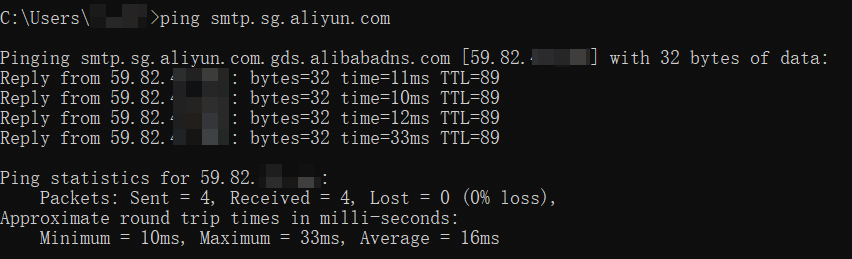
Command 1: View the IP address of the assigned server. The IP address varies based on the region.
ping smtp.sg.aliyun.comIf the ping command fails or has high latency, it may be a local forbidden ping or a network connection problem.
Successful results:
Command 2 (Connect to the SMTP server by using the specified port to view the port and network connectivity):
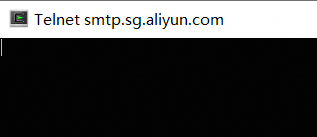
telnet smtp.sg.aliyun.com 465Successful results:

or
Command 3 (check routing path):
# Linux or Mac command:
mtr -n -i 1 -c 100 smtp.sg.aliyun.com
traceroute smtp.sg.aliyun.com
# Windows commands:
tracert smtp.sg.aliyun.com
pathping smtp.sg.aliyun.com
Look at the routing path to the SMTP server and identify which hop is starting to have problems.
By default, tracert displays a maximum of 30 hops, and the last IP is the mailbox server IP.
The pathping runs slowly and takes a few minutes to generate statistics.
Visual open source tools such as WinMTR can also be used.
Successful results: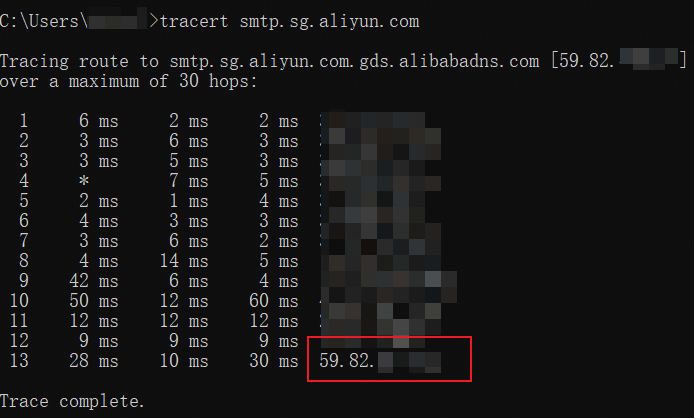
Command 4 (465 port only):
# The TLS version is not specified.
openssl s_client -connect smtp.sg.aliyun.com:465
# Specify the TLS version.
openssl s_client -connect smtp.sg.aliyun.com:465 -tls1_2
Use the encryption method to perform a connection test to determine whether a handshake exception is caused by the TLS version.
Successful results:
CONNECTED

3. Exclusion analysis
Check whether other ports can send messages normally, such as port 25 and port 80 (note that ECS prohibits port 25 by default). You can try whether port 80 is successful. These two ports do not use SSL-related codes. Please comment out the related codes.
If other ports are normal, 465 will not work: 465 ports to forcibly enable SSL
final Properties props = new Properties();
props.setProperty("mail.smtp.ssl.enable", "true");
Try sending independently from other scripts or using sample code (to exclude code interference from other business logic).
Direct Mail product examples (reference only):
Use other server addresses and use port 465 to send letters for testing: such as qq mailbox smtp.qq.com and Netease mailbox smtp. 163.com, Alibaba Cloud Direct Mail smtpdm.aliyun.com, etc.
4. Packet capture analysis
If port 25 or 80 is not disabled (465 port encryption, details are not visible), you can capture packets on port 25 or 80 for analysis.
Packet capture process and command reference:
The sender starts to capture packets (specify the mailbox IP address and port)
linux command reference: the default save root directory, you can also modify the command to specify the save directory, such as /tmp/capture.pcap.
sudo tcpdump -i eth0 host xx.xx.xx.xx and port 80 -w capture.pcapwindows: Use wireshark.
Test the letter and reproduce the problem.
Stop packet capture
linux: press ctrl + c on the command execution interface to stop capturing packets.
windows: operation stop button on the software.
Open the analysis with wireshark.
Other possible options
Encryption Algorithm Mismatch in Handshake Phase
Take the Java environment as an example. The high version of JRE prohibits the encryption algorithm SSLv3, TLSv1, TLSv1.1, etc. Try to specify the version or delete the related disabled items.
final Properties props = new Properties();
props.put("mail.smtp.ssl.protocols", "TLSv1.2");
SSL to establish a connection and fall back compatible if it fails.
If for some reason SSL cannot be used to establish a connection (for example, the server does not support it), it does not fall back to the non-encrypted connection method, but allows the connection attempt to fail.
final Properties props = new Properties();
prop.put("mail.smtp.socketFactory.class", "javax.net.ssl.SSLSocketFactory");
prop.put("mail.smtp.socketFactory.fallback", "false");
Other analysis methods
If you enable the debug mode, the interaction process with the server is printed and can be used for error analysis in other phases, which may not be applicable in the current scenario.
Java example:
// Enable the debug mode:
Session mailSession = Session.getInstance(props, authenticator);
mailSession.setDebug(true);