Problem Description
The body of the email contains table information. Alibaba Mail the web page or Alibaba Mail client does not display the table, only the text content is displayed, while Outlook can display the table and the content.
Causes
Outlook proprietary format compatibility issues. The original message header contains multiple Content-Type types.
The text/plain is a standard plain text format that can be recognized and displayed by all mail clients.
MS-TNEF is a proprietary format, so the use of cross-platform and cross-mail clients may be limited, and some email clients may not be able to correctly identify and display.
If there is an unsupported format, it will be displayed as text/plain to be compatible with the display of more content.
Example 1:
Content-Type: text/plain;charset=utf-8
Content-Transfer-Encoding: base64
Example 2:
Content-Type: application/ms-tnef;charset=utf-8
Content-Transfer-Encoding: base64
Content-Type is a header field in an email protocol that indicates the type of data contained in the message body and its format.
The Content-Type header field usually consists of two parts, separated by semicolons: type and subtype.
The Content-Type is usually used together with header fields such as Content-Disposition and Content-Transfer-Encoding to specify the specific format and encoding of the email body so that the recipient can correctly resolve and display the body.
The text/plain indicates that the message body is plain text, and charset=utf-8 indicates that the message body is encoded using the UTF-8 character set.
MS-TNEF is an email format developed by Microsoft and based on the International Mail Transfer Protocol standard (RFC 1341) and Multipurpose Internet Mail Extensions(MIME) standards. It is a proprietary format, so the use of cross-platform and cross-mail clients may be limited.
Solution
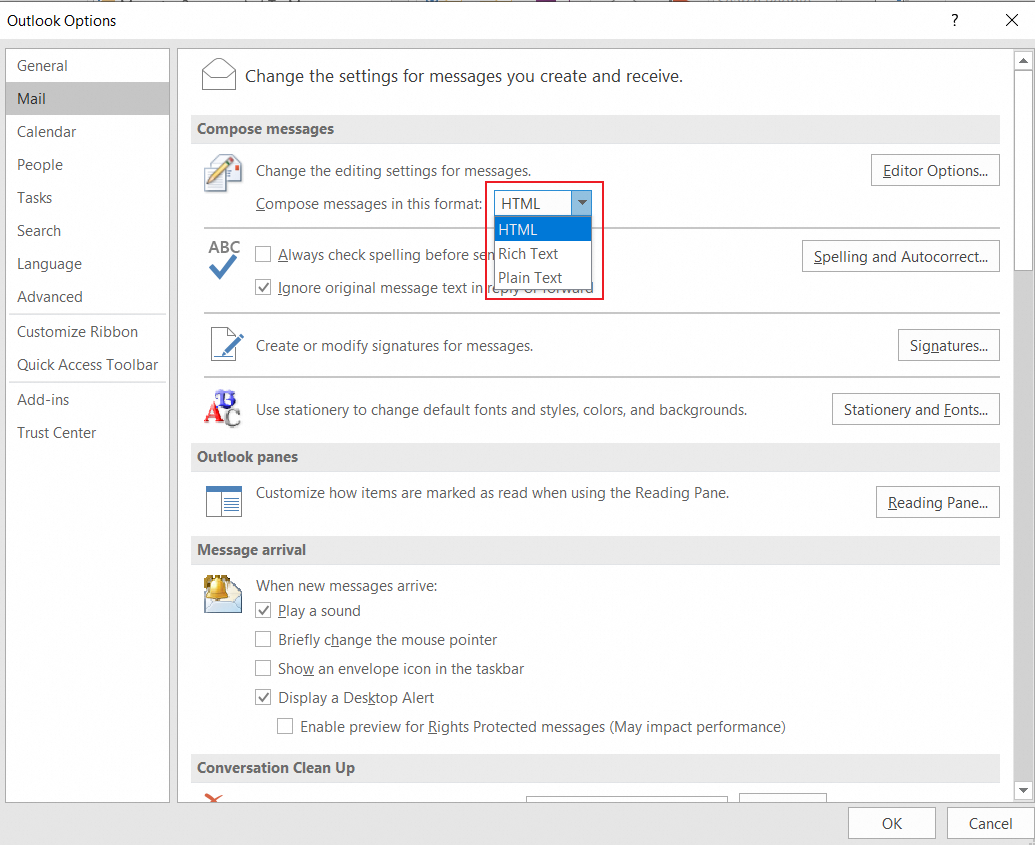
It is recommended that the sender modify the Outlook settings that changes RTF to HTML to avoid compatibility problems and cause abnormal email format.
Path: File-- Options-- Mail -- Compose messages-- Compose messages in this format