To protect enterprise mailbox data and support flexible work, administrators can use the Alibaba Mail domain management console to configure access permissions for third-party clients (such as Outlook and Foxmail), enforce secure passwords, and manage service agreements.
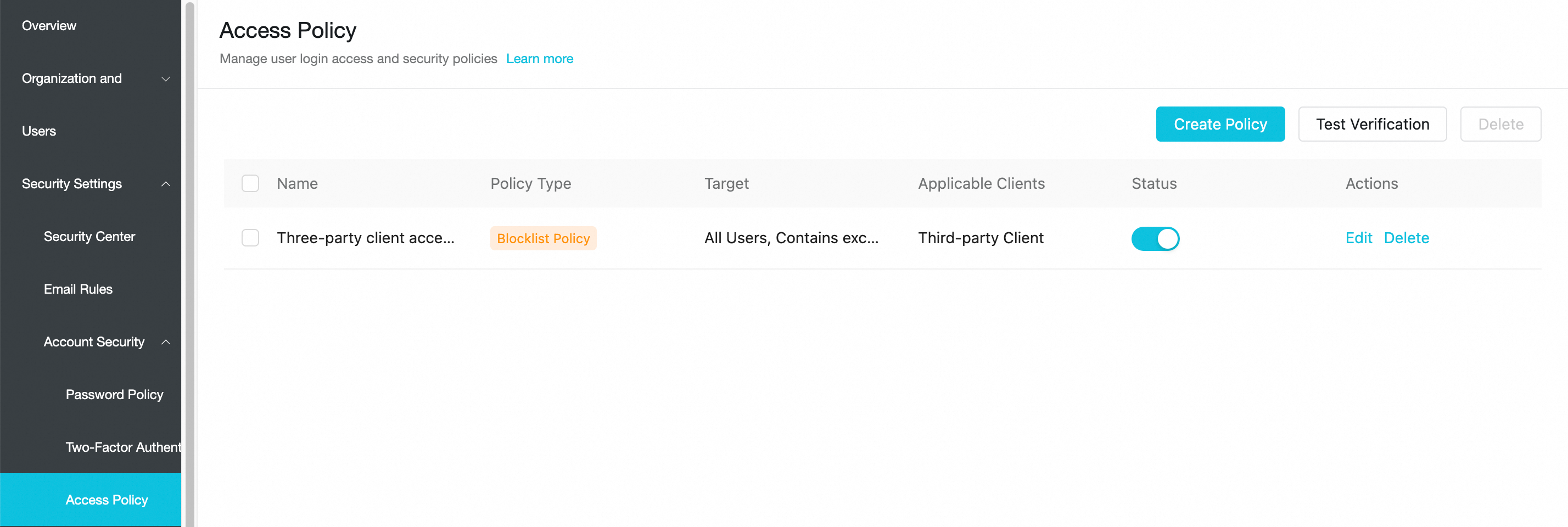
To enhance account security, new Alibaba Mail subscriptions include a default, enabled blacklist policy named "Third-party Client Access Policy." This policy blocks logins from all third-party clients. If an account needs to use a third-party client, navigate to the mail admin console > security management > account security > access policy. Click Edit to add the account as an exception or disable the policy entirely. The change takes effect within five minutes.
Prerequisites
-
You have an Alibaba Mail administrator account (postmaster@domain-name) or a delegated administrator account with domain management permissions.
-
You understand your organization’s internal security and compliance requirements. For example, you know whether employees are allowed to receive company email on personal devices.
Set third-party client logon permissions
By default, the high-security policy blocks third-party clients and allows only the web interface and the official Alibaba Mail app. To use software such as Outlook, manually enable third-party client logon permissions.
Feature overview
-
Default policy (for new customers): Members cannot log in using third-party clients. If a member tries to log in, the client shows an authentication failure or connection error. This does not affect logins from the web interface or the Alibaba Mail app.
Procedure
-
Log on to the Alibaba Mail domain admin platform with the administrator account (postmaster). (Choose the logon URL for your site.)
Singapore
China (Hong Kong)
Germany
United States
-
In the left-side navigation pane, choose .
-
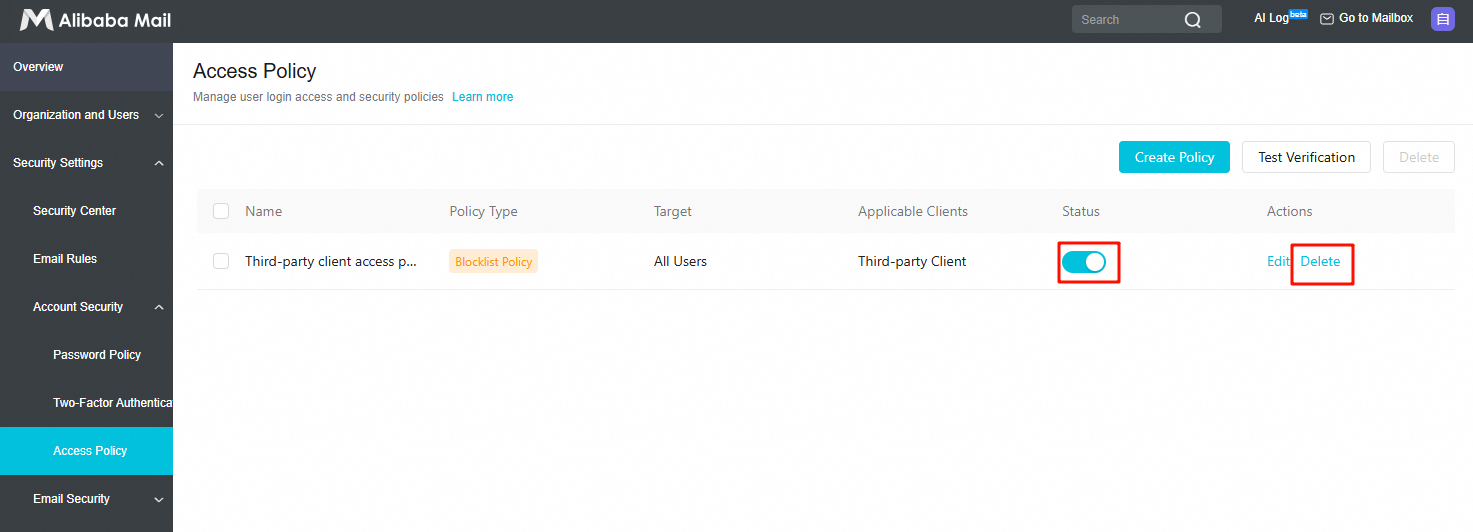
Find the blacklist policy named that is enabled by default.
-
Block third-party clients: Turn on the toggle (
 ).
). -
Allow third-party clients: Turn off the toggle (
 ) or delete the policy.
-
Verify the result: With the policy enabled, try to configure an enterprise account in your phone's native mail app. You should see a server connection error or a username/password error.
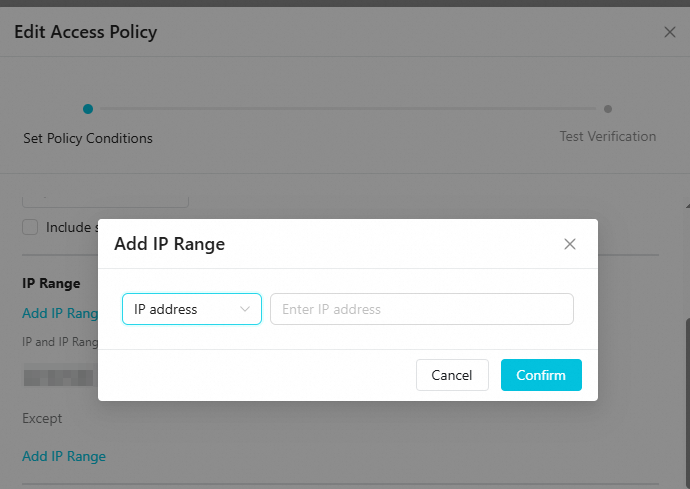
You can configure an IP address range. This corresponds to the legacy "Set secure logon IPs" feature.
This feature restricts third-party client access to specific public IP addresses, such as your corporate network, and blocks connection attempts from untrusted networks.
Verify the result: Try fetching email while connected to a mobile hotspot (a non-corporate IP address). It should fail. Then, switch to your company's Wi-Fi. Email fetching should succeed.
Enforce secure passwords for third-party clients
If your users need to use third-party email clients, enable this setting to enhance account security. Select the scope for this policy carefully.
After the policy is enabled, existing third-party client connections will immediately fail, typically with a password error.
Make sure to notify employees in advance to log in to their web-based email, generate a new password under , and replace the old password in the third-party client. Enable and set a third-party client secure password
When enforced, third-party client login credentials are separated from the root account password. Even if client credentials leak, attackers obtain only a revocable dedicated password—not the actual mailbox password.
Feature overview
After enabling this setting, members must use a third-party client secure password generated separately in the web interface. They cannot use their mailbox logon password to configure third-party clients.
Procedure
-
Log on to the Alibaba Mail domain admin platform with the administrator account (postmaster). (Choose the logon URL for your site.)
Singapore
China (Hong Kong)
Germany
United States
-
Go to .
-
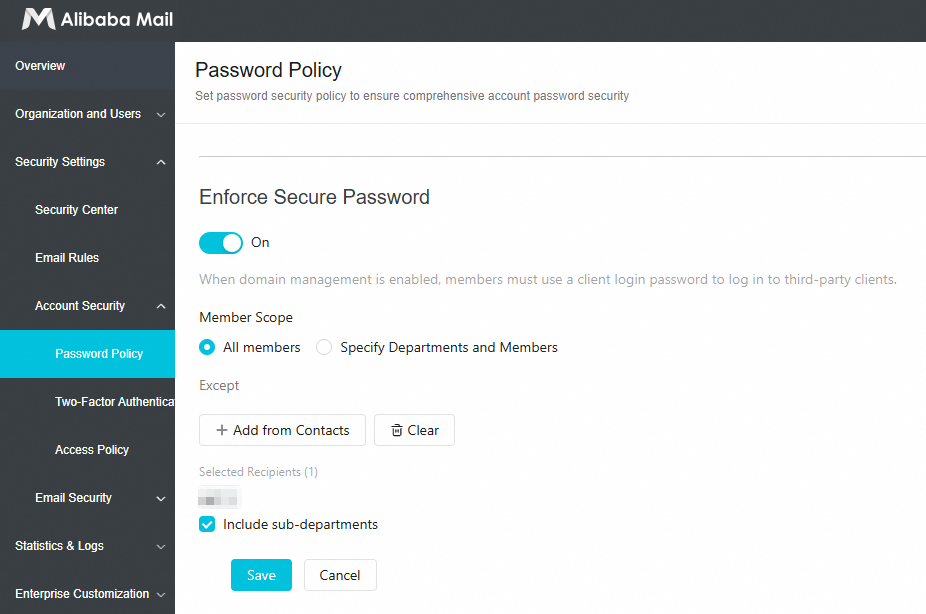
Find the option and turn on the switch.
-
Set the scope:
-
All Members: All members must use a secure password.
-
Specific Departments and Members: Click Open Selector and select the departments or employees for whom you want to enforce the policy.
-
-
(Optional) Exceptions: If you enable the policy for all members, you can add specific accounts to the exceptions list. For example, add accounts for services that do not support this protocol, such as a printer's scan-to-email feature.
-
Click Save.
Management Mailbox Service Agreement
Manage POP3 and IMAP services as needed. For example, enable IMAP for mobile work but disable POP3 to prevent bulk email downloads to local devices and reduce data leakage risk.
Protocol overview
-
POP3: Downloads email to a local device. Often used for local archiving.
-
IMAP: Syncs email status across multiple devices. Best for mobile work.
-
SMTP: Sends email.
Procedure
Modify a single account
-
Log on to the Alibaba Mail domain admin platform with the administrator account (postmaster). (Choose the logon URL for your site.)
Singapore
China (Hong Kong)
Germany
United States
-
Go to .
-
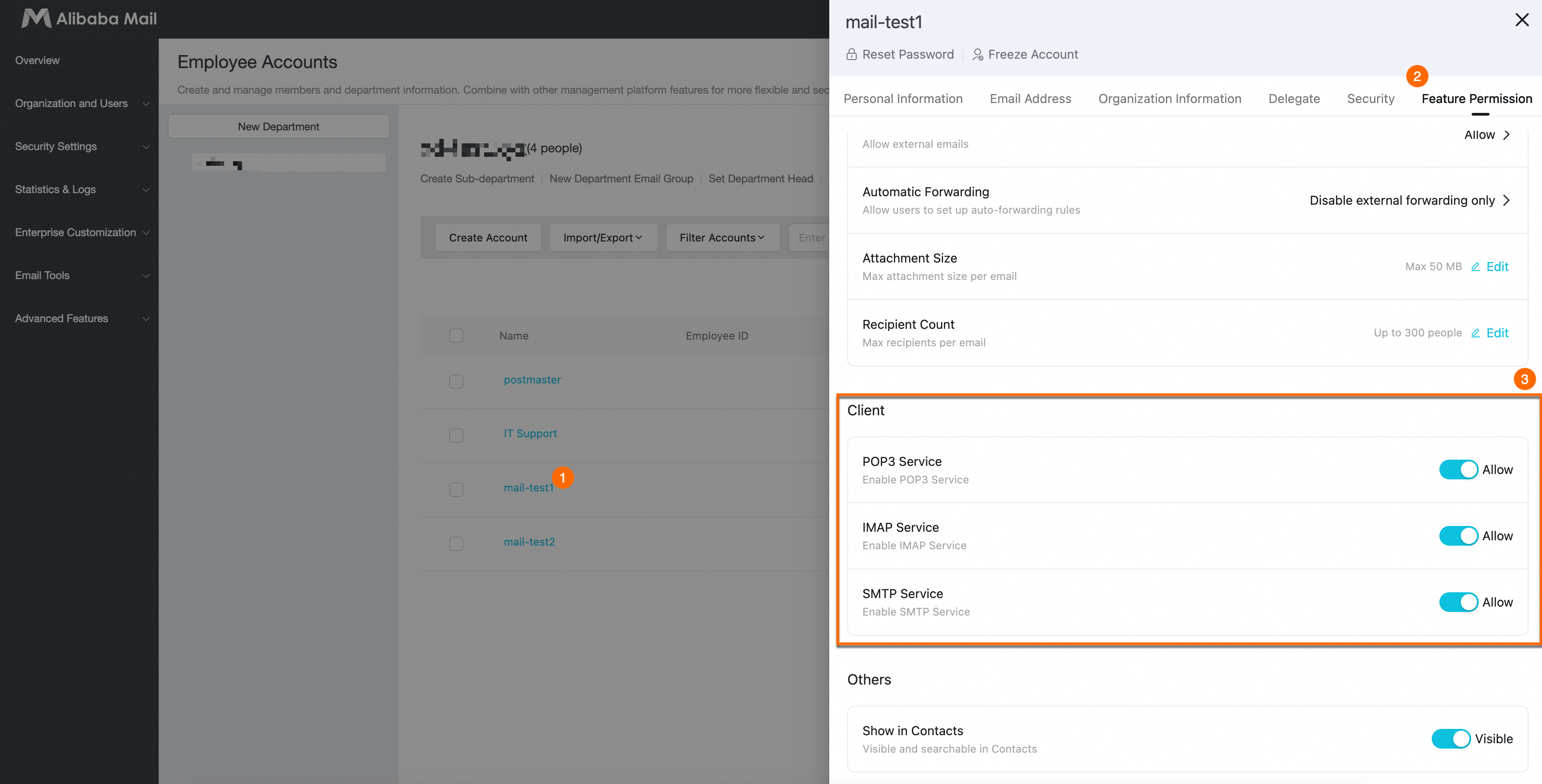
Click the employee’s email address. Switch to the Feature Permissions tab. Find the Client settings to manage service agreements. Use one of these two recommended options:
-
Option 1: Enable both IMAP and SMTP (recommended).
-
Option 2: Enable both POP3 and SMTP.
Changes save automatically.
-
Modify multiple accounts
-
Log on to the Alibaba Mail domain admin platform with the administrator account (postmaster). (Choose the logon URL for your site.)
Singapore
China (Hong Kong)
Germany
United States
-
Go to .
-
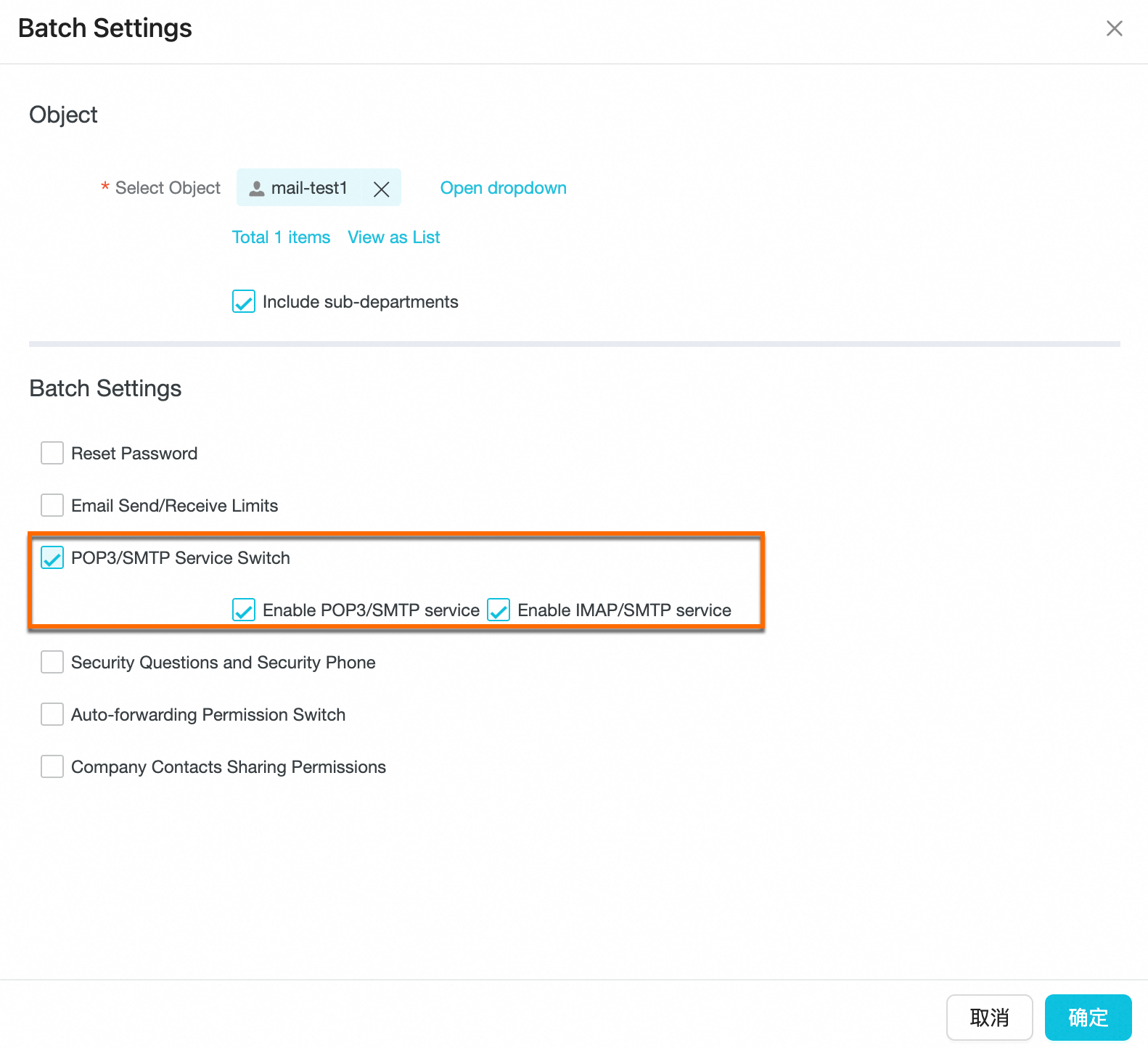
Select targets: In the employee list, check the departments or individual employee accounts you want to update. Then click Batch Settings.
-
In the feature list, check POP3/SMTP Service Toggle.
-
Adjust sub-options as needed:
-
Block email download: Clear the check box next to Enable POP3/SMTP Service.
-
Allow synchronized viewing: Keep Enable IMAP/SMTP Service checked.
-
-
Click OK to finish.
FAQ
-
Can I still log on to the web interface if the third-party client blacklist is enabled?
Yes. This setting only blocks third-party client software such as Outlook, Foxmail, and Mac Mail. It does not affect the Alibaba Mail web interface or the official Alibaba Mail app.
-
Why does my client show password error after I enable Enforce Secure Password?
This is expected. After enabling this feature, the original mailbox logon password stops working in third-party clients. Users must log on to the web interface, generate a new third-party client secure password, and replace the old password in their client.
-
Even though I disabled third-party clients, why can employees still receive email on their phones?
Check whether the employees are using the Alibaba Mail app. The Alibaba Mail app is a secure client not restricted by the third-party client policy.
-
What happens when employees travel after I set up an IP address whitelist?
If you enable an IP address whitelist and block third-party clients on external networks, employees outside the whitelisted IP range—such as while traveling or working from home—cannot use third-party clients. Guide them to use the web interface or the official Alibaba Mail app for mobile work.