Description
An email is sent to the foreign domain user through the Alibaba Mail, but the foreign domain user indicates that this email has not been received.
Cause
Failed to deliver the email
Incorrect receiving address
Emails are sorted to spam or other folders
Solution
Follow these steps to troubleshoot the issue and identify the cause of the issue.
1. Log in to the Alibaba Mail Webmail and enter the Sent Item folder.
2. Find the email sent to the foreign domain recipient and click this email to go to the email content page. Click Send successful, View Read Status to view the email status.
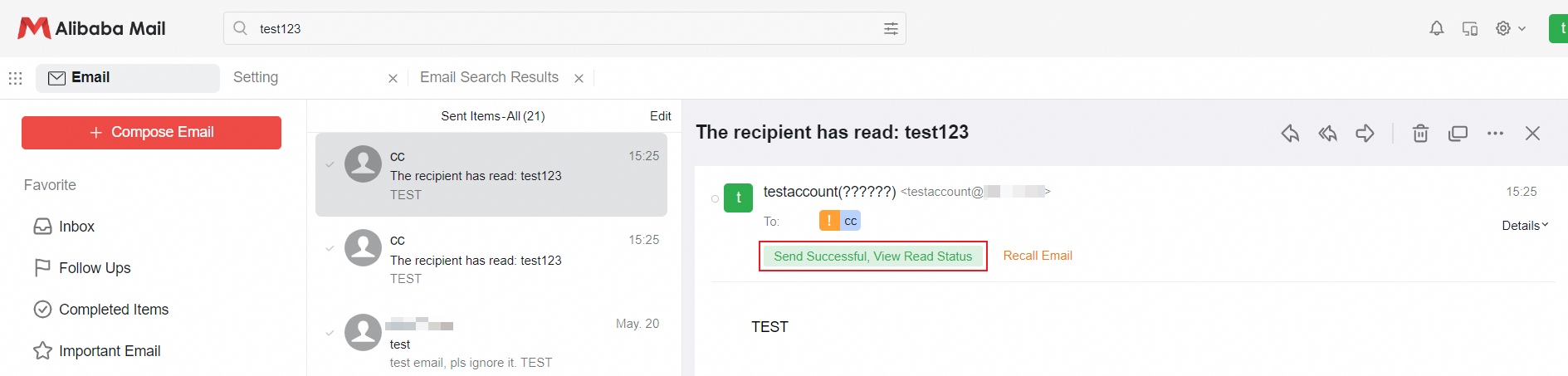
This picture is for reference only, please subject to the actual situation.
3. In the pop-up letter reading status page, check whether the recipient address is correct and the email sending status.
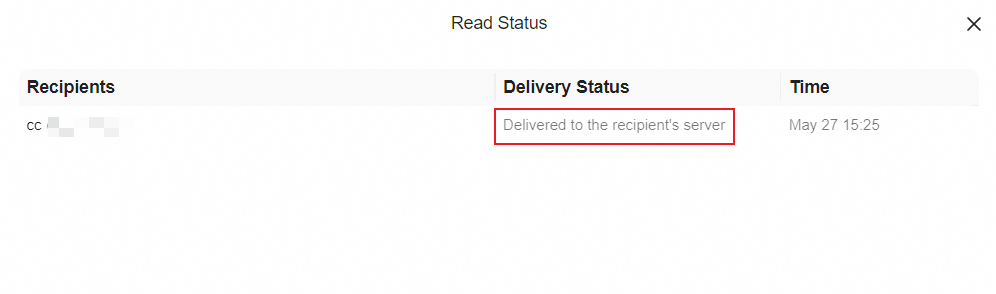
4. If the following conditions exist, please refer to the corresponding methods for handling:
a. Wrong recipient address: Please resend the email to the correct email address.
b. The sending status shows Bounced.

It means that the email failed to be sent. Please check the system bounce instructions in the Inbox and handle it according to the bounce instructions.
c. The sending status shows that Delivered to the recipient's server.

It means that the email has been successfully sent to the recipient. Please ask the recipient to check the spam folder and receiving rules. The email may be marked as spam or delivered to other folders.
5. If the recipient still does not receive the email you sent, please contact its email service provider.
We cannot troubleshoot the problem of sending and receiving issues of external users, please contact the email service provider for handling.