Before you perform a traffic switchover, you can test the operations to obtain recommendation results by using a server SDK of Artificial Intelligence Recommendation (AIRec). You can also use the call testing feature in the AIRec console.
Test the operations to obtain real-time recommendation results
After you confirm that boot data is uploaded, you can perform a user experience test.
We recommend that you complete the test before you use real traffic to verify the recommendation effect.
After you set the Test Type, Scenario ID, Test User, and Recommended Commodities parameters on the Service Testing page, you can click Request Results to obtain the recommendation results of AIRec. The test is equivalent to calling the Recommend operation to obtain recommendation results.
Then, you can perform other operations based on your preferences and interests, request recommendation results again, and then perform tests to check whether the recommendation results meet your interests. You can turn on or off Custom to specify whether to provide personalized recommendation results.
During the test, behavioral data is automatically pushed to the system. You can view detailed information on the Behavior Messages tab of the Data Query page. If you deploy AIRec on an app, a mini program, or a PC, the real-time behavioral data of users is also synchronized to AIRec.
In the returned results of a user experience test, you can click Click, Favorite, Add, or Buy to perform the corresponding operation. When you perform one of the operations, an entry of behavioral data is automatically generated in the background to test the recommendation effect. If you request recommendation results again, the returned results vary based on the operations that you perform.
In addition to the recommendation results, AIRec also returns the corresponding recommendation reasons. This helps you better understand how the recommendation algorithms work and verify whether the recommendation results meet your business requirements.
Example:
Common recommendation reasons include recommendations of popular items, recommendations of new items, recommendations based on historical user behavior, and recommendations based on user preferences for specific brands, stores, tags, channels, authors, or platforms. Recommendations based on historical user behavior refer to recommending items similar to those that users have clicked. Recommendations based on user preferences refer to determining the brands, stores, tags, channels, authors, or platforms that users prefer based on the items that they have clicked and recommending items that meet the same preferences. In this view, both types of recommendations are based on the historical click behavior of users. If recommendation results are returned based on historical user behavior or user preferences, you can click Details to view the items that you clicked, and the time when the click operation was performed.
In addition, if an item is recommended because an increased weight or a traffic quota is allocated to the item, the recommended item is marked with an Allocate Weight or Support sign. For more information about the recommendation reasons, see Details of recommendation results.
View behavioral data on the Data Query page
Obtain recommendation results by using a server SDK
For more information about how to obtain recommendation results by using a server SDK, see Obtain recommendation results.
Possible causes of recommendation failures
If no recommendation result is returned during a user experience test, you can refer to the following possible causes:
1. Your request parameters are invalid.
After you set the Scenario ID parameter, the returned results must contain the ID of this scenario.
If you specify a user ID that is not contained in user tables, this user is regarded as a new user.
When you set the Recommended Commodities parameter, make sure that the value is smaller than the maximum number of items that can be recommended in the scenario. In a user experience test, the maximum number of recommended items is 10.
Note: In the recommendation results that are obtained by using a server SDK, the maximum number of recommended items is 50. If you set the Test Type parameter to Related Recommendations, you must also set the Existing Commodity parameter in the item_id:item_type format. The following figure shows the parameters.  2. The number of items that meet the recommendation conditions is small. No available items in the item pool can be recommended to users. Therefore, no result is returned.
3. If an InternalServerError error is returned, try again later. If this error occurs multiple times, you can contact Alibaba Cloud technical support.
Query and analyze historical recommendation results
After you obtain recommendation results by using a server SDK, you can query historical recommendation results on the Query Historical Recommendation Results page.
The value of the RequestId parameter is not returned for a user experience test. Therefore, historical recommendation results for user experience tests cannot be queried.
Query methods
Query historical recommendation results by using the return value of the RequestId parameter
After you obtain the recommendation results by using a server SDK, the value of the RequestId parameter and the recommendation results are returned.
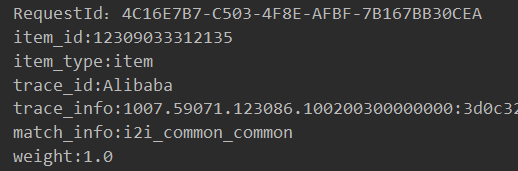
Enter the value of the RequestId parameter in the Request ID field on the Query Historical Recommendation Results page and click Obtain Results.

Query historical recommendation results by using field combinations
You can also click Query by User ID and Time to change the query method.
Enter the user ID or International Mobile Equipment Identity (IMEI) in the User ID field and specify a time range for the query. To perform a fine-grained query, you can also set the Scene ID and Item ID to Be Checked parameters. Specify the value of the Item ID to Be Checked parameter in the item_id:item_type format.