In public opinion analysis, developers face the challenge of efficiently processing massive volumes of data while ensuring real-time insights. Traditional systems often fall short in data processing timeliness, which can delay critical decisions. This topic guides you through building an automated, streaming public opinion analysis system on the Function Compute AgentRun platform to address these challenges.
Get started
Preparations
Before you begin, complete the following preparations:
-
Activate Alibaba Cloud services and grant permissions:
-
Make sure that you have an Alibaba Cloud account.
-
Access and activate the following services. When you access these services for the first time, follow the on-screen instructions to complete service activation and RAM role authorization.
-
-
Obtain a model access credential (API key):
-
This application relies on a large language model for conversation understanding. Log in to the Model Studio console, and on the Key Management page, create or copy an API key. You will need this key for later steps.
-
-
You can create a Large Language Model (LLM) in Model Management.
The following example configures the
qwen3-maxmodel in Model Studio. For more information about configuring other models or custom models, see Large language models.-
On the Model Management page, click Add Model.
-
Select API Model and configure the following parameters:
-
Name:
qwen3-model. -
For Service provider, select Alibaba Cloud from the drop-down list.
-
API destination: Keep the default value.
-
Specific model: Search for and select qwen3-max.
-
Credential management: Select API key and paste the Model Studio API key obtained in the previous step. Alternatively, select Use existing credential and choose a preconfigured credential from the drop-down list. For more information, see Credential management.
-
-
-
Create a browser sandbox instance in the Sandbox.
The following example uses quick configuration in the console. For more information about specific parameters or how to use the sandbox API, see BrowserTool browser.
-
Go to the Sandbox page and click the Create Sandbox Template button.
-
Select Browser and click Create Now. On the configuration page, enter the following parameters and leave all other parameters at their default values:
-
Name:
sandbox-in-opinion_analysis. -
Execution role ARN:
AliyunAgentRunDefaultRole.
-
-
Click Create Browser and wait for the sandbox to be created.
-
Select a template and deploy
-
In the AgentRun console, click Agent Template at the top of the page. From the popular agent templates, find Public Opinion Analysis Expert and click Deploy. You can also click Details on the card to view an overview of the template.
-
On the deployment page, configure the parameters as shown in the following example:
-
Application name: Enter a descriptive name for the application, such as
opinion_analysis. -
Description (optional): Briefly describe the function of the application, such as
Agent created from the Public Opinion Analysis Expert template. -
Permission configuration: Authorize the AgentRun application to access cloud resources such as models and tools.
-
(Recommended) Click Quick Create. The system creates a default role named
AliyunAgentRunDefaultRolewith all the required permissions. -
To customize permissions, click the Add button
 next to the drop-down list, and then click Create Role to manually configure a role. Attach the appropriate access policies. For more information, see Configure execution roles as needed.
-
-
Large language model: From the drop-down list, select the qwen3-model that you configured, and then select the qwen3-max model. If you have not configured it, click the add button
next to the drop-down list and follow step 3 in Preparations. -
Browser Sandbox: From the drop-down list, select the
sandbox-in-opinion_analysisyou just configured. If you have not configured it yet, click the add button next to the drop-down list and follow step 4 in Preparations to configure it immediately. -
Click Confirm Creation and wait for the deployment to complete.
-
After the deployment is successful, an access link for your application is displayed. Click the link to open the WebUI. Alternatively, you can find the application in the Agent console. Click Details and locate the endpoint under Integration Configuration on the right side of the Overview and Configuration page.
-
Experience the application
-
On the application's Web UI, you will see the public opinion analysis system interface. Enter a keyword or topic to start the analysis. For example, you can enter
new energy vehicles. During the analysis, the system invokes your configured browser sandboxsandbox-in-opinion_analysis, and AI controls a cloud-based browser to retrieve data. -
After the analysis is complete, the system organizes the collected data and generates a visual report that combines text and charts.
View application details
After the application is deployed, you can manage and perform operations and maintenance (O&M) on it in the AgentRun console. In the application list, find the application that you created and click its name to go to the Details page. The navigation pane on the left provides the following core features:
Overview and Configuration: View basic application information and runtime configurations, such as models and memory specifications. You can also manage environment variables on this page.
Code and Debugging: View, edit, and debug code online. You can also perform custom development online.
Versions and Phased Releases: Use version control features. You can use a phased release to switch a small amount of traffic to a new version for testing before a full release. Each version has a temporary domain name for testing.
Integration and Publishing: Integrate the developed agent into your frontend webpage, backend application, or other services. For more information, see Agent integration and publishing.
Elasticity and Instances: View the list and status of currently running instances. You can configure flexible Auto Scaling policies to automatically add or remove instances based on the business workload.
Observability: Integrate with Alibaba Cloud Application Real-Time Monitoring Service (ARMS) to obtain code-level performance diagnostics, request tracing, exception monitoring, and alerting capabilities to ensure application stability.
Billing overview
Deploying the Public Opinion Analysis Expert application creates and activates the following Alibaba Cloud services. You pay only for the resources you use. Your final charges appear on your Alibaba Cloud bill.
-
Core computing: Function Compute (FC)
-
Description: Deploying this application creates Agent instances and browser sandboxes. These components serve as the core runtime units deployed on Alibaba Cloud Function Compute (FC). Function Compute uses a pay-as-you-go billing method based on actual invocation counts and resource consumption (such as execution duration and memory).
-
Billing documentation: Function Compute billing overview.
-
-
Large language model: Alibaba Cloud Model Studio
-
Description: Intelligent analysis and content generation features rely on the large language model service provided by Alibaba Cloud Model Studio. Model invocation fees are calculated based on the number of tokens in input and output text.
-
Billing documentation: Model Studio model invocation billing.
-
-
Logging and monitoring: SLS & ARMS
-
Description: To ensure stable operation, the system automatically activates Simple Log Service (SLS) and Application Real-Time Monitoring Service (ARMS). Both services offer free quotas. Usage beyond the free quota is billed on a pay-as-you-go basis.
-
Billing documentation: For more information, see SLS billing overview and ARMS product billing.
-
Cost management tip: Before deployment, carefully review the billing documentation for each service. Set up spending alerts in the Alibaba Cloud Management Console based on your business needs to effectively manage costs.
Application architecture analysis
System architecture design
The entire public opinion analysis system uses a layered architecture. Its core principle is strict code control over the execution flow rather than relying on autonomous LLM decision-making.
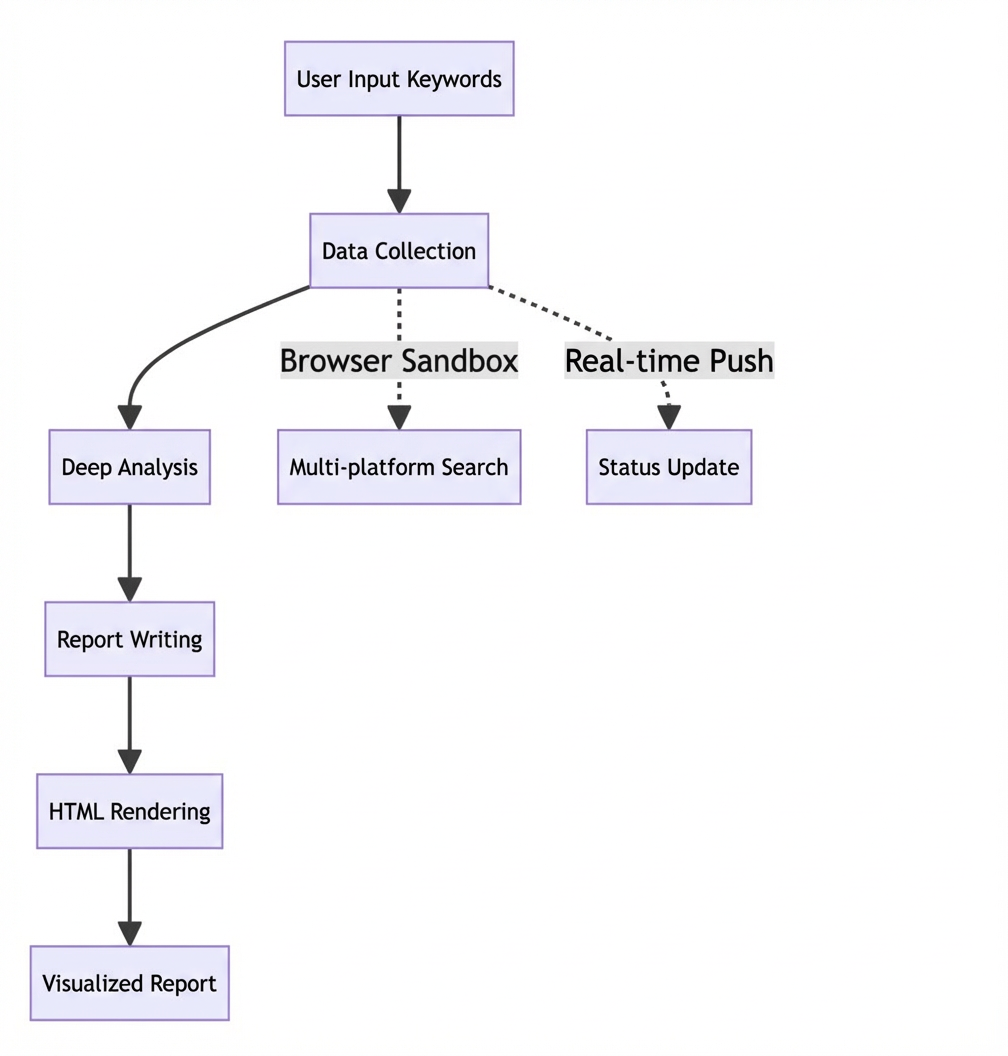
Key advantages
-
Securely isolated execution environment
Traditional public opinion systems typically run crawler programs directly on servers, which poses security risks and dependency conflicts. When anti-crawling mechanisms on a website are triggered, they can affect the entire server’s stability. AgentRun Sandbox provides a fully isolated browser environment. Even if a single data collection task fails, the overall system remains unaffected.
async def create_browser_sandbox() -> Optional[BrowserSandbox]: """Create an isolated browser environment to avoid environmental contamination""" try: sandbox = await Sandbox.create_async( template_type=TemplateType.BROWSER, template_name=agentrun_browser_sandbox_name, ) _sandboxes[sandbox.sandbox_id] = sandbox return sandbox except Exception as e: # Failure of a single Sandbox does not affect other instances raise SandboxCreationError(f"Failed to create Sandbox: {e}") -
Real browser environment simulation
Traditional crawlers often use simple HTTP request libraries, which modern websites easily detect and block. AgentRun Sandbox provides a real Chrome browser environment that fully executes JavaScript and handles complex page interactions, significantly improving data collection success rates. As shown in the code, the system connects to a real Chrome instance using Playwright.
async with async_playwright() as playwright: browser = await playwright.chromium.connect_over_cdp(sandbox.get_cdp_url()) context = browser.contexts[0] if browser.contexts else await browser.new_context() page = context.pages[0] if context.pages else await context.new_page() -
Visual debugging capability
A unique advantage of Function Compute AgentRun is its real-time VNC preview feature. Developers and users can observe browser operations in real time. This transparency, which is unattainable in traditional solutions, aids in debugging and optimizing collection logic and lets users clearly understand the system’s operational status.
-
Elastic scaling and fault recovery
Traditional systems require complex distributed architectures for large-scale collection tasks. Function Compute AgentRun natively supports parallel processing across multiple Sandboxes. The system dynamically creates and destroys browser instances as needed. More importantly, it automatically detects and rebuilds failed instances.
async def recreate_sandbox_if_closed(sandbox_id: str, error_message: str):
    """Intelligent fault detection and automatic reconstruction mechanism"""
    closed_error_patterns = [
        "Target page, context or browser has been closed",
        "Browser has been closed",
        "Connection closed",
    ]

    is_closed_error = any(pattern.lower() in error_message.lower()
                          for pattern in closed_error_patterns)

    if is_closed_error:
        await remove_sandbox(sandbox_id)
        new_sandbox = await create_browser_sandbox()
        return new_sandbox
Frontend VNC integration implementation
-
Dynamic library loading mechanism
The frontend VNC client dynamically loads the noVNC library. The system implements an intelligent loading mechanism that supports local resources with CDN fallback.
function loadScript(url) { return new Promise(function(resolve, reject) { var script = document.createElement('script'); script.src = baseUrl + url; script.onload = resolve; script.onerror = function() { // Local loading failed, try CDN var fallbackUrl = url.includes('wordcloud') ? 'https://cdn.jsdelivr.net/npm/echarts-wordcloud@2.1.0/dist/echarts-wordcloud.min.js' : 'https://cdn.jsdelivr.net/npm/echarts@5.4.3/dist/echarts.min.js'; var fallbackScript = document.createElement('script'); fallbackScript.src = fallbackUrl; fallbackScript.onload = resolve; fallbackScript.onerror = reject; document.head.appendChild(fallbackScript); }; document.head.appendChild(script); }); } -
Multi-protocol adaptation
Considering the complexity of deployment environments, the VNC component implements automatic WebSocket protocol adaptation for HTTP and HTTPS environments.
import { useCallback } from 'react';

const adjustWebSocketUrl = useCallback((url: string): string => {
    const isHttps = window.location.protocol === 'https:';

    if (!isHttps && url.startsWith('wss://')) {
        return url.replace('wss://', 'ws://');
    }

    if (isHttps && url.startsWith('ws://')) {
        return url.replace('ws://', 'wss://');
    }

    return url;
}, []);
Backend core implementation
-
Agent toolchain design
The system’s core is a PydanticAI-based agent that contains four key tools, each handling a different phase of public opinion analysis. The agent follows a strict execution sequence to ensure data completeness and analytical accuracy.
opinion_agent = Agent( agentrun_model, deps_type=StateDeps, system_prompt="""You are the executor of the public opinion analysis system. Your task is to perform public opinion analysis strictly in the following sequence: 【Process】 1. After receiving a keyword, call the collect_data tool to gather data 2. After data collection, call the analyze_data tool to analyze data 3. After analysis, call the write_report tool to draft a report 4. After report drafting, call the render_html tool to generate HTML 【Important rules】 - Call tools strictly in order - Call each tool only once - Do not skip any steps - Do not fabricate data""", retries=3, ) -
Streaming output and real-time feedback
Traditional public opinion systems typically use batch processing, which requires users to wait a long time for results. The Function Compute AgentRun-based system delivers streaming output, which lets users observe progress in real time. This immediacy improves the user experience and enables timely issue detection and resolution.
import time async def push_state_event(run_id: str, state: OpinionState): """Push state updates in real time so users don't need to wait""" event = StateSnapshotEvent( type=EventType.STATE_SNAPSHOT, snapshot=state.model_dump(), timestamp=int(time.time() * 1000) ) await event_manager.push_event(run_id, event) -
Intelligent data quality control
The system implements strict data quality control through multi-dimensional evaluation to ensure the high relevance and value of collected data. Traditional systems often lack such quality control, which leads to noisy data that degrades analysis results.
async def evaluate_relevance(keyword: str, title: str, snippet: str) -> float:
    """Multi-dimensional relevance evaluation to ensure data quality"""
    text = f"{title} {snippet}"
    text_lower = text.lower()

    # Detect keyword match level
    has_chinese_keyword = any('\u4e00' <= char <= '鿿' for char in keyword)
    result_has_chinese = any('\u4e00' <= char <= '鿿' for char in text)

    # Chinese keywords must have Chinese content in results
    if has_chinese_keyword and not result_has_chinese:
        return 0.0

    # Exclude clearly irrelevant sites
    irrelevant_patterns = [
        "calculator", "deepseek", "chegg", "stackoverflow",
        "translation", "dictionary", "lexicon"
    ]
    if any(pattern in text_lower for pattern in irrelevant_patterns):
        return 0.0

    # Calculate relevance score
    score = 0.0
    if keyword in text:
        score += 0.6  # Base score

    # Timeliness bonus
    time_keywords = ["latest", "today", "recently", "2024", "2025"]
    if any(tk in text for tk in time_keywords):
        score += 0.1

    return max(0.0, min(1.0, score))
Deep content scraping technology
-
Platform-specific adaptation strategy
Different social media platforms have distinct page structures and content organization. Traditional systems often use uniform scraping strategies, which results in inconsistent data quality. The AgentRun system implements customized scraping logic for different platforms.
async def explore_page_with_llm(page, keyword: str, url: str, source: str, initial_content: str): """Intelligent content scraping based on platform characteristics""" if "weibo.com" in url: # Weibo-specific comment and repost scraping available_actions = [ {"action": "view_comments", "selector": ".WB_feed_expand, [class*='comment']"}, {"action": "view_retweets", "selector": ".WB_feed_expand, [class*='repost']"}, ] elif "zhihu.com" in url: # Zhihu answer and comment scraping available_actions = [ {"action": "view_more_answers", "selector": ".AnswerItem, .List-item"}, {"action": "view_comments", "selector": ".Comments-container, .CommentItem"}, ] elif "bilibili.com" in url: # Bilibili video comment scraping available_actions = [ {"action": "view_comments", "selector": ".reply-item, .root-reply"}, {"action": "view_related", "selector": ".video-page-card, .recommend-list"}, ] -
LLM-driven intelligent exploration
The system innovatively introduces an LLM-driven intelligent exploration mechanism. The AI decides whether to deeply scrape additional content from a page, such as comments or related recommendations. This intelligent decision-making greatly improves data collection efficiency and precision.
import json

async def llm_decide_exploration(keyword: str, page_url: str, page_content: str, source: str):
    """LLM intelligent decision on whether to perform deep exploration"""
    prompt = f"""Decide whether further page exploration is needed to obtain more public opinion data based on the following information.
【Search keyword】{keyword}
【Current page】{page_url}
【Collected content preview】{page_content[:500]}
【Decision criteria】
1. If current content is already sufficient, further exploration may not be needed
2. For platforms like Weibo/Bilibili, comment sections usually contain important public opinion information
3. Balance time cost—explore at most 1–2 actions per page

Return the decision result in JSON format."""

    result = await explorer.run(prompt)
    return json.loads(result.output)
Intelligent analysis and report generation
-
Standardized sentiment analysis
The system implements a keyword dictionary-based sentiment analysis algorithm. Compared to traditional machine learning models, this approach is more transparent and controllable.
class SentimentStandards: """Standardized sentiment calculation""" POSITIVE_KEYWORDS = [ "excellent", "outstanding", "innovative", "leading", "breakthrough", "successful", "praise", "positive review", "support", "recognition", "satisfied", "trust", "expectation", "optimistic", "worthwhile", "recommend", "like" ] NEGATIVE_KEYWORDS = [ "poor", "terrible", "failure", "backward", "problem", "defect", "criticism", "questioning", "concern", "disappointment", "dissatisfaction", "complaint", "complaint", "negative review", "garbage", "scam" ] @staticmethod def calculate_sentiment_score(text: str) -> float: """Calculate sentiment score (-1.0 to 1.0)""" positive_count = sum(1 for word in SentimentStandards.POSITIVE_KEYWORDS if word in text) negative_count = sum(1 for word in SentimentStandards.NEGATIVE_KEYWORDS if word in text) total_count = positive_count + negative_count if total_count == 0: return 0.0 return (positive_count - negative_count) / total_count -
Streaming report generation
The report generation process uses streaming output. Users can watch the report being written in real time, which is an experience that traditional systems cannot provide.
import asyncio

async with writer.run_stream(report_prompt) as result:
    async for text in result.stream_text():
        report_content = text
        state.report_text = report_content

        current_time = asyncio.get_event_loop().time()
        content_delta = len(report_content) - last_event_length
        time_delta = current_time - last_event_time

        # Send an update every 100 characters or every 0.3 seconds
        if content_delta >= 100 or time_delta >= 0.3:
            await push_state_event(run_id, state)
Deployment and O&M advantages
-
Simplified deployment process
Compared to traditional public opinion systems that require complex distributed crawler cluster deployments, the AgentRun system deployment is relatively simple. You only need to configure environment variables and an AgentRun Sandbox template, and the system automatically manages the creation and destruction of browser instances.
# Core configuration AGENTRUN_MODEL_NAME=your_model_name MODEL_NAME=qwen3-max AGENTRUN_BROWSER_SANDBOX_NAME=your_browser_template TIMEOUT=180 -
Automated O&M capabilities
The system includes comprehensive monitoring and self-healing mechanisms that greatly reduce operational complexity. When anomalies are detected, the system automatically rebuilds resources to maintain service continuity.
import { useEffect, useRef } from 'react';

// Automatically reconnect on connection failure (retry every 10 seconds)
useEffect(() => {
    if (status === 'error' && active && rfbLoaded) {
        reconnectTimerRef.current = setTimeout(() => {
            cleanupRfb();
            lastUrlRef.current = null;
            fetchVncUrl(true);
        }, RECONNECT_INTERVAL);
    }
}, [status, active, rfbLoaded]);
Performance and scalability analysis
-
Concurrent processing capability
Traditional systems are often limited by single-machine resources. The Function Compute AgentRun system dynamically creates multiple Sandbox instances as needed, which enables horizontal scaling. Through asynchronous programming and connection pool management, the system efficiently handles high-concurrency requests.
import uvicorn uvicorn.run( "main:app", host="0.0.0.0", port=8000, log_level="info", timeout_keep_alive=120, limit_concurrency=100, # Supports high concurrency ) -
Elastic Resource Management
The system implements smart resource management that dynamically adjusts the number of Sandbox instances based on the task load. This elastic scaling capability is difficult to achieve with traditional fixed architectures.
from typing import Any, Dict, List

async def get_all_sandboxes() -> List[Dict[str, Any]]:
    """Dynamically retrieve all available Sandbox instances"""
    result = []
    async with _sandbox_lock:
        for sandbox_id, sandbox in _sandboxes.items():
            try:
                # Check instance health status
                vnc_url = sandbox.get_vnc_url()
                result.append({
                    "sandbox_id": sandbox_id,
                    "vnc_url": vnc_url,
                    "active": True,
                })
            except Exception:
                # Automatically clean up failed instances
                result.append({
                    "sandbox_id": sandbox_id,
                    "active": False,
                })
    return result
Summary
The public opinion analysis system built on Function Compute AgentRun demonstrates significant advantages over traditional solutions in security, reliability, observability, and scalability. It solves core pain points of security and dependency conflicts through isolated Sandbox environments. Real-time VNC previews provide unprecedented process transparency. Built-in fault detection and self-healing mechanisms greatly reduce operational complexity. Most importantly, the system achieves end-to-end automation, from data collection and intelligent analysis to streaming report generation. Users can observe the entire analysis process in real time, which provides a significantly better user experience compared to traditional batch processing. This ability to highly automate complex workflows, combined with continuous AI advancements, will greatly enhance public opinion insights and decision support for enterprises and institutions.