Alibaba Cloud CLI is a general-purpose command-line tool developed based on APIs. You can use it to automate the management and maintenance of Container Registry (ACR). This topic walks you through installing and configuring Alibaba Cloud CLI, then calling Container Registry API operations from your shell.
By the end of this guide, you will have:
-
Installed and configured Alibaba Cloud CLI with AccessKey credentials
-
Discovered the Container Registry API operations available in Alibaba Cloud CLI
-
Called the
GetInstanceoperation to query the details of a Container Registry instance
For a foundational overview of the tool, see What is Alibaba Cloud CLI?.
Prerequisites
Before you begin, ensure the following are in place:
-
A Container Registry instance in the region you plan to use.
-
A RAM user with an AccessKey pair. Using the root Alibaba Cloud account directly carries unnecessary security risk. Create a dedicated RAM user instead. See Create a RAM user and Create an AccessKey pair for a RAM user.
-
The
AliyunContainerRegistryReadOnlyAccesspolicy attached to the RAM user. This grants read-only access to Container Registry following the principle of least privilege. See Grant permissions to a RAM user and System permission policies of Container Registry. -
The region ID for your Container Registry instance. See Endpoints for the list of available regions.
Step 1: Install Alibaba Cloud CLI
Install Alibaba Cloud CLI on your operating system. Select the guide for your platform:
-
Windows: Install CLI on Windows.
-
Linux: Install CLI on Linux.
-
macOS: Install CLI on macOS.
Alternatively, use Cloud Shell, which has Alibaba Cloud CLI pre-installed. For more information, see What is Cloud Shell?.
Step 2: Configure Alibaba Cloud CLI
Using the root Alibaba Cloud account to call API operations introduces security risk because the account has unrestricted permissions across all services. Always use a RAM user with only the permissions required for your task.
Configure Alibaba Cloud CLI with the AccessKey credentials of your RAM user. Alibaba Cloud CLI supports multiple credential types; this guide uses AccessKey credentials. For other options, see the Credential types section of the "Configure profiles" topic.
Perform the following steps:
-
Use the AccessKey ID and AccessKey secret of your RAM user to configure identity credentials in the configuration file named
AkProfile. For step-by-step instructions, see the Configuration examples section of the "Configure profiles" topic. -
Note your region ID. Alibaba Cloud CLI uses the region ID you specify when initiating API calls. You can override the configured region at any time by adding
--region <regionId>to a command. When this option is present, Alibaba Cloud CLI ignores the region in your default credential configuration and environment variables. For more information, see Command line options for API calls.
Call API Operations
The following examples demonstrate how to discover and call Container Registry API operations using Alibaba Cloud CLI.
Example 1: List Container Registry API Operations Available in Alibaba Cloud CLI
Use the --help option to display the Container Registry API operations you can call from Alibaba Cloud CLI. You can also browse the full list in List of operations by function.
Run the following command:
aliyun cr --helpExpected output:

The output lists all Container Registry API operations you can call using Alibaba Cloud CLI.
Example 2: Query the Details of a Container Registry Instance
Use the GetInstance operation to query the details of a specific Container Registry instance.
Run the following command, replacing the region and instance ID with your own values:
aliyun cr GetInstance --region cn-shanghai --InstanceId 'cri-xkx6vujuhay0****'Expected output:
{
  "ModifiedTime": 1571926560000,
  "RequestId": "6EF34B18-4228-470C-860C-D28597CF010E",
  "CreateTime": 1571926439000,
  "InstanceName": "shanghai-instance1",
  "InstanceSpecification": "Enterprise_Basic",
  "Code": "success",
  "InstanceStatus": "RUNNING",
  "InstanceId": "cri-xkx6vujuhay0****",
  "IsSuccess": true,
  "ResourceGroupId": "rg-acfmv36i4isx****",
  "InstanceIssue": "Instance issue. Valid values:\nOSS_TOO_MANY_BUCKETS: The maximum number of Object Storage Service (OSS) buckets is reached.\n\nOSS_BUCKET_ALREADY_EXISTS: An OSS bucket that has the same name already exists.\n\nOSS_SERVICE_ROLE_UNAUTHORIZED: You do not have permissions to access OSS resources.\n\nUSER_NOT_REGISTERED_BY_REAL_NAME: The Alibaba Cloud account has not completed real-name verification.",
  "Tags": [
    {
      "TagKey": "test_key",
      "TagValue": "test_value"
    }
  ]
}
The response confirms the instance is RUNNING with the specification Enterprise_Basic. Key fields include InstanceStatus, InstanceSpecification, InstanceId, and ResourceGroupId.
Generate a Sample Command (Optional)
OpenAPI Explorer can generate a ready-to-use CLI command for any Container Registry API operation. Use this as a secondary tool to explore parameter syntax before running commands in your shell.
-
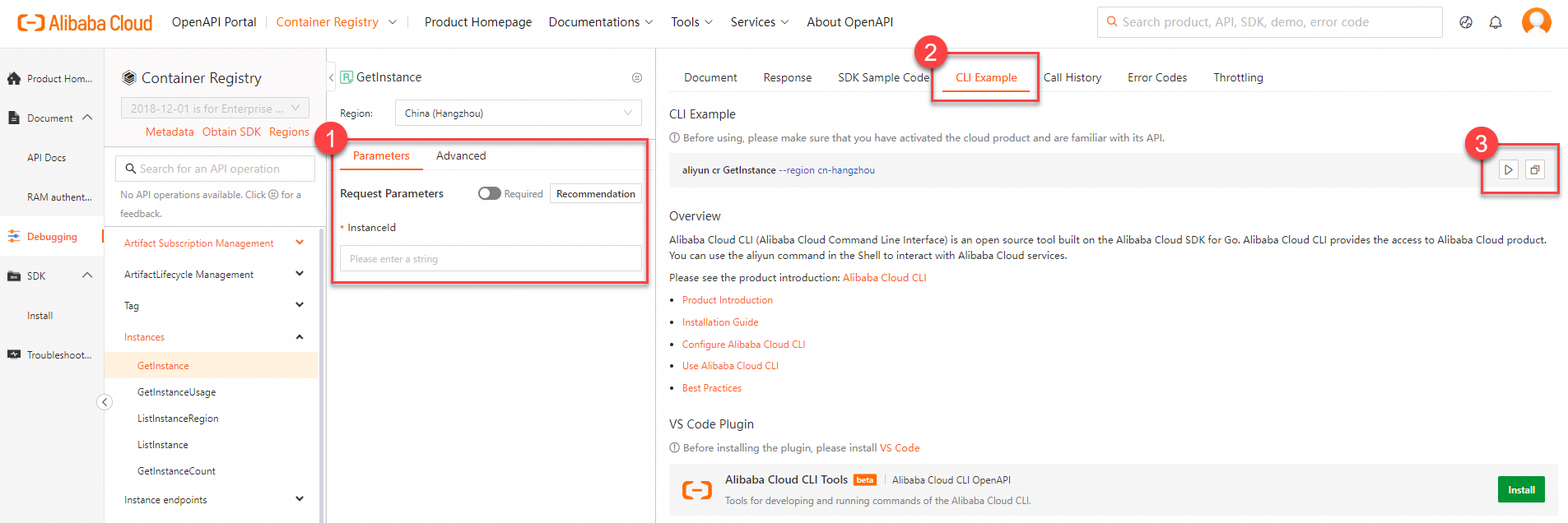
Go to the GetInstance debugging page in OpenAPI Explorer.
-
On the Parameter Settings tab, configure the request parameters and initiate an API call. Then click the CLI Example tab to view the generated sample command.
-
Copy or run the sample command:
-
Click the Run Command in CloudShell icon
 to open Cloud Shell and run the command directly.
 -
Click the Copy icon
 to copy the command to your clipboard, then paste it into your local shell.
-
-
Pay attention to parameter formats when copying commands from OpenAPI Explorer to your shell. See Parameter formats for details.
-
By default, OpenAPI Explorer includes the
--regionoption in generated commands. When present, Alibaba Cloud CLI uses the specified region and ignores the region in your default credential configuration and environment variables. Remove or keep this option based on your requirements.
Troubleshooting
If an error is returned after calling a Container Registry API operation, check whether the request parameters and the values of the request parameters are valid based on the returned error code. For self-service diagnostics, use the returned request ID or error message on the OpenAPI problem diagnosis page.
Next Steps
After querying your instance, you can continue to manage Container Registry resources using Alibaba Cloud CLI:
-
List of operations by function — Browse all available Container Registry API operations
-
System permission policies of Container Registry — Review and adjust RAM permissions as your usage grows
-
Parameter formats — Learn how to pass complex parameter types correctly in Alibaba Cloud CLI