Container Service for Kubernetes supports AHPA (Advanced Horizontal Pod Autoscaler). AHPA learns from historical metrics, predicts future resource demand, and dynamically adjusts Pod replicas—scaling up and pre-warming before traffic peaks to improve responsiveness and stability, and scaling down during troughs to save cost.
Prerequisites
An ACK managed cluster or ACK Serverless cluster is created. See Create an ACK managed cluster or Create a cluster.
Managed Service for Prometheus (Prometheus) is enabled with at least seven days of historical application data, such as CPU and memory usage. See Access and configure Prometheus.
Step 1: Install AHPA Controller
-
Log on to the ACK console. In the left navigation pane, click Clusters.
-
On the Clusters page, click the name of your cluster. In the left navigation pane, click Components and Add-ons .
On the Add-ons page, locate AHPA Controller and click Install. Follow the prompts.
Step 2: Configure Prometheus data source
Log on to the ARMS console.
-
In the left navigation pane, choose .
On the Instances page, select the region, then click the instance named after your ACK cluster.
On the Settings page, in the HTTP API Address (Grafana Read Address) section, record:
(Optional) The access token, if token-based authentication is enabled.
The Internal Network endpoint (Prometheus URL).
Set the Prometheus query URL in your ACK cluster.
Create
application-intelligence.yamlwith the following content.prometheusUrl: The Prometheus endpoint.token: The access token for Prometheus.
apiVersion: v1 kind: ConfigMap metadata: name: application-intelligence namespace: kube-system data: prometheusUrl: "http://cn-hangzhou-intranet.arms.aliyuncs.com:9443/api/v1/prometheus/da9d7dece901db4c9fc7f5b9c40****/158120454317****/cc6df477a982145d986e3f79c985a****/cn-hangzhou" token: "eyJhxxxxx"NoteTo view the AHPA dashboard in Prometheus, also configure these fields in this ConfigMap:
prometheus_writer_url: The internal endpoint for Remote Write.prometheus_writer_ak: The AccessKey ID of your Alibaba Cloud account.prometheus_writer_sk: The AccessKey secret of your Alibaba Cloud account.
Deploy
application-intelligence.kubectl apply -f application-intelligence.yaml
Step 3: Deploy a test service
The test service includes a Deployment fib-deployment, a Service fib-svc, and a load generator fib-loader that simulates traffic. An HPA provides a baseline for comparison with AHPA.
Create demo.yaml with the following content.
apiVersion: apps/v1
kind: Deployment
metadata:
  name: fib-deployment
  namespace: default
  annotations:
    k8s.aliyun.com/eci-use-specs: "1-2Gi"
spec:
  replicas: 1
  selector:
    matchLabels:
      app: fib-deployment
  strategy:
    rollingUpdate:
      maxSurge: 25%
      maxUnavailable: 25%
    type: RollingUpdate
  template:
    metadata:
      creationTimestamp: null
      labels:
        app: fib-deployment
    spec:
      containers:
      - image: registry.cn-huhehaote.aliyuncs.com/kubeway/knative-sample-fib-server:20200820-171837
        imagePullPolicy: IfNotPresent
        name: user-container
        ports:
        - containerPort: 8080
          name: user-port
          protocol: TCP
        resources:
          limits:
            cpu: "1"
            memory: 2000Mi
          requests:
            cpu: "1"
            memory: 2000Mi
---
apiVersion: v1
kind: Service
metadata:
  name: fib-svc
  namespace: default
spec:
  ports:
  - name: http
    port: 80
    protocol: TCP
    targetPort: 8080
  selector:
    app: fib-deployment
  sessionAffinity: None
  type: ClusterIP
---
apiVersion: apps/v1
kind: Deployment
metadata:
  name: fib-loader
  namespace: default
spec:
  progressDeadlineSeconds: 600
  replicas: 1
  revisionHistoryLimit: 10
  selector:
    matchLabels:
      app: fib-loader
  strategy:
    rollingUpdate:
      maxSurge: 25%
      maxUnavailable: 25%
    type: RollingUpdate
  template:
    metadata:
      creationTimestamp: null
      labels:
        app: fib-loader
    spec:
      containers:
      - args:
        - -c
        - |
          /ko-app/fib-loader --service-url="http://fib-svc.${NAMESPACE}?size=35&interval=0" --save-path=/tmp/fib-loader-chart.html
        command:
        - sh
        env:
        - name: NAMESPACE
          valueFrom:
            fieldRef:
              apiVersion: v1
              fieldPath: metadata.namespace
        image: registry.cn-huhehaote.aliyuncs.com/kubeway/knative-sample-fib-loader:20201126-110434
        imagePullPolicy: IfNotPresent
        name: loader
        ports:
        - containerPort: 8090
          name: chart
          protocol: TCP
        resources:
          limits:
            cpu: "8"
            memory: 16000Mi
          requests:
            cpu: "2"
            memory: 4000Mi
---
apiVersion: autoscaling/v1
kind: HorizontalPodAutoscaler
metadata:
  name: fib-hpa
  namespace: default
spec:
  maxReplicas: 50
  minReplicas: 1
  scaleTargetRef:
    apiVersion: apps/v1
    kind: Deployment
    name: fib-deployment
  targetCPUUtilizationPercentage: 50
---
Step 4: Deploy AHPA
To configure a scaling policy, create an AdvancedHorizontalPodAutoscaler resource.
Create
ahpa-demo.yamlwith the following content.apiVersion: autoscaling.alibabacloud.com/v1beta1 kind: AdvancedHorizontalPodAutoscaler metadata: name: ahpa-demo spec: scaleStrategy: observer metrics: - type: Resource resource: name: cpu target: type: Utilization averageUtilization: 40 scaleTargetRef: apiVersion: apps/v1 kind: Deployment name: fib-deployment maxReplicas: 100 minReplicas: 2 stabilizationWindowSeconds: 300 prediction: quantile: 95 scaleUpForward: 180 instanceBounds: - startTime: "2021-12-16 00:00:00" endTime: "2031-12-16 00:00:00" bounds: - cron: "* 0-8 ? * MON-FRI" maxReplicas: 15 minReplicas: 4 - cron: "* 9-15 ? * MON-FRI" maxReplicas: 15 minReplicas: 10 - cron: "* 16-23 ? * MON-FRI" maxReplicas: 20 minReplicas: 15Selected parameters.
Parameter
Required
Description
scaleTargetRef
Yes
The target Deployment.
metrics
Yes
The scaling metrics. Supported metrics include CPU, GPU, memory, QPS, and RT.
target
Yes
The target threshold. For example,
averageUtilization: 40targets 40% CPU utilization.scaleStrategy
No
The scaling mode. Default:
observer.auto: AHPA performs scaling.observer: AHPA observes without scaling. Use to verify AHPA behavior.proactive: Only proactive prediction takes effect.reactive: Only reactive scaling takes effect.
maxReplicas
Yes
The maximum replica count.
minReplicas
Yes
The minimum replica count.
stabilizationWindowSeconds
No
The stabilization window to prevent rapid replica fluctuations. Default: 300 seconds.
prediction.quantile
Yes
The prediction quantile (0–100). Higher values yield more conservative predictions. Recommended: 90–99. Default: 99.
prediction.scaleUpForward
Yes
Time for a new pod to become
Ready, also known as the cold start time.instanceBounds
No
Replica count boundaries for specific time periods.
startTime: The start time.endTime: The end time.
instanceBounds.bounds.cron
No
A cron expression for scheduled tasks. For example,
- cron: "* 0-8 ? * MON-FRI"runs every minute from 00:00 to 08:59, Monday to Friday.Cron expression fields. See Cron scheduled tasks.
Field
Required
Allowed values
Special characters
Minutes
Yes
0–59
* / , -
Hours
Yes
0–23
* / , -
Day of month
Yes
1–31
* / , - ?
Month
Yes
1–12 or JAN–DEC
* / , -
Day of week
Yes
0–6 or SUN–SAT
* / , - ?
NoteMonth and Day of week are case-insensitive. For example,
SUN,Sun, andsunare equivalent.Day of week defaults to
*if not specified.Special characters:
*: Matches all values./: Specifies an increment.,: Lists enumerated values.-: Specifies a range.?: No specific value. Use in Day of month or Day of week when the other is set.
Create the AHPA scaling policy.
kubectl apply -f ahpa-demo.yaml
Step 5: View prediction results
Enable the Prometheus dashboard for AHPA to view prediction results.
Prediction requires seven days of historical data. Run the sample application for seven days, or specify an existing production application in the AHPA resource.
This example uses the observer scaling mode (observer mode) to compare AHPA predictions against an HPA baseline for actual resource needs.
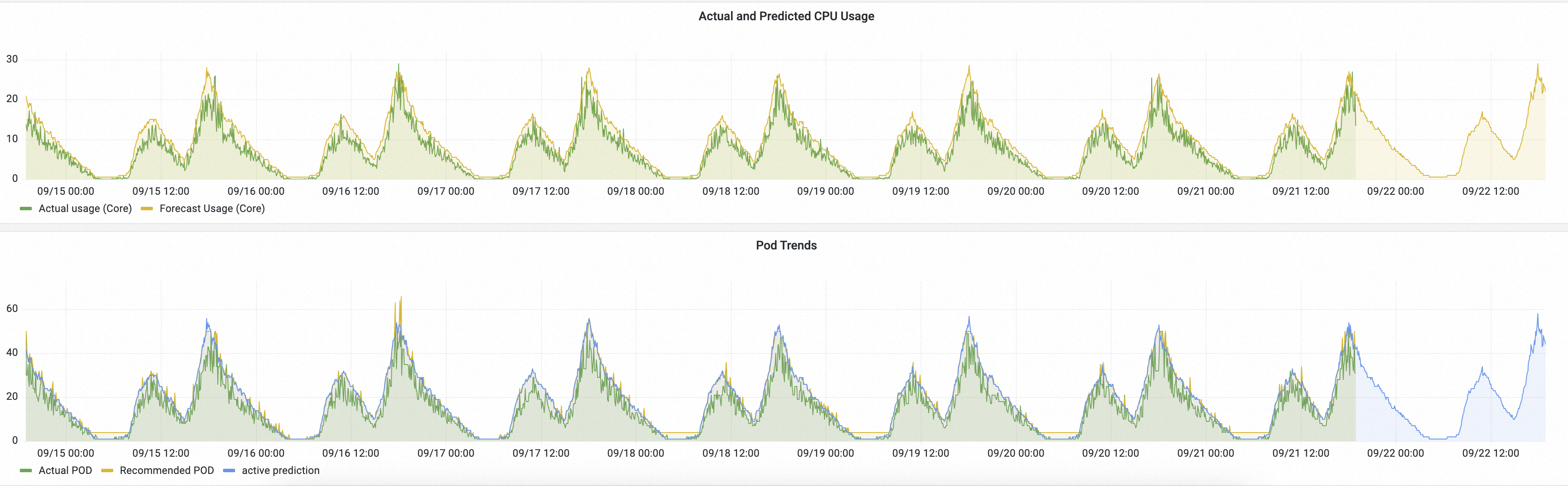
Actual and Predicted CPU Usage: Green line: actual CPU usage (HPA). Yellow line: AHPA-predicted CPU usage.
Yellow above green: predicted capacity is sufficient.
Yellow rising before green: AHPA pre-warms resources ahead of demand.
Pod Trends: Green line: actual pod count (HPA). Yellow line: AHPA-predicted pod count.
Lower yellow curve: AHPA achieves the same goal with fewer pods.
Smoother yellow curve: AHPA scaling is less volatile, improving stability.
If the predicted trend meets expectations, set the scaling mode to auto to let AHPA manage scaling.