DNS resolution is one of the methods used for service discovery in an ACK Serverless cluster. This topic describes how DNS resolution works in ACK Serverless clusters and the DNS-based service discovery solutions they support.
In this topic
Usage notes
-
If you do not enable a DNS service discovery component when you create an ACK Serverless cluster, pods default to using the DNS server provided by the Virtual Private Cloud (VPC) for DNS resolution. In this mode, Kubernetes service name resolution is not supported.
-
For an existing ACK Serverless cluster, enabling a DNS service discovery solution affects only newly created pods. Pods created before the solution was enabled do not automatically switch their DNS configuration files. You must recreate these pods to apply the new service discovery solution.
-
Managed CoreDNS is gradually replacing non-managed CoreDNS, which will eventually be deprecated. You may not be able to find non-managed CoreDNS in the console in the future. If you need to use non-managed CoreDNS, please submit a ticket.
ACK Serverless cluster: How DNS resolution works
When you create a pod in an ACK Serverless cluster, the content of the /etc/resolv.conf file is as follows by default. This file specifies the DNS servers, search domains, and other parameters.
# The IP address of the DNS server used by this pod.
nameserver 172.xx.x.xx
# The domain suffixes to append when resolving a service name. The following example is for a pod in the kube-system namespace.
search kube-system.svc.cluster.local svc.cluster.local cluster.local
# Other options
options ndots:5
For more information about the DNS configuration file and pod DNSPolicy fields, see DNS resolution and configurations.
ACK Serverless cluster supported DNS service discovery solutions
|
Solution |
Description |
|
managed CoreDNS |
This is the recommended method. Pods use the managed CoreDNS component for domain name resolution. ACK Serverless creates and maintains CoreDNS to ensure that it runs properly. This eliminates the need to monitor the operational state of CoreDNS or perform manual O&M. In addition, this solution does not consume ECI instances in the cluster. |
|
non-managed CoreDNS |
Pods use the non-managed CoreDNS component for DNS resolution. You must correctly configure CoreDNS and continuously monitor the status of its replicas. |
|
PrivateZone |
Pods use the PrivateZone component for DNS resolution. ACK Serverless automatically creates and updates the DNS records in PrivateZone. |
Managed CoreDNS
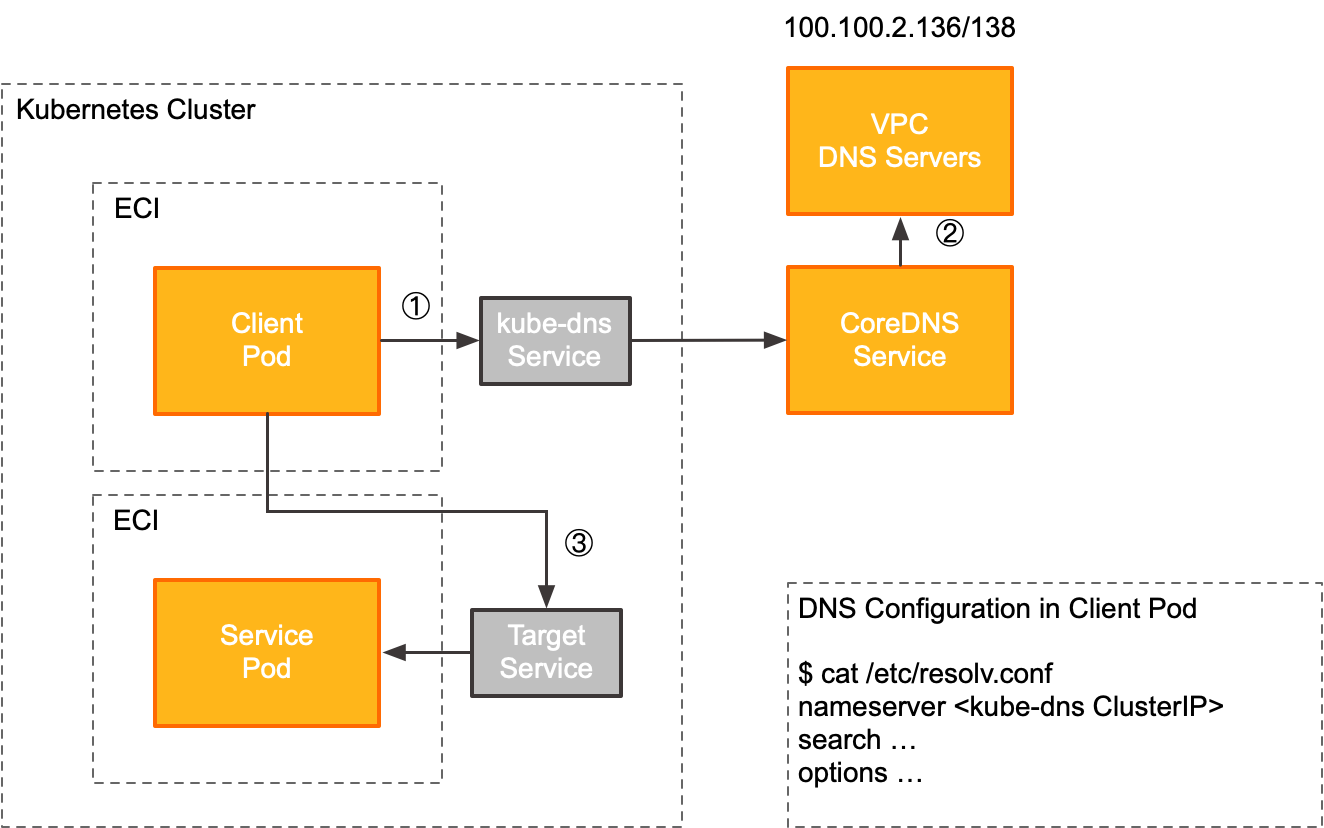
The managed CoreDNS component exposes the DNS service through the cluster IP of the kube-dns service in the kube-system namespace. Client pods use the managed CoreDNS as follows.
|
Step |
Description |
|
① |
When a client pod accesses an upstream service (TargetService), it first retrieves the DNS server address from its local DNS configuration file ( In this solution, the DNS server address is the cluster IP of the kube-dns Service, which is in the kube-system namespace of the ACK Serverless cluster. The ACK Serverless cluster dynamically manages the backends for the kube-dns cluster IP, requiring no user intervention. |
|
② |
When a client pod requests an external domain name, managed CoreDNS forwards the DNS query to the VPC-provided DNS servers (for example, 100.100.2.136 and 100.100.2.138) for resolution. |
|
③ |
After the client pod receives the IP address of the upstream service (TargetService) from the DNS server, it sends requests to that IP address. |
Enable managed CoreDNS
-
After you enable the managed CoreDNS component, the ACK Serverless cluster automatically creates a ClusterIP Service named kube-dns in the kube-system namespace. Do not modify this Service.
-
The managed CoreDNS component is being rolled out to more regions. If you cannot find the managed CoreDNS component in the console, it is not yet available in your region. The feature to customize managed CoreDNS configurations is also being gradually released. If you require this feature, submit a ticket for assistance.
-
Method 1: For a new ACK Serverless cluster, select CoreDNS (Managed) for Service Discovery during cluster creation to enable the managed CoreDNS component.
In the Component Configuration step, for the Service Discovery setting, select CoreDNS.
-
Method 2: For an existing ACK Serverless cluster, go to the cluster details page and choose . Click the Networking tab, find the CoreDNS component, and click Install. For more information, see Manage add-ons.
Non-managed CoreDNS
Non-managed CoreDNS is a component in a Kubernetes cluster responsible for DNS resolution. It supports resolving both custom internal service domain names and external domain names. Non-managed CoreDNS provides a rich set of plug-ins that allow cluster-level customizations, such as custom DNS servers, custom hosts, CNAME records, and rewrite rules. Like Kubernetes, the CoreDNS project is hosted by the Cloud Native Computing Foundation (CNCF). For more information about CoreDNS, see the CNCF website. For more information about CoreDNS, see CoreDNS: DNS and Service Discovery.
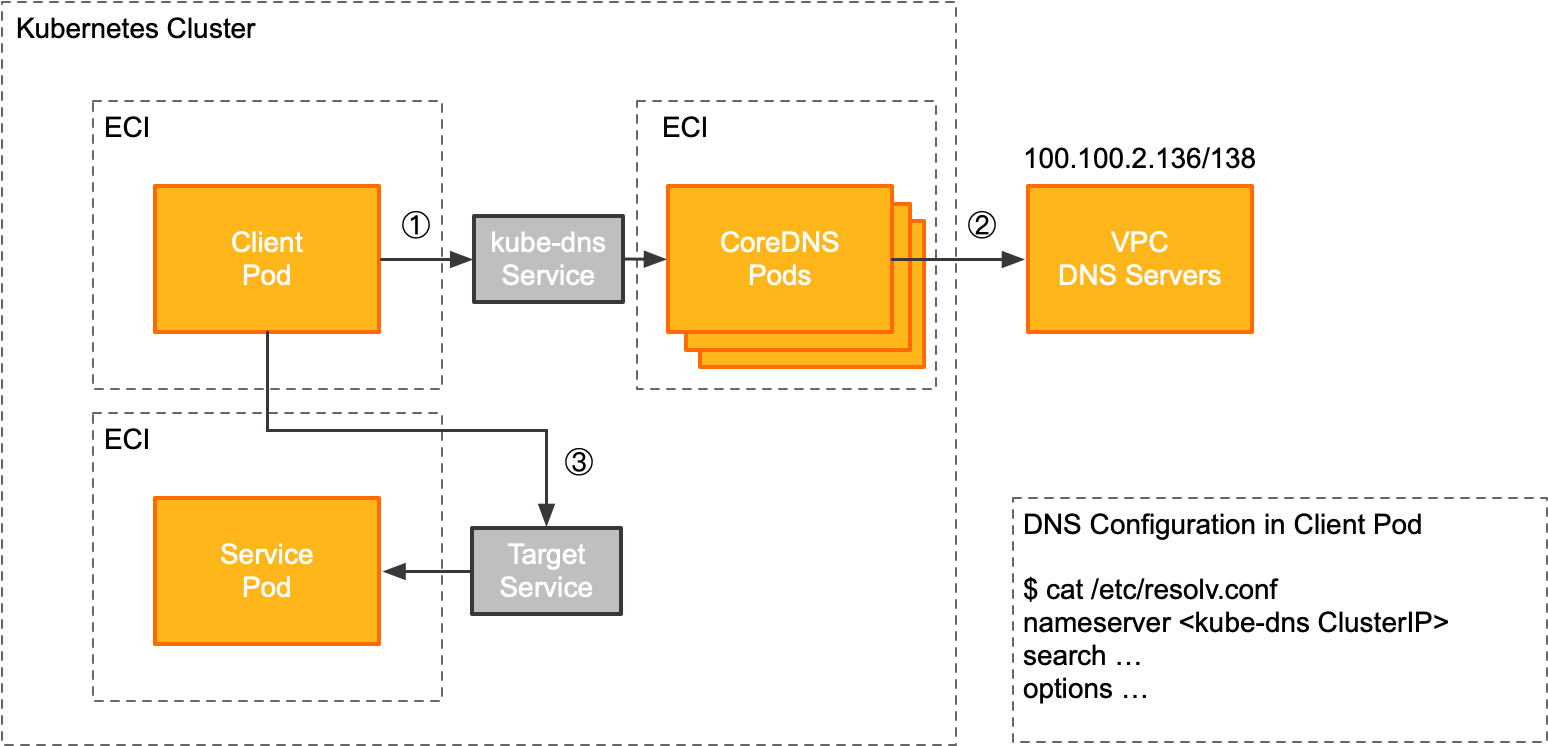
The non-managed CoreDNS component exposes the DNS service via the cluster IP of the kube-dns Service in the kube-system namespace. The following diagram illustrates how a client pod uses non-managed CoreDNS.
|
Step |
Description |
|
① |
When a client pod accesses an upstream service (TargetService), it first retrieves the DNS server address from its local DNS configuration file ( In this solution, the DNS server address is the cluster IP of the kube-dns Service in the kube-system namespace of the ACK Serverless cluster. |
|
② |
When a client pod requests an external domain name, CoreDNS forwards the DNS query to the VPC-provided DNS servers (for example, 100.100.2.136 and 100.100.2.138) for resolution. |
|
③ |
After the client pod receives the IP address of the upstream service (TargetService) from the DNS server, it sends requests to that IP address. |
Enable non-managed CoreDNS
-
Method 1: For a new ACK Serverless cluster, select CoreDNS for Service Discovery during cluster creation to enable the non-managed CoreDNS component.
-
Method 2: For an existing ACK Serverless cluster, go to the cluster details page and choose . Click the Networking tab, find the CoreDNS component, and click Install. For more information, see Manage add-ons.
PrivateZone
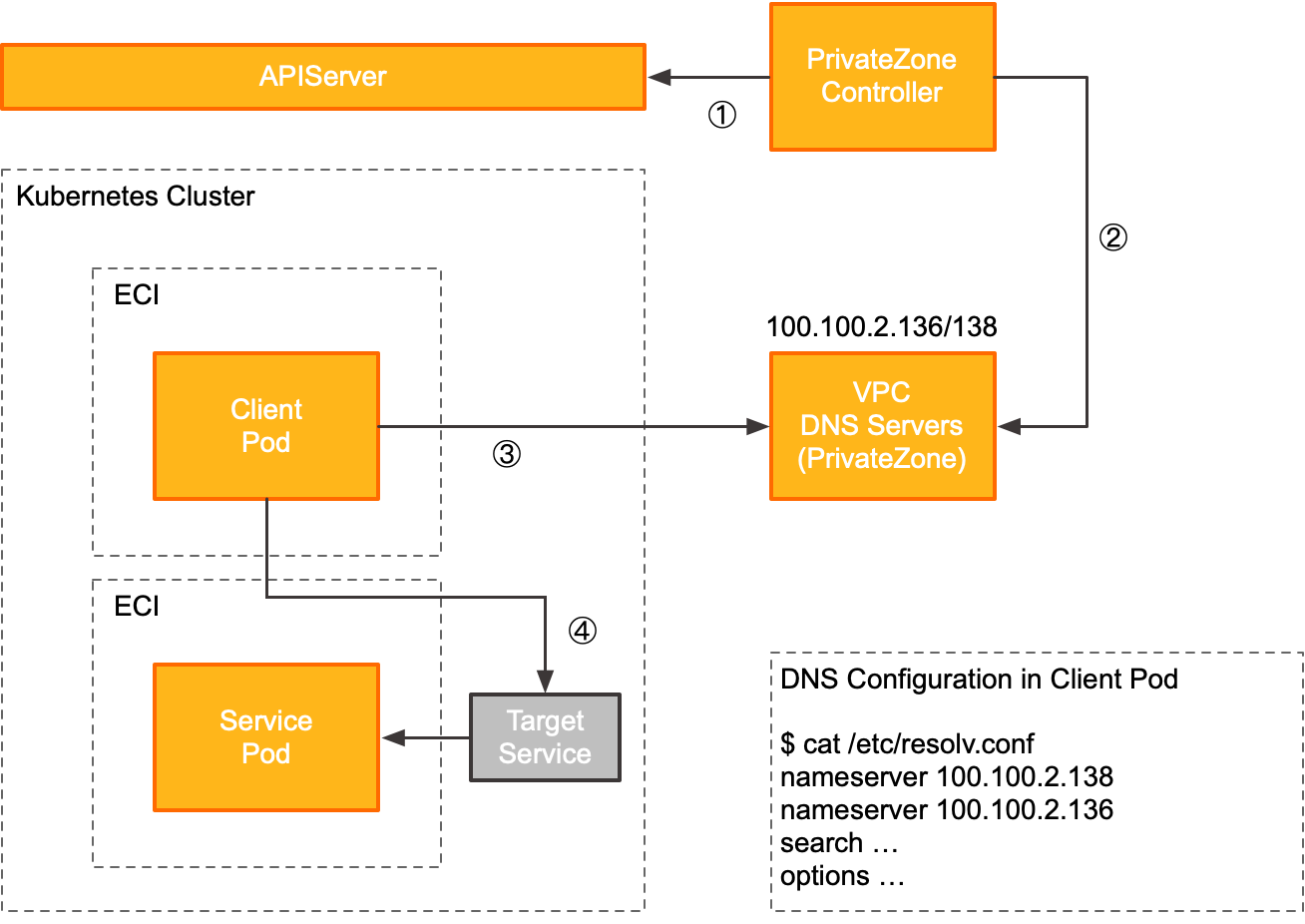
Alibaba Cloud DNS PrivateZone is a private domain name resolution service provided in an Alibaba Cloud Virtual Private Cloud (VPC) environment. You can use the PrivateZone controller to monitor Service and Endpoint resources in each namespace of an ACK Serverless cluster in real time. The controller interacts with the API server to automatically sync the domain names of the resources to PrivateZone. Pods in an ACK Serverless cluster can use the PrivateZone DNS resolution service to enable Kubernetes service discovery. For more information, see ACK Serverless clusterService discovery based on Alibaba Cloud DNS PrivateZone.
PrivateZone exposes its DNS service through the VPC-provided DNS servers (for example, 100.100.2.136 and 100.100.2.138). The following diagram illustrates how a client pod uses PrivateZone.
|
Step |
Description |
|
① |
The PrivateZone controller connects to the API server to watch for Service creation and update events in the cluster. |
|
② |
When the PrivateZone controller detects a Service creation or update event, it synchronizes this information with the DNS records of the authoritative zone in PrivateZone. |
|
③ |
When a client pod accesses an upstream service (TargetService), it first retrieves the DNS server address from its local DNS configuration file ( In this solution, the DNS server addresses are the IP addresses of the VPC-provided DNS servers (for example, 100.100.2.136 and 100.100.2.138). The DNS server retrieves the correct resolution record from PrivateZone and returns it to the client. |
|
④ |
After the client pod receives the IP address of the upstream service (TargetService) from the DNS server, it sends requests to that IP address. |
Enable PrivateZone
-
Method 1: For a new ACK Serverless cluster, select PrivateZone for Service Discovery during cluster creation to enable the PrivateZone component.
-
Method 2: For an existing ACK Serverless cluster, enable the PrivateZone component by setting the
enablePrivateZoneparameter totruein theeci-profileConfigMap.
FAQ
How to verify that managed CoreDNS, non-managed CoreDNS, or PrivateZone is enabled?
-
Managed and non-managed CoreDNS
Log on to the ACK console. Go to the cluster details page and choose . Click the Network tab. If Installed appears in the upper-right corner of the component card, that component is enabled.
-
PrivateZone
Log on to the Alibaba Cloud DNS PrivateZone console. On the Authoritative Zone tab, search for a Zone by using the cluster ID. If you find a zone whose name ends with the cluster ID, the PrivateZone component is enabled.
How to verify a pod is using the managed CoreDNS, non-managed CoreDNS, or PrivateZone component?
-
Managed and non-managed CoreDNS
Run the
kubectl execcommand to access the pod and then runcat /etc/resolv.conf. If thenameserverfield points to the cluster IP address of the kube-dns Service in the kube-system namespace, the pod is using either the managed CoreDNS or non-managed CoreDNS component. -
PrivateZone
Run the
kubectl execcommand to access the pod and then runcat /etc/resolv.conf. If thenameserverfield points to100.100.2.136and100.100.2.138, the pod is using the PrivateZone component. Note: These IP addresses are examples only; your actual IP addresses may vary.