Kubernetes Operator for Apache Spark lets you run Spark jobs on elastic container instances (ECIs) in an ACK Serverless cluster. The operator supports Apache Spark 2.3.0 and later, and provides more features than open source Apache Spark, integrates with Kubernetes storage, monitoring, and logging components, and supports disaster recovery, auto scaling, and optimized resource scheduling. This guide walks you through installing the operator, configuring RBAC, building a Spark job image, and submitting your first Spark job — with verification steps at each stage.
Prerequisites
Before you begin, ensure that you have:
-
An ACK Serverless cluster. See Create an ACK Serverless cluster
-
kubectl configured to connect to the cluster. See Connect to an ACK cluster by using kubectl or Use kubectl to manage ACK clusters on Cloud Shell
-
An OSS bucket for storing test data, results, and logs. See Create buckets
If your cluster needs to pull images from the internet or your Spark jobs need internet access, configure an internet NAT gateway before proceeding.
Install Kubernetes Operator for Apache Spark
Install the operator
-
In the ACK console, choose Marketplace > Marketplace in the left-side navigation pane.
-
On the App Catalog tab, search for ack-spark-operator and click its icon.
-
In the upper-right corner, click Deploy.
-
In the Deploy panel, select your cluster and follow the on-screen instructions to complete the configuration.
Configure RBAC
A Spark job needs a ServiceAccount with permission to create pods. Apply the following YAML to create a ServiceAccount, Role, and RoleBinding in the default namespace. Replace the namespace values if you use a different namespace.
apiVersion: v1
kind: ServiceAccount
metadata:
  name: spark
  namespace: default
---
apiVersion: rbac.authorization.k8s.io/v1
kind: Role
metadata:
  namespace: default
  name: spark-role
rules:
- apiGroups: [""]
  resources: ["pods"]
  verbs: ["*"]
- apiGroups: [""]
  resources: ["services"]
  verbs: ["*"]
---
apiVersion: rbac.authorization.k8s.io/v1
kind: RoleBinding
metadata:
  name: spark-role-binding
  namespace: default
subjects:
- kind: ServiceAccount
  name: spark
  namespace: default
roleRef:
  kind: Role
  name: spark-role
  apiGroup: rbac.authorization.k8s.io
Save this file as rbac.yaml and apply it:
kubectl apply -f rbac.yamlBuild a Spark job image
Compile your Spark job into a Java Archive (JAR) file, then package it into a container image using a Dockerfile.
The following Dockerfile uses the Alibaba Cloud Spark 2.4.5 base image (registry.aliyuncs.com/acs/spark:ack-2.4.5-latest), which is optimized for resource scheduling and faster application startup in Kubernetes clusters. It also includes the OSS JARs needed to read from and write to OSS.
FROM registry.aliyuncs.com/acs/spark:ack-2.4.5-latest
RUN mkdir -p /opt/spark/jars
# Add OSS support JARs
ADD https://repo1.maven.org/maven2/com/aliyun/odps/hadoop-fs-oss/3.3.8-public/hadoop-fs-oss-3.3.8-public.jar $SPARK_HOME/jars
ADD https://repo1.maven.org/maven2/com/aliyun/oss/aliyun-sdk-oss/3.8.1/aliyun-sdk-oss-3.8.1.jar $SPARK_HOME/jars
ADD https://repo1.maven.org/maven2/org/aspectj/aspectjweaver/1.9.5/aspectjweaver-1.9.5.jar $SPARK_HOME/jars
ADD https://repo1.maven.org/maven2/org/jdom/jdom/1.1.3/jdom-1.1.3.jar $SPARK_HOME/jars
COPY SparkExampleScala-assembly-0.1.jar /opt/spark/jars
Build and push the image to your container registry:
docker build -t <your-registry>/<your-image>:<tag> .
docker push <your-registry>/<your-image>:<tag>Large Spark images can be slow to pull. Use ImageCache to accelerate image pulling. See Manage image caches and Use ImageCache to accelerate the creation of pods.
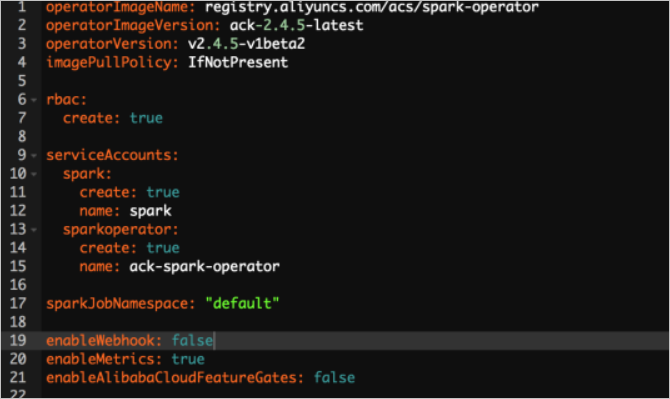
To enable scheduling optimization, set enableAlibabaCloudFeatureGates to true in the Helm chart. To reduce startup time further, set enableWebhook to false.
Submit a Spark job
Create the job manifest
Create a file named spark-pi.yaml with the following content. This example runs the built-in SparkPi application to estimate the value of Pi.
apiVersion: "sparkoperator.k8s.io/v1beta2"
kind: SparkApplication
metadata:
  name: spark-pi
  namespace: default
spec:
  type: Scala
  mode: cluster
  image: "registry.aliyuncs.com/acs/spark:ack-2.4.5-latest"
  imagePullPolicy: Always
  mainClass: org.apache.spark.examples.SparkPi
  mainApplicationFile: "local:///opt/spark/examples/jars/spark-examples_2.11-2.4.5.jar"
  sparkVersion: "2.4.5"
  restartPolicy:
    type: Never
  driver:
    cores: 2
    coreLimit: "2"
    memory: "3g"
    memoryOverhead: "1g"
    labels:
      version: 2.4.5
    serviceAccount: spark
    annotations:
      k8s.aliyun.com/eci-kube-proxy-enabled: 'true'
      k8s.aliyun.com/eci-auto-imc: "true"
    tolerations:
    - key: "virtual-kubelet.io/provider"
      operator: "Exists"
  executor:
    cores: 2
    instances: 1
    memory: "3g"
    memoryOverhead: "1g"
    labels:
      version: 2.4.5
    annotations:
      k8s.aliyun.com/eci-kube-proxy-enabled: 'true'
      k8s.aliyun.com/eci-auto-imc: "true"
    tolerations:
    - key: "virtual-kubelet.io/provider"
      operator: "Exists"
For the full SparkApplication API reference, see spark-on-k8s-operator.
Deploy the job
kubectl apply -f spark-pi.yamlConfigure log collection
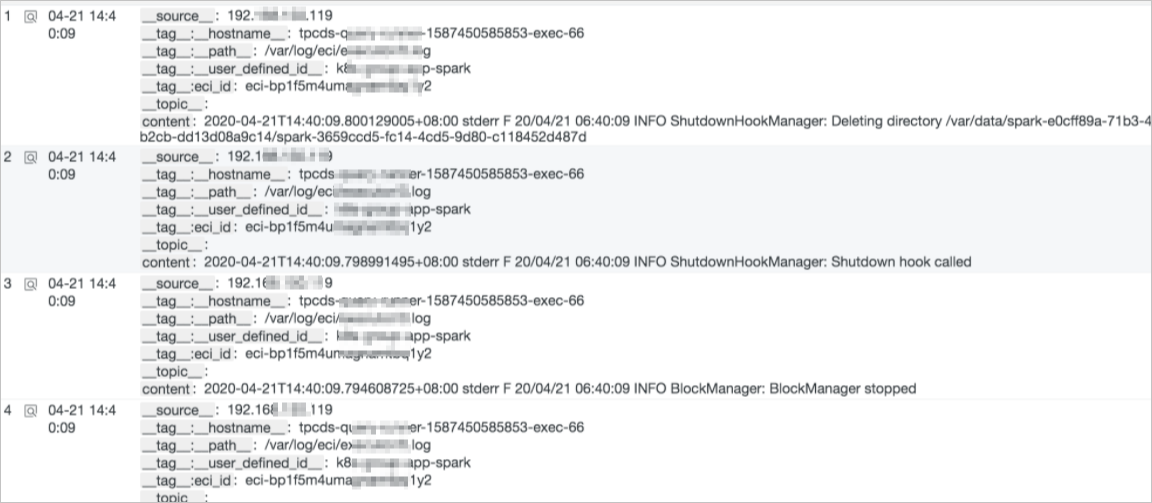
To collect stdout logs from the Spark driver and executor, set the following environment variables in the envVars field of each component. Logs are then collected automatically.
envVars:
  aliyun_logs_test-stdout_project: test-k8s-spark
  aliyun_logs_test-stdout_machinegroup: k8s-group-app-spark
  aliyun_logs_test-stdout: stdout
For setup instructions, see Customize log collection for an elastic container instance.
Configure a history server
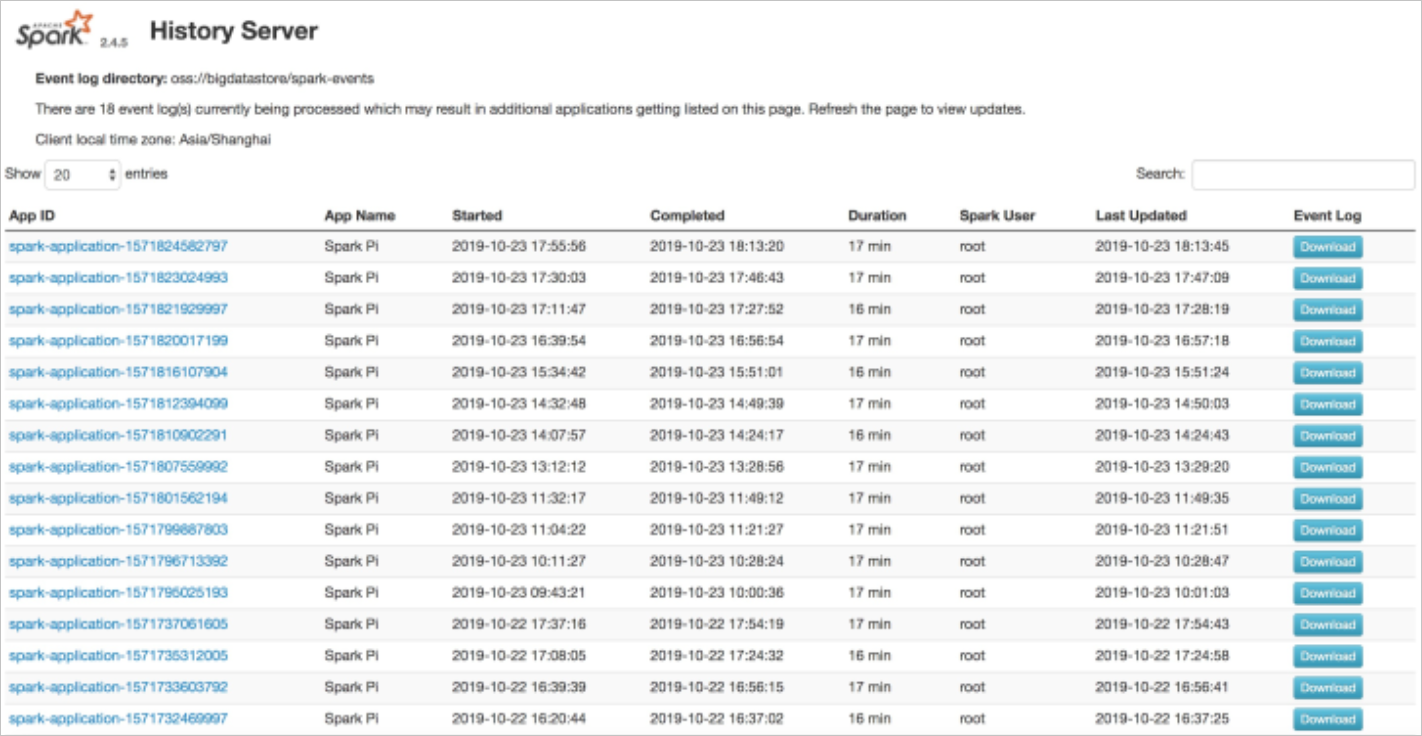
The Spark history server lets you review completed Spark jobs. Configure the Spark application to write event logs to OSS, then deploy the history server to read from that location.
Enable event logging in the Spark application
Add the following sparkConf block to your SparkApplication manifest:
sparkConf:
  "spark.eventLog.enabled": "true"
  "spark.eventLog.dir": "oss://bigdatastore/spark-events"
  "spark.hadoop.fs.oss.impl": "org.apache.hadoop.fs.aliyun.oss.AliyunOSSFileSystem"
  # OSS bucket endpoint, for example: oss-cn-beijing.aliyuncs.com
  "spark.hadoop.fs.oss.endpoint": "oss-cn-beijing.aliyuncs.com"
  "spark.hadoop.fs.oss.accessKeySecret": ""
  "spark.hadoop.fs.oss.accessKeyId": ""
Deploy the history server
In the ACK console, choose Marketplace > Marketplace in the left-side navigation pane. On the App Catalog tab, search for ack-spark-history-server and deploy it.
When configuring the deployment, specify your OSS details in the Parameters section:
oss:
  enableOSS: true
  # AccessKey ID
  alibabaCloudAccessKeyId: ""
  # AccessKey Secret
  alibabaCloudAccessKeySecret: ""
  # OSS bucket endpoint, for example: oss-cn-beijing.aliyuncs.com
  alibabaCloudOSSEndpoint: "oss-cn-beijing.aliyuncs.com"
  # OSS path where event logs are stored
  eventsDir: "oss://bigdatastore/spark-events"
After deployment, find the external endpoint on the Services page. Open the endpoint in a browser to view historical Spark jobs.
Verify the result
Check whether the job succeeded
Run the following command to get pod status:
kubectl get podsExpected output when the job is running:
NAME                            READY   STATUS    RESTARTS   AGE
spark-pi-1547981232122-driver   1/1     Running   0          12s
spark-pi-1547981232122-exec-1   1/1     Running   0          3s
When the driver pod reaches Completed status, the job has finished:
NAME                            READY   STATUS      RESTARTS   AGE
spark-pi-1547981232122-driver   0/1     Completed   0          1m
Read the result from the driver log:
kubectl logs spark-pi-1547981232122-driverThe output includes a line similar to:
Pi is roughly 3.152155760778804Monitor the real-time Spark UI
While the job is running, forward the driver's web UI port to your local machine:
kubectl port-forward spark-pi-1547981232122-driver 4040:4040Then open http://localhost:4040 in your browser to view real-time job progress.
Troubleshoot a failed job
If the driver pod is in an error state or the job does not complete, use these commands to investigate.
Check the SparkApplication status and events:
kubectl describe sparkapplication spark-piExpected output:
Name:         spark-pi
Namespace:    default
Labels:       <none>
Annotations:  kubectl.kubernetes.io/last-applied-configuration:
                {"apiVersion":"sparkoperator.k8s.io/v1alpha1","kind":"SparkApplication","metadata":{"annotations":{},"name":"spark-pi","namespace":"default"...}
API Version:  sparkoperator.k8s.io/v1alpha1
Kind:         SparkApplication
...
Status:
  Application State:
    State:          COMPLETED
  Driver Info:
    Pod Name:             spark-pi-driver
    Web UI Port:          31182
    Web UI Service Name:  spark-pi-ui-svc
  Execution Attempts:     1
  Executor State:
    Spark - Pi - 1547981232122 - Exec - 1:  COMPLETED
Events:
  Type    Reason                     Age   From            Message
  ----    ------                     ----  ----            -------
  Normal  SparkApplicationSubmitted  55m   spark-operator  SparkApplication spark-pi was submitted successfully
  Normal  SparkDriverRunning         53m   spark-operator  Driver spark-pi-driver is running
  Normal  SparkExecutorCompleted     53m   spark-operator  Executor spark-pi-1547981232122-exec-1 completed
Check driver pod logs for runtime errors:
kubectl logs <spark-driver-pod>What's next
-
Manage image caches — accelerate large Spark image pulls with ImageCache
-
Customize log collection for an elastic container instance — set up structured log collection for Spark jobs