When a Kubernetes cluster in a data center connects to a registered cluster through an Express Connect circuit, the ack-virtual-node component calls Alibaba Cloud API operations to manage the lifecycle of serverless computing resources. The domain names used by these API operations typically resolve to IP addresses in the 100.x.x.x range. If other services in your internal network use the same CIDR block, address conflicts can disrupt normal resource access and operations.
To avoid these conflicts, you can use PrivateLink to route API traffic through private endpoints within your virtual private cloud (VPC), bypassing the conflicting 100.x.x.x address range entirely.
Prerequisites
Before you begin, make sure the following requirements are met:
A registered cluster is created and connected to a Kubernetes cluster in a data center or from another cloud provider. Kubernetes 1.24 or later is recommended.
The ack-virtual-node component is installed and its version is 2.13.0 or later. For more information, see Schedule pods to run on elastic container instances through virtual nodes and Schedule pods to run on elastic container instances through virtual nodes.
The endpoint service is activated.
Procedure
To use serverless computing resources through ack-virtual-node, you must create endpoints for the VPC, Container Compute Service (ACS), and Elastic Container Instance respectively. The following steps use VPC as an example. Repeat the same process for ACS and Elastic Container Instance.
Step 1: Create an endpoint
Log on to the VPC console. On the Endpoints page, click Create Endpoint.
On the Create Endpoint page, configure the following parameters. For more information, see Create and manage endpoints.
- For Alibaba Cloud Service endpoints, you must submit a ticket to be added to the whitelist. - By default, you can add an endpoint to up to five security groups. - You can configure zones in the following ways: - Single zone: Select one zone of the endpoint service. Click the
 icon in the Zone and vSwitch section, and then click OK in the message that appears. - Multiple zones: By default, you must select at least two zones and one vSwitch in each zone. To add more zones, click Add vSwitch. - You can select multiple zones to ensure that if any zone fails, applications can quickly switch to others. This provides high service availability and stability, and prevents service interruptions or data loss. - When you create an endpoint for the first time, the system automatically creates a service-linked role for the endpoint. This role allows the endpoint to access other resources. For more information, see service-linked role.
Parameter Description Region Select the region to which the endpoint belongs. Endpoint Name Specify a name for the endpoint. Endpoint Type Select Interface Endpoint. Endpoint Service Select Alibaba Cloud Service, and then enter the name of the endpoint service. VPC Select the VPC where you want to create the endpoint. Security Group Select the security group to associate with the elastic network interface (ENI) of the endpoint. The security group controls data transfer from the VPC to the endpoint ENI. The endpoint ENI serves as the entry point for the endpoint VPC to access the endpoint service. Zone and vSwitch Select the zone of the endpoint service and select a vSwitch in that zone. The system automatically creates an endpoint ENI in the vSwitch. Resource Group Select the resource group to which the endpoint belongs. Tag Configure the Tag Key and Tag Value. Description Enter a description for the endpoint. Access Policies Select an access policy: Default Policy uses the full access policy by default. Custom Policy allows you to enter a custom access policy. After you complete the configuration, click OK.
Step 2: Verify the DNS resolution
After the endpoint is created, verify that DNS resolution is properly configured:
Log on to the Alibaba Cloud DNS console.
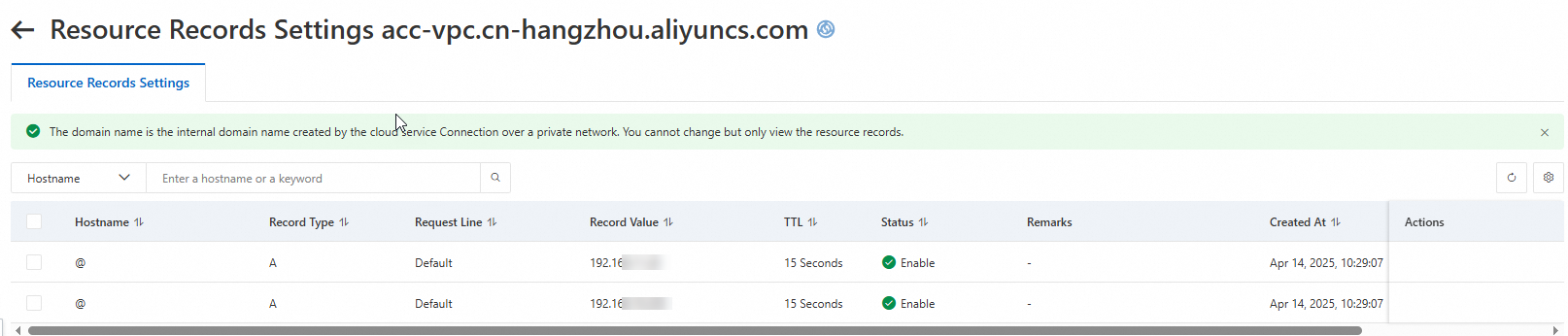
In the left navigation pane, click Private DNS (PrivateZone), and then click the Cloud Service Defined Zones tab to view the default resolved domain name.

Click the domain name in the Built-in Authoritative Zone column to view the resolution records.